Best Portable Monitors for Coding on the Go
As an Amazon Associate, I earn from qualifying purchases. This article may contain affiliate links, which means we may receive a commission at no extra cost to you.
As an Amazon Associate, I earn from qualifying purchases. This article may contain affiliate links, which means we may receive a commission at no extra cost to you.
If you’re a developer or technical professional who spends a lot of time on the move, a portable monitor can transform cramped workflow into a productive mobile office. Portable displays give you a second screen for code, terminals, documentation, and quick previews without lugging a full desktop setup. This guide compares five popular 15.6-inch portable monitors that crop up again and again in buyer searches: MNN, KYY, two InnoView models, and the ASUS ZenScreen MB169CK. Each option focuses on Full HD IPS panels, USB-C/HDMI connectivity, and thin, travel-ready designs, but they differ in stands, warranty, HDR support, and real-world handling.
Below you’ll find an in-depth buying guide that explains what matters for coding while traveling, followed by five detailed product write-ups that summarize practical pros and cons, who each monitor is best for, and realistic usage scenarios. The aim is to help you pick a screen that matches how you actually work—whether that’s pair-programming in a coffee shop, debugging on a train, or running a dual-monitor setup in a hotel room.
Buying Guide
Why a portable monitor for coding? A second screen boosts focus and reduces context-switching: keep your IDE on one screen and documentation, terminals, or a browser on the other. For travel, the right portable monitor balances size, weight, connectivity, and power management.
Key features to prioritize:
– Resolution and panel: 15.6-inch Full HD (1920×1080) IPS is the sweet spot for clarity, text rendering, and wide viewing angles. Higher resolutions are nice but often increase cost, battery draw, and scaling friction.
– Connectivity: Look for a single-cable USB-C (DisplayPort Alt Mode) option that carries video and power. HDMI adds compatibility for consoles or older laptops. If you need power delivery to charge your laptop through the monitor, confirm wattage support.
– Refresh rate and HDR: 60Hz is adequate for coding. HDR and higher refresh rates help gaming but are less critical for development work.
– Stand and case: Built-in kickstands or smart covers are vital—your workspace is often a lap or a café table. A robust protective sleeve and a multi-angle stand make the monitor usable anywhere.
– Speakers and audio: Built-in speakers are convenient for conference calls, but don’t expect studio quality. Consider a headset for long meetings.
– Weight, thickness, and build quality: Aim for under 1.8–2.2 pounds if you travel often. Metal or sturdy plastic frames survive repeated packing better than flimsy bezels.
– Compatibility and drivers: Check for plug-and-play support with macOS, Windows, Linux, and mobile devices. Some monitors require drivers for features like touch or color profiles.
Typical use-case considerations:
– Frequent flyer/trainer: Prioritize thinness, low weight, and a simple smart cover stand.
– Remote contractor in hotels: Choose a stable multi-angle stand and reliable single-cable USB-C power.
– Hybrid gamer/coder: Consider HDR and higher refresh rate options.
In the sections below, each product is evaluated against these factors, with realistic examples of how they perform in the real world.
MNN Portable Monitor 15.6inch FHD 1080P USB C HDMI Gaming Ultra-Slim IPS Display w/Smart Cover & Speakers,HDR Plug&Play, External Monitor for Laptop PC Phone Mac (15.6” 1080P)

Best For:
Traveling developers, students, and budget-conscious coders who want a lightweight, plug-and-play second screen.
The MNN 15.6-inch portable monitor is an affordable, travel-oriented Full HD display that targets users who want a balance between features and portability. With an IPS panel and plug-and-play support via USB-C and HDMI, it’s designed to be straightforward to use with modern laptops, some phones, and gaming consoles. HDR processing is advertised, which helps richer contrasts in media and makes color differentiation slightly easier when scanning code or viewing UI mockups.
For coders, the practical benefits are clear: the FHD panel renders text crisply at native resolution, and the built-in speakers plus headphone jack mean you can handle client calls or watch tutorial videos without extra peripherals. The smart cover doubles as a protective sleeve and a stand—an essential convenience when your “desk” might be a café table, an airplane tray, or a hotel nightstand. The monitor is ultra-slim and light enough to slip into a laptop bag alongside a 13–15" machine.
What this monitor solves is the friction of setting up extra screen real estate while traveling. Instead of juggling windows on one small laptop screen, you can dedicate the portable display to docs, terminals, or a live preview of a web app. Compared with standard docking stations or large desktop monitors, the MNN is far lighter and doesn’t require additional power bricks for basic use.
From reviews and product listings, buyers note stable image quality and straightforward connectivity but caution that HDR on a budget portable can be subtle compared to higher-end models. Color-critical designers might prefer a professional monitor, but for developers, the MNN offers a great mix of value and portability.
Who it’s best for: developers and students who travel frequently and need an inexpensive, reliable second screen that’s easy to set up.
Who might skip it: professionals needing high color accuracy, higher refresh rates for fast-paced visuals, or heavy-duty on-board power delivery.
Practical observation: expect to rely on a laptop’s keyboard for long coding sessions; pairing the MNN with a compact mechanical keyboard makes a productive, travel-ready workstation.
Check the latest price on Amazon.
Pros
- Lightweight, easy to pack
- USB-C + HDMI for wide compatibility
- Smart cover protects and serves as a stand
- Built-in speakers for calls and media
Cons
- HDR effect is limited on a budget panel
- Not ideal for color-critical design work
Check the latest price on Amazon.
KYY Portable Monitor 15.6inch 1080P FHD USB-C, HDMI Computer Display HDR IPS Gaming Monitor w/Premium Smart Cover & Screen Protector, Speakers, for Laptop PC MAC Phone PS4 Xbox Switch

Best For:
Coders who value practical accessories and a reliable second screen for work and light gaming.
The KYY 15.6-inch portable monitor is a long-standing contender in the budget-to-midrange segment. It pairs a Full HD IPS panel with both USB-C and mini-HDMI inputs and includes convenient extras like a smart cover and a pre-applied screen protector—small touches that reduce setup friction when you’re on the road. The speakers are serviceable for video calls and quick testing of audio, and many users appreciate the crisp text rendering for IDE windows and terminal sessions.
For someone coding away from home, the KYY monitor emphasizes a predictable, no-fuss experience. The USB-C input supports single-cable video on compatible laptops, and the HDMI input provides an easy path to connect consoles, older laptops, or streaming sticks during downtime. Compared with running everything on a single laptop screen or packing a heavy external monitor, the KYY is far more travel-friendly. It doesn’t replace a desktop monitor for color-accurate UI work, but it makes multitasking while traveling very achievable: keep your editor on the main laptop and use the KYY for documentation, browser testing, or a live server log.
Real-life scenarios where KYY shines include co-working afternoons where you need a second screen for stack overflow and browser previews, or a short conference trip where you must present slides or code without a full setup. It’s also a practical companion for those who pair coding with light console gaming on a Switch or PS4.
From user feedback and spec checks, the KYY shows consistent performance and durable build for its price point. The main limitations are average color gamut and brightness compared to premium portable monitors; indoor and low-glare environments work best. If you need higher refresh rates for gaming, look elsewhere; this model focuses on balance and portability.
Who it’s best for: hybrid users who code and occasionally game, and travelers who value protective accessories included in the box.
Who might skip it: creatives needing wide color gamut or competitive gamers wanting >60Hz panels.
Practical observation: keep a small USB-C cable and a USB power bank handy for setups where your laptop can’t supply enough power.
Check the latest price on Amazon.
Pros
- Includes screen protector and smart cover
- Both USB-C and HDMI inputs for flexibility
- Good text clarity for coding
Cons
- Limited color gamut for design work
- Average brightness in brightly lit environments
Check the latest price on Amazon.
InnoView Portable Monitor, 15.6 Inch FHD 1080P HDMI USB C Second External Monitor for Laptop, Desktop, MacBook, Phones, Tablet, PS5/4, Xbox, Switch, Built-in Speaker with Protective Case
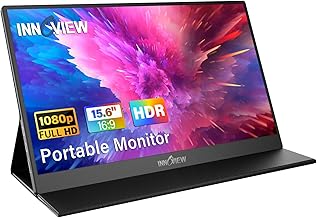
Best For:
Traveling professionals who need a durable, dependable second screen with a stable protective case and stand.
The InnoView 15.6" portable monitor is targeted at users who want a dependable secondary display with attention to practical travel ergonomics. With Full HD resolution, an IPS panel, USB-C and HDMI connections, and a protective case that doubles as a stand, it’s tailored to the needs of remote workers and developers on the move. The case offers multi-angle support so you can set up a stable workspace on a cramped table or on your lap.
For coding, the InnoView delivers readable text, stable color rendition for debugging UIs, and the usual convenience of switchable inputs that let you pair with a laptop and test on a console or tablet without swapping cables mid-session. Reviewers often highlight the solid build quality and consistent panel performance. Unlike some cheaper alternatives, the InnoView emphasizes a slightly sturdier feel in daily handling, which matters when you open and close the screen multiple times while traveling.
Where this model stands out is in balance: it’s not claiming pro-level color calibration, but it’s more reliable than entry-level screens in the same size class. That makes it attractive to developers who occasionally do front-end checks or light photo edits but primarily need a readable, portable display for long editing sessions, debugging, and pair programming.
A practical travel use case: set the InnoView up beside your laptop during a flight layover to run local server tests on one screen while editing code on the other. Another common scenario is using it for remote interviews—one screen for the video call and the other for notes and terminal windows.
Who it’s best for: serious road warriors who want a sturdy, reliable portable monitor with multi-angle case support.
Who might skip it: pros who need color-accurate grading or ultrafast refresh rates for intense gaming.
Practical observation: the protective case and adjustable angles make it much easier to use on uneven surfaces than models with flimsy covers.
Check the latest price on Amazon.
Pros
- Sturdy build and protective case
- Multi-angle stand for varied surfaces
- Consistent panel quality for text and UI checks
Cons
- Not a pro-grade color-accurate display
- No high refresh-rate option
Check the latest price on Amazon.
ASUS ZenScreen 15.6” Portable Monitor for Laptop (MB169CK) – Dual USB-C, Mini-HDMI, Plug & Play External Screen for Travel Dual Setup, Full HD, IPS, Anti-Glare Surface, 360° Kickstand, 3yr Warranty

Best For:
Professionals who prioritize build quality, ergonomic kickstand flexibility, and brand-backed warranty for reliable travel use.
The ASUS ZenScreen MB169CK targets travelers who want a polished, brand-backed portable monitor experience. With dual USB-C, mini-HDMI, Full HD IPS panel, anti-glare surface, and a 360° adjustable kickstand, it’s engineered for ergonomic versatility. The ASUS name brings reassurance in warranty and support; the included 3-year warranty is a differentiator for professionals who handle gear frequently and want long-term reliability.
For coding while traveling, the ZenScreen’s anti-glare coating and flexible kickstand pay dividends. Anti-glare reduces reflections on airplane windows and in coffee shops, and the 360° hinge lets you rotate or pivot the display to get the best angle when using it in portrait mode for reading long documents or logs. Portrait mode can be especially helpful for reading long config files or documentation without constant scrolling. Dual USB-C ports ease cable management, and mini-HDMI keeps compatibility with older hardware.
Compared with generic portable monitors, the ZenScreen feels more refined: better fit-and-finish, predictable firmware, and a more versatile stand that adapts to unconventional surfaces. It’s a particularly good choice for developers who care about ergonomics—portrait mode support, anti-glare coating, and a sturdy kickstand reduce neck strain during long sessions.
Limitations: while ASUS emphasizes build quality, the panel remains a 60Hz Full HD IPS unit; it’s not aimed at gamers who want high refresh rates or color professionals needing wide gamut coverage. The ZenScreen’s premium touches come at a price premium compared to no-name alternatives, but many buyers value the warranty and design refinement.
Who it’s best for: frequent travelers and professionals who prioritize ergonomic flexibility, anti-glare, and a trusted brand warranty.
Who might skip it: buyers on a very tight budget or those who need professional color accuracy or ultra-high refresh rates.
Practical observation: portrait mode is a genuine productivity booster for reading logs and long code files—pair it with a compact keyboard for a highly portable dev setup.
Check the latest price on Amazon.
Pros
- Anti-glare surface and 360° kickstand
- Dual USB-C + mini-HDMI for wide compatibility
- 3-year warranty for peace of mind
Cons
- Higher price than generic options
- Not geared for color-accurate pro work
Check the latest price on Amazon.
InnoView Portable Monitor 15.6" 1080P for Laptop with Protective Sleeve, Built-in 90° Adjustable Stand USB C HDMI Ultra-Slim Portable Laptop Monitor for MacBook Phone PS Xbox Switch

Best For:
Ultralight travelers and developers who want the slimmest practical second screen with a sturdy sleeve and stand.
This second InnoView model focuses on ultra-slim portability while retaining the practical protective sleeve and a built-in 90° adjustable stand. The 15.6" Full HD IPS panel and USB-C/HDMI inputs offer the same baseline benefits you’d expect for coding away from a fixed desk: legible text, stable viewing angles, and easy multi-device connectivity.
Where the B09K3FWMPL distinguishes itself is emphasis on a minimal footprint. If you frequently switch between airplanes, coworking spaces, and hotel rooms, a thinner chassis and a sleeve that slides into your laptop bag without bulking up your kit matter. The adjustable 90° stand is simple but effective: it gives you a sturdy platform at a couple of useful angles so your display won’t flop when you rest it against a laptop or a stack of books.
From a developer’s perspective, this InnoView is very pragmatic. It’s ideal for short to medium coding sessions—editing, testing, running terminal windows, or keeping documentation and pull requests visible while you iterate on a laptop screen. Compared with using a tablet as a second screen, this monitor often yields crisper text at 1080p and behaves more like a traditional monitor for window management.
Limitations include average speakers and standard 60Hz refresh—fine for coding but not aimed at motion-heavy content. Color professionals should consider dedicated hardware if they demand precise color calibration. Users report the stand and sleeve combo makes this a trustworthy travel mate; the build is light without feeling cheap.
Who it’s best for: developers who prioritize the lightest possible travel monitor without sacrificing a usable stand and screen quality.
Who might skip it: those wanting advanced color accuracy or higher refresh rates for competitive gaming.
Practical observation: pack a short USB-C cable and a small foldable keyboard; this setup turns a coffee table into a surprisingly effective coding station.
Check the latest price on Amazon.
Pros
- Ultra-slim, very travel-friendly
- Protective sleeve and built-in adjustable stand
- Good text clarity for coding tasks
Cons
- Speakers are basic
- 60Hz only, not for fast-paced gaming
Check the latest price on Amazon.
Final Verdict
Choosing the right portable monitor for coding while traveling depends on how you balance weight, ergonomics, and connectivity. If you need the most budget-friendly option that still gives readable text and basic HDR, the MNN model is a solid pick. If you value included accessories like screen protectors and smart covers, the KYY offers convenience for the price. For a sturdier build and multi-angle case support, InnoView’s B095GG31KX model is a reliable workhorse. The ASUS ZenScreen MB169CK is ideal if you want brand reliability, an anti-glare surface, and a rotatable stand for portrait mode reading; its longer warranty can be important for frequent travelers. Finally, the slimmer InnoView B09K3FWMPL prioritizes the smallest footprint and a solid sleeve-stand combination for minimal pack weight.
Across these options, keep your priorities front and center: single-cable USB-C convenience, a protective case, anti-glare and adjustable stands, and whether you’ll need HDMI for gaming or legacy compatibility. For most traveling coders, a 15.6" Full HD IPS portable monitor with a reliable stand is the best compromise between screen real estate and portability.
If you’re ready to upgrade your travel setup, pick the monitor that matches your workflow and pack a compact keyboard and cable kit so you can be productive anywhere. Check user Q&A and the latest compatibility notes on each product page before buying to confirm power delivery and OS support.
Check the latest price on Amazon.
Conclusion
These Portable monitor for coding while traveling picks are trending now and offer great value and variety. Check the links above for latest prices and reviews.
As an Amazon Associate, I earn from qualifying purchases.
Tags:
portable monitor, travel monitor, portable monitor for coding, USB-C monitor, 15.6 inch portable monitor, dual screen travel
