Best Digital Voice Recorders for Lectures
As an Amazon Associate, I earn from qualifying purchases. This article may contain affiliate links, which means we may receive a commission at no extra cost to you.
As an Amazon Associate, I earn from qualifying purchases. This article may contain affiliate links, which means we may receive a commission at no extra cost to you.
Recording lectures and meetings is one of those small conveniences that pays off in big ways: more accurate notes, the ability to revisit complex explanations, and a reliable record of study material. But not every voice recorder is suited to the classroom. Some are bulky, others lack battery life, and cheaper models can produce muffled audio that makes transcription a headache. This guide walks through the best digital voice recorders for lectures—options that balance clarity, battery life, storage, and ease of use so you can focus on learning, not fiddling with settings.
Below you’ll find a concise buying guide followed by in-depth descriptions of five recommended models ranging from ultra-simple plug-and-play units to feature-rich recorders with large internal memory and noise-reduction functions. Each product section explains who it’s best for, realistic use cases, practical observations, and pros and cons to help you choose with confidence.
Buying Guide
What to look for in a lecture recorder
Clarity and microphone quality: For lectures the mic’s sensitivity and position matter more than fancy codecs. Look for recorders with good built-in mics or the option to plug in an external mic if you sit far from the podium. Mono recorders often capture voice well enough for a single-speaker lecture; stereo helps when you need room ambiance or multiple speakers.
Battery life and charging: Long battery life or rechargeable models with built-in USB are essential for day-long seminars. If you can charge from a laptop or power bank between classes, that flexibility is a big plus.
Storage and file formats: Lectures can be long. Select a recorder with adequate internal memory or microSD support. Low-bitrate formats extend recording time but make editing harder; MP3 is widely compatible and often adequate.
Voice activation and noise reduction: Voice-activated recording (VOR) saves space by pausing during silence, which is handy for meetings. Noise-reduction processing or clear mono capture can reduce background hum in lecture halls.
Portable design and ease of use: You don’t want to fumble with menus while the lecturer starts. Large, tactile buttons and a clear display speed setup. Built-in USB connectors or simple transfer over microSD make moving files to a computer painless.
Price vs. features: Many lecture recorders are budget-friendly; prioritize audio clarity and battery life over bells and whistles. If you plan to transcribe automatically, prioritize clear recordings and consistent levels.
Who should read this guide: Students, researchers, journalists, and professionals who regularly attend lectures, seminars, or meetings and want reliable, searchable recordings without fuss. If you rarely record or only need voice memos, a smartphone app may suffice, but dedicated recorders often deliver better clarity and longer, more reliable recordings.
Sony ICD-PX370 Mono Digital Voice Recorder with Built-In USB Voice Recorder,black

Best For:
Students and first-time buyers who need a compact, easy-to-use recorder for single-speaker lectures and quick note-taking.
The Sony ICD-PX370 is a straightforward, budget-friendly digital recorder that focuses on dependable lecture capture without unnecessary complexity. Its mono microphone design concentrates on clear voice pickup from a single direction, which is ideal for a standard lecture hall where one speaker dominates. The integrated USB plug folds into the body for clip-and-go convenience—just plug into a laptop to drag-and-drop MP3 or LPCM files rather than wrestle with proprietary cables.
Battery life is a practical highlight: the device runs on AAA cells and can give many hours of recording depending on the chosen quality mode. For students who carry a few spare batteries or prefer disposables over built-in rechargeables, this can be a benefit: you’re not stranded if you forget a charger. The ICD-PX370’s interface is intentionally simple—large buttons for record, stop, and play, plus a compact display for file navigation—so you can start capturing a lecture as soon as class begins without learning a complicated menu system.
Where this model stands out is price-to-performance. Compared with larger, more feature-packed alternatives, the ICD-PX370 trades advanced noise-cancellation and vast internal memory for portability and simplicity. It does a good job picking up a lecturer’s voice from the front of a classroom but will struggle more at the back rows compared with stereo or external-mic setups. It’s an excellent choice if you want a reliable, low-maintenance recorder to stash in a backpack and use daily for classes or quick interviews.
Who it’s best for: Students on a budget, first-time buyers, or anyone who needs a no-nonsense recorder for single-speaker lectures and short interviews.
Key considerations: Remember that this is a mono recorder—if you plan to record group discussions or capture room ambiance for later context, a stereo or external-mic option may be better. Also factor in spare AAA batteries or a small rechargeable kit.
Pros: Compact and lightweight; built-in USB for easy file transfer; clear single-speaker capture; tactile buttons for one-handed use.
Cons: Mono mic limits spatial detail; fewer advanced features like onboard noise reduction; depends on disposable batteries.
Check the latest price on Amazon.
Pros
- Compact, lightweight design with fold-out USB
- Simple controls for quick recording
- Good voice pickup for front-of-room lectures
Cons
- Mono microphone limits stereo detail
- Lacks advanced noise reduction features
Find complete specs and customer feedback on Amazon. Check the latest price on Amazon.
Sony ICD-UX570 Digital Voice Recorder, ICDUX570BLK, usb

Best For:
Students and educators who need reliable stereo recording, rechargeable power, and flexible recording modes for larger lecture halls.
The Sony ICD-UX570 steps up from basic models with improved microphones, a sleeker design, and more recording flexibility—qualities that make it a favorite among students and professionals who want cleaner lecture captures without complicated extras. This recorder typically features sensitive stereo microphones and a choice of file formats, giving you better results in larger rooms or when there are multiple voices to capture. The UX570 also tends to include built-in USB for easy transfers and a rechargeable battery, removing the need for single-use cells.
Practical improvements over entry-level units include a clearer display and more granular recording settings. Many users appreciate the voice-activated recording (VOR) modes and manual level adjustments, which help keep file sizes reasonable while maintaining intelligible speech—handy for recording long seminars or multi-hour workshops. The stereo pickup pattern is beneficial when you sit off-axis to the podium or when panel discussions occur, offering depth that a mono recorder can’t reproduce.
Compared to smartphones, the UX570 delivers more consistent gain control and less ambient interference; compared to ultra-budget recorders, it offers better microphone sensitivity and a more refined user interface. It’s not a studio device, so you won’t get multi-track mixing or professional-grade XLR inputs, but for lecture capture, its balance of sound quality, size, and battery life makes it a sensible mid-range choice.
Who it’s best for: Students attending larger lectures, teaching assistants recording multiple sessions, and professionals who need reliable, rechargeable recording with stereo capability.
Key considerations: If you need extreme storage (hundreds of hours) or pro-level inputs, consider devices with microSD expansion or external mic jacks. The UX570’s onboard options cover most classroom scenarios well.
Pros: Sensitive stereo microphones for richer capture; rechargeable battery and USB file transfer; flexible recording settings including VOR.
Cons: Not upgradeable with professional XLR inputs; more expensive than basic models.
Check the latest price on Amazon.
Pros
- Stereo mics for clearer, more natural recordings
- Rechargeable battery and built-in USB
- Voice-activated recording and adjustable levels
Cons
- No professional mic inputs
- Higher cost than entry-level recorders
See current features and buyer reviews on Amazon. Check the latest price on Amazon.
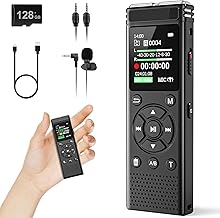
136GB Digital Voice Recorder with Playback,9000 Hours Audio Recording Device,Voice Activated Recorder with Noise Reduction,A-B Repeat,Mp3 Player and Password for Lectures Meeting/Classes/Interviews
Best For:
Researchers, conference-goers, and students who need extremely long recording times and built-in study playback features.
This large-capacity 136GB digital voice recorder is designed for users who prioritize insane storage and long unattended recording sessions—claims of thousands of hours of recording make it a practical companion for extended conferences, semester-long lecture capture, or archiving research interviews. With features like voice-activated recording, noise reduction, A-B repeat, MP3 playback, and password protection, it reads like a feature-packed package targeted at students, researchers, and professionals who need both quantity and basic quality controls.
The most obvious advantage is storage: 136GB will hold far more than the typical internal-memory recorder and removes the frequent need to offload files during intense study periods. Voice activation helps conserve recording space and battery by pausing during silence, but it’s worth noting that VOR can occasionally clip the beginnings of sentences if not tuned correctly—so for critical lectures you may prefer continuous recording. The presence of noise reduction modes indicates in-device processing to reduce background hum and classroom chatter, which improves intelligibility for later review or automated transcription.
Playback controls like A-B repeat and built-in MP3 player functions turn the device into a study tool: loop difficult passages to rehearse or transcribe, and protect sensitive files with a password. Compared to standard alternatives, this device trades the refined interface of brands like Sony for raw capacity and a broader feature set at a value price. That makes it appealing for power users who prioritize storage and features over brand-name ergonomics.
Who it’s best for: Researchers, multi-day conference attendees, and students who record many long sessions and want powerful storage and playback tools.
Key considerations: Large storage is great, but consider how you will manage and back up large files. Also check battery type and charging approach; long recording sessions need reliable power. The feature list is strong for the price, but user interfaces on these high-capacity budget units can be less intuitive than premium brands.
Pros: Massive 136GB storage for extensive recording; voice-activated recording and noise reduction; study-friendly playback features like A-B repeat and password protection.
Cons: Interface and build quality may be less refined than premium brands; voice-activation can occasionally trim speech starts.
Check the latest price on Amazon.
Pros
- Huge 136GB internal storage suitable for long-term use
- Voice-activated recording and noise reduction
- A-B repeat and password protection for study and security
Cons
- Interface can be less intuitive than name-brand recorders
- VOR may clip the start of some phrases
Review full specs and user comments on Amazon. Check the latest price on Amazon.
Tonfarb 64GB Digital Voice Recorder with Playback,Audio Recording Device for Lectures Meeting/Classes/Interviews,Tape Recorder with Voice Activated,Password,Noise Reduction,A-B Repeat,MP3 Player Etc

Best For:
Students and researchers who want robust features and moderate storage without a premium price tag.
The Tonfarb 64GB recorder is a mid-range alternative that balances storage, convenience, and study-focused playback tools. With built-in voice activation, noise reduction, A-B repeat, MP3 playback, and password protection, it borrows the most useful classroom features from larger units while remaining compact and affordable. Sixty-four gigabytes of storage is enough for many semesters of lecture recordings if you use MP3 encoding and voice-activated modes judiciously.
This model suits students who want more than a basic recorder but who don’t need the enormous capacity of the 136GB model. The inclusion of noise reduction and playback loop functions makes it useful for transcribing and reviewing tough passages. Password protection is a thoughtful addition for those recording sensitive interviews or seminar discussions where privacy matters. Compared to brand-name devices it may not match the same build materials or UI polish, but the Tonfarb focuses on delivering practical tools for study and research.
In real-life scenarios, this recorder performs well for back-to-back classes: use VOR during short lectures to save space, or switch to continuous mode for important sessions. The MP3 player function turns the device into a portable review device between classes or during commutes, and A-B repeat is valuable when drilling complex formulas or foreign-language vocabulary. If you frequently switch between lecture and interview modes, the preset options and password security are convenient additions.
Who it’s best for: Students and early-career researchers who want a balance of storage, study features, and decent noise reduction without paying premium brand prices.
Key considerations: Check how files are exported and whether the interface supports easy file naming—this makes managing many recordings much easier. Also verify battery life expectations for your typical use case.
Pros: Good mid-range storage (64GB); study-friendly playback and noise reduction; voice activation and password security.
Cons: Build and menu polish may trail premium models; battery and transfer speeds vary by unit.
Check the latest price on Amazon.
Pros
- Balanced 64GB storage for semester-long use
- Useful study tools: A-B repeat, MP3 playback, password protection
- Noise reduction and voice-activated recording
Cons
- UI and build not as refined as premium brands
- Battery life may vary under heavy use
Compare features and read customer insights on Amazon. Check the latest price on Amazon.
128GB Digital Voice Recorder for Lectures Meetings – EVIDA 9296 Hours Voice Activated Recording Device Audio Recorder with Playback,Password

Best For:
Graduate students and professionals needing very large storage and study-friendly playback tools for extended recording sessions.
The EVIDA 128GB voice recorder targets power users who want long-term storage and study-friendly playback options without moving into very high-end price tiers. With a substantial 128GB of internal memory, advertised thousands of hours of recording, voice-activated recording to conserve space, and basic playback and security features like password protection, it’s built for academics, journalists, and professionals who need dependable long-session capture.
What makes the EVIDA compelling for lecture capture is the sheer storage and the feature set tailored for reviewing content: A-B repeat to loop problem passages, password locks for sensitive recordings, and playback controls so you can use the recorder as a portable study tool. Compared to standard alternatives such as entry-level mono recorders, the EVIDA’s capacity and playback features give it an edge for students balancing heavy recording loads. Its voice-activated modes and noise-handling aim to improve intelligibility in typical classroom environments.
In practical use, EVIDA works well for multi-day conferences or for students who record many classes back-to-back. The large storage reduces the need to back up files daily. However, with great storage comes the responsibility to manage files—building a workflow for backups and naming conventions saves time when you later search for a specific lecture.
Who it’s best for: Graduate students, researchers, and professionals who log many hours of audio and want an all-in-one recorder and review device.
Key considerations: Check the actual usable storage and file system format for compatibility with your computer. Also prioritize how the unit charges and how long it operates in continuous recording mode.
Pros: Very large 128GB storage; voice-activated recording and playback features; password protection for sensitive files.
Cons: Large files require disciplined backup; interface and build quality might not match premium brands.
Check the latest price on Amazon.
Pros
- 128GB large-capacity internal memory
- Voice-activated recording and playback features like A-B repeat
- Password protection for secure recordings
Cons
- Requires good file management practices
- Build and UI may be less refined than top-tier brands
View specs and buyer experiences on Amazon. Check the latest price on Amazon.
Final Verdict
Choosing the right lecture recorder comes down to matching features to your real-world needs. For students seeking simple, reliable capture without fuss, the Sony ICD-PX370 offers a compact, no-nonsense way to preserve classroom audio. If you frequently face larger lecture halls or panels, the Sony ICD-UX570’s stereo mics, rechargeable battery, and refined controls are a step up. For users who prioritize long-term storage and built-in study tools, the 136GB and 128GB models deliver massive capacity and playback features like A-B repeat and password protection; the 64GB Tonfarb strikes a middle ground with useful study features at a friendlier price.
Practical buying tips: prioritize microphone quality and battery life over flashy extras, consider voice-activated modes if you want to save space (but test them to avoid clipped speech), and make a plan for backing up large audio archives. If you already use transcription software, choose the recorder that produces the clearest, most consistent audio levels.
All five options here are focused on lecture use, but your best choice depends on whether you value simplicity (Sony ICD-PX370), a refined mid-range experience (Sony ICD-UX570), or very large storage and study features (the 136GB, 64GB Tonfarb, and 128GB EVIDA units). Take stock of your typical recording duration, whether you need stereo mics or password security, and how much time you’re willing to spend managing files. With the right match, a dedicated voice recorder will make studying and research far more efficient.
Check the latest price on Amazon.
Conclusion
These Best Digital Voice Recorders for Lectures picks are trending now and offer great value and variety. Check the links above for latest prices and reviews.
As an Amazon Associate, I earn from qualifying purchases.
Tags:
digital voice recorder, lecture recorder, audio recorder for students, voice activated recorder, portable voice recorder, recorders for lectures, long recording device
