Best Desk Organizers for All-Nighter Study Sessions
As an Amazon Associate, I earn from qualifying purchases. This article may contain affiliate links, which means we may receive a commission at no extra cost to you.
Pulling an all-nighter is often more about setup than willpower. When you’re racing to meet deadlines, the last thing you need is clutter, a wobbling monitor, or losing your notes under a pile of sticky pads. That’s where the right desk organizer comes in — not a decorative afterthought, but a practical system that keeps essentials within reach, saves time, and helps maintain flow when fatigue sets in. Below you’ll find five thoughtfully selected organizers—ranging from pocket add-ons and acrylic valets to clamp-on storage and two-tier monitor risers—that many creators and students choose for late-night work sessions. Each pick includes realistic use cases, buyer considerations, and pros and cons so you can quickly decide what fits your study style.
Buying Guide
What to look for in an all-nighter desk organizer
When you’re shopping for a desk organizer meant to support late-night study sessions, prioritize these practical attributes:
– Access speed: You should be able to reach pens, notes, and your phone without breaking your concentration. Shallow divided compartments and an open-top layout help.
– Stability: A wobbly shelf or clamp can interrupt work. If you use a clamp-on organizer, check clamp range, padding, and stated weight capacity.
– Surface protection: Look for soft feet or non-slip pads to protect desks and prevent sliding when you shuffle materials.
– Modularity and expandability: Add-on pockets or stackable shelves are great for dorms or shared desks because they let you scale storage without replacing furniture.
– Cable and device accommodation: If you rely on a laptop and phone, an organizer with dedicated device grooves or a monitor riser with cable routing keeps power cords out of the way and reduces heat build-up under laptops.
– Material and cleaning: Acrylic wipes clean easily and looks tidy under a desk lamp; wood or MDF hutch pieces give a warmer feel but weigh more. Consider dust and spill resistance if you snack while studying.
– Ergonomics: A monitor riser that raises your screen to eye level reduces neck strain during long sessions and creates drawer or shelf space underneath for notebooks or a keyboard.
Who should prioritize which feature
– Minimalists who need quick access: shallow acrylic valets and pocket organizers.
– Gamers and creators with peripherals: clamp-on organizers for controllers, headphones, and cups.
– Students with limited space: countertop hutches or add-on pocket modules that mount to existing organizers.
– Anyone concerned with posture: monitor risers with drawers or two-tier designs.
Balancing these factors based on your desk footprint and study habits will help you pick an organizer that actively reduces friction during long study stretches.
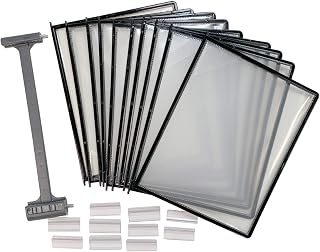
Ultimate Office AdjustaView 10-Pocket Desk Reference Organizer Add-On with Easy-Load Pockets (Add-On Module Only), Black Pockets
Best For:
Students and creators who already use modular desktop systems and need compact, upright storage for reference sheets, index cards, and flashcards.
If you already use desktop reference systems or modular organizers, the Ultimate Office AdjustaView 10-Pocket Add-On is a space-efficient way to expand without replacing what’s working. This add-on module focuses on quick-access pockets designed for letters, reference sheets, flashcards, and frequently used documents — the items you want visible and grab-ready during a late-night study sprint.
Practical benefits: the pockets are easy-load, meaning you can slide in a stack of index cards, printed formulas, or syllabus pages in seconds and flip through them while maintaining your workflow. The vertical pocket layout keeps pages upright and readable, which minimizes desk spread and reduces time spent hunting for that single note you need. Because this is an add-on module it’s especially useful for people who already own a matching front rail or base plate; you don’t need to reorganize your entire desk to add more reference storage.
Real-life usage scenarios: imagine an evening where you’re juggling three subjects. One pocket holds urgent to-dos and a printed assignment checklist, another stores cheat-sheet-sized formula cards, while a third keeps small sticky-note reminders for timed work blocks. For creators working on scripts, storyboards, or layering media assets, those pockets become a fast-swapping surface for visual references.
Comparison with standard alternatives: Compared with a freestanding file sorter, this add-on keeps material more upright and out of the way, making it a better fit for desks with limited depth. Unlike large desktop hampers or boxes, pockets eliminate riffling and maintain a tidy vertical profile.
Who should buy it: students and creatives who use modular desktop systems and need a low-profile way to expand reference storage. It’s especially handy for people who frequently switch between small stacks of documents and need them displayed at eye level.
Who may not need it: if you don’t already have a compatible organizer base or you prefer horizontal filing trays, this module alone won’t serve as a stand-alone solution.
Buying considerations: confirm compatibility with your existing AdjustaView base or rail system before purchasing. The lightweight pockets are convenient but not suited for heavy books or thick binders. If you prefer a mixed-material aesthetic (wood or metal), the utilitarian black pockets are functional but minimalist.
Check the latest price on Amazon.
Pros
- Expands existing AdjustaView systems without replacing the base
- Easy-load pockets keep small stacks visible and accessible
- Vertical footprint saves desk depth compared to horizontal trays
Cons
- Not a stand-alone unit — requires a compatible base
- Pockets are best for thin materials, not thick books
Add extra reference pockets to your setup and keep key papers visible. Check the latest price on Amazon.
Tangkula Desktop Bookshelf for Computer Up to 32”, 37” Countertop Storage Hutch with 6 Storage Shelves, 3-Tier Desktop Organizer Display Rack, Wooden Desk Hutch for Dorm Home Office (White)

Best For:
Dorm students, remote workers, and creators who want to maximize vertical desk space with a warm wooden hutch for textbooks, devices, and display items.
A multi-shelf hutch can completely change how you use limited desk real estate, and the Tangkula Desktop Bookshelf is built to do exactly that. Designed to sit on top of a desk or countertop, this 3-tier organizer offers six shelves for books, decorative storage bins, and frequently referenced binders. It’s a purposeful solution for dorm rooms, shared study spaces, and home offices where vertical storage matters more than having a low-profile surface.
Main benefits: the raised design clears the desk surface while creating visual zones — one shelf for textbooks, another for tech peripherals, and a top ledge for a reference binder or notepad. Because it supports monitors up to 32”–37” (check dimensions), many users use the lower shelf area to position a monitor while still taking advantage of open storage above and to the sides. The wooden construction gives a warmer look than acrylic and tends to hide wear better than ultra-clear organizers when used in high-traffic spaces.
Real-life usage examples: picture a late-night research session. Your laptop or monitor sits on the lower portion, an open textbook rests on the middle shelf for quick flipping, and index card boxes or sticky notes sit in the top compartments. During group study, you can place shared reference materials on the central level so everyone can reach them without cluttering the main workspace.
Why it’s valuable: it converts wasted vertical space into organized, categorized storage, reducing the pile-on effect that often happens during long sessions. Unlike a simple bookend or small file tray, the hutch organizes material into separate, accessible tiers, which cuts down time spent searching for a single reference among a stack.
Who should buy it: students in small rooms, remote workers who want a tidy backdrop for video calls, and creators who juggle books, props, and small gear. It’s especially useful if you want a balance between display and hidden storage (use baskets or boxes on the shelves).
Who may not need it: if your goal is an ultra-minimal desk with no raised shelving, or if you have a fully standing desk setup with lots of vertical clearance elsewhere, a low-profile organizer may suit you better.
Buying considerations: assemble time can be moderate; keep in mind the overall footprint so it fits your monitor and desk depth. The white finish looks clean but may show dust faster than darker tones.
Check the latest price on Amazon.
Pros
- Maximizes vertical storage with multiple tiers
- Warmer wooden finish hides wear and looks homey
- Useful for placing monitors and freeing desk surface
Cons
- Larger footprint — needs sufficient desk depth
- Assembly required and may take time
Turn vertical space into usable storage and keep your desk clear for focused work. Check the latest price on Amazon.
Acrylic Desk Organizer for Office Supplies and Desk Accessories, 12.5” x 5.5” x 4” and 5mm Acrylic Valet to Organize Documents, Files, Paper Clips, Sticky Notes, Tablet, Other Storage (Black Glitter)

Best For:
Minimalists and students who want a compact, easy-to-clean organizer for pens, sticky notes, and a tablet or phone near the keyboard.
A compact acrylic desk valet is one of the fastest ways to reduce visual clutter and keep essentials reachable during long study nights. This 12.5” x 5.5” x 4” acrylic organizer in black glitter balances function with a touch of personality without being overly flashy. Because it’s clear-ish with a decorative finish, it creates a tidy visual effect under bedside lamps or desk LEDs while keeping items segmented and visible.
Main benefits: the shallow, divided tray layout is ideal for pens, sticky notes, paper clips, small notebooks, and a tablet or phone laid flat. The rigid 5mm acrylic walls hold shape and make cleaning easy — a quick wipe removes dust, snack crumbs, or highlighter residue. The dimensions fit comfortably beside a keyboard, which means you can reach grab-and-go items without leaning or stretching, preserving your posture when fatigue sets in.
Real-life usage examples: for exam prep, assign each compartment a task set — flashcards in one slot, current assignment notes in another, and penalized time blockers on sticky notes in a third. Creators can use the forward-most groove for a tablet or phone in landscape to keep reference videos or timers visible while working on scripts or edits. The glitter finish is subtle enough to personalize a dorm desk without clashing with other décor.
Why it’s valuable: compared with a bulky caddy or mug full of loose pens, the acrylic valet keeps similar items grouped and prevents them from rolling around or getting lost under paper stacks. The low profile ensures you retain sightlines to your monitor and can slide it under a riser when not in use.
Who should buy it: minimalists and students who favor a compact, easy-to-clean organizer that holds daily essentials and fits beside a keyboard. It’s also good for creators who need an unobtrusive spot for a tablet or phone.
Who may not need it: if you keep only digital notes and rarely use physical tools, a valet of this size may be unnecessary.
Buying considerations: acrylic shows dust and fingerprints more than wood, so expect occasional wiping. The glitter version adds flair but may not match every aesthetic; check photos to ensure you like the finish.
Check the latest price on Amazon.
Pros
- Compact and low-profile—sits beside keyboard comfortably
- Easy to clean 5mm acrylic walls
- Subtle glitter finish personalizes a study setup
Cons
- Shows fingerprints and dust more readily than matte finishes
- Not suited for heavy or oversized items
Keep your essentials tidy and within arm’s reach during study sessions. Check the latest price on Amazon.
Desk Side Storage Hold Up To 11lbls Hanging Side Of Desk Organizer Clamp On Table Edge To Store Office Accessories, Gaming Devices, Cups For Office, Living Room, Dinning Room (White)

Best For:
People with cramped desks, gamers who need quick access to controllers/headsets, and anyone who wants drinks or bulky items off the main workspace.
Clamp-on side storage is a clever fix when desktop space is tight and you need a place for peripherals, drinks, or controllers that otherwise add to clutter. This desk-side storage unit clamps to the table edge and supports up to 11 lbs, creating a hanging pocket for items you want off the surface but still within reach during intense work or gaming sessions.
Main benefits: by moving bulky or awkward items off your main desktop — mugs, headphones, gamepads, or external drives — you instantly reclaim usable surface area. The clamp mechanism means there’s no permanent change to your desk and no drilling; most clamps include padding to protect tabletops. Because the unit sits just off the edge, you can reach for your water bottle or phone without interrupting your typing rhythm or knocking other items over.
Real-life usage examples: students who alternate studying with breaks to game can stash a controller and headset in the clamp basket, then switch focus to textbooks on the main surface without distraction. If you like a beverage while working, a dedicated cup space prevents accidental spills on notes or electronics. For creators using multiple small accessories—chargers, dongles, or portable drives—this hanging organizer keeps them separated and accessible.
Why it’s valuable: a clamp-on solution provides quick surface relief without the permanence or footprint of a full shelf or hutch. Compared with drawer storage, it keeps frequently used items in plain sight and prevents the distracted search that happens when small gear disappears into a drawer.
Who should buy it: people with limited desk surfaces, gamers who share desk space with study materials, and home office users who want to keep drinks or bulky accessories off their main work area.
Who may not need it: if you have a long, wide desk with ample surface or dedicated shelving, a clamp-on organizer might be redundant.
Buying considerations: confirm your desk thickness and edge profile to ensure the clamp fits, and distribute weight carefully—11 lbs is the max but heavy, concentrated loads can still stress thin tabletops.
Check the latest price on Amazon.
Pros
- Reclaims desk surface by hanging accessories off the edge
- Clamp mounting avoids permanent installation
- Useful for cups, controllers, and small peripherals
Cons
- Requires a compatible desk edge and sufficient thickness
- Weight limit means heavy items should be avoided
Free up desk space and keep frequently used accessories within reach. Check the latest price on Amazon.
OPNICE Desk Organizer and Accessories, 2-Tier Computer Monitor Stand Riser with Drawer and 2 Pen Holders, Laptop Stand, Office Desk Accessories for Office Supplies, Black

Best For:
Students and remote workers who want better ergonomics and hidden storage for small items beneath a monitor or laptop.
Raising your monitor a few inches changes more than posture — it creates a hidden storage zone and gives you a cleaner focal area for work. The OPNICE 2-Tier Monitor Stand Riser combines a sturdy riser surface with a built-in drawer and pen holders to keep daily tools organized beneath and around your screen. This effectively turns wasted space under a monitor into a practical catch-all.
Main benefits: elevating your monitor or laptop to a more ergonomic height reduces neck strain and increases comfort over marathon study sessions. The additional drawer hides small but essential items like thumb drives, sticky notes, or earbuds, reducing desktop visual noise. Two built-in pen holders mean your most-used writing instruments are upright and ready; that’s useful when you alternate typing with handwritten notes or sketching diagrams.
Real-life usage examples: during a late-night coding sprint, place your laptop on the riser so the screen is easier to read while you reference a notebook stored beneath. For writers or students, keep pens, a small notepad, and sticky flags in the drawer for immediate annotation. Creators who switch between editing and note-taking will find the pen holders and drawer cut down on interruptions caused by searching for implements.
Why it’s valuable: compared with a plain monitor stand or separate desk drawer, this integrated solution clusters frequently used small items under your screen and keeps the top surface clear for peripherals like a keyboard and mouse. It’s a simple way to get immediate ergonomic benefits while adding targeted storage without additional furniture.
Who should buy it: anyone who wants to improve ergonomics and reduce desktop clutter simultaneously—students, remote workers, and content creators who use a monitor or laptop for extended sessions.
Who may not need it: those who already use full standing desks with adjustable arms or have dedicated large drawers built into their desk might not see as much benefit.
Buying considerations: verify the riser’s weight capacity for your monitor or laptop and measure its footprint against your desk so it fits comfortably with your keyboard and mouse. Materials vary—look for solid construction if you place heavier displays on top.
Check the latest price on Amazon.
Pros
- Raises screen for better posture and ergonomics
- Built-in drawer hides small clutter
- Integrated pen holders keep writing tools accessible
Cons
- May be unnecessary if you already have an adjustable monitor arm
- Check weight limits for larger monitors
Improve ergonomics and reclaim under-monitor space with a riser that doubles as storage. Check the latest price on Amazon.
Final Verdict
The right desk organizer for late-night study sessions comes down to how you use your surface. If you already own a modular reference system, the Ultimate Office AdjustaView add-on provides vertical pockets that keep flashcards and sheets visible without eating desk depth. The Tangkula desktop hutch is a great pick when you need many tiers of storage and want a warmer look that accommodates a monitor. For minimalists, the acrylic desk valet offers a compact, easy-to-clean place for essentials and a tablet groove for reference videos. If desk surface is at a premium, a clamp-on side organizer makes sense — it moves bulky items like controllers and cups off the tabletop without permanence. Finally, the OPNICE monitor riser is a practical, ergonomic choice that hides small clutter in a drawer while elevating your screen.
When choosing, match capacity and mounting style to your desk: clamp-ons need a compatible edge, add-ons need a matching base, hutches need depth to avoid crowding, and risers need a clear footprint. Think about what interrupts your flow (searching for pens? wiping crumbs? neck stiffness?) and prioritize the organizer that solves that one friction point first.
All five options here provide focused solutions that help sustain concentration during long study sessions by streamlining access and reducing visual noise. Pick the item that addresses your biggest pain point and try rearranging only what you need—small changes to your desk setup often yield the biggest gains in productivity.
Check the latest price on Amazon.
Conclusion
These Desk organizers creators use during all nighter study sessions picks are trending now and offer great value and variety. Check the links above for latest prices and reviews.
As an Amazon Associate, I earn from qualifying purchases.
Tags:
desk organizers, study desk accessories, monitor riser, clamp-on organizer, acrylic desk valet, desktop hutch, study supplies
