Best Desk Gadgets for Focused Workflow Sessions
As an Amazon Associate, I earn from qualifying purchases. This article may contain affiliate links, which means we may receive a commission at no extra cost to you.
If you’re trying to carve out distraction-free time in a busy day, the right desk gadgets can make focused workflow sessions feel more reliable and even enjoyable. Whether you follow the Pomodoro technique, need tactile cues to stay on task, or want a calming fidget to keep restlessness from derailing a sprint, there are simple tools designed to support concentrated work.
As an Amazon Associate, I earn from qualifying purchases. This article may contain affiliate links, which means we may receive a commission at no extra cost to you.
Below you’ll find a practical guide to five popular desk gadgets—rotating and cube Pomodoro timers, a multi-function countdown cube, and a kinetic desk toy—chosen because they solve common problems people run into during focused work: keeping time without staring at a phone, creating a consistent start/stop ritual, and managing fidgeting without losing momentum. I’ve researched product specifications, typical user experiences, and real-world use cases so you can match a gadget to your workflow.
Buying Guide
How to pick a desk gadget for focus: start with your main distraction and the workflow you want to protect. If you lose hours to a scattered schedule, a visual countdown timer (Pomodoro-style) gives structure and helps you commit to short, intense work intervals followed by breaks. For people with ADHD or sensory needs, look for vibration and mute modes so alerts don’t overstimulate; tactile devices like a kinetic spinner or soft-weighted cube can channel fidget energy without sending you down a rabbit hole.
Key features to consider:
– Preset intervals vs. fully customizable countdown: Presets are fast and consistent; custom timers suit irregular tasks.
– Alert options: sound, vibration, and mute let you adapt to shared workspaces or sensory preferences.
– Form factor and placement: a rotating cube or desk toy that sits firmly prevents accidental resets. Gravity sensors and flip activation reduce fiddliness.
– Build and finish: wood-grain or metal finishes look better on a desk and often feel more durable than basic plastic.
Compare these gadgets to smartphone apps: phone timers are flexible but tempt you to check notifications. Standalone desktop timers cost a little and provide discipline without screens. For office settings, prioritize mute and vibration modes. For home study, a louder chime may be useful. Finally, take into account battery life, ease of charging, and whether the device fits your workspace aesthetic. Below are five vetted options, with realistic scenarios and pros/cons to help you choose.
Rotating Pomodoro Timer 5, 25, 10 50 Minutes Preset, Desk Productivity Flip Timer, ADHD Tool Cube Countdown Stopwatch, Vibration/High/Low Volume/Custom Modes, for Work, Study, Back to School, Kitchen

Best For:
Remote workers, students, people with ADHD who prefer tactile cues and need both preset and custom countdowns.
This rotating Pomodoro timer is one of the most straightforward ways to add structure to a work or study session. It offers preset intervals—5, 10, 25 and 50 minutes—and also supports custom timing, which makes it flexible for different workflows. The flip/rotate activation is intuitive: turn the cube to the desired face and the countdown begins, removing the need to fiddle with buttons or look at a screen. Users who struggle with impulsive phone checking will appreciate this physical anchor.
In practice, the timer’s multiple alert modes are especially useful. You can choose between high and low sound levels, or vibration-only for shared workspaces and classrooms. A custom mode enables fine-tuning of interval length when you want to extend deep work or shorten breaks. The cube’s tactile operation helps create a ritualized start to a session—a small psychological trick that reinforces focus over time.
Compared to phone apps and basic digital timers, this device removes notification temptation and provides a clear visual cue that you’re in a timed focus block. People with ADHD often report that tactile and ritualized cues make it easier to initiate tasks; this timer combines both. It’s also handy in the kitchen for timing cooking tasks, or in study sessions for students who need visual structure without screen interruptions.
Buying considerations: check the battery/charging method and whether a gravity sensor prevents accidental activation. The build finish varies between models; a wood-grain or matte finish looks less toy-like on a professional desk. If you need absolute silence, confirm the vibration-only mode is strong enough to notice. From user reports, the main trade-offs are occasional accidental flips if placed at an edge and some learning time to get used to the preset durations.
Best for: people who want a tactile, screen-free Pomodoro tool that’s adaptable for ADHD, students, and remote workers who prefer not to use their phones as timers.
Pros: tactile flip activation, multiple alert modes (vibration/high/low), preset and custom intervals.
Cons: can be accidentally flipped if not placed securely; learn curve for custom modes.
If a physical timer appeals to you and you want both presets and customization, this rotating Pomodoro cube is a solid choice. Check the latest price on Amazon.
Pros
- Tactile flip/rotate activation for distraction-free starts
- Multiple alert modes: vibration, high and low volume
- Preset and custom timing options for flexible workflows
Cons
- Can be accidentally flipped if placed at the desk edge
- Some users report a small learning curve with custom settings
If you want a simple physical timer to anchor focused sessions and avoid phone distractions, this rotating Pomodoro cube is worth a look. Check the latest price on Amazon.
Jack Pomodoro Timer – Productivity Cube, Visual Focus Timer, Mute & Vibration & Adjustable Sound Alert, for Office, ADHD, Study, Work, 3/5/10/25/30/60min & Custom Countdown – Black

Best For:
People with varied workflow rhythms—multitaskers, students with mixed study tasks, and those who need micro timers in addition to standard Pomodoro slots.
The Jack Pomodoro Timer broadens the Pomodoro concept with more preset options (3, 5, 10, 25, 30 and 60 minutes) while keeping the familiar cube form factor. It’s designed as a visual focus timer that flips to start, and comes with adjustable sound levels plus vibration and mute modes—features that make it suitable for shared offices and classrooms. The additional short intervals (3 and 5 minutes) can be surprisingly useful for micro-tasks or transition routines.
In a typical day, this timer can act as the pacemaker for everything from deep writing sessions to email triage. Use a 25-minute focus block for writing, a 5-minute flip for quick inbox zero sprints, and a 3-minute face for a brief reset or breathing break. Users who juggle lots of context switches find the diversity of presets helps maintain momentum without overcommitting time. The custom countdown option allows longer stretches when you need uninterrupted flow—for example, a 90-minute coding sprint broken into two segments.
Compared to simpler cube timers with only standard Pomodoro intervals, the Jack Timer gives you more flexibility out of the box. Its sound adjustability is practical: choose a clear chime for solo work or vibration/mute for open-plan spaces where audible alarms would be disruptive. People with ADHD or sensory sensitivities often prefer vibration or a low chime, and this unit supports both.
Buying considerations include build stability—look for a model with a reliable gravity sensor—and battery life or charging method. Some buyers note the black finish hides fingerprints but can show dust, which matters if aesthetics are important in your workspace. The main compromise is that with more presets comes slightly more menu navigation if you often change intervals.
Best for: multitaskers, people with variable session needs, and anyone who needs both micro-timers and longer focus blocks.
Pros: wide range of presets including micro-intervals, adjustable sound and vibration, visual flip activation.
Cons: menu navigation for custom settings can be fiddly; finish may show dust.
If you like having many preset choices and need versatile timing for varied tasks, this productivity cube is a flexible pick. Check the latest price on Amazon.
Pros
- Multiple presets including 3, 5, 10, 25, 30 and 60 minutes
- Adjustable sound, vibration, and mute modes for different spaces
- Flip-start, visual timer that reduces phone use
Cons
- Switching presets can require extra button presses
- Black finish may show dust or fingerprints
For flexible timing options that cover micro-sprints and long blocks, the Jack Pomodoro Timer is a strong, adaptable choice. Check the latest price on Amazon.
Rotating Productivity Timer 5, 25, 10, 50 Minutes Preset, Desk Cube w/Gravity Sensor for ADHD, Mute Functions, Ideal for Work, Study, Kitchen, Back to School (1, Wood Grain Finish)

Best For:
Students, teachers, and professionals who want a stylish, screen-free timer that blends into a warm or traditional workspace.
This wood-grain rotating productivity timer blends a refined look with practical timing functionality. It includes commonly used presets—5, 10, 25, and 50 minutes—and uses a gravity sensor so flipping the cube starts the countdown reliably. The wood-grain finish helps it sit unobtrusively on a desk, making it a good option if you want a prettier alternative to plastic timers.
Beyond aesthetics, the timer delivers the core benefits of Pomodoro-style work: clear start and stop signals, a physical ritual to begin work, and remediable breaks. Students and professionals who appreciate a less ‘gadgety’ look will enjoy this one. The mute function and vibration options make it usable in quiet study rooms or libraries where audible alarms would be inappropriate.
Compared with plain plastic cubes, the wood-grain build feels more at home in a study or an office with warm décor. It’s well-suited for back-to-school use—teachers and students can use the cube to structure class activities or study periods—or for anyone who uses visual cues to manage attention. Since it’s screen-free, it reduces temptation to check devices, which is often the biggest time-sink.
Practical observations from customer experiences highlight how helpful a stable base and a clear tactile flip are for preventing accidental resets. Check whether the gravity sensor sensitivity fits your workspace (some report very sensitive sensors, others note slightly stiff faces). Also note charging method: some of these cubes are rechargeable via USB, while others use replaceable batteries.
Best for: people who want a stylish, low-profile Pomodoro cube that fits in a home office, dorm room, or classroom environment.
Pros: attractive wood-grain finish, gravity-sensor reliability, mute and vibration options for quiet spaces.
Cons: sensor sensitivity varies by unit; finish requires occasional dusting.
If you want a tasteful, effective timer that looks good on a desk while keeping your Pomodoro practice intact, this rotating wood-grain cube is a great fit. Check the latest price on Amazon.
Pros
- Attractive wood-grain finish that looks professional on a desk
- Gravity sensor flip-start for easy activation
- Mute and vibration modes suitable for quiet environments
Cons
- Gravity sensor sensitivity can vary between units
- Wood finish shows dust and needs occasional cleaning
If aesthetics matter and you still want the Pomodoro structure, this wood-grain rotating timer is a tasteful, functional option. Check the latest price on Amazon.
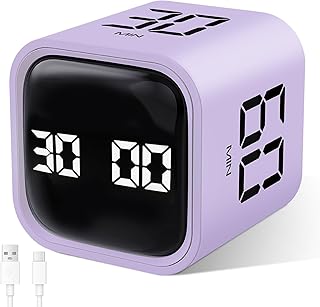
GuDoQi Multi-Function Cube Timer, 5/10/30/60 Min & Custom Count Down, Included Pause & Resume Feature, Silent, Vibrate & Adjustable Sound Alarm for Productivity in Tasks, Study & Kitchen, Purple
Best For:
Busy households, group study sessions, and anyone who benefits from a pause/resume timer for interrupted workflows.
The GuDoQi multi-function cube timer focuses on flexibility and control. With presets for 5, 10, 30 and 60 minutes and a custom countdown option, it covers short sprints and long sessions. A practical pause-and-resume feature is especially helpful during interruptions—flip back to pause and flip forward to resume—so you don’t lose accumulated focus time. The unit also offers silent, vibration-only, and adjustable sound alarm modes, making it suitable in many environments.
This timer is aimed at people who need a dependable, fuss-free device that can handle context switches. For example, use a 30- or 60-minute setting for a long study block, pause for a quick distraction or household task, then resume without rebuilding momentum. In group study or family spaces, the silent and vibration modes keep alarms discreet while the visible countdown encourages everyone to commit to the agreed time.
Compared to single-purpose Pomodoro cubes, the GuDoQi stands out with its pause/resume capability and longer preset durations. These features make it more than a Pomodoro toy—it acts as a general-purpose countdown for cooking, focused housework, meetings, and studying. Customers often note that the pause function reduces the stress of interruptions, which is a real advantage for busy households or shared workspaces.
Buying considerations include ease of switching modes and ensuring the pause gesture is intuitive for you. Also check how the device charges and whether the vibration is strong enough in noisy environments. The purple finish is bold—if you prefer a neutral look, verify available color options.
Best for: people who need pause/resume capability, families, and anyone who wants longer preset durations alongside standard sprint intervals.
Pros: pause and resume feature, multiple presets including 60 minutes, silent and vibration modes.
Cons: bright color options may not match every desk; vibration strength varies by unit.
If interruptions are frequent and you need a timer that can pause and pick up where you left off, consider the GuDoQi cube. Check the latest price on Amazon.
Pros
- Pause and resume feature preserves accumulated focus time
- Wide range of presets including 60 minutes
- Silent, vibration, and adjustable sound modes
Cons
- Bold color choices may not suit every workspace
- Vibration strength can feel weak in louder environments
For workflows that need interruption-friendly timing and longer presets, the GuDoQi multi-function cube is a practical choice. Check the latest price on Amazon.
Upgraded Kinetic Desk Toys, Kinetic Spinning Desk Toy for Office for Adults, Quite Fidget Toys for Kids Teens, Desk Fidgets for Adults with ADHD (Grey Rose Gold)

Best For:
Adults with ADHD, teens, and anyone who benefits from subtle tactile stimulation to remain focused during meetings or deep work.
Not every focus aid is a timer. Kinetic desk toys offer a tactile outlet for fidgeting and can help sustain attention during long stretches of work. This upgraded kinetic spinning desk toy is designed to be quiet, visually calming, and durable enough for daily use. It uses a smooth spinning mechanism and a balanced design so it keeps motion with a gentle nudge rather than frantic twirling, which is useful when you want subtle sensory input without distraction.
In real-life use, a kinetic toy can be great during tasks that require steady cognitive load—design review, editing, or listening-heavy meetings—where you need a small, repetitive motion to keep your hands busy without breaking concentration. People with ADHD often report that low-effort fidgeting helps maintain focus; unlike noisy fidgets, a well-designed kinetic toy provides visual rhythm and tactile feedback without creating an audible disturbance.
Compared to squeezable or click-based fidget toys, the kinetic spinner is more desk-friendly and looks like a tasteful accessory rather than a toy. It pairs well with a timer: use the spinner during a 25-minute block to keep hands occupied while you work. Pay attention to build material and base stability—higher-quality metals or weighted bases are less likely to wander across your desk during use.
Buying considerations include noise level, size relative to your workspace, and aesthetic—this model’s grey and rose-gold finish aims to blend into modern desks. Also consider whether you want something purely tactile or something that doubles as a conversation piece on your desk.
Best for: adults and teens who benefit from tactile input, people with ADHD seeking subtle fidget options, and anyone who wants a quiet desk toy to support long focus sessions.
Pros: quiet operation, tasteful finish, smooth, low-effort spinning for subtle fidgeting.
Cons: not a timing tool—best paired with a separate timer; may be unnecessary for those who don’t fidget.
If tactile, low-noise stimulation helps you concentrate, this kinetic desk toy is a tasteful, practical addition to your workspace. Check the latest price on Amazon.
Pros
- Quiet, smooth spinning ideal for shared spaces
- Stylish grey and rose-gold finish that fits modern desks
- Low-effort fidgeting helps maintain focus without distraction
Cons
- Doesn’t provide timing features—best used with a timer
- May be unnecessary if you don’t fidget while working
If a quiet, stylish fidget helps you sustain attention during long sessions, add this kinetic spinner to your desk toolkit. Check the latest price on Amazon.
Final Verdict
Focused work often comes down to small rituals and the right physical cues. A tactile Pomodoro cube gives you a simple start/stop ritual and removes the temptation of phone-based timers; a multi-function cube with pause/resume suits people whose days are interrupted; and a kinetic desk toy channels fidget energy so you can stay attentive without noisy distraction.
Which one to choose depends on your habits: pick a rotating cube if you want the classic Pomodoro discipline, choose a timer with many presets if your work rhythm varies, and add a kinetic toy if you need a low-noise tactile outlet. For shared or quiet spaces, prioritize vibration and mute modes. If aesthetics matter, consider wood-grain or metal finishes that blend into your workspace.
These gadgets are inexpensive investments in your attention economy. They won’t replace good time-management habits, but they make it easier to build consistent routines and to reclaim small chunks of productive time. If you’re ready to experiment, start with one timer and see how it affects your daily rhythm—then add a tactile toy if you still feel restless during focus blocks.
Check the latest price on Amazon.
Conclusion
These Desk gadgets people use during focused workflow sessions picks are trending now and offer great value and variety. Check the links above for latest prices and reviews.
As an Amazon Associate, I earn from qualifying purchases.
Tags:
desk gadgets, Pomodoro timer, productivity tools, ADHD focus, kinetic desk toy, study timers, focus gadgets
