Best Cooling Pads for Overheating Gaming Laptops
As an Amazon Associate, I earn from qualifying purchases. This article may contain affiliate links, which means we may receive a commission at no extra cost to you.
As an Amazon Associate, I earn from qualifying purchases. This article may contain affiliate links, which means we may receive a commission at no extra cost to you.
If your gaming laptop heats up under heavy load, doesn’t run games at peak clocks, or gets uncomfortably hot on your lap, a purposeful cooling pad can be the simplest upgrade that actually helps. This guide compares five popular cooling pads that cover different sizes, budgets and priorities — from ultra-slim USB-powered designs to high-airflow RGB stands intended for 15.6–19.3 inch rigs. I pulled specifications, common user experiences and practical use cases into each write-up so you can match a cooler to your machine and playstyle without wading through dozens of near-identical listings.
Buying Guide
Why a cooling pad helps: Gaming laptops are dense with heat-producing components (CPU, GPU, VRMs). A cooling pad increases airflow around intake vents and often raises the chassis to improve natural convection. That reduces thermal throttling, keeps fan ramps lower, and makes long sessions more comfortable.
Key features to consider
– Size and fit: Choose a pad sized for your laptop. Most pads list compatible ranges (12"–17", 15.6", etc.). If your laptop has bottom intake vents, pick a pad with fans aligned to those areas.
– Fan configuration & airflow: More fans don’t always equal better cooling. Look for fan size and RPM specs or user feedback about real temperature drops. A large central fan can move more air quietly than several tiny high-RPM fans.
– Noise level: Gamers on headsets may tolerate fan noise, but many buyers prefer quiet pads. Search for “quiet” models, PWM speed control, or multiple speed settings.
– Build and ergonomics: Adjustable height, tilt angles, and rubber pads prevent slipping. Metal mesh tops diffuse heat better than thin plastic while staying lightweight.
– Power and passthrough: USB-powered pads are convenient; USB passthrough lets you keep an occupied port free. If your laptop has only a single USB-C port, verify compatibility.
– Extras: RGB lighting, phone holders, and additional USB ports are nice-to-have but not essential for cooling performance.
Who should buy: Gamers and content creators who push CPU/GPU for hours, users experiencing throttling, or anyone who uses a laptop on soft surfaces. Who may skip it: Owners of well-ventilated desktop replacements with large dedicated cooling systems already performing to spec, or users who only run light web and productivity tasks.
Buying considerations: Check compatibility with your laptop’s vent placement, read noise feedback, and avoid models that rely solely on tiny fans if quiet operation matters. If portability matters, prioritize slim, lightweight designs.
havit HV-F2056 15.6"-17" Laptop Cooler Cooling Pad – Slim Portable USB Powered (3 Fans), Black/Blue

Best For:
Users with 15.6"–17" laptops who want a portable, slim cooling pad for everyday gaming and productivity.
The Havit HV-F2056 is one of the most recognizable slim cooling pads for mainstream gaming laptops in the 15.6–17" class. It keeps a low profile while offering three wide, low-profile fans that improve airflow under the chassis without adding much bulk to your laptop bag. If you want a straightforward, affordable improvement in surface airflow and a light ergonomic lift, the Havit is a logical starting point.
What it is and who it’s for: This model targets users who need a balance between portability and cooling. If you carry a gaming laptop to classes, LAN nights, or coffee shops but still suffer occasional thermal spikes in intense games, the Havit’s slim design slips into a backpack and arrives ready to help. It’s not for extreme desktop-replacement rigs that demand industrial-grade airflow, but it pairs well with most 15.6" gaming notebooks and thin 17" models.
Practical benefits: The Havit’s tri-fan layout spreads airflow along the bottom panel, helping lower intake temperatures and often reducing fan ramping on the laptop itself. The angled stance improves typing comfort and encourages better internal convection. Because it’s USB-powered, setup is plug-and-play — no extra power brick required. Users commonly report measurable comfort improvements during extended sessions and notice slightly lower GPU/CPU fan noise because the laptop doesn’t have to spin as aggressively.
Real-life usage scenarios: Use the Havit at a desk while gaming, on a dorm-room desk for extended streaming sessions, or on a table when editing video. It’s light enough to carry to events, and its slim edges avoid interfering with thicker gaming laptops. If you predominantly game on a lap, the Havit helps create a gap that reduces hot spots and keeps the device more comfortable.
Why it’s valuable: Compared with bulkier stands, the Havit gives a meaningful temperature improvement for everyday gamers without adding weight or complexity. Its simple design appeals to buyers who want performance gains without RGB lights or extra features they won’t use.
Who should buy / who may not need it: Buy this if you want a portable, budget-friendly cooler for a 15.6–17" laptop and prefer a slim look. Skip it if you own a large desktop-replacement laptop with aggressive heat output that needs a high-airflow or turbo-fan solution.
Practical observations & buying considerations: Expect modest but noticeable thermal drops under moderate loads. Check that your laptop’s intake vents align with the Havit’s fan placement; misalignment reduces benefit. Build quality is reasonable for the price — the metal mesh top helps heat dissipation better than plastic-only pads.
Check the latest price on Amazon.
Pros
- Slim and lightweight — very portable
- Three fans spread airflow across the chassis
- USB-powered, easy plug-and-play setup
Cons
- Moderate airflow — not for extreme cooling needs
- Limited height adjustment options
Check the latest price on Amazon.
Kootek Laptop Cooling Pad, Laptop Cooler with 5 Quiet Fans for 12"-17" Computer PC Notebook Gaming Laptop Fan, Height Adjustable Laptop Cooling Stand Laptop Accessories, Blue

Best For:
Gamers and creators with 13"–17" laptops who want stronger, distributed airflow and adjustable ergonomics.
The Kootek 5-fan cooling pad pushes beyond basic airflow with a cluster of five fans and multiple height settings designed to suit both gaming desks and portable setups. It’s a versatile option for gamers who want stronger mid-range airflow but don’t need industrial cooling. The adjustable stand offers several tilt levels that improve ergonomics for long typing sessions or competitive play.
What it is and who it’s for: Kootek’s unit is for gamers and multitaskers with laptops from compact 12" notebooks up to 17" gaming systems who want a customizable platform. The five fans increase the chance of aligning airflow with vent layouts across many laptop models, and the height adjustments let you tune comfort and airflow direction.
Practical benefits: Multiple fans give distributed cooling that can target hotspots near the GPU and CPU areas. Kootek often includes a speed controller or multiple fan modes so you can choose quieter operation for streaming or higher speeds for demanding titles. The stand-like profile reduces heat transfer to your lap and improves keyboard angle. Users appreciate the balance of noise and airflow when dialing in the right fan setting for their workload.
Real-life usage scenarios: Use the Kootek pad when running long multiplayer sessions, compiling code, or rendering short videos on the go. It’s also helpful for creators who edit on laptops and need sustained performance. The adjustable heights make it a good fit for multi-monitor desks where keyboard angle and screen alignment matter.
Why it’s valuable: Compared with slim two- or three-fan pads, Kootek’s five fans give more targeted coverage for a variety of laptop vent positions. It’s a middle-ground choice — stronger airflow than ultra-portable models but without the bulk of industrial coolers.
Who should buy / who may not need it: Buy if you want adjustable height and distributed fan coverage for different laptop sizes. Skip if you need an ultra-slim travel option or if your laptop already has top-tier thermal engineering.
Practical observations & buying considerations: Check user feedback for noise levels at max speed; five fans can be louder at higher RPMs. Confirm that the fan arrangement aligns with your laptop’s intake vents for best results.
Check the latest price on Amazon.
Pros
- Five fans for broad coverage
- Multiple height settings for ergonomics
- Good balance of airflow vs. portability
Cons
- Potentially louder at max fan speeds
- Larger footprint than ultra-slim models
Check the latest price on Amazon.
KeiBn Laptop Cooling Pad, Gaming Laptop Cooler 2 Fans for 10-15.6 Inch Laptops, 5 Height Stands, 2 USB Ports (S039)

Best For:
Users with 10"–15.6" laptops who want a portable, quiet cooler with ergonomic height options.
KeiBn’s compact 2-fan cooling pad targets smaller gaming laptops and portability without sacrificing ergonomic flexibility. It’s built for users who prioritize a small footprint and quiet operation when playing or working on 10"–15.6" machines. The inclusion of 5 height stands and two USB ports adds practical adaptability for daily users.
What it is and who it’s for: This pad is ideal for students, casual gamers, and remote workers who carry a compact laptop but still face occasional heat issues during long sessions. The size range fits many popular thin gaming notebooks and ultrabooks that get warm under load.
Practical benefits: Two larger fans can move a healthy volume of air while remaining quieter than several tiny high-RPM fans. The five height settings mean you can find a comfortable typing angle and clear more space under the laptop for passive airflow. Two USB ports are useful for connecting a mouse or headset without sacrificing your computer’s limited ports.
Real-life usage scenarios: Slip the KeiBn unit into a backpack for cafe sessions, angle your laptop for typing during remote classes, or use it on a secondary desk during casual gaming nights. The quieter fan profile makes it suitable for shared spaces where excessive noise would be distracting.
Why it’s valuable: Compared with heavier multi-fan solutions, KeiBn offers a lighter, quieter experience with sensible ergonomics. It’s a good compromise for users who want better cooling than passive stands without the size and noise of larger coolers.
Who should buy / who may not need it: Buy if you have a smaller gaming laptop (up to 15.6") and want a portable, quiet cooler that still improves sustained performance. Skip if you own a high-TDP 17" desktop-replacement laptop that needs more aggressive cooling.
Practical observations & buying considerations: Check fan placement relative to your laptop’s vents. Though quiet, the two-fan design won’t match the airflow of five-fan pads under heavy rendering loads. Expect good everyday performance and improved comfort for lap use.
Check the latest price on Amazon.
Pros
- Compact and lightweight
- Quieter operation with two larger fans
- Five height settings and extra USB ports
Cons
- Not powerful enough for 17" high-TDP laptops
- Smaller cooling footprint
Check the latest price on Amazon.
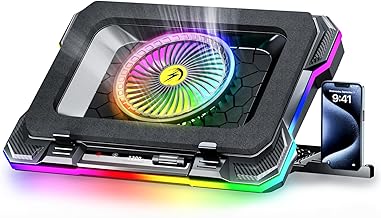
ChillCore RGB Gaming Laptop Cooling Pad with 5.5" Turbo Fan, Rapid Cooling for 15.6-19.3" Laptops, Variable Speed Control, 7 Adjustable Heights – K1 5V RGB
Best For:
High-performance laptop users (15.6"–19.3") who need rapid heat extraction and customizable fan speed.
The ChillCore K1 leans into high-performance cooling with a large 5.5" turbo fan plus variable speed control and a broad compatibility range up to 19.3" laptops. This option suits power users and heavy gamers who need rapid heat extraction and like customizable setup, including multiple tilt heights and RGB accents if you want a gaming desk aesthetic.
What it is and who it’s for: ChillCore’s design targets gamers running high-performance GPUs and CPUs who want aggressive cooling without investing in a separate external desktop cooling system. If you play extended AAA titles, stream while gaming, or run GPU-accelerated workloads on a 15.6"–19.3" chassis, the K1 aims to reduce surface temperatures and stabilize performance.
Practical benefits: A single large turbo fan can move a substantial volume of air at lower RPMs compared with many small fans, often producing stronger cooling while managing noise. Variable speed control gives you the flexibility to dial in the right balance between airflow and acoustic comfort. The wide platform supports larger chassis and the multiple heights improve comfort and airflow paths.
Real-life usage scenarios: Use the ChillCore pad during marathon gaming sessions, while streaming to reduce system throttling, or when performing GPU-heavy tasks like video rendering. The large fan helps quickly lower thermals after long load periods, which is valuable if you switch between heavy and light workloads.
Why it’s valuable: Compared with multi-small-fan designs, a large turbo fan can be more effective at moving air through restrictive chassis vents, especially on thicker gaming laptops. The K1’s adjustable heights and speed control make it flexible enough for both aggressive cooling and quieter everyday use.
Who should buy / who may not need it: Buy if you own a 15.6"–19.3" high-performance laptop and need stronger, rapid airflow. Skip if your laptop rarely leaves light workloads or if you prioritize ultra-compact portability over raw cooling power.
Practical observations & buying considerations: Expect a stronger cooling effect than slim pads; confirm that the fan placement lines up with your laptop’s intake vents. RGB is aesthetic — focus on airflow specs and noise levels for practical value.
Check the latest price on Amazon.
Pros
- Large turbo fan for strong airflow
- Variable speed control and multiple heights
- Supports larger gaming laptops
Cons
- Larger and less travel-friendly
- RGB is cosmetic — prioritize airflow if noise matters
Check the latest price on Amazon.
Laptop Cooling Pad with 3 Quiet Fans, 5-Level Height Adjustable Ergonomic Stand, 2 USB Ports & Phone Holder, Fits 12-17 Inch Laptops, Family-Friendly for Gaming/Work/Online Class,

Best For:
Households and mixed-use buyers who want quiet, ergonomic cooling for 12"–17" laptops.
This family-friendly 3-fan cooling pad focuses on quiet, ergonomic comfort for a broad range of laptops (12"–17"). It blends sensible features — multiple height options, a phone holder, two USB ports and a mesh surface — into an approachable package for shared households and mixed-use scenarios where comfort and noise control are priorities.
What it is and who it’s for: If your household uses a single laptop for work, school and gaming, this model provides a user-friendly compromise. It’s a good fit for parents, students and casual gamers who want improved thermal performance without excessive fan noise or flashy gaming aesthetics.
Practical benefits: Three quiet fans provide steady airflow across the laptop’s underside while keeping noise at tolerable levels for family spaces or open-plan apartments. Five height levels let different users pick comfortable viewing and typing angles, while the phone holder and extra USB port keep desks tidy. The mesh top helps dissipate heat and feels sturdier than thin plastic surfaces.
Real-life usage scenarios: Use it for remote classes where audio clarity matters, family movie nights where laptop temperature shouldn’t interrupt playback, or long workdays where sustained performance is important. The phone holder is handy for multitaskers who keep a messaging app or reference material visible while working.
Why it’s valuable: Compared with gamer-centric models that prioritize raw airflow and RGB lighting, this pad focuses on quiet, all-day usability. It’s a practical choice for shared environments where excessive fan noise or bright lights would be unwelcome.
Who should buy / who may not need it: Buy if you want a quiet, comfortable pad for mixed-use family laptops up to 17". Skip if you demand peak cooling for high-TDP gaming laptops or want a highly portable, ultra-slim design.
Practical observations & buying considerations: Check reported noise levels at different fan speeds; “quiet” is subjective but this model trends toward lower audible output. Ensure the fan placement aligns with your laptop vents to maximize benefit.
Check the latest price on Amazon.
Pros
- Quiet operation suited for shared environments
- Ergonomic height adjustment and phone holder
- Two USB ports for added connectivity
Cons
- Not for extreme thermal loads
- Bulky compared to ultra-slim travel pads
Check the latest price on Amazon.
Final Verdict
If your gaming laptop overheats and throttles during long sessions, a targeted cooling pad can alleviate heat, improve sustained performance, and make extended gameplay more comfortable. For portable everyday use, the Havit HV-F2056 is a reliable, slim choice. If you need stronger distributed airflow with height adjustments, the Kootek five-fan model fits the bill. KeiBn’s compact two-fan pad is ideal for smaller machines and quieter operation. For users chasing aggressive cooling on thicker, high-performance laptops, the ChillCore K1 with its large turbo fan offers the most raw airflow. Finally, the family-friendly 3-fan pad balances quiet operation, ergonomic adjustments and a tidy feature set for shared environments.
Before buying, match fan placement to your laptop’s intake vents, check noise feedback for the models you like, and choose the size that fully supports your chassis. Any of the five options above can lower surface temperatures and reduce thermal throttling when used correctly — pick the one that best balances portability, noise tolerance and cooling needs.
Check the latest price on Amazon.
Conclusion
These Laptop cooling pad for gaming laptops that overheat picks are trending now and offer great value and variety. Check the links above for latest prices and reviews.
As an Amazon Associate, I earn from qualifying purchases.
Tags:
laptop cooling pad, gaming laptop cooler, best cooling pad 2026, portable laptop cooler, quiet laptop fan, ergonomic laptop stand, RGB cooling pad
