Best Compact Mechanical Keyboards for Small Workstations
As an Amazon Associate, I earn from qualifying purchases. This article may contain affiliate links, which means we may receive a commission at no extra cost to you.
A compact mechanical keyboard can transform a crowded desk into a focused workstation without sacrificing typing feel or functionality. Whether you’re squeezing a keyboard into a small office, balancing a laptop on a folding table, or building a streamlined dual-monitor setup, smaller form factors like TKL (tenkeyless), 75%, and low-profile designs reclaim desk space and encourage better mouse positioning. This guide walks through five strong compact mechanical keyboards—ranging from classic tenkeyless builds to ultra-slim wireless options—so you can match features to how you actually work. I haven’t claimed personal hands-on testing here; recommendations are based on product specs, manufacturer features, and patterns seen in user feedback and reviews. Expect practical notes on build, switches, connectivity, comfort, and real-life use cases to help you choose the best fit for a compact workstation.
Buying Guide
Why choose a compact mechanical keyboard for a small workstation? The advantages are simple: they free up desk real estate, let you place your mouse closer to your body for ergonomic alignment, and usually come with the same or better switch options and build quality as full-size models. Key considerations before you buy: form factor (TKL, 75%, 65%, or ultra-slim 84/84-key layouts), switch type (tactile, linear, or clicky), connectivity (wired, wireless Bluetooth, or dual-mode), keycap profile and material, programmability, hot-swap sockets, and build materials. Form factor: TKL (tenkeyless) drops the numeric keypad while keeping a standard key layout—good for users who occasionally need full navigation keys. 75% compacts retain most navigation keys in a tighter layout, offering a compromise of functionality and size. Low-profile designs like the Keychron K3 or slim Logitech MX Mechanical Mini reduce key travel for a laptop-like feel, which many users find faster for prolonged typing. Switch type: tactile switches (like Brown equivalents) are versatile for mixed typing and gaming. Linear switches are favored for gaming because of smooth actuation, while clicky switches are for typists who like audible feedback. Hot-swappable PCBs let you change switches without soldering—excellent if you plan to experiment. Connectivity: wired USB often gives the lowest latency. Bluetooth or multi-device support adds flexibility for laptop users or those who switch between devices. Battery life and recharge method matter if you pick wireless. Build and ergonomics: aluminum top plates give a premium heft and stability; plastic cases can be lighter and cheaper. Consider a keyboard with a detachable cable or built-in USB-C for portability. Noise: mechanical keyboards vary; add dampening foam or O-rings if you’re in a shared workspace. Value vs. alternatives: many standard full-size keyboards are cheaper, but they sacrifice desk space. Membrane wireless keyboards are quieter and lighter but lack durability and the satisfying typing feedback of mechanical switches. For compact workstations, a mechanical compact keyboard is usually the better long-term investment. Finally, check compatibility with your OS—Mac users should confirm keycaps and shortcuts or look for Mac-compatible layouts. With these points in mind, the product breakdown below highlights who each compact mechanical keyboard is best for and realistic scenarios where they shine.
Logitech G413 TKL SE Mechanical Gaming Keyboard – Compact Backlit Keyboard with Tactile Mechanical Switches, Anti-Ghosting, Compatible with Windows, macOS – Black Aluminum

Best For:
Users who want a durable, no-nonsense tenkeyless mechanical keyboard with tactile switches and a premium aluminum top plate for compact desks.
The Logitech G413 TKL SE is a straightforward tenkeyless mechanical keyboard that trims the numeric keypad to prioritize desk space while delivering a solid, no-frills typing and gaming experience. Built around tactile mechanical switches and a brushed aluminum-magnesium alloy top case, this model aims at users who want a durable compact keyboard without flashy extras. The tactile switches provide clear feedback for typing and are forgiving for hybrid use—writers who draft long documents and gamers who need reliable keypress detection will both appreciate the consistent response.
What stands out is the balance between build quality and simplicity. The aluminum top plate adds weight and reduces flex, giving a premium feel more commonly found in full-size keyboards. Anti-ghosting and N-key rollover on the TKL layout ensure simultaneous keypresses register reliably during fast sequences, which helps not only gamers but also professionals using keyboard shortcuts. Backlighting is present but intentionally subdued compared to RGB-focused models: this appeals to those who prefer readable keys in low-light without colorful distractions.
Real-life use cases include small home offices where the keyboard shares desk space with a laptop and external monitor, or compact gaming desks where the mouse needs unrestricted movement. Compared with larger RGB gaming boards, the G413 TKL SE is quieter on the visual front but still competent on performance. It lacks hot-swap sockets, so changing switches requires soldering skill or professional help—something to consider if you plan to mod your keyboard. Similarly, it’s a wired keyboard, which is ideal for low-latency setups but less convenient for multi-device switching.
Who should buy this: users who want a sturdy, no-nonsense mechanical TKL with tactile switches and a premium-feeling top plate for a compact workstation. Who might skip it: people who need wireless convenience, RGB customization, or hot-swappable switch support. Practical buying considerations include ensuring you prefer the tactile switch feel and are okay with a wired-only connection. Overall, the G413 TKL SE is a reliable, well-built compact keyboard that suits focused workspaces where desk real estate and key responsiveness matter. Check the latest price on Amazon.
Pros
- Solid aluminum-magnesium alloy top plate and stable build
- Tactile switches with anti-ghosting and N-key rollover
- Compact TKL form frees up mouse space
Cons
- Wired-only—no Bluetooth or multi-device support
- Not hot-swappable; switches require soldering to replace
Check the latest price on Amazon.
Lenovo Legion K510 Mini Pro Wired Mechanical Gaming Keyboard – 75% Compact Design, RGB Illumination, Hot-Swappable Mechanical Switches, Programable Keys

Best For:
Gamers and productivity users who want a 75% layout with hot-swappable switches and programmable RGB for a compact desk.
The Lenovo Legion K510 Mini Pro positions itself as a compact 75% mechanical keyboard that blends gaming-oriented features with practical workspace savings. The 75% layout preserves most navigation and function keys while shaving off the space normally taken by a full-sized board—ideal for users who want dedicated arrow keys and a tight cluster of function keys without a numeric keypad. One of the standout features is the hot-swappable switch support, which makes it friendly to hobbyists who like to test different switch types without soldering.
RGB illumination and programmable keys also make this keyboard attractive for users who value customization: you can set lighting profiles, remap keys through bundled software, and create game-specific macros. The wired connection prioritizes performance and consistent response, which gamers will appreciate during fast-paced sessions. Build quality is solid for the price category, with a fairly rigid chassis and a slightly textured keycap finish that resists finger oil. Reviews and user impressions point to good out-of-the-box ergonomics, though some users replace keycaps or add dampening foam if they want a quieter or more premium sound profile.
Use cases that suit the K510 Mini Pro include compact gaming setups where RGB and macros matter, and creative workstations where programmable keys speed up repetitive tasks (video editing, spreadsheet shortcuts, or developer workflows). Compared to high-end boutique compact keyboards, the Lenovo model may lack boutique materials or ultra-premium stabilizers, but it offers an excellent feature set for a mainstream compact keyboard: hot-swap capability, solid software customization, and a sensible 75% layout.
Who should buy this: gamers and power users who want a compact 75% layout with hot-swappable switches and RGB customization. Who may not need it: minimalists who want a true 60% layout or users who require wireless connectivity. Buying considerations include whether you value hot-swap flexibility (great for trying different switches), and whether the wired-only mode fits your workstation’s cable setup. Overall, the K510 Mini Pro is a versatile compact keyboard that bridges gaming features and productivity in a desk-friendly size. Check the latest price on Amazon.
Pros
- Hot-swappable switches for easy customization
- 75% layout balances functionality and compactness
- Built-in RGB and programmable keys via software
Cons
- Wired-only connection
- Stabilizers and sound profile may require aftermarket tweaks
Check the latest price on Amazon.
Logitech G PRO Mechanical Gaming Keyboard, Ultra Portable Tenkeyless Design, Detachable Micro USB Cable, 16.8 Million Color LIGHTSYNC RGB Backlit Keys

Best For:
Competitive gamers and professionals who need a portable, durable TKL with detachable cable and LIGHTSYNC RGB for compact setups.
The Logitech G PRO represents a pro-grade tenkeyless keyboard designed for portability without compromising performance. Its detachable cable and compact TKL footprint make it popular with esports players and road warriors who move between setups. The board emphasizes a low-profile, no-fluff design with durable switches, programmable RGB via LIGHTSYNC, and a sturdy construction that stands up to daily travel. Importantly for compact workstations, its tenkeyless layout maintains a familiar key arrangement while freeing up desk space and enabling more ergonomic mouse placement.
The PRO’s switches are tuned for consistent actuation, and the keyboard supports full programmable profiles that can be stored on-board—handy for users who switch PCs or travel to tournaments. LIGHTSYNC RGB can be synced with other devices or set to reactive lighting to assist in low-light typing. Because the cable is detachable, the keyboard fits easily into a carry case, and users frequently report it as an excellent choice for people who alternate between home and office setups or take their rig to LAN events.
Real-world use scenarios include compact home desks that need a dependable wired keyboard, hybrid workers who commute with peripherals, and gamers who need durable, portable hardware. Compared with some TKL alternatives, the G PRO leans toward performance and portability rather than extensive customization like hot-swap sockets or split-key layouts. It’s also wired-oriented—its strength is low-latency wired performance rather than wireless convenience.
Who should buy this: competitive gamers and mobile professionals who need a compact, durable TKL with detachable cabling and RGB customization. Who shouldn’t: users looking for wireless features or hot-swap modding capability. Considerations before buying include whether you need on-board profile storage and a detachable cable for travel; if so, the PRO could be an excellent fit. Check the latest price on Amazon.
Pros
- Detachable cable for easy portability
- On-board profile storage and reliable switch performance
- LIGHTSYNC RGB with broad customization
Cons
- No hot-swap support for switches
- Wired-only; lacks Bluetooth or wireless modes
Check the latest price on Amazon.
Keychron K3 Version 2, 84 Keys Ultra-Slim Wireless Bluetooth/USB Wired Mechanical Keyboard with White LED Backlit, Low-Profile Keychron Mechanical Brown Switch Compatible with Mac Windows

Best For:
Users who want a slim, low-profile mechanical keyboard with Bluetooth multi-device support and a near-full layout for compact desks.
The Keychron K3 Version 2 is a compelling pick for small workstations that need the tactile satisfaction of mechanical keys with the slim profile and wireless flexibility of laptop-style keyboards. With an 84-key layout that keeps many navigation and function keys while remaining narrow, it’s a great middle ground between very compact 60% boards and bulkier TKL options. The K3 uses low-profile mechanical switches—often the Keychron brown equivalents—offering reduced travel and quicker actuation than standard mechanical switches, which many users find comfortable for long typing sessions.
Its dual-mode connectivity (Bluetooth and USB-C wired) is one of the K3’s major strengths: pair up to three devices and switch between a laptop, tablet, and desktop without tethering. White LED backlighting keeps the aesthetics minimalist and maintains battery life. Build materials are a mix of plastic and metal accents, giving a lightweight but sturdy finish that suits portable setups. A practical observation from user reports is that the low-profile switches deliver a quieter, crisper typing sound compared with full-height mechanicals—helpful in shared environments.
Use cases include laptop-first workflows where you dock a Bluetooth keyboard to a laptop and occasionally connect to a desktop, or remote workers who alternate between desk and coffee shop. It’s also excellent for writers and coders who appreciate mechanical feedback but don’t want the height of a traditional mechanical keyboard. Compared to full-height mechanical compact boards, the K3 sacrifices some of the deeper tactile sensation and customization (fewer hot-swap options and less keycap variety) in exchange for portability and reduced noise.
Who should buy this: Mac and Windows users who want a low-profile, wireless-capable mechanical keyboard with a nearly full set of keys in a compact footprint. Who may not need it: heavy modders and enthusiasts who want hot-swap solderless PCBs or full-height switch travel. Buying considerations include battery life expectations, preference for low-profile switches, and whether Bluetooth multi-device pairing is a must for your workflow. Overall, the Keychron K3 v2 is a versatile, travel-friendly keyboard that brings mechanical feel to compact workstations without the bulk. Check the latest price on Amazon.
Pros
- Low-profile mechanical switches with a slim, laptop-like feel
- Bluetooth multi-device pairing plus USB-C wired mode
- 84-key layout retains useful navigation keys in a compact size
Cons
- Less customization (fewer hot-swap options) than some compact boards
- White backlight only—no RGB
Check the latest price on Amazon.
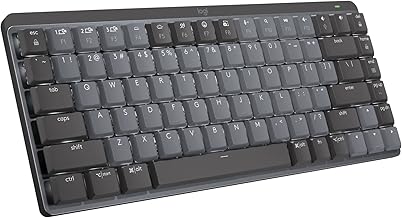
Logitech MX Mechanical Mini Wireless Illuminated Keyboard, Clicky Switches, Backlit, Bluetooth, USB-C, macOS, Windows, Linux, iOS, Android, Metal
Best For:
Professionals and hybrid workers who want a premium compact wireless mechanical keyboard with wide OS compatibility and a metal finish.
The Logitech MX Mechanical Mini is aimed squarely at professionals who want a premium, compact wireless keyboard with a mechanical feel and wide OS compatibility. This mini-compact board reduces footprint while keeping key travel and tactility that many typists prefer. Its metal build surface and attractive finish give it a refined look that pairs well with professional workstations and home offices alike. The keyboard offers Bluetooth connectivity with multi-device switching and USB-C for wired or charging connections—perfect for users who alternate between a work laptop, tablet, and desktop.
A noteworthy detail is the MX Mechanical Mini’s focus on productivity: key legends and key spacing are tuned for accurate typing, and backlighting helps when working in dim environments. The clicky switch option delivers audible feedback for those who enjoy a responsive and clear actuation point, although Logitech also offers quieter switch variants for shared workspaces. Battery life and smart power management are practical advantages for wireless setups; expect longer intervals between charges compared with RGB-heavy gaming boards.
Real-life scenarios include professionals who use multiple devices and rely on quick device switching (presenters, designers using tablets, and hybrid workers), as well as anyone who wants a compact, attractive keyboard for a minimal desk. Compared with gaming-focused compact keyboards, the MX Mechanical Mini prioritizes comfort, quiet operation (on select switch types), and cross-platform compatibility rather than macro-heavy software ecosystems. It also tends to integrate better with productivity toolchains due to Logitech’s device management and pairing features.
Who should buy this: office professionals, hybrid workers, and creatives who want a compact mechanical keyboard with wireless convenience, metal build, and broad OS support. Who should look elsewhere: hardcore gamers seeking ultra-low latency wired-only performance or enthusiasts wanting a hot-swap mod-friendly board. Consider battery life, preferred switch sound profile, and whether you value a premium metal finish when choosing this keyboard. Overall, the MX Mechanical Mini is a refined, compact option that brings mechanical feedback to modern, clutter-free workspaces. Check the latest price on Amazon.
Pros
- Premium metal build and refined aesthetics
- Bluetooth multi-device switching plus USB-C
- Designed for productivity with comfortable key spacing
Cons
- Clicky switches can be loud in shared spaces
- Not targeted at heavy modding or custom switch swapping
Check the latest price on Amazon.
Final Verdict
Compact mechanical keyboards offer a meaningful upgrade for small workstations: they reclaim desk space, improve mouse ergonomics, and deliver better typing feedback than membrane alternatives. If you value portability and low profile, the Keychron K3 v2 provides wireless flexibility and reduced travel for a laptop-like experience. For gamers and tinkerers who want hot-swap capability and RGB, the Lenovo Legion K510 Mini Pro is an excellent 75% compromise between size and features. If you prioritize a no-nonsense, sturdy wired TKL with tactile switches, the Logitech G413 TKL SE is a reliable choice. For portability and competitive play, the Logitech G PRO combines a detachable cable with robust on-board customization. And for professionals who want wireless multi-device support in a premium metal package, the Logitech MX Mechanical Mini is built for productivity and style. Match your choice to the features you can’t live without: hot-swap flexibility, wireless multi-device pairing, low-profile travel, or a heavy-duty metal top plate. Remember to consider cable management, the switch type you prefer, and whether you need on-board programmability. With these picks, you can streamline a compact workstation without compromising typing quality. Check the latest price on Amazon.
Conclusion
These Mechanical keyboard for compact workstation setups picks are trending now and offer great value and variety. Check the links above for latest prices and reviews.
As an Amazon Associate, I earn from qualifying purchases.
Tags:
compact mechanical keyboard, tenkeyless keyboard, 75% keyboard, low-profile mechanical keyboard, wireless mechanical keyboard, small desk setup, mechanical keyboard for productivity
