Best Affordable Smart Doorbells for Apartments
As an Amazon Associate, I earn from qualifying purchases. This article may contain affiliate links, which means we may receive a commission at no extra cost to you.
Finding a smart doorbell that suits apartment living can feel complicated: you want good video, easy installation that won’t void a lease, and reliable alerts without a confusing subscription. This guide focuses on affordable, apartment-friendly options that balance features, privacy, and renter-friendly installs. As an Amazon Associate, I earn from qualifying purchases. This article may contain affiliate links, which means we may receive a commission at no extra cost to you.
In the sections below you’ll find concise, research-based rundowns of five compact and budget-minded doorbells — from full-featured Nest options to simple wireless chimes — plus a practical buying guide that highlights what matters most for renters and small-space living. Recommendations are based on product specs, company support, common user feedback, and practical installation considerations rather than personal hands-on testing.
Buying Guide
Why apartment living changes the rules
Apartments often mean limits on drilling, shared Wi‑Fi, and no doorbell transformer in individual units. That makes battery models, wireless chimes, or doorbells that work with existing wiring (with a chime adapter) particularly attractive. Also consider building rules — some landlords allow battery mounts or adhesive brackets but forbid hardwiring or extensive drilling.
Key features to prioritize
– Power type: Battery models are easiest for renters. Wired/PoE models offer continuous power and fewer battery worries but may need landlord sign-off or professional installation.
– Video quality and field of view: Higher resolution (1080p or 2K) and a tall field of view (“head-to-toe” or wide-angle) help identify packages on a stoop and recognize faces at different distances.
– Motion detection and AI: Good motion filtering reduces false alerts caused by passing pedestrians, shadows, or traffic — important in multi-unit buildings where hallways and exterior walkways are shared.
– Two-way audio and live view: Helpful to deter porch thieves or give instructions to couriers. Low-latency two-way talk is more useful than a glossy app feature that frequently lags.
– Smart home compatibility: If you already use Google Home, Alexa, or HomeKit, pick a doorbell that fits your ecosystem. HomeKit Secure Video, for example, adds local-first privacy and iCloud-based recording for Apple users.
– Storage and subscriptions: Many companies offer cloud recording with a monthly fee; check whether local storage (microSD or local NVR) or basic free clips are available.
– Network requirements: 2.4 GHz Wi‑Fi is still common for many devices; some new models support 5 GHz or Wi‑Fi 6 for better performance but require compatible routers.
– Weatherproofing: Check IP ratings (e.g., IP65) if your building’s entry is exposed to rain or wind.
Installation and renter-friendly tips
– Non-permanent mounts: Use adhesive plates, wedge adapters, or no-drill brackets to avoid holes. Check product compatibility before buying.
– Power workaround: Battery doorbells or models that include a chime adapter are often the simplest path. For PoE or hardwired units, ask your landlord or building management for approval and consider hiring a pro.
– Shared entry considerations: If multiple units share a corridor, confirm how motion zones and sensitivity settings work so you don’t get constant alerts.
Balancing cost and usefulness
Affordable models can handle the basics — motion alerts, 1080p video, and two-way audio — but pricier options often add better detection algorithms, higher resolution, or broader smart-home support. For apartments, prioritize installation type, privacy, and robust motion filtering over ultra-high resolution. The five options below reflect that balance: some are focused on budget simplicity, others on smart-home integration and higher video quality.
Google Nest Doorbell (Wired, 3rd Gen) – 2K Video and Gemini, Live View, Night Vision, 2-Way Audio – Works with Google Home – 2025 Model – Snow

Best For:
Owners or renters who can permit a wired installation and want high-resolution video plus deep Google Home integration.
The Google Nest Doorbell (Wired, 3rd Gen) brings a polished mix of high-resolution video and smart features in a compact package suited for apartment owners who can accommodate a wired install or have permission for a permanent mount. With 2K video quality and Google’s newer Gemini-powered processing for better person and package alerts, this model aims to reduce false alarms while delivering crisp live view and recorded clips. Night vision and a broad vertical field-of-view help ensure you catch faces and packages at varying door heights, which is especially useful in multi-level entryways common to apartment buildings.
What sets this wired Nest apart is its tight integration with Google Home. If you already use Nest cameras or Google smart displays, notifications, live view, and automations (like turning on lights when motion is detected) work smoothly. The two-way audio is clear enough to talk to delivery people and visitors without shouting into the hallway. Keep in mind that a wired unit assumes access to a doorbell transformer — common in houses but less so in individual apartment units — so installation may require landlord approval or professional help.
Practical use cases include: confirming identity before buzzing a visitor into a shared lobby, watching for package drop-offs on an exposed stoop, and integrating alerts with other Google devices in your flat. Compared with battery models, the wired Nest avoids battery drains and frequent recharging, but it’s less renter-friendly unless your lease or landlord permits a hardwired connection.
Who should consider this: renters with permission to hardwire or owners in small multi-family buildings who want high-quality video and seamless Google Home integration. Who may skip it: renters who need a no-drill, battery-powered solution.
Buying considerations: confirm transformer compatibility, check if a chime connector is required for your internal chime, and remember that full-featured cloud recording may involve a Google subscription for extended history and richer event detection.
Check the latest price on Amazon.
Pros
- 2K video for clearer identification
- Gemini-enhanced event detection reduces false alerts
- Strong Google Home ecosystem integration
- Good night vision and wide field of view
Cons
- Requires wired power — not ideal for no-drill renters
- Advanced features may need a Google subscription
View full product details and buy on Amazon using the link above. Check the latest price on Amazon.
Google Nest Doorbell (Battery) – Linen

Best For:
Renters and apartment residents who need a no-wiring, easy-install option while staying in the Google ecosystem.
The Google Nest Doorbell (Battery) prioritizes ease of installation and renter-friendly flexibility without completely sacrificing smart features. This battery-powered model removes the need for a doorbell transformer, which makes it a top pick for apartment dwellers who aren’t allowed to hardwire or who want a simple, no-fuss setup. Despite its battery operation, it still offers solid video, reliable person detection, two-way audio, and integration with Google Home for announcements and automations.
Battery models trade continuous power for convenience: expect periodic recharging depending on motion activity and recording frequency. For many apartment scenarios — intermittent motion in a corridor or a building lobby — the battery life holds up well. If your building has frequent motion outside your door, you’ll want to tune motion sensitivity and activity zones to stretch battery life.
This Nest Battery doorbell works well for everyday apartment use: screening visitors, asking a courier to leave a package in a designated spot, or checking live view from your phone when you’re away. It’s particularly convenient for renters who use multiple Google devices; announcements and routines (for example, turning on indoor lights when the doorbell detects a person) are straightforward to set up.
Compared with the wired Nest, you trade the never‑ending power of a hardwired unit for install freedom. Compared with very cheap third-party battery doorbells, the Nest offers better AI-based detection and smoother smart-home linking, though that comes with a typically higher price and potential need for a subscription for extended event history.
Who should buy: renters who value a no-drill install and Google Home compatibility.
Who may not need it: people who prefer HomeKit-first products or who want a permanently powered unit without recharging.
Check the latest price on Amazon.
Pros
- Battery-powered for easy, no-drill installation
- Good person detection and Google Home compatibility
- Clear two-way audio for visitor interaction
Cons
- Battery recharges needed depending on activity
- Some features may be gated behind a subscription
Tap the Amazon link to see more details and purchase. Check the latest price on Amazon.
SECRUI Doorbell, Wireless Doorbell with 2 Receivers Easy installation, Adjustable Volume, 58 Chimes, Colorful LED, 1000Ft Range, M520+F55, Black

Best For:
Residents who want a simple, no-frills chime extender for multi-room coverage without video or apps.
Not every apartment needs a camera-equipped doorbell. For those who simply want a reliable chime extension, the SECRUI wireless doorbell kit is a straightforward, budget-friendly solution. It includes two plug-in receivers and a battery-powered push button so you can hear visitors from multiple rooms without running wires through walls. With 58 chime tones, adjustable volume, and colorful LED indicators, it’s lightweight on features but heavy on practicality.
Consider this if your building has a working mechanical or wired doorbell at the entry but the tone is too quiet inside your unit or you want a backup chime in a different room. Installation is typically no-drill: plug the receivers into outlets and mount the button with the included screw or adhesive pad. The advertised 1000ft range should be taken as a best-case scenario; building walls and interference will reduce that in practice, but it still performs well in most apartment layouts.
Real-life uses include: ensuring you hear the doorbell while working in a home office, enabling an elderly household member to be alerted in another room, or adding a non-camera chime for privacy-conscious tenants who prefer not to record video. Compared with video doorbells, this SECRUI option doesn’t offer video, app alerts, or two-way talk — but that simplicity is its strength: no accounts, subscriptions, or Wi‑Fi setup.
Who should buy: apartment residents who need a louder, multi-room chime without cameras or smart-home integrations.
Who may not need it: anyone looking for video monitoring or remote alerts.
Check the latest price on Amazon.
Pros
- Very easy installation — plug-and-play receivers
- No account, app, or subscription required
- Multiple chime tones and volume control
Cons
- No video or smart features
- Real-world range can be lower than the advertised maximum
Follow the Amazon link above to view product specs and purchase. Check the latest price on Amazon.
Aqara Doorbell Camera G400 with Chime, Wired/PoE, HomeKit Secure Video, 2K HD Head-to-toe View, 2-Way Audio, 2.4/5GHz Wi-Fi 6, Supports Alexa/Google/SmartThings, Local Detection & 24/7 Recording, IP65

Best For:
HomeKit users and renters/owners who prioritize privacy, local recording, and advanced network options like PoE and Wi‑Fi 6.
The Aqara Doorbell Camera G400 aims squarely at tech-savvy apartment residents who want strong privacy controls (including HomeKit Secure Video support) and flexible power options. It supports wired installs and PoE for continuous power, but also integrates with Apple’s HomeKit, Google Assistant, Alexa, and SmartThings, which is rare for a single device. The 2K head-to-toe view and support for both 2.4 and 5 GHz Wi‑Fi (including Wi‑Fi 6) make it future-ready for faster networks and denser apartment Wi‑Fi environments.
A big draw for Apple users is HomeKit Secure Video compatibility, which enables encrypted local-first recording to iCloud and avoids some cloud provider privacy concerns. That makes the G400 a great fit if privacy and local detection are high on your checklist. For renters, PoE or wired options mean professional installation may be required — but if your unit or building supports a networked camera setup, the G400’s 24/7 recording and local detection reduce reliance on subscription cloud plans.
Use cases include multi-tenant hallways where you want reliable person detection, small stoops where package detection matters, or smart-home setups that trigger indoor automations when someone approaches the door. Compared to simpler battery models, the Aqara delivers superior detection and more ecosystem flexibility; compared with cheaper Wi‑Fi-only doorbells, it adds enterprise-style features like PoE and native HomeKit support.
Who should buy: Apple HomeKit users and tech-forward residents who want strong privacy, local recording options, and advanced network compatibility.
Who may not need it: those who need a strictly no-drill, battery-powered doorbell.
Check the latest price on Amazon.
Pros
- HomeKit Secure Video and local recording options
- 2K head-to-toe view with robust detection
- Supports PoE/wired and 2.4/5GHz Wi‑Fi (Wi‑Fi 6 compatible)
- IP65 weather rating for outdoor durability
Cons
- PoE or wired installs may require professional setup
- More advanced features add complexity for casual users
Click the Amazon link to view compatibility and purchase options. Check the latest price on Amazon.
Orbitell 1080p Wireless Wi-Fi Video Doorbell Camera with Two Way Audio, Night Vision, Cloud Storage, Smart AI Motion Detection, Support 2.4GHz Wi-Fi only
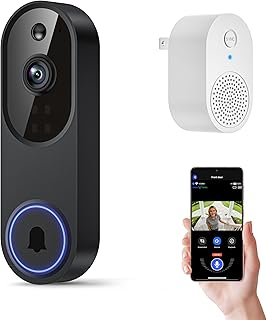
Best For:
Apartment residents seeking a simple wireless video doorbell with AI motion detection and 1080p video without advanced ecosystem ties.
The Orbitell 1080p Wireless Video Doorbell is an attractive mid-range option for apartment users who want straightforward video monitoring, two-way audio, and AI motion detection without a steep learning curve. Its 1080p video resolution is sufficient for recognizing faces and delivery details, and night vision ensures visibility in low-light corridor or porch situations. As a 2.4 GHz-only device, it’s compatible with most apartment routers but doesn’t take advantage of faster 5 GHz networks.
Orbitell’s AI motion detection aims to filter out non-relevant movement, which is particularly helpful in an apartment setting where shared walkways can trigger frequent alerts. The doorbell offers cloud recording and an app for live view and clip review; check whether long-term storage requires a subscription and whether there are free short clips available for basic coverage.
Typical uses include screening deliveries at your doorstep, checking on a package left in a building vestibule, and communicating with visitors when you’re in another room. Its wireless install makes it more renter-friendly than PoE or hardwired alternatives, though you’ll need to recharge or swap batteries if it’s battery powered (confirm the exact model’s power type prior to buying).
Compared to the Nest Battery model, Orbitell offers similar core functions at a competitive price point but typically lacks the deep Google or HomeKit integrations that some users prefer. Compared to a non-camera chime, it adds remote viewing and cloud alerts — trade-offs to consider if privacy or subscription fees are top concerns.
Who should buy: renters who want an easy-install video doorbell with reliable 1080p video and AI motion filtering.
Who may not need it: those who require HomeKit or Google-specific integrations or need 2K resolution.
Check the latest price on Amazon.
Pros
- 1080p video and night vision for clear monitoring
- AI motion detection to reduce false alerts
- Wireless install suitable for many renters
Cons
- Supports only 2.4GHz Wi‑Fi
- Cloud storage features may require a subscription
Open the Amazon product page to compare specs and buy. Check the latest price on Amazon.
Final Verdict
Choosing the right smart doorbell for an apartment comes down to power, permissions, and the features you actually use. If you want deep Google integration and higher resolution and can accommodate a wired install, the Nest Wired model is a strong, future-ready pick. For renters who prioritize easy installation and no-drill flexibility, the Nest Battery and Orbitell options offer practical video, reliable detection, and two-way audio without the need to alter wiring. If you want the simplest, purely audio-focused solution with zero subscriptions or cameras, the SECRUI wireless chime is a budget winner. And for privacy-minded, HomeKit users or those wanting local recording and PoE flexibility, the Aqara G400 stands out.
Before buying: double-check your building’s rules, the unit’s power requirements, and whether a subscription is necessary for the level of recording you want. Consider how often you’ll need live view vs. recorded clips, and whether two-way audio and good motion filtering are priorities. If you’re unsure, a battery model or plug-in chime is the least invasive way to try a doorbell upgrade in an apartment.
All five products here address different apartment needs — from no-drill simplicity to advanced local recording. Use the product sections above to match features to your situation, and follow the Amazon links to read full specs and current user reviews.
Check the latest price on Amazon.
Conclusion
These Affordable Smart Doorbells for Apartments picks are trending now and offer great value and variety. Check the links above for latest prices and reviews.
As an Amazon Associate, I earn from qualifying purchases.
Tags:
smart doorbell, apartment doorbell, video doorbell, wireless doorbell, renter-friendly doorbell, HomeKit doorbell, budget smart home
