Apartment Productivity: Gadgets Creators Use
As an Amazon Associate, I earn from qualifying purchases. This article may contain affiliate links, which means we may receive a commission at no extra cost to you.
Resetting your apartment workspace doesn’t require a full renovation. For many creators, podcasters, designers and remote workers, small, carefully chosen gadgets make the biggest difference. The wrong setup leads to distractions, missed deadlines, and friction that eats creative momentum. This guide collects five compact, practical tools that creators actually turn to when they want to re-establish a productive routine in a small space. Each pick focuses on easy setup, clear value, and real-life usefulness — not gimmicks.
Before we dive into individual products, a quick note on approach: these recommendations come from research into what remote professionals and content creators naturally gravitate toward — tools that reduce friction, keep tasks visible, and help time feel manageable. No single gadget will solve every problem, but together they create a lightweight system for staying focused in a shared or limited living space.
Buying Guide
What to prioritize when you’re resetting an apartment workspace
Space and footprint: Apartment desks are often compact, so pick gadgets that either mount, lean, or stack without taking up prime surface area. Vertical or wall-mounted solutions (a 55" board that doubles as a mounted hub, or monitor clip-on memo pads) are especially useful.
Distraction control: Creators need tools that nudge focus without demanding constant attention. Visual timers (Pomodoro timers with vibration or mute modes) and undated daily planners that live on the desk remove the need to open apps or check a phone.
Integration and compatibility: If a product claims to be smart (wireless chargers, 4K touch displays, dual OS interactive boards), check the inputs, mounting requirements, power and Wi‑Fi/hardware compatibility. For example, a “board only” interactive display will need a compatible PC or media source and a secure wall mount.
Durability and finish: Look for materials and finishes that withstand repeated use—dry-erase glass, smooth touchscreens, and sticky pads that don’t leave residue. For adhesives and clip-on accessories, read notes about fit with common monitor bezels.
Noise and etiquette: In shared apartments, noise matters. Timers that offer mute, vibration, or low-volume chimes avoid disrupting roommates. Likewise, boards and planners that minimize crumpled paper keep a tidy shared living area.
Budget and value: You don’t always need top-of-the-line gear. Often entry-to-mid-level gadgets that address one friction point (timekeeping, task visibility, or cable-free charging) give outsized returns in daily productivity.
Who this guide is for: creators living in apartments or small homes who want compact, practical upgrades to reset focus and workflow. If you work in a larger home office with room for bulky equipment, some picks (like a compact memo board set) may be redundant.
55" Smart Board, 8 + 256 GB Digital Interactive Whiteboard Display Built-in Windows10 & Android 11 Dual System with 4K Touchscreen, Electronic Smartboard for Classroom Office Home (Board Only)

Best For:
Visual creators, remote teams, educators, and video editors who want a consolidated, large-format hub for brainstorming, presenting, and previewing 4K content.
A 55-inch interactive 4K touchscreen can feel extravagant in a compact apartment — until you use it as a single surface for brainstorming, video calls, and content review. This 55" Smart Board combines a high-resolution 4K touchscreen with a dual operating system (Windows 10 and Android 11) and a substantial internal storage configuration (8 GB RAM + 256 GB ROM), making it a flexible hub for creators who want to centralize workflow without a tangle of laptops and dongles. Note that this listing is the board only, so you’ll want to plan for wall mounting, cables, and any peripheral PC or media sources you intend to connect.
Main benefits: The biggest advantage is reducing context-switching. Instead of toggling between devices, you can run a native app on Android, connect a Windows machine for specialized software, and annotate or present on a single surface. The 4K touchscreen is responsive for sketching, visual planning, and quick edits during collaborative sessions. Generous on-board storage means you can keep reference files, project assets, and meeting notes locally without relying on external drives.
Real-life usage: Imagine a weekend reset where you clear the coffee table, mount the board to a living-room wall, and use it as a project canvas. Storyboards for a short film or a layered social media campaign are much easier when you can drag elements, annotate ideas, and save snapshots. During client calls, use the touchscreen as a virtual whiteboard to sketch timelines or iterate live on feedback. For video creators, the 4K display doubles as a high-quality monitor for editing or previewing footage.
Why it’s valuable: Compared with a standard monitor or a low-end smart display, this board is a multi‑purpose hub. It replaces separate devices (large monitor + dedicated whiteboard + streaming display) and keeps your apartment tidy by consolidating functionality. The dual-system approach is especially handy if you alternate between lightweight Android tools and full Windows apps like Adobe Premiere or Illustrator via an attached mini-PC.
Considerations before buying: This is a sizable device; wall space, mounting kit, and cable management are essential. The listing specifies "board only," so you may need a VESA-compatible mount and possibly an external PC for heavy-duty apps. Sound output and webcam needs should be evaluated if you plan on using the board for frequent video calls. Also consider roommate impact — a bright 55" screen in a living area may require scheduled usage.
Who should buy this: Creators who need a visual, collaborative hub and have the wall space and budget to support a 55" installation. It’s ideal for teams doing frequent visual brainstorming, video editors who want a large preview surface, and educators or workshop hosts running sessions from home.
Who may not need it: If you work exclusively on a laptop, have limited wall space, or need a plug-and-play portable solution, a smaller monitor or tablet might be a better fit.
Check the latest price on Amazon.
Pros
- Large 4K touchscreen for detailed visual work
- Dual OS (Windows 10 + Android 11) for flexible workflows
- 8GB RAM + 256GB storage keeps files local and responsive
Cons
- Board only — requires mount and potential PC peripherals
- Large footprint may not suit very small apartments
Explore the 55" Smart Board and see if it fits your workspace. Check the latest price on Amazon.
Printers Jack, Productivity Cube Timer, Visual Pomodoro Timer, Mute & Vibration & Adjustable Sound Alert, for Office, ADHD, Study, Work, 3/5/10/25/30/60min & Custom Countdown – Orange

Best For:
Writers, editors, podcasters, and creators who use Pomodoro-style sprints, plus neurodiverse people who benefit from tactile and visual focus cues.
Small, tactile timers are a surprisingly powerful reset tool. The Printers Jack Productivity Cube Timer is a compact visual Pomodoro-style device built for apartment life: it offers multiple preset durations (3/5/10/25/30/60 minutes) plus a custom countdown, and it supports mute, vibration, and adjustable sound alerts. The cube form factor makes it easy to glance at from across a room or clip into a dedicated focus station, and its visual feedback helps you avoid reaching for your phone when you want to stay in flow.
Main benefits: This timer tackles two common problems that derail apartment productivity — phone distractions and fuzzy time boundaries. Rather than relying on an app, the cube sits on your desk as an external commitment device: you start a session, work without interruptions, and get a clear sensory cue when it’s time for a break. Vibration and mute modes are ideal for shared living spaces or late-night work sessions where you don’t want loud beeps.
Real-life usage: Creators often mix deep creative sprints with administrative tasks. Use the 25-minute setting for writing or editing, switch to 10 minutes for email triage, or set a 3- or 5-minute timer for quick physical resets — a stretch, a short walk around the apartment, or a water refill. The custom countdown is handy when you need non-standard session lengths for rehearsals or timed shots during a shoot.
Why it’s valuable: Compared with phone timers or generic alarms, a dedicated physical timer is less tempting to abuse. It’s harder to start doomscrolling when the device is an object with one purpose. For neurodiverse creators or anyone with ADHD, the combination of visual cues and tactile feedback can materially increase the odds of starting and completing tasks.
Considerations before buying: Check the build size and visibility from your usual working position; very small timers can be easy to overlook. Battery life and charging method are practical points to confirm. Also, consider color options — the orange model stands out visually, which can be helpful or distracting depending on your aesthetic.
Who should buy this: Creators who benefit from structured time blocks, people who want to reduce phone usage while working, and those living with roommates who need silent or vibration alerts.
Who may not need it: If you already have a robust app-based workflow or prefer fully automated digital timers integrated into your task manager, a physical cube may be redundant.
Check the latest price on Amazon.
Pros
- Multiple preset and custom timers
- Mute, vibration, and adjustable sound options
- Simple, glanceable cube form factor
Cons
- May be redundant if you rely exclusively on digital apps
- Visibility and battery life depend on model specifics
Add a tangible focus tool to your desk—check this Productivity Cube Timer on Amazon. Check the latest price on Amazon.
Taja To Do List Notepad – To Do List Notebook for Work with 52 Sheets, 9.8" x 6.5", Undated Daily Planner Perfect for Daily Tasks and Goal Setting, Notepad Suitable for Office, Home & School – Greenery Sway

Best For:
Solo creators, freelancers, and students who want a simple, compact daily planner to pair with time-blocking techniques.
A paper notepad still plays an outsized role in many creators’ workflows, especially during a productivity reset. The Taja To Do List Notepad offers 52 undated sheets sized at 9.8" x 6.5", an approachable format for daily tasks and goal-setting that sits neatly beside a laptop or under a monitor. The undated layout lets you pace creative sprints without feeling locked into a calendar — ideal for fluctuating schedules common to freelance and content work.
Main benefits: The tactile act of writing helps prioritize and cements intentions for the day. Because each sheet is a fresh start, you can experiment with different structures (three main tasks, a time block column, a notes area) without being confined to a rigid planner. The compact dimensions mean it fits in a small desk drawer or can be carried to a coffee shop for an offsite reset.
Real-life usage: Use a daily sheet during a morning reset to list the three most important tasks, set a short Pomodoro cycle with the cube timer beside it, and cross items off as you complete them. For creators juggling content, admin, and outreach, having a physical list reduces the temptation to open endless tabs. Over weeks, you can flip through past pages for a quick review of progress and recurring bottlenecks.
Why it’s valuable: Compared with sprawling digital to-do apps, a single-sheet approach reduces choice overload and keeps attention on execution. It’s inexpensive, portable, and low-tech — which is precisely why it often outperforms more complex systems during a reset. The Greenery Sway design is unobtrusive, blending into a clean apartment aesthetic.
Considerations before buying: Paper quality, adhesive (if it’s a tear-off pad), and layout should match your working preferences. If you prefer time-blocked planning or integrated calendars, you may need to pair the notepad with a digital calendar for date-specific commitments.
Who should buy this: Freelancers, social creators, and anyone who benefits from a short, tactile daily planning ritual. It’s especially helpful if you combine the notepad with a visual timer and a clean desk surface.
Who may not need it: People who rely entirely on shared digital calendars for team coordination or those who prefer journaling systems with more structure.
Check the latest price on Amazon.
Pros
- Undated, flexible daily layout
- Compact 9.8" x 6.5" size fits small desks
- 52 sheets — enough for weeks of daily resets
Cons
- Not suitable as a replacement for a shared digital calendar
- Paper layout may not fit time-blocking purists
Pick up the Taja To Do List Notepad to simplify daily planning. Check the latest price on Amazon.
Joyberg 3PCS Monitor Memo Board, Memo Board for Computer Monitor, Monitor Memo Board Computer Monitor Sticky Note Holder, Office Desk Accessories

Best For:
Streamers, video creators, and remote workers who need quick, visible reminders attached directly to their monitor.
Sticky notes are great until they multiply and fall off your monitor. The Joyberg 3PCS Monitor Memo Board set offers a tidy alternative — thin memo boards that attach to the edge of your monitor to hold sticky notes, small to-do cards, and quick reminders. For creators who need visible prompts without cluttering their workspace, this set is a low-cost, low-friction way to keep important items in your line of sight.
Main benefits: These memo boards extend your monitor’s usable area, giving you a small, designated zone for short-term priorities. Compared with loose sticky notes or a crowded desk surface, the clip-on memo boards keep reminders organized and less likely to be lost. Having three pieces means you can dedicate different boards to categories: urgent tasks, ideas to revisit, and short reminders like camera angles or recurring show notes.
Real-life usage: During a content shoot in a cramped apartment, clip one board with a short checklist (battery, SD card, lighting), another with shot timings, and a third with quick script prompts. For live streaming or recording, glance cues on the memo boards help reduce takes and keep energy consistent. When editing, use one board to list final export checks and another for timestamps of edits to make.
Why it’s valuable: Compared to full monitor-mounted whiteboards or sticky note overload, this product is subtle and space-saving. It’s especially useful for creators who rely on visual micro-reminders and want to maintain a clean desk aesthetic. The boards are inexpensive and can be moved as your setup evolves.
Considerations before buying: Check compatibility with your monitor bezel thickness — very thin or curved bezels may not secure the clip as well. Adhesion strength and finish (rigid vs. slightly flexible) determine how well notes stay in place when you adjust your screen. Also consider whether you prefer reusable dry-erase surfaces instead of sticky notes.
Who should buy this: Video creators, streamers, and remote workers who need short, visible reminders without losing desk real estate. Great for anyone who uses sticky notes and wants a neater solution.
Who may not need it: People with ultra-thin or non-standard monitors, or those who prefer digital task overlays and notification systems.
Check the latest price on Amazon.
Pros
- Creates a tidy, visible zone for short-term notes
- Three-piece set allows categorical organization
- Low-cost and easy to reposition
Cons
- May not fit very thin or curved monitor bezels
- Not a replacement for larger whiteboards or planners
Keep your sticky notes organized—see the Joyberg Monitor Memo Board on Amazon. Check the latest price on Amazon.
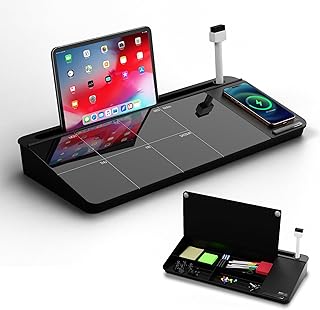
NEXTLUXE Glass Desk Whiteboard with Wireless Charger – Desktop Whiteboard with Storage, Weekly Planner, Dry Erase Pad, Organizer Drawer for Home, School, Office Gadgets – Black (Black)
Best For:
Creators and remote workers seeking a compact desktop organizer that combines a dry-erase planner and wireless phone charging.
A hybrid desktop organizer that doubles as a workspace ritual, the NEXTLUXE Glass Desk Whiteboard brings dry-erase planning, a built-in wireless charger, and small-item storage into one compact unit. For creators doing a productivity reset in a small apartment, it offers a central place for daily planning and charging a phone without adding cable clutter.
Main benefits: The tempered glass writing surface feels high-end and is easier to clean than many plastic pads; its weekly planner grid encourages a habit of visualizing the week at a glance. The integrated wireless charger reduces cable spaghetti — simply lay down Qi-compatible phones during a focus session and keep notifications at bay while the device charges. Small drawers and compartments handle pens, markers, SD cards, and other shoot-day essentials.
Real-life usage: Place the NEXTLUXE unit on a small desk between a laptop and a microphone stand. In the morning, sketch a quick daily plan, place your phone on the wireless charger, then start a timed session. During recording or editing, use the dry-erase surface to jot quick timestamps, topic points, or reminders for retakes. The organizer drawer keeps batteries and adapters within reach, which speeds up setup and reduces interruptions when a shoot is live.
Why it’s valuable: Compared with a standard desk pad or separate wireless charger, this product consolidates daily planning and charging into a single footprint — valuable in apartments where surface space is the limiting factor. The glass surface resists ghosting and looks more refined than typical melamine pads, which matters if you’re on camera or hosting regular video calls.
Considerations before buying: Confirm your phone supports Qi wireless charging and that the charger’s output matches your device’s fast-charging needs. The unit’s dimensions should fit your desk without blocking monitor placement. Also evaluate the storage layout — if you carry many accessories, you may still need an additional case.
Who should buy this: Creators and remote workers who want a neat, multifaceted desktop organizer that blends planning and charging. Particularly useful for anyone working in a visible living area who wants a clean on‑camera backdrop.
Who may not need it: People who prefer minimal desktops with separate specialty chargers or those whose phones don’t support wireless charging.
Check the latest price on Amazon.
Pros
- Tempered glass dry-erase surface with weekly planner
- Built-in Qi wireless charger reduces cable clutter
- Integrated storage drawer for small accessories
Cons
- Requires Qi-compatible phone for wireless charging
- Desk footprint may still be too large for very tiny work surfaces
Tidy your desk with the NEXTLUXE Glass Desk Whiteboard—check it out on Amazon. Check the latest price on Amazon.
Final Verdict
Putting a few thoughtful gadgets into your apartment setup can turn a cluttered corner into a productive studio. The five items here cover visual planning (55" Smart Board), focused timekeeping (productivity cube timer), daily task capture (Taja notepad), in-line reminders (monitor memo boards), and an all-in-one desktop organizer and charger (NEXTLUXE glass whiteboard). Taken together they address the core friction points creators face: scattered notes, distracted devices, and unclear time boundaries.
Choose the 55" Smart Board if you need a central visual hub and have wall space and the willingness to add mounting and peripherals. Pick the cube timer and to-do notepad if you want low-cost, high-impact behavior changes that reduce phone use and increase completed tasks. The monitor memo boards are the cheapest, lowest-commitment upgrade if you simply want to keep key reminders in view. The NEXTLUXE glass desk whiteboard is the most elegant combination — a tactile planning surface with a wireless charger to keep phones out of your hand.
If you’re on a tight budget, start with the timer and notepad — they produce immediate gains. If you frequently hold video sessions, want to centralize creative assets, or run mini-workshops from home, the Smart Board might justify the installation effort. For most creators in apartments, a mix of the cube timer, the Taja notepad, and the NEXTLUXE organizer will deliver the best balance of cost, space efficiency, and daily impact.
As an Amazon Associate, I earn from qualifying purchases. This article may contain affiliate links, which means we may receive a commission at no extra cost to you.
Check the latest price on Amazon.
Conclusion
These Office gadgets creators use during apartment productivity resets picks are trending now and offer great value and variety. Check the links above for latest prices and reviews.
As an Amazon Associate, I earn from qualifying purchases.
Tags:
apartment productivity gadgets, creator workspace tools, pomodoro timer, desk whiteboard, monitor memo board, wireless charging organizer, daily planner notepad
