Apartment Productivity Gadgets Creators Use
As an Amazon Associate, I earn from qualifying purchases. This article may contain affiliate links, which means we may receive a commission at no extra cost to you.
Resetting your apartment workspace for a week of focused creative output often comes down to a few small, high-impact gadgets. Whether you’re a writer, podcaster, illustrator, or content creator juggling noise, limited surface area, and short attention spans, the right tools can make a tiny space feel like a studio. This guide highlights compact, apartment-friendly office gadgets creators rely on to structure time, tame clutter, and keep ideas visible without taking over your living room.
Buying Guide
When choosing productivity gadgets for apartment resets, prioritize size, noise control, and multi-function features. Timers should offer silent or vibration modes if you share walls. Desk organizers and whiteboards are best when they double as storage (drawers or wireless chargers are a plus). Look for easy-to-clean surfaces, low-profile designs that don’t block natural light, and accessories that work both seated and standing. If you’re mobility-limited or have ADHD, choose tactile and visual cues—rotating timers, sticky monitor notes, and clear glass whiteboards help translate intentions into action. Finally, compare physical timers with app alternatives: hardware wins for fewer distractions and better physical cues, while apps are more flexible but invite phone-based interruptions.
Rotating Pomodoro Timer 5, 25, 10 50 Minutes Preset, Desk Productivity Flip Timer, ADHD Tool Cube Countdown Stopwatch, Vibration/High/Low Volume/Custom Modes, for Work, Study, Back to School, Kitchen

Best For:
Writers, students, creators with ADHD, and anyone needing physical, low-distraction timers in shared living spaces.
This rotating Pomodoro timer is built for creators who need tactile, distraction-free time blocks without pulling out a phone. The cube design offers four quick presets (5, 25, 10, 50 minutes) you set by rotating the face; it’s intentionally simple so you can start a focused session in one motion. For apartment living, the vibration, high/low volume, and mute options make it a considerate neighbor-friendly choice—use vibration during late-night edits and audible alerts during daytime sessions. The custom mode opens up flexibility for nonstandard routines like 15/40 or repeating micro-breaks. Compared with smartphone apps, this hardware timer reduces the temptation to check notifications and gives a concrete start/stop cue that many creators report helps with momentum.
Practical scenario: a short 25-minute writing sprint followed by a 5-minute stretch—flip to 25, work, flip to 5 for a break. Another use is baking quick meals between editing sessions; the visible cube on your counter is a better reminder than a buried app. Who should buy: creators with limited space, anyone who needs strong physical cues, or roommates who require quiet modes. Who may skip it: heavy app users who prefer integrated timers with calendars. Consider battery life, footprint on your desk, and whether you want tactile rotation versus touchscreen settings. Grab this cube if you want a low-friction, apartment-aware timing tool. Check it on Amazon.
Pros
- Tactile rotating presets for quick use
- Vibration and mute modes for apartment-friendly alerts
- Custom mode for flexible timing
Cons
- Requires batteries or charging (check specs)
- May be redundant for those who prefer app-based timers
See it on Amazon
TSJ OFFICE Small Desktop Whiteboard -Glass Dry Erase Board Computer Keyboard Stand White Board Surface Pad with Drawer, Desk Organizers with Accessories for Office, Home, School Supplies – White

Best For:
Renter-friendly creators, livestreamers, and anyone who wants a compact whiteboard that doubles as storage and a keyboard stand.
A multipurpose glass dry erase board that doubles as a keyboard stand and small organizer is a smart choice for creators reclaiming flat surfaces in an apartment. This TSJ OFFICE unit functions as a low-profile desktop whiteboard with a sliding drawer to tuck pens, cables, and sticky notes away—so your tabletop looks tidy in between sessions. The tempered glass surface wipes clean and feels premium compared with cheaper melamine boards that ghost over time. Use it under your monitor as a weekly planner, or flip it up to prop a laptop and keep your wrists elevated. Compared with wall-mounted whiteboards, this model is portable and renter-friendly: no drilling required and it won’t disturb paint.
Real-life use cases include laying out storyboard beats for a short video across the whiteboard, jotting daily episode topics and crossing them off as you go, or using the drawer to store external hard drives and charging cables when you need to free up space for props. Creators who livestream will like the ability to hide clutter quickly between calls. Who should buy: creatives with limited wall space, renters, and hybrid workers who want a dual-purpose board and stand. Who may not need it: those with large studio desks who prefer permanent wall planners. Consider board size relative to your keyboard, whether the glass is magnetic, and how the drawer fits your accessories. If you need a compact, attractive whiteboard that keeps small tools organized, this is a practical pick. Add it to your setup and tidy your workflow. Check it on Amazon.
Pros
- Tempered glass surface resists ghosting
- Built-in drawer for small-item storage
- Doubles as a keyboard stand
Cons
- Smaller than wall-mounted boards—limited writing area
- May not suit heavy magnetic use unless specified
Grab it on Amazon
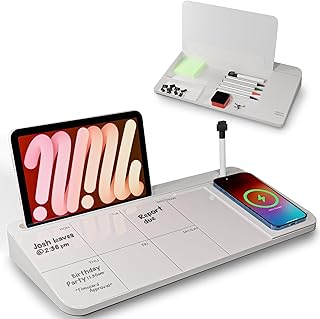
NEXTLUXE Glass Desk Whiteboard with Wireless Charger – Desktop Whiteboard with Storage, Weekly Planner, Dry Erase Pad, Organizer Drawer for Home, School, Office Gadgets – White
Best For:
Mobile creators, content planners, and anyone who wants wireless charging integrated with a weekly planner surface.
The NEXTLUXE glass desk whiteboard upgrades a simple organizer into a multi-function station by adding a wireless charger and a structured weekly planner surface. For creators in apartments where outlets are precious, built-in Qi charging lets you keep a phone on top while you sketch ideas or pin tomorrow’s deliverables. The glass surface writes smoothly and wipes clean, and the drawer/slots beneath are sized for pens, small notebooks, and cables—helpful when you need to switch between camera gear and a laptop quickly.
Use it to map a week’s worth of social posts on the planner grid while charging your phone between takes, or place it beside your camera rig to scribble lighting notes. Compared with basic desk pads, the NEXTLUXE adds tech-friendly convenience: your phone slides on to charge, so you’re less likely to reach for it and get distracted. Who should buy: mobile creators, podcasters, or video editors who need a compact command center with charging built in. Who may not need it: creators who already have a dedicated wireless charging pad or a large wall planner. Buying considerations include the charger’s compatibility with your phone case thickness and the board’s footprint on a small desk. If you want a neat, all-in-one desktop organizer that reduces cable clutter and keeps plans visible, this is a versatile choice. Check it on Amazon.
Pros
- Built-in wireless charger reduces cable clutter
- Glass planner surface is easy to clean
- Integrated storage keeps tools at hand
Cons
- Wireless charging performance can vary with thick cases
- Takes up desk real estate on very small surfaces
Check it on Amazon
Monitor Memo Board, 2PCS Multifunction Sticky Note Holder for Computer Screen, Acrylic Computer Monitor Memo Board, Office Desk Accessories, Computer Sticky Note Holder with Sticky Notes

Best For:
Streamers, editors, podcasters, and multi-monitor creators who need persistent but nonpermanent reminders at eye level.
Small, inexpensive, and surprisingly effective, monitor memo boards stick to the edge of your screen and keep short reminders where you can’t miss them. These acrylic note holders come as a two-pack, perfect for multi-monitor setups or a monitor plus a laptop. For creators resetting a compact apartment workspace, the memo boards are a no-fuss way to keep script beats, camera settings, or sponsor notes visible without cluttering the main desk surface. They’re lighter and less intrusive than full-size sticky-note walls and more durable than paper notes that curl or fall.
Imagine live-streaming: clip a quick cue sheet at eye level so you don’t shuffle papers between takes. Or attach voiceover lines and short scene markers during editing; they won’t slide off with a breeze of air like loose notes. Compared with app pop-ups, physical memo boards reduce habit-driven phone checking and keep essential cues in your sightline. Who should buy: creators who need quick visual reminders, podcasters, multi-monitor editors, and anyone who values a clean desk with visible prompts. Who may not need them: creators who prefer digital task managers or have very thin-framed monitors that don’t suit clips. Consider adhesive compatibility with your monitor’s bezel and how sticky notes will remove from the acrylic. If you want low-cost, nonpermanent visual cues that keep sessions smooth, this two-pack is a smart addition. Check it on Amazon.
Pros
- Keeps notes in sight without cluttering desk
- Two-pack covers multiple screens
- Durable acrylic lasts longer than paper notes
Cons
- Clip may not fit very thin or curved bezels
- Adhesive or clip strength varies by monitor frame
Buy it on Amazon
Rotating Productivity Timer 5, 25, 10, 50 Minutes Preset, Desk Cube w/Gravity Sensor for ADHD, Mute Functions, Ideal for Work, Study, Kitchen, Back to School (1, Wood Grain Finish)

Best For:
Design-conscious creators, ADHD users who prefer tactile activation, and anyone who wants a discreet, decorative timer for a shared space.
This wood-grain finish rotating productivity cube offers the same preset convenience as other Pomodoro cubes but with a warmer aesthetic that blends into living spaces. It includes 5/10/25/50 minute presets, a gravity sensor for intuitive activation, and mute options—ideal for creators who value both function and style. Because it’s visually attractive, it doubles as a small decorative object on a shelf or desk, which helps keep a tidy apartment look while still serving a practical timing purpose. The gravity sensor means you don’t need to press tiny buttons; flip the cube and it detects orientation to start the countdown, which is an accessible feature for creators who prefer minimal interaction.
Real-world uses include timed recording sessions (use 50-minute blocks for a full edit pass), focused idea sprints for thumbnail creation, or timed breaks that remind you to step away from screens. Compared with smartphone timers, this hardware unit avoids the distraction loop and offers physical change of state that reinforces habit formation. Who should buy: creators seeking a visually pleasing timer with accessible controls and households sensitive to sound. Who may not need it: those who already use advanced task apps with integrated timers and analytics. Buying considerations: check dimensions to ensure it won’t crowd your desk and confirm whether it requires batteries or charges via USB. If you want a discrete, attractive timer that encourages focused sessions without shouting, this wood-grain cube is a solid pick. Check it on Amazon.
Pros
- Attractive wood-grain finish fits home decor
- Gravity sensor enables easy, intuitive use
- Mute functions for quiet apartment life
Cons
- Decorative finish may show wear over time
- Similar functionality to other Pomodoro cubes—compare features
Find it on Amazon
Final Verdict
Small, well-chosen gadgets can change how productive you are during an apartment reset. Timers provide non-distracting cues to start and stop work, whiteboards keep ideas visible without commitment or damage to walls, monitor memo boards make short reminders unavoidable, and organizers with wireless charging reduce cable clutter. Pick hardware when you need fewer distractions and stronger physical cues; choose integrated desk organizers when you want to combine charging and planning. For creators who value speed, clarity, and low setup fuss, these five items offer a compact, respectful, and effective toolkit to reclaim a small space for creative work. Check the latest price on Amazon.
Conclusion
These Office gadgets creators use during apartment productivity resets picks are worth comparing if you want practical options with useful features, clear use cases, and buyer-friendly details.
As an Amazon Associate, I earn from qualifying purchases.
Tags:
apartment productivity, pomodoro timer, desk whiteboard, wireless charger, monitor memo board, creator desk setup, adhd productivity, small-space office, office gadgets creators use during apartment productivity resets, apartment productivity gadgets creators use, gifts, amazon affiliate, product recommendations, buying guide, shopping guide
