Apartment Productivity: Essential Office Gadgets
As an Amazon Associate, I earn from qualifying purchases. This article may contain affiliate links, which means we may receive a commission at no extra cost to you.
Resetting your productivity in a small apartment often starts with a few smart desk gadgets. Creators and remote workers favor compact tools that keep ideas visible, time on track, and clutter minimized. This guide highlights practical whiteboards, timers, and a minimalist notepad that people actually reach for when they want a quick, effective productivity reboot without overhauling their space.
Buying Guide
When choosing apartment-friendly productivity gear, prioritize footprint, noise level, and multi-function design. Look for desktop whiteboards with storage or keyboard stands to reclaim surface area; opt for glass surfaces for durability and easy cleaning. For timers, check presets, sound and vibration settings, and whether a mute mode or gentle alert suits shared walls. Notepads should be undated and portable so you can grab routines anywhere. Materials and cable management (for wireless chargers) matter in small spaces. Think about who will use the item—creatives often want visible planning real estate, while people with ADHD benefit from tactile timers and vibration alerts. Compare compact solutions against bulkier alternatives: a small glass board is more elegant and lasts longer than flimsy paper pads, and a visual Pomodoro cube is quicker to glance at than a phone app that tempts distractions.
TSJ OFFICE Small Desktop Whiteboard -Glass Dry Erase Board Computer Keyboard Stand White Board Surface Pad with Drawer, Desk Organizers with Accessories for Office, Home, School Supplies – White

Best For:
Remote workers, students, and creatives needing a compact, reusable planning surface with small storage.
This TSJ OFFICE small desktop whiteboard pairs the practicality of a dry-erase surface with a surprising amount of built-in organization—an ideal fit for apartment desks where space is tight. The glass-like white surface gives you a clear, erasable canvas for quick brainstorms, daily priorities, or a running task list that stays in sight. Its design doubles as a low-profile keyboard stand and includes a slim drawer to tuck markers, sticky notes, and cables away. Compared with bulky wall boards or full-size easels, this desktop model offers the same visual clarity without sacrificing desk real estate.
In real-life use, creators place it between laptop and wall to keep weekly goals visible, or flip it forward as a temporary two-line monitor for idea mapping during deep work sessions. It solves the common apartment problem of limited wall mounting options—no drilling required—and gives you a reusable planning surface that’s cleaner than loose paper. Buyers often appreciate the included accessories and the way the drawer keeps essentials accessible but out of sight during video calls.
Who should buy: remote creatives, students, and anyone who needs a permanent, wipe-clean task surface but lacks wall space. Who may skip it: people who prefer purely digital planners or already have a large mounted whiteboard. Practical buying points: check surface size relative to your keyboard and confirm marker compatibility. Friendly tip: pair with a magnetic clip or small desk lamp to turn it into a quick workstation focal point. Grab one and keep your daily plan front-and-center. Check the latest price on Amazon.
Pros
- Compact footprint doubles as keyboard stand
- Wipe-clean surface for reusable planning
- Built-in drawer for small desk items
Cons
- Smaller than wall-mounted boards
- May not replace digital calendar needs
Keep your tasks visible and organized — Check the latest price on Amazon.
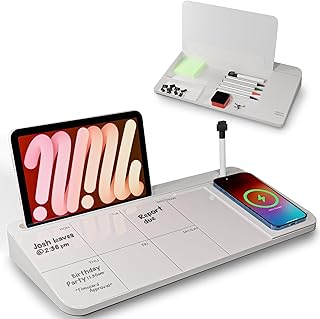
NEXTLUXE Glass Desk Whiteboard with Wireless Charger – Desktop Whiteboard with Storage, Weekly Planner, Dry Erase Pad, Organizer Drawer for Home, School, Office Gadgets – White
Best For:
Design-conscious remote workers who want a durable whiteboard with integrated wireless charging and storage.
The NEXTLUXE glass desk whiteboard brings a modern twist to compact productivity: a tempered glass dry-erase surface combined with a built-in wireless charger and storage drawer. This model is for people who want fewer cables and a cleaner look—set a compatible phone on the charging pad while your weekly plan stays front and center. Compared to standard melamine boards, glass resists ghosting and cleans to a bright finish, which keeps your daily priorities legible over long stretches of use.
In practical apartment setups, creators place NEXTLUXE beside a laptop to charge a phone without reaching for a wall outlet, while the weekly planner layout helps block time visually for content shoots or editing sessions. The drawer hides pens and adhesive tabs, helping reduce the visual clutter that undermines focus in small spaces. Users who juggle task lists and time-sensitive notifications find having the phone charging directly under their plan reduces distraction from notifications that pull them away from work.
Who should buy: remote creators who value design, wireless charging convenience, and a durable writing surface. Who may not need it: those without Qi-enabled phones or who prefer paper planners. Buying considerations: confirm phone compatibility with the charger and desk depth to fit the unit comfortably. This hybrid board blends tech and planning for tidy, productive desks. Check the latest price on Amazon.
Pros
- Tempered glass resists staining
- Built-in wireless charger reduces cable clutter
- Integrated drawer for tidy storage
Cons
- Requires Qi-compatible phone for charging
- Larger footprint than paper pads
Upgrade your desk with a tech-friendly planner — Check the latest price on Amazon.
Rotating Productivity Timer 5, 25, 10, 50 Minutes Preset, Desk Cube w/Gravity Sensor for ADHD, Mute Functions, Ideal for Work, Study, Kitchen, Back to School (1, Wood Grain Finish)

Best For:
People practicing Pomodoro, users with ADHD, and anyone who prefers a tactile, phone-free timer.
This rotating productivity timer offers tactile control and preset intervals (5, 10, 25, 50 minutes) in a compact cube—perfect for quick Pomodoro sessions in small apartments. The gravity sensor and mute functions make it gentle on shared walls: flip the cube to start and use vibration or silence instead of loud beeps when needed. Creators and focused workers like this because it’s a single-purpose tool that removes the temptation of checking a phone-based timer and slipping into distractions.
Use cases are straightforward: set a 25-minute writing sprint, flip to 5 minutes for a short reset, or pick 50 minutes for deep editing. Its wood grain finish blends with apartment decor better than bright plastic timers, so it sits unobtrusively on a shelf or beside a laptop. Compared to phone apps, the cube’s physicality helps establish a ritual—turning it over signals the brain that focus begins now.
Who should buy: people with irregular attention, those practicing Pomodoro, and anyone who prefers tactile timers over phone apps. Who may not need it: heavy multitaskers who rely on digital calendars with integrated reminders. Practical considerations: check which alert modes (sound, vibration, mute) suit your building’s noise rules and whether the preset times match your workflow. A simple flip can turn a jittery afternoon into a productive block. Check the latest price on Amazon.
Pros
- Tactile, easy-to-use cube with preset times
- Gravity sensor and mute/vibration options
- Stylish wood grain finish
Cons
- Limited to preset intervals
- May lack advanced programming for some users
Bring focus to your desk with a tactile timer — Check the latest price on Amazon.
Printers Jack, Productivity Cube Timer, Visual Pomodoro Timer, Mute & Vibration & Adjustable Sound Alert, for Office, ADHD, Study, Work, 3/5/10/25/30/60min & Custom Countdown – Orange

Best For:
Users needing customizable intervals and adjustable alerts—great for shared living spaces and varied workflows.
The Printers Jack productivity cube expands on the simple timer concept with more presets (3, 5, 10, 25, 30, 60 minutes) and adjustable sound, mute, and vibration alerts—making it a flexible choice for apartment dwellers who need different timing options throughout the day. Its visual design and bright color make it easy to spot at a glance, and the custom countdown mode is handy for tasks that don’t fit standard Pomodoro slots.
Real-world uses include short warm-up bursts before recording, focused 25-minute editing cycles, or a 3-minute reset between stretches of emails. The adjustable alerts help you tailor the cube to thin apartment walls—choose vibration or low sound when roommates or neighbors are nearby. Compared to app-based timers, this cube reduces screen time and creates a consistent physical cue for work blocks, which many users find helpful for building habits.
Who should buy: flexible-timing fans, parents balancing household noise, and people who need a customizable visual timer. Who may not need it: those who prefer fully digital, app-synced time tracking. Buying considerations: match the alert settings to your living situation and note the bright color if you want a subtler desk accessory. Use it to turn irregular work bursts into predictable, productive blocks. Check the latest price on Amazon.
Pros
- Multiple presets plus custom countdown
- Adjustable sound, mute, and vibration
- Clear visual design for quick glances
Cons
- Bright color may not suit minimalist desks
- Battery or charging needs to be monitored
Customize your focus sessions with a versatile cube timer — Check the latest price on Amazon.
Taja To Do List Notepad – To Do List Notebook for Work with 52 Sheets, 9.8" x 6.5", Undated Daily Planner Perfect for Daily Tasks and Goal Setting, Notepad Suitable for Office, Home & School – Greenery Sway

Best For:
Analog planners and creators who use short daily checklists to structure work sessions.
This Taja To Do List Notepad is a straightforward, no-frills daily planner for people who prefer pen-and-paper routines. With 52 undated sheets sized at 9.8" x 6.5", it fits easily on a small desk or slips into a tote for work-from-café days. Each page focuses on short daily tasks and goals, helping you break a larger project into actionable steps without the commitment of a dated planner.
Creators and freelancers often use a pad like this as the first step of their reset ritual: a quick five-minute brain dump each morning, then transferring top tasks to a visible whiteboard or timer. It solves the common apartment problem of digital overload—writing tasks down reduces screen switching and provides a tactile satisfaction that aids follow-through. Compared with full notebooks, this undated notepad is flexible: you can skip days without wasting pages, and the single-sheet-per-day format keeps the plan concise.
Who should buy: analog planners, creators who mix paper and digital tools, and anyone who wants a portable daily checklist. Who may not need it: people strictly using digital task managers or those who need long-form journaling space. Buying considerations: check paper thickness if you prefer fountain pens, and pair it with a small clipboard or stand to keep pages visible while you work. Use it as your quick-start checklist to get the day moving. Check the latest price on Amazon.
Pros
- Undated, flexible daily sheets
- Portable 9.8" x 6.5" size
- 52 pages for a full year of weekly routines
Cons
- Limited to short daily entries
- Not ideal for long-form notes or projects
Start each day with a clear checklist — Check the latest price on Amazon.
Final Verdict
Small, well-chosen desk tools can transform an apartment slump into focused productivity. A compact glass or dry-erase whiteboard keeps goals visible without taking wall space, wireless-charging hybrids reduce cable clutter, tactile Pomodoro cubes create reliable focus rituals, and an undated notepad gives a low-friction place to capture priorities. Choose a whiteboard if you need constant visual reminders, a hybrid charger board if you also want to cut cable mess, a tactile timer if you’re building habits or managing attention, and the notepad if you prefer analog checklists. Combine one visual planning surface, one tactile timer, and a small paper notepad for a complete, apartment-friendly reset toolkit. Happy reorganizing—Check the latest price on Amazon.
Conclusion
These Office gadgets creators use during apartment productivity resets picks are worth comparing if you want practical options with useful features, clear use cases, and buyer-friendly details.
As an Amazon Associate, I earn from qualifying purchases.
Tags:
apartment productivity, desk whiteboard, pomodoro timer, wireless charger desk, daily planner notepad, adhd timers, home office gadgets, desk organizers, office gadgets creators use during apartment productivity resets, apartment productivity: essential office gadgets, gifts, amazon affiliate, product recommendations, buying guide, shopping guide
