Amazon Devices That Make Life Easier — 2026 Picks
As an Amazon Associate, I earn from qualifying purchases. This article may contain affiliate links, which means we may receive a commission at no extra cost to you.
As an Amazon Associate, I earn from qualifying purchases. This article may contain affiliate links, which means we may receive a commission at no extra cost to you.
Smart home tech has moved from niche to necessary for many households. In 2026, Amazon’s ecosystem — from compact smart plugs to full-size displays — continues to lead by combining affordability, broad compatibility, and voice-first convenience. Whether you want to automate lamps, keep the family organized, or add a reliable voice assistant in every room, the right Amazon device can simplify daily routines.
This long-form guide walks through five practical Amazon devices that deliver real-world value. I’ll explain what each device does, who will benefit most, realistic use cases, comparisons with standard alternatives, and buying considerations you should weigh before clicking through. You won’t find puff pieces here: the guidance is geared toward helping you pick devices that genuinely solve problems, reduce friction, and improve living spaces without unnecessary complexity.
Throughout the article you’ll find product overviews, pros and cons derived from common customer feedback trends, and clear buying signals so you can match a device to your lifestyle. Whether you’re building a starter smart home setup or upgrading an established system, this guide is structured to be actionable and easy to scan.
Let’s start by covering a few practical points to consider before buying, then deep-dive into each device with hands-on-style use cases and realistic expectations.
Buying Guide
Before you buy smart-home devices, a short checklist will save time and money.
1) Network and compatibility: Most modern Amazon devices require a reliable 2.4 GHz Wi‑Fi network. Echo devices and Amazon smart plugs rely on your router for responsiveness; if your home has weak coverage, consider improving Wi‑Fi or placing extenders near critical rooms. Also check whether devices require an Alexa app and whether you want multiple Amazon accounts linked to one household profile.
2) Privacy and microphone control: Echo speakers and Echo Shows include microphone and camera controls. If privacy is a top concern, review physical camera covers, mute buttons, and privacy settings in the Alexa app. Amazon publishes guidance for managing voice recordings, but it’s worth confirming the controls you’ll use daily.
3) Ecosystem and smart-home standards: Amazon devices integrate best with Alexa-compatible smart lights, plugs, and Zigbee hubs when present. If you prefer voice assistants from other brands or want a local-control-first setup, consider whether you need third-party hubs or different platforms like Matter-compatible switches for cross-platform flexibility.
4) Use cases and placement: Pick devices based on specific rooms and routines. A compact Echo Dot makes sense for a bedroom for alarms and white noise, while an Echo Show 15 or Show 5 works well where you need a glanceable display for recipes, calendars, and video calls. Smart plugs are the simplest automation entry point—use them to schedule lamps, coffee makers, or holiday lights without rewiring.
5) Sound and display quality: If you listen to music frequently, choose an Echo model with stronger bass and stereo capabilities. For kitchens or shared family spaces, larger displays with HD screens make browsing, recipes, and video content far more pleasant than small displays.
6) Budget and expansion: Start with a couple of well-placed devices and expand. Many buyers pair a central Echo Show with a few Echo Dots and smart plugs to add convenience room by room without overspending.
With those considerations in mind, the following product sections dig into how each Amazon device performs in realistic home settings, who should buy, and what trade-offs to expect.
Amazon Smart Plug, Works with Alexa, Simple Setup, Endless Possibilities

Best For:
Renters, smart-home beginners, and anyone wanting to automate lamps or simple appliances without installing hardwired switches.
The Amazon Smart Plug is a straightforward entry-point into home automation: a compact plug that turns ordinary outlets into Alexa-controlled switches. It pairs directly with the Alexa app and requires no hub, so setup is typically a matter of plugging in the unit, connecting it to your 2.4 GHz Wi‑Fi network, and discovering it through the Alexa app. The practical payoff is immediate—any lamp, fan, or low‑voltage appliance that plugs into a wall outlet becomes schedulable and voice-activated.
Who should consider this plug? If you’re building a starter smart home or want a simple way to automate seasonal lights, bedside lamps, or a slow cooker timer, this product matches the bill. It’s especially useful for renters who can’t or don’t want to change wiring, and for people who want easy access to basic automation without the complexity of full smart switches.
Real-life use cases are simple but impactful. In the living room, plug a floor lamp into the smart plug and schedule it to turn on at dusk or when you ask Alexa to start “movie mode.” In a bedroom, set a fan to automatically shut off after falling asleep with an Alexa Routine. For holiday decorating, sync multiple smart plugs to a scene so all exterior lights come on at sunset. Many customers also use smart plugs as a convenience for appliances that lack native smart features—think coffee makers that you can power on remotely (check manufacturer guidance for safety), or an electric diffuser that runs on a schedule.
Compared with standard smart plugs from third-party brands, this Amazon model stands out for tight Alexa integration and a straightforward app experience. Competitors sometimes provide a broader app ecosystem or additional energy monitoring, but the Amazon Smart Plug prioritizes reliability and ease-of-use in Alexa-driven homes.
Important buying considerations: confirm your home’s Wi‑Fi coverage at the intended outlet, and note that the plug is designed for indoor use. If you want energy reporting or outdoor weatherproof operation, look at third-party alternatives with those specific features. Also, multiple smart plugs close together can crowd an outlet; a power strip may be a practical complement.
Pros: Easy Alexa setup, no hub required, reliable basic automation. Cons: No energy monitoring, indoor-only design. Check the latest price on Amazon.
Pros
- Plug-and-play Alexa integration, no hub needed
- Simple to set up in the Alexa app
- Compact design that fits most outlets
Cons
- No built-in energy usage monitoring
- Not designed for outdoor or heavy-duty appliances
Check the latest price on Amazon.
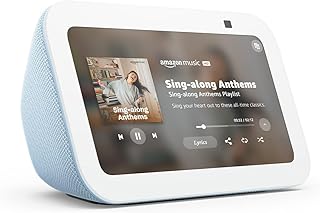
Amazon Echo Show 5 (newest model), Smart display, Designed for Alexa+, 2x the bass and clearer sound, Cloud Blue
Best For:
Small-room users: bedrooms, nurseries, desks, and compact kitchens that want a visual Alexa with decent sound in a small footprint.
The Echo Show 5 is Amazon’s compact smart display aimed at bedside tables, desks, and small kitchens. The newest model improves on sound with stronger bass and clearer voice pickup, while still keeping a footprint that fits into tight spaces. The 5.5-inch screen offers glanceable information—alarms, weather, calendar events, drop-in calls, and a small video stream—without the bulk of larger displays.
Who benefits most? The Echo Show 5 is ideal for people who want a visual Alexa companion in small rooms: parents who want a device on a nursery nightstand for lullabies and camera feeds, remote workers who need a secondary display for quick timers or meetings, or apartment dwellers who appreciate voice control plus a modest screen for recipes and video calls.
Practical scenarios illustrate the practicality. Use the Echo Show 5 as a hands-free bedside command center: set routines that lower lights, start a white-noise playlist, and announce the morning schedule. In the kitchen, its compact screen is perfect for step-by-step recipes or quickly asking Alexa to set multiple timers while you cook. Remote check-ins are simple—use Drop In to see and speak to a family member or check a connected camera. Students and home office users appreciate that the Show 5 can handle brief video calls and display reminders without distracting like a full computer monitor.
Compared with larger Echo Shows, the Show 5 trades display real estate and video performance for a smaller, more affordable package. Competing compact smart displays from other brands may offer similar screens, but the Echo Show 5’s tight Alexa integration and improved audio make it a strong pick when you want voice-first convenience plus occasional visual content.
Considerations: the small screen is not ideal if you plan to stream long videos or use the device as a primary entertainment display. Privacy-conscious buyers should note the built-in camera and microphone—there are physical controls and settings in the Alexa app to mute microphones and disable the camera. If sound quality is a top priority for music listening, a larger Echo or a dedicated speaker will provide richer audio.
Pros: Compact size for small spaces, improved bass and clarity, helpful bedside and kitchen features. Cons: Small screen limits media viewing, built-in camera requires privacy controls. Check the latest price on Amazon.
Pros
- Small footprint fits tight spaces
- Improved bass and clearer sound for its size
- Great for alarms, timers, and quick video calls
Cons
- Limited screen size for extended media
- Has camera and mic that require privacy management
Check the latest price on Amazon.
Amazon Echo Show 15 (newest model), Full HD 15.6" kitchen hub for home organization, with built-in Fire TV, Designed for Alexa+

Best For:
Families, shared households, and anyone who wants a wall-mounted communal hub for schedules, recipes, and media.
The Echo Show 15 is designed to be a central hub for busy households. With a 15.6-inch Full HD display and wall-mount capability, it’s intended for kitchens, family rooms, or entryways where everyone can see schedules, shopping lists, and shared notes. The Show 15 supports widgets for calendars, sticky notes, weather, and compatible smart-home controls. It also integrates Fire TV features for streaming content when you want it—meaning it can pull double duty as an information center and media screen.
Who should buy it? Families juggling schedules, households that want a communal command center, and anyone who benefits from a large, glanceable display are the primary buyers. If you prepare meals while following recipes, use a shared family calendar, or run a household with multiple people, the Show 15’s size and organizational features reduce friction and miscommunication.
Real-world usage is where the Show 15 shines. Mount it in the kitchen and pin recipes, timers, and instructional videos at eye level while you cook. Use the shared calendar widget to show each family member’s appointments; link family member profiles so reminders and lists are personalized. Students can use the large display for remote tutoring, and remote workers might find the Show 15 useful for hands-free video calls while multitasking. Integrated Alexa routines can trigger whole-home changes—set a “Dinner” routine that dims the lights, plays a playlist, and displays the recipe cards.
Compared to smaller Echo Shows, the Show 15’s advantage is scale: you get a true communal surface for information that can replace magnets, whiteboards, or kitchen paper lists. Alternatives like tablets or dedicated smart displays will sometimes offer similar screens, but the Echo Show 15 is purpose-built for family features and deeper Alexa integrations. If you need privacy, remember this is a large, always-available screen with camera options—review the privacy settings and use the physical camera shutter when preferred.
Important considerations: wall-mounting may require planning for power placement, and if your home’s Wi‑Fi is spotty near the installation site, streaming or multi-device interactions can stutter. Also, the device is more noticeable than smaller displays, so aesthetics and placement matter. For those who want a wall hub that coordinates schedules, shopping lists, and media in one place, the Echo Show 15 is a compelling choice.
Pros: Large Full HD display for family organization, built-in Fire TV features, wall-mountable design. Cons: Requires planning for placement and consistent Wi‑Fi; larger footprint may not suit minimal spaces. Check the latest price on Amazon.
Pros
- Large Full HD screen great for communal use
- Widgets and shared calendars streamline household organization
- Built-in Fire TV expands media options
Cons
- Requires planning for wall placement and power
- Needs strong Wi‑Fi for smooth streaming and multi-device use
Check the latest price on Amazon.
Amazon Basics Smart Plug, Works with Alexa Only, Voice Control, Remote APP Control, Schedule, Compact Design, Versatile, 2.4 GHz Wi-Fi, No Hub Required, 4-Pack, White

Best For:
Budget-focused buyers, renters, and anyone wanting to automate multiple plug-in devices at once without hardwiring.
The Amazon Basics Smart Plug 4‑pack is a cost-conscious option for people who want to jumpstart multiple automations at once. Packaged in a multi-pack, these plugs follow the same core idea as the single Amazon Smart Plug—no hub needed, simple Alexa app setup, and hands-free voice control for devices that plug into standard outlets. The multi-pack is especially useful for outfitting an entire room or multiple rooms without buying single units individually.
Who benefits most? Budget-minded households, first-time smart-home adopters who want to automate several lights or appliances at once, and renters who need a non-invasive way to make plug-in devices smarter. A 4‑pack is handy for living rooms and bedrooms where multiple lamps or tabletop devices can be scheduled together.
Everyday examples show how the bundle pays off. Outfit a family room with a floor lamp and two side-table lamps to create a synchronized lighting scene for evenings. For apartment renters, place smart plugs on a fish tank heater, an essential oil diffuser, and a reading lamp so routines can be automated without rewiring. Small business owners running a pop-up stand or seasonal display may also appreciate the affordability and simplicity of controlling multiple devices from one account.
Compared to single-brand premium plugs, the Amazon Basics option typically sacrifices advanced features like energy metering or outdoor weatherproofing in favor of straightforward automation and a low price-per-unit. If you need power consumption reporting or industrial-grade durability, look for higher-end models. But for routine lighting scenes, schedule-based automations, and voice control via Alexa, this 4‑pack is a practical, wallet-friendly way to scale your smart setup quickly.
Buying considerations: ensure you have adequate Wi‑Fi coverage for the rooms where you’ll use these plugs, and avoid overloading outlets with high-draw appliances—these plugs are meant for everyday items rather than heavy-duty heaters. Check compatibility if you plan to integrate with third-party hubs or Matter devices; these plugs are optimized for Alexa-centric setups.
Pros: Affordable multi-pack for quick automation, easy Alexa setup, great value for scaling. Cons: No energy monitoring, not suitable for heavy-duty appliances. Check the latest price on Amazon.
Pros
- Cost-effective 4‑pack for scaling automation
- Simple setup and Alexa integration
- Compact design fits most outlets
Cons
- Lacks energy usage monitoring
- Not rated for high-power appliances
Check the latest price on Amazon.
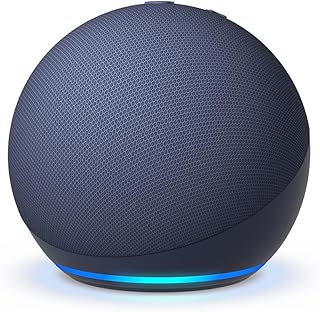
Amazon Echo Dot (newest model) – Vibrant sounding speaker, Designed for Alexa+, Great for bedrooms, dining rooms and offices, Deep Sea Blue
Best For:
Anyone who wants an affordable Alexa device for alarms, timers, and background music; ideal for bedrooms, offices, and multi-room setups.
The Echo Dot is Amazon’s most popular compact smart speaker—designed to fit unobtrusively into bedrooms, bathrooms, and small living areas while delivering better-than-expected sound for its size. The newest model emphasizes clearer vocals and balanced audio, making it a reliable choice for podcasts, news, catch-up radio, and ambient music. It’s also a budget-friendly way to put Alexa in multiple rooms for whole-home voice control.
Who should consider the Echo Dot? Anyone looking for a low-cost voice assistant for common tasks like timers, alarms, voice-controlled lights, and quick information lookups. The Echo Dot is also a natural fit for multi-room audio when paired with other Echo speakers, and for people who want Alexa’s convenience without a display.
Real-world scenarios: keep a Dot on the nightstand to replace an alarm clock and play sleep sounds, use one in a study to set timers and transcribe quick notes, or place a Dot in a dining room to provide background music during meals that you can control by voice. Because the Dot is compact and inexpensive, it’s often the device people use to create an inexpensive whole-home Alexa setup—multiple Dots across rooms allow you to issue voice commands wherever you are.
Compared with the Echo Show 5, the Dot sacrifices a screen for a smaller form factor and lower price. If you want a visual display for recipes, video calling, or camera feeds, choose a Show device. If sound quality and richer media are priorities, a larger Echo model will outperform the Dot. However, for most everyday voice interactions and background audio, the Echo Dot hits a sweet spot between capability and cost.
Considerations: the Dot requires a stable Wi‑Fi connection for snappy responses, and you’ll want to review the privacy options for voice recording control in the Alexa app. The speaker is not intended for deep bass or high-volume listening, so audiophiles should opt for higher-tier Echo speakers.
Pros: Compact and affordable, good voice recognition, great for alarms and background music. Cons: Limited audio power compared to larger Echo models, no display. Check the latest price on Amazon.
Pros
- Affordable way to add Alexa to any room
- Compact design with clear voice pickup
- Works well for alarms, timers, and background audio
Cons
- Limited bass and volume compared to larger speakers
- No display for visual tasks
Check the latest price on Amazon.
Final Verdict
Amazon’s 2026 lineup of smart plugs and Echo devices offers a spectrum of practical options—from single smart plugs that make lamps and holiday lights smarter to full-size displays that act as the family’s digital command center. For renters and newcomers, the plug-and-play Amazon Smart Plug and the Amazon Basics 4‑pack provide reliable, low-risk automation without a hub. For small rooms and bedside use, the Echo Show 5 and Echo Dot deliver voice-first convenience with compact footprints, while the Echo Show 15 is a clear choice if you want a communal home hub that replaces sticky notes, fridge magnets, and paper lists.
When choosing, prioritize where you need the most value: convenience and low friction (smart plugs), glanceable visual organization (Show 15), or ubiquitous voice assistance (Echo Dot and Show 5). Also consider Wi‑Fi reliability, privacy settings, and whether you need features like energy monitoring or weatherproofing—these are common trade-offs when comparing Amazon’s straightforward offerings with third-party alternatives.
If you’re building a modest smart home, start with a couple of plugs and one Echo device in a central area. Expand based on the routines that stick—lighting scenes, voice-controlled timers, and a shared family calendar are often the first automations that deliver consistent value. For families and anyone who benefits from a shared surface, invest in a larger display like the Echo Show 15 for a visible, always-on hub that pulls together schedules, shopping lists, and entertainment.
If you’re ready to add convenience and automation to your home, these Amazon devices make an easy first step. Check the latest price on Amazon.
Conclusion
These Smart Living / Everyday Tech,Amazon Devices That Make Life Easier (2026 Picks) picks are trending now and offer great value and variety. Check the links above for latest prices and reviews.
As an Amazon Associate, I earn from qualifying purchases.
Tags:
Amazon smart home, Echo Show, smart plug, Echo Dot, home automation, Alexa devices
