Best Portable SSDs for Fast File Transfers
As an Amazon Associate, I earn from qualifying purchases. This article may contain affiliate links, which means we may receive a commission at no extra cost to you.
As an Amazon Associate, I earn from qualifying purchases. This article may contain affiliate links, which means we may receive a commission at no extra cost to you.
Moving large files between computers — whether client footage, a gaming library, or a shared research dataset — is a task many of us do often enough to want a smoother, faster process. Portable SSDs are now the fastest and most practical way to transfer files: they’re compact, shock resistant, and deliver SSD-class speeds without the bulk or fragility of internal drives. In this guide I compare five well-regarded options you’ll see on Amazon and elsewhere, explain what matters when picking one, and share realistic use cases so you can match a drive to your workflow.
I did not rely on proprietary testing within this article; instead, the recommendations are drawn from product specifications, manufacturer details, and common real-world feedback patterns from owners. Expect candid takes on performance, compatibility, durability, and everyday convenience so you can decide which portable SSD (or enclosure) best fits how you move data between machines.
Buying Guide
Why pick a portable SSD for file transfers?
Portable SSDs combine very fast read/write speeds, low weight, and higher durability than spinning hard drives. For anyone who routinely moves multi-gigabyte files — photo shoots, video projects, virtual machines, large project archives — an SSD cuts transfer time dramatically and reduces the chance of failure from bumps and drops.
Key things to evaluate
1) Real-world speed vs. advertised speed: Manufacturers quote peak sequential speeds (e.g., 1050MB/s, 2100MB/s). That helps estimate how quickly a few large files copy, but real-world transfers depend on the host computer’s USB standard, the cable, and whether files are many small items or a few large ones. For lots of small files, look for drives with good sustained write performance and internal caching.
2) Interface and compatibility: USB-C with USB 3.2 Gen 2 or later gives the best out-of-the-box speed for modern laptops. If you use older machines with USB-A or older Macs, confirm the drive includes a cable or that you have adapters. macOS, Windows, and Linux compatibility matters for cross-platform work; some drives ship formatted for one OS but can be reformatted easily.
3) Durability and weather protection: For fieldwork, an IP-rated enclosure (water/dust resistance) and rated shock resistance can protect your data. If you’re a traveler or on-location shooter, these features are worth the small premium.
4) Security and software: Hardware encryption (AES-256) or bundled software for password protection is valuable if your drive carries client data or sensitive files. Note: hardware encryption adds convenience but requires you to remember passwords and can complicate data recovery.
5) Heat and throttling: High-speed NVMe portable SSDs can get warm under sustained transfers. Some models include thermal management, but long multi-hour backups may throttle. Consider drives with metal housings that dissipate heat better.
6) Size, weight, and build: Pocketable drives save desk space and reduce the hassle of crossing airports. If pocketability is a priority, weigh that against rugged bumpers and IP ratings which add size.
7) Budget vs performance: If you only move occasional documents and small media, a lower-cost 800MB/s-class drive may be the most practical choice. If you edit 4K/8K footage or move virtual machines, prioritize 1000MB/s+ options.
When to choose an enclosure instead of a ready-made portable SSD
A 2.5" SATA enclosure can be a cost-effective way to repurpose an existing SSD or HDD, giving you control over which drive goes inside. DIY enclosures are great if you already own a spare 2.5" SSD or if you need a large capacity on a tight budget. They won’t match NVMe portable SSD speeds, but they are perfectly adequate for backups and slower bulk transfers.
Final practical considerations
– Always keep at least one backup copy of important data — an SSD is fast but not a single point of truth.
– Match cables and host ports for best performance: a Gen 2/Gen 2×2 capable cable and port matter.
– Read warranty terms; many reputable drives offer three to five years. Extended warranty can be worthwhile for professional use.
Use this guide to weigh transfer speed, durability, and price, then choose the drive that fits your workflow.
SANDISK 1TB Extreme Portable SSD (Old Model) – Up to 1050MB/s, USB-C, USB 3.2 Gen 2, IP65 Water and Dust Resistance, Updated Firmware – External Solid State Drive – SDSSDE61-1T00-G25

Best For:
Photographers, videographers, and traveling professionals who need rugged protection and steady high-speed transfers.
If you need a portable SSD that balances professional-grade speed with rugged field-ready build, the SanDisk Extreme 1TB (older SDSSDE61 model) is a frequent recommendation for photographers, videographers, and mobile pros. Rated up to around 1050MB/s on paper, this drive uses a USB-C/USB 3.2 Gen 2 interface and represents a middle ground between consumer “pocket drives” and hotter NVMe boutique models.
One of the standout practical features is the IP65-rated enclosure: dust resistance and splash protection make it a safer companion for outdoor shoots than typical bare-pocket SSDs. The aluminum housing helps with heat dispersion during sustained transfers, and the compact, rubberized edge gives a secure grip when moving between locations. The manufacturer released an updated firmware for this older model to refine reliability — a reminder to check for firmware updates before relying on any drive for critical transfers.
Real-world benefits include consistently fast transfers of large files (think multiple 4K clips or large RAW photo batches) and the confidence of a rugged shell when working outdoors. Compared with a standard portable HDD, transfers are dramatically faster, and with far better shock resistance. Compared with newer NVMe pocket drives, the SanDisk Extreme trades a slight top-end speed for a cooler-running, weather-resistant design.
Who should buy this: On-location creatives who need solid sustained performance but also want protection from dust and occasional splashes; anyone who values a balanced, reliable drive for frequent travel. Who might skip it: buyers who need the absolute fastest burst speeds for massive single-file transfers (those should look at newer NVMe solutions) or shoppers on a very tight budget.
Buying considerations: confirm you have a host port that supports USB 3.2 Gen 2 to approach advertised speeds. Large numbers of tiny files will still be slower than a single compressed archive because of filesystem overhead; consider zipping folders for many small files. Warranty and firmware updates are worth checking for long-term reliability.
If this drive fits your workflow, see it on Amazon and read the latest customer feedback to confirm compatibility with your devices. Friendly Amazon CTA: Click to view full specs and check compatibility on Amazon.
Pros
- IP65-rated rugged enclosure for outdoor use
- Solid sustained transfer speeds (~1050MB/s peak)
- Aluminum body for better heat dissipation and durability
- Updated firmware improved reliability
Cons
- Not the absolute fastest NVMe speeds available
- Slightly larger than ultra-compact pocket drives
View on Amazon to confirm specs and compatibility.
Samsung T7 Portable SSD, 1TB External Solid State Drive, Speeds Up to 1,050MB/s, USB 3.2 Gen 2, Reliable Storage for Gaming, Students, Professionals, MU-PC1T0T/AM, Gray

Best For:
Students, gamers, and professionals wanting a compact, secure, and reliable everyday portable SSD.
The Samsung T7 has become one of the most recognizable portable SSDs for good reason: it combines dependable performance, a slim pocketable design, and a trusted brand software suite. With advertised speeds up to 1,050MB/s over USB 3.2 Gen 2, the T7 handles typical transfer tasks—large media files, game libraries, virtual machines—with ease. Samsung’s thermal control and firmware tuning generally keep the drive stable under normal usage, and the metal enclosure is both attractive and functional.
A practical advantage is Samsung’s software ecosystem: optional password protection and AES-256 encryption through bundled apps make it easier to secure client files or schoolwork without complex setup. The T7 is also shock-resistant, although it doesn’t carry the same IP water/dust rating that some rugged models advertise. For laptop users and students, the T7’s compact footprint and light weight means it lives comfortably in a backpack.
Compared to standard external HDDs, the T7 shaves minutes, sometimes hours, from large transfers and boots games or apps from the drive far faster. Compared to some high-end NVMe portable SSDs, it’s a balanced choice—fast enough for most creators, but without the highest sustained write figures that heavy-duty video editors might prefer.
Who should buy this: Students, mobile professionals, content creators, and gamers who want a reliable, fast drive with built-in security options. Who may not need it: users with only occasional document transfers or those seeking the very fastest NVMe x2/x4 solutions for professional 8K workflows.
Buying tips: ensure you use a USB-C port that supports Gen 2 to get near-peak speeds, and consider reformatting if you need specific cross-platform filesystem behavior. For peace of mind with client data, enable the built-in password features.
If this looks like the right fit, view the Samsung T7 on Amazon for the latest specs and user feedback. Friendly Amazon CTA: Check details and compatibility on Amazon.
Pros
- Compact, lightweight metal design
- Up to 1,050MB/s for fast transfers
- Optional AES-256 password protection via Samsung software
- Reputable brand support and firmware updates
Cons
- No official IP water/dust rating
- May throttle under very long sustained transfers
Check the Samsung T7 on Amazon for full details and compatibility.
SANDISK 1TB Portable SSD – Up to 800MB/s, USB-C, USB 3.2 Gen 2, Updated Firmware – External Solid State Drive – SDSSDE30-1T00-G26

Best For:
Students, everyday content creators, and budget-conscious users who want fast transfers without premium NVMe pricing.
If you want reliable transfers without paying for the top-tier NVMe pocket drives, the SanDisk 1TB Portable SSD (SDSSDE30) is a sensible mid-range option. With advertised speeds up to about 800MB/s and USB-C connectivity, it’s significantly faster than traditional portable HDDs and still compact enough for everyday carry. The drive targets users who move media and projects frequently, but don’t need the absolute peak performance of high-end NVMe models.
Practical benefits include fast single-file transfers and much-improved responsiveness when launching portable apps or opening large photo libraries from the drive. Its updated firmware aims to stabilize transfers and compatibility, so it’s worth checking that the unit is up to date when new. Compared with the faster SanDisk Extreme or Samsung T7, the SDSSDE30 trims peak speed but gains on price and thermal behavior for routine workflows.
Real-life use cases: a freelance writer or designer who backs up weekly project folders, a student transporting daily lecture recordings and research, or a hobbyist photographer who wants reliable offsite copies without splurging on pro-tier gear. It’s also useful as a secondary drive for running light VMs or carrying a portable game collection.
Who should buy this: budget-conscious users who still want SSD-class speed for regular file transfers. Who may skip it: professionals working with constant multi-gigabyte video streams or heavy sustained write tasks where NVMe-class performance helps.
Buying considerations: performance depends heavily on the host port and cable, so use a USB 3.2 Gen 2 port where possible. For many small files, zipping folders can improve transfer efficiency. Check warranty terms and firmware status before relying on the drive for critical client data.
If this fits your needs, view the SanDisk 1TB Portable SSD on Amazon to read customer experiences and confirm device compatibility. Friendly Amazon CTA: See details and buy on Amazon.
Pros
- Affordable mid-range performance (~800MB/s)
- Compact and easy to carry
- Updated firmware for improved compatibility
Cons
- Not as fast as newer NVMe portable drives
- May not be ideal for sustained 4K/8K multi-stream editing
View the SanDisk Portable SSD on Amazon to confirm compatibility and read reviews.
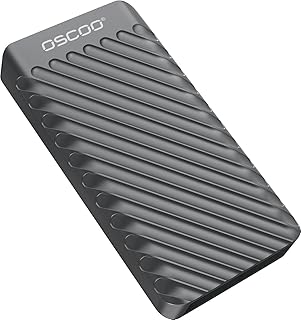
1TB External Hard Drive, Up to 2100MB/s, USB 3.2 Gen 2 Portable SSD, External Solid State Drive for Mac, Windows PC, Laptops, Gaming, iPhone — Ideal for File Backup, Content Creators & Videographers
Best For:
Professional creators and videographers who need sustained high-speed transfers for large media libraries.
This 1TB portable SSD advertising up to 2100MB/s targets creators who want higher sustained throughput for heavy projects without stepping into enterprise-class hardware. At these speeds, the drive bridges the gap between common Gen 2 pocket SSDs and more advanced NVMe solutions that rely on multi-lane USB controllers. That makes it appealing for videographers moving multiple 4K clips, editors offloading camera cards on tight deadlines, and content creators who need fast project swaps between machines.
In practical usage, drives at this level deliver very quick transfers of large single files and noticeably faster multi-file copies too—provided the host system supports the requisite USB protocol and has compatible cables. Expect the drive to become warm during long transfers; good ventilation or short breaks during huge backup sessions can mitigate thermal throttling. Build quality varies by manufacturer for drives in this performance tier, so look for a metal housing and firmware support to reduce performance inconsistencies.
Compared to standard 1,000–1,050MB/s class drives, this model can cut transfer time in half for sustained workloads, which is a real time-saver for busy workflows. Against DIY NVMe enclosures or high-end branded competitors, the differences are often in thermal design, warranty support, and bundled software.
Who should buy this: professional content creators and videographers who frequently transfer multi-gigabyte project folders and need faster throughput. Who may not need it: casual users or students who only move documents and photos occasionally.
Buying tips: confirm your host port and cable are compatible (Gen 2×2 or equivalent) to approach the top speed, and be mindful of thermal behavior during extended copying. Check warranty support and customer feedback for real-world reliability notes.
If this sounds right for your workload, view the product page on Amazon to confirm exact specs and read recent user experiences. Friendly Amazon CTA: Check it out on Amazon.
Pros
- Very high advertised throughput (up to 2100MB/s)
- Excellent for transferring large video projects quickly
- Good balance of speed and portability for pros
Cons
- Can run hot under sustained load
- Top speeds require compatible host ports and cables
Check this high-speed SSD on Amazon for compatibility and user feedback.
ORICO 2.5” Hard Drive Enclosure SATA to USB3.0 DIY Sticker External HDD Enclosure for 7/9.5mm HDD SSD, Portable Hard Drive Case with UASP Max 6TB Compatible with Xbox, PS4, Samsung, WD, Seagate

Best For:
DIY users and anyone repurposing a 2.5" SSD/HDD for portable backups or data migration.
The ORICO 2.5" SATA to USB3.0 enclosure is a great option if you want flexibility: repurpose an existing 2.5" SSD/HDD or create a custom capacity drive without buying a factory-sealed portable SSD. It supports UASP for better throughput over USB 3.x and handles 7mm and 9.5mm drives, making it compatible with most laptop SSDs and HDDs. For anyone migrating data from an old laptop, this enclosure simplifies the job—just slide in the drive and connect.
The biggest practical advantage is cost-effectiveness. If you already own a spare 2.5" SSD (for example, a high-capacity SATA SSD from a previous system), an enclosure like this gives you portable storage at a fraction of the cost of a new branded portable SSD. It’s also useful for tech-savvy users who like to swap drives frequently for different projects or who maintain a set of archival drives.
However, it isn’t as compact as many purpose-built pocket SSDs, and you won’t hit NVMe speeds with a SATA drive inside—typical SATA speeds top out around 550MB/s in practice. That said, for backups, file migration, and carry-around archives, the enclosure is more than sufficient. The UASP support helps improve small-file performance and reduces CPU overhead compared with basic USB-to-SATA bridges.
Who should buy this: DIYers, people repurposing old laptop drives, and anyone wanting flexible capacity on a budget. Who might skip it: users who need NVMe-class speeds or a rugged IP-rated pocket drive for field work.
Buying considerations: check whether your donor drive is a 7mm or 9.5mm form factor and ensure you have the right cable. UASP support is a plus—confirm your host OS supports it for best performance. For simple migration tasks, this enclosure is a practical, wallet-friendly solution.
If you plan to reuse an existing drive or build a custom portable volume, view this ORICO enclosure on Amazon to confirm compatibility with your drive. Friendly Amazon CTA: See compatibility and buy on Amazon.
Pros
- Cost-effective way to repurpose existing drives
- Supports UASP for improved performance
- Compatible with common 2.5" 7mm and 9.5mm drives
Cons
- Limited by SATA speeds (not NVMe-level performance)
- Less compact and rugged than purpose-built portable SSDs
View the ORICO enclosure on Amazon to confirm drive compatibility.
Final Verdict
Choosing the right portable SSD for transferring files between computers comes down to matching speed, durability, and budget to how you actually work. If you spend hours each day offloading multi-gigabyte projects, a high-throughput option (like the 2100MB/s model) can be a serious time-saver — but make sure your computer and cable support those speeds. The SanDisk Extreme offers a useful middle ground for travelers thanks to IP-rated protection, while the Samsung T7 hits a sweet spot for students and professionals who want a compact, secure, and reliable everyday drive. The SanDisk SDSSDE30 is an excellent budget-minded SSD for regular file transfers without premium pricing, and an ORICO enclosure remains the most flexible budget choice if you already own a 2.5" drive or want to build your own portable solution.
In short: pick a drive that fits the ports on your computers (Gen 2 vs Gen 2×2 matters), trust drives from reputable brands for firmware and warranty support, and consider how often you’ll perform sustained transfers that might throttle a compact drive. Always keep a separate backup for critical data — portable SSDs are fast and convenient, but backups are the real safety net.
If you’ve read through the options above and know which specification matters most for your workflow, follow the product links to confirm current specs, warranty, and recent user feedback. Check the latest price on Amazon.
Conclusion
These Portable SSD for transferring files between computers picks are trending now and offer great value and variety. Check the links above for latest prices and reviews.
As an Amazon Associate, I earn from qualifying purchases.
Tags:
portable ssd, external ssd, file transfer, usb-c ssd, nvme portable, ssd enclosure, external storage
