Desk Gadgets for Deep Work & Focus Sessions
As an Amazon Associate, I earn from qualifying purchases. This article may contain affiliate links, which means we may receive a commission at no extra cost to you.
As creators, writers, designers and coders, we all chase the same fragile state: deep, uninterrupted work. The right small tools on your desk can make that transition smoother — not by adding noise, but by structuring time, giving your hands something mindful to do, and reminding you to rest. Below you’ll find five thoughtfully selected gadgets — modular timers and tactile desk toys — that many focused workers use to trigger flow and protect attention.
Affiliate disclosure: As an Amazon Associate, I earn from qualifying purchases. This article may contain affiliate links, which means we may receive a commission at no extra cost to you.
This guide is written to help you choose the right desk companion for concentrated sessions. I looked across design, features and common user experiences to highlight practical benefits, trade-offs, and where each gadget shines.
Buying Guide
Why a small desk gadget can change your work rhythm
When people talk about productivity hacks, timers and fidgets show up for a reason: they solve two predictable problems — starting and sustaining focus, and giving your brain and hands predictable breaks. A tactile cube timer makes the Pomodoro method feel effortless (flip it, start work). A kinetic desk toy keeps restless hands quietly occupied without zapping concentration. The best choices balance unobtrusiveness, clarity (easy-to-read timers/LEDs), and a range of alert styles (vibrate, mute, soft chime) so you can use them in shared spaces.
Key features to compare
– Timer presets and custom modes: Do you want fixed Pomodoro blocks (25/5) or flexible lengths (up to 90 minutes)?
– Sound vs vibration vs mute: If you work in an office or co-working space, vibration and visual cues can be lifesavers.
– Rechargeable vs replaceable batteries: Rechargeables reduce waste and mean fewer interruptions, but replaceable batteries are easier to swap in a pinch.
– Size and weight: A small cube that sits under your monitor is different from a heavier desk toy meant as a focal point.
– Pause/resume and count-up modes: Useful if you get interrupted and need to reclaim a session without restarting the timer.
Who should buy these gadgets
– Creators who struggle to start tasks and benefit from structured sprints.
– People with ADHD who prefer tactile, visual, or vibrating cues.
– Anyone working in shared or noise-sensitive environments who needs silent alerts.
Who might not need them
– Those already disciplined with software-only timers and minimal desk items.
– Users who find any desk toy distracts rather than helps; everyone’s impulse-control is different.
In the product sections below I describe real-life use cases, practical observations from customer feedback, and buying considerations so you can match a tool to your work style.
Jack Pomodoro Timer – Productivity Cube, Visual Focus Timer, Mute & Vibration & Adjustable Sound Alert, for Office, ADHD, Study, Work, 3/5/10/25/30/60min & Custom Countdown – Black

Best For:
Creators, writers, students, and people who prefer tactile timers with vibration and multiple presets.
What it is and who it’s for
The Jack Pomodoro Timer is a compact productivity cube that aims to make focused work tactile and habit-driven. It comes with multiple preset durations (3, 5, 10, 25, 30, 60 minutes) and supports a custom countdown — ideal for creators who switch between quick micro-tasks and deeper sessions. The cube’s visual layout and tactile flipping action make starting a session nearly reflexive: set it down, orient the desired time up, and the timer begins.
Main benefits
This model’s key advantage is its variety of alert modes: mute, vibration, and adjustable sound. For people working in studios, shared offices, or late-night home setups, vibration and mute modes provide polite reminders without disturbing others. The adjustable sound is helpful if you sometimes work in an open area and need a gentle chime.
Real-life usage examples
Writers: Use 25-minute blocks for drafting, 5-minute breaks to stand and stretch, and a 60-minute preset for editing passes. Designers: Structure short UI reviews (10 minutes) and longer prototyping sessions (30 minutes). Students: Switch between micro-review (3–5 minutes) and longer study rounds.
Practical observations and buying considerations
Users who prefer physical interaction often mention that the cube’s flip-and-go action removes the friction of opening an app. The visual face with labeled times is easier to use during deep work than a phone screen that tempts notifications. Consider whether you want a small footprint on your desk — the Jack timer is unobtrusive, but its tactile finish and weight vary between batches, so if precise heft matters (for stability), check product images and recent buyer photos.
How it compares to software or other timers
Compared with smartphone apps, the Jack cube reduces distraction risk by staying off your phone. Compared to simple single-mode timers, its range of presets and custom countdown gives more flexibility for creators who alternate task lengths.
Who should buy it and who may skip it
Buy this if you want a physical cue to start work, frequent vibration or silent alerts, and quick preset options. Skip it if you already prefer screen-based timers integrated into task managers, or if you want an ultra-minimal look with no visible numbers.
Check the latest price on Amazon.
Pros
- Multiple preset and custom timer options
- Vibration and mute modes for quiet spaces
- Tactile flip-to-start interaction reduces start friction
Cons
- May feel redundant for those who use app-based timers
- Build weight/finish can vary between batches
Check the latest price on Amazon.
Rotating Productivity Timer 5, 25, 10, 50 Minutes Preset, Desk Cube w/Gravity Sensor for ADHD, Mute Functions, Ideal for Work, Study, Kitchen, Back to School (1, Wood Grain Finish)

Best For:
People who value aesthetic desk accessories, creatives, and those who prefer rotation-based controls over buttons.
What it is and who it’s for
This rotating productivity timer is a wood-grain finished cube built around a gravity/rotation sensor. It offers preset blocks (5, 10, 25, 50 minutes) and a mute function, designed for people who want a natural, low-tech aesthetic on their desk. The rotation mechanism — turn the cube so the desired time face is up — starts the countdown automatically.
Main benefits
The standout here is the sensory satisfaction of rotation plus a warm wood-grain look that blends with home décor or creative studios. The gravity sensor removes the need to press buttons, which makes it an excellent option for those easily distracted by fiddly controls. The mute option and visual cue let you keep sessions private without audible alarms.
Real-life usage examples
Photographers and video editors: Run a 50-minute edit block, then rotate to a 10-minute break. Teachers and students: Use the 25-minute preset for lesson-focused work and quick 5-minute breathers between tasks. Home cooks: Use the 25 or 50-minute mode for meal prep windows while you answer emails — the visual timer keeps you on track without loud beeps.
Practical observations and buying considerations
Reviewers often note the pleasing heft and stability of the wood-grain model; it doesn’t slide when nudged. If you work in a very small workspace, check the cube’s footprint — wood-grain finishes can look larger than plastic variants. Since the control relies on a gravity sensor, ensure it sits squarely on a flat surface for reliable triggering.
How it compares to alternatives
Unlike minimal digital timers, this cube blends physical charm with reliable timing. Compared to plain app timers, it reduces screen time and temptation. Compared to more feature-rich cubes, it trades some customization for simplicity and style.
Who should buy it and who may skip it
Buy if you want a visually pleasing desk object that doubles as a reliable timer and prefer tactile rotation to buttons. Skip if you want highly granular custom timing options or need audible alerts at high volume.
Check the latest price on Amazon.
Pros
- Attractive wood-grain finish that fits home or studio décor
- Gravity sensor rotation is simple and intuitive
- Mute function keeps alerts discreet
Cons
- Less customizable than multi-mode cubes
- Requires a flat surface to trigger reliably
Check the latest price on Amazon.
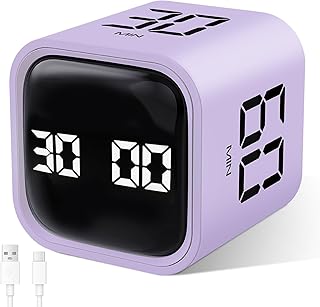
GuDoQi Multi-Function Cube Timer, 5/10/30/60 Min & Custom Count Down, Included Pause & Resume Feature, Silent, Vibrate & Adjustable Sound Alarm for Productivity in Tasks, Study & Kitchen, Purple
Best For:
Podcasters, developers, students, and anyone who needs pause/resume and custom timing options.
What it is and who it’s for
The GuDoQi Multi-Function Cube Timer is a feature-rich option with presets for 5, 10, 30 and 60 minutes, plus custom countdown and a pause/resume function. It supports silent, vibration and adjustable sound alarms, making it a flexible choice for creators who need both structure and adaptability.
Main benefits
Pause and resume is the primary differentiator here — if your workflow includes unexpected calls or interruptions, this cube lets you pause mid-session and pick up where you left off without losing momentum. The adjustable sound and vibration settings give more control over how intrusive alerts are, and a custom countdown lets you dial in less-common durations for specialized tasks.
Real-life usage examples
Podcasters: Use a 60-minute block to record an episode, pause between takes, then resume timing without restarting. Developers: Run focused debugging sessions (30 minutes) with the ability to pause when a meeting pops up. Students and professionals: Use the custom countdown for unusual task lengths like practice exams or client calls.
Practical observations and buying considerations
Customers tend to highlight the pause/resume feature as the one they return to most. If you frequently break flow to handle short tasks, this saves you from restarting timers and losing cumulative focus. Check battery type — some users prefer a rechargeable model but appreciate the simplicity of replaceable batteries for travel.
How it compares to competitors
The GuDoQi cube competes with simpler flip-to-start devices by offering more on-the-fly control. It sits in the middle ground between minimal aesthetic cubes and larger smart timers with app integrations — you get flexibility without needing a companion app.
Who should buy it and who may skip it
Buy if you need pause/resume, adjustable alerts, and a custom timer for irregular session lengths. If you don’t face frequent interruptions or already use a synced app-based system for time tracking, a simpler cube might suffice.
Check the latest price on Amazon.
Pros
- Pause and resume prevents lost session progress
- Adjustable sound and vibration for different environments
- Custom countdown for flexible session lengths
Cons
- May be over-featured for users who want a minimalist device
- Battery type may not be rechargeable on all units
Check the latest price on Amazon.
Small Rechargeable Pomodoro Timer, Gravity Sensor Auto-Rotating 7 Preset Times (1/3/5/15/30/60/90 min) & Count Up Mode, Digital Kitchen Timers for Cooking, Work and Study (Space Gray)

Best For:
Heavy users, frequent travelers who want rechargeable convenience, and creators who alternate between very short and long sessions.
What it is and who it’s for
This small rechargeable Pomodoro timer combines a gravity auto-rotating design with a rechargeable battery and an expanded range of presets (1, 3, 5, 15, 30, 60, 90 minutes) plus a count-up mode. It’s designed for people who want the convenience of rotation-based controls but won’t tolerate frequent battery replacements.
Main benefits
Rechargeability is the headline feature. For heavy users, being able to charge the timer via USB means fewer interruptions and better long-term value. The wide range of presets — including 90 minutes — caters to creators who alternate between short warm-ups and long deep-focus passes. Count-up mode is useful for open-ended tasks where you want to track elapsed time rather than limit it.
Real-life usage examples
Composers and visual artists: Use a 90-minute block for immersive studio time, switching to a 3-minute break to step back and reassess. Remote workers: Charge once a week and rotate through 30- and 60-minute work blocks. Home cooks who also work: Use a 15-minute preset for quick tasks and count-up mode for timing rising dough or slow-simmer steps without preset limits.
Practical observations and buying considerations
Buyers praise the rechargeable convenience and compact footprint. If you frequently travel with a timer, this model’s lack of disposable batteries is a plus — just bring a USB cable. The gravity sensor works best on level surfaces, and the count-up mode is handy for habitual trackers who want data on how long certain tasks actually take. If you prefer mechanical knobs or ultra-simple designs, the digital interface might feel like overkill.
How it compares to other timers
This unit sits between analog tactile cubes and larger smart timers. Compared to non-rechargeable cubes, it’s lower maintenance; compared to app solutions, it removes phone-based distractions and gives physical cues.
Who should buy it and who may skip it
Buy if you want a rechargeable, durable timer with both very short presets and long-session options. Skip if you prefer a unique tactile heft or if you never charge small electronics and favor instant battery swaps.
Check the latest price on Amazon.
Pros
- Rechargeable battery reduces downtime
- Wide range of presets including 90 minutes and count-up mode
- Gravity auto-rotation keeps controls simple
Cons
- Gravity sensor needs a flat surface to operate perfectly
- Digital design may feel less tactile than solid mechanical cubes
Check the latest price on Amazon.
Upgraded Kinetic Desk Toys, Kinetic Spinning Desk Toy for Office for Adults, Quite Fidget Toys for Kids Teens, Desk Fidgets for Adults with ADHD (Grey Rose Gold)

Best For:
Adults and teens who need a quiet tactile outlet during prolonged focus sessions, and those who prefer elegant desk decor.
What it is and who it’s for
This upgraded kinetic desk toy is a polished, spinning desktop fidget designed for quiet, repetitive motion. It’s marketed to adults, teens and kids as a tasteful desk accessory that helps manage restless hands and nerves without loud clicking or distracting noise. For creators who find that a small physical outlet helps maintain focus, a kinetic spinner provides gentle motion without pulling eyes away from the screen.
Main benefits
The toy’s quiet, smooth spinning motion can lower the impulse to pick up your phone or surf the web. Many users report that having a discrete tactile outlet reduces mental friction during long editing or coding sessions. Its metallic finish (grey with rose-gold accents) allows it to sit on a professional desk without looking juvenile.
Real-life usage examples
Writers: Keep it as a discreet hand-fidget during long research sessions or meetings. Video editors: Use short spins between cuts to reset attention. Students with ADHD: Use during lecture note-taking (when allowed) to channel excess energy without creating noise.
Practical observations and buying considerations
Buyers frequently mention the satisfying spin and how its stable base prevents tipping. Unlike noisy fidget toys, the kinetic spinner aims for subtlety; check material and finish if you’re sensitive to temperature or weight. This is not a timer; it complements timing tools by providing a physical anchor during work sprints.
How it compares to alternatives
Compared to popping fidget devices or noisy clickers, this kinetic spinner is a calmer option. It doesn’t provide structured timing like the cubes above but is an excellent companion for those who need something tactile to keep hands engaged while the brain focuses.
Who should buy it and who may skip it
Buy if you benefit from subtle tactile stimulation to sustain attention and want an elegant desk object. Skip if any desk toy distracts you or you need strictly silent visual cues instead of motion.
Check the latest price on Amazon.
Pros
- Quiet and smooth spinning motion
- Attractive metallic finish suitable for professional desks
- Stable base prevents tipping or sliding
Cons
- Not a timer — pairs best with a timing gadget
- May distract users who prefer a minimal desk
Check the latest price on Amazon.
Final Verdict
Picking the right desk gadget often comes down to how you start and sustain focus. If your struggle is getting into the first minute of work, a tactile cube like the Jack Pomodoro Timer or the rotating wood-grain model can remove that friction instantly. If interruptions are frequent, the GuDoQi’s pause/resume and adjustable alerts give you the control to maintain cumulative focus. For heavy, regular use, the rechargeable rotating Pomodoro timer pairs long session options with the convenience of USB charging. And if your hands need a little work too, the kinetic desk toy provides a quiet physical outlet without yanking your attention away from the task.
My recommendation by use-case
– Best for tactile Pomodoro starters: Jack Pomodoro Timer
– Best for aesthetic desks and simplicity: Rotating wood-grain Productivity Timer
– Best for interrupted workflows: GuDoQi Multi-Function Cube Timer
– Best for heavy/rechargeable use: Small Rechargeable Pomodoro Timer
– Best for quiet fidgeting and focus: Upgraded Kinetic Desk Toy
Think about the environment you work in (shared vs private), whether you need vibration or mute modes, and if rechargeability matters. Combining a timer with a small kinetic toy is a common and effective setup: time your work, let your hands spin during high-focus stretches, and take intentional breaks. Whatever you choose, these desktop tools are meant to reduce starting friction, support consistent work rhythms, and give your attention the structure it needs to produce more reliably.
Check the latest price on Amazon.
Conclusion
These Desk gadgets creators use during focused deep work sessions picks are trending now and offer great value and variety. Check the links above for latest prices and reviews.
As an Amazon Associate, I earn from qualifying purchases.
Tags:
pomodoro timer, desk timer, productivity gadgets, focus tools, kinetic desk toy, timers for ADHD, rechargeable pomodoro
