Top Desk Organizers for Realistic Remote Workflows
As an Amazon Associate, I earn from qualifying purchases. This article may contain affiliate links, which means we may receive a commission at no extra cost to you.
Working from home—or running a hybrid schedule—often means juggling a laptop, external monitor, notepads, pens, sticky notes and a steady stream of small tech. A thoughtfully arranged workspace can reduce friction, speed workflow and help creative professionals focus. Below you’ll find five practical, affordable office organizers commonly recommended by creators, writers, project managers and remote workers to manage daily clutter and streamline realistic remote workflows. This guide focuses on functional choices: pen cups that rotate, monitor-attached memo pockets, stackable letter trays, and elevated monitor stands with drawers. Each product section includes realistic use cases, who will benefit most, practical observations from user feedback and buying considerations to help you pick the organizer that fits your setup.
Buying Guide
Choosing the right desk organizer depends on your workflow, available desk space and the types of clutter you battle most. Start by identifying your pain points: are your pens always hiding under sticky notes? Do receipts, incoming mail and draft printouts pile across your workspace? Or do you need to raise a monitor to a comfortable eye level while reclaiming drawer space? Consider footprint first: desktop trays and risers need a stable surface and will take more horizontal space than a slim monitor memo board. Material and build matter—plastic organizers offer lightweight affordability and easy cleaning, while metal mesh or wood alternatives add sturdiness and a premium feel. For monitor accessories, measure bezel thickness and the gap between screen and stand; not every clip-on memo board fits ultra-thin monitors. Rotation mechanisms (for pen holders) should move smoothly but not be flimsy—look for reviews that mention wobble or noise. Drawers are excellent for hiding small items like cables, dongles and sticky notes, but check depth—the shallow drawer won’t fit a bulky power bank. If you often switch between devices, prioritize modular or stackable systems that adapt: separate trays you can rearrange, or a riser with space for a laptop beneath. For creative workflows, consider accessibility: a rotating pen cup or a memo board mounted to your monitor keeps essential tools at your dominant hand and your central vision clear, while tiered trays help triage documents (To Do, In Progress, Reference). Finally, weigh aesthetics—if you spend hours in video meetings, a neat, cohesive look can matter. Below are five specific organizers that fit a range of remote workflows, each with realistic use scenarios and buying considerations.
SKYDUE 360 Degree Rotating Desk Organizer, Dual-Purpose Pencil Pen Holder for Desktop, Rotating Desk Pen Organizer with 5 Slots, Office Supplies, Pencil Cup for Office, School, Home

Best For:
Writers, students and remote workers who need fast access to pens and small tools without sacrificing desk space.
The SKYDUE 360 Degree Rotating Desk Organizer is a compact, dual-purpose pen cup designed to keep writing tools, styluses and small accessories within easy reach. Its rotating base and five segmented slots make it faster to find the exact pen, marker or pencil you need without rummaging. The plastic construction is lightweight, so it won’t weigh down flimsy desks, and the vertical design keeps your work surface clearer than a wide-brim pen dish. While it won’t replace a full desk caddy for art supplies, it’s an elegant upgrade from a single cup or a drawer full of loose items.
Main benefits include quick access to tools, a small footprint, and the convenience of organization by slot—ideal if you like sorting by pen type, color or function (e.g., highlighters in one slot, technical pens in another). Compared with standard metal mesh cups or open ceramic holders, the SKYDUE rotating design reduces the need to lean across your desk to reach a favorite pen and prevents pile-ups at the base.
Real-life usage examples: a copywriter keeps three gel pens, two highlighters, a mechanical pencil, a stylus and an eraser in separate sections so everything is visible during draft revisions; a remote meeting host places a slim whiteboard marker and laser pointer in a dedicated slot; a student uses the slots to separate colored pencils during quick study sessions. Users commonly note that the rotation is smooth enough for frequent use but compact enough to sit beside a laptop without crowding the keyboard area.
Why this product is valuable: it solves the small but constant friction of searching for the right writing tool. For creators who switch between note-taking, sketching and annotation during a single session, the organized visibility speeds transitions and reduces distraction. Compared to full-sized desk organizers, its vertical profile preserves desk space and keeps most-used items reachable without standing.
Buying considerations and observations: if you store heavy tools like large scissors or metal rulers, a sturdier holder may be better—this model excels with pens, pencils and lightweight accessories. Check the diameter to ensure it fits next to your monitor stand or laptop. A few users mention surface scratches on delicate desks, so place a thin pad underneath if you have a delicate finish.
Who should buy it: remote writers, content creators, students and anyone who appreciates fast access to a handful of everyday tools. Who might skip it: minimalists who prefer to keep everything digital or users who need a larger, multi-compartment art caddy. Check the latest price on Amazon.
Pros
- Compact vertical profile saves desk space
- 360-degree rotation for quick access
- Segmented slots keep items visible and sorted
Cons
- Plastic construction not ideal for heavy tools
- May require a desk pad to prevent surface scratches
Check the latest price on Amazon.
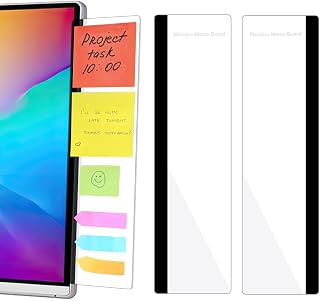
2 Pack Computer Monitor Memo Board, Acrylic Computer Monitor Sticky Note Holder, Transparent Side Panel Office Desk Organizer, Home Office Desk Accessories, Office Supplies for Women Men Computer
Best For:
Remote professionals and multitaskers who prefer physical reminders and need a low-profile way to keep notes visible.
The 2 Pack Computer Monitor Memo Board offers a slim, transparent acrylic panel that clips onto a monitor to hold sticky notes, small memos and thin index cards. It’s an unobtrusive way to keep urgent reminders and quick reference notes in your line of sight without covering screen real estate. The double-pack gives you options—mount one on each side of a large monitor, use one on a secondary display, or keep a spare for a laptop when you travel.
Key benefits include improved visual organization of short-term items, reduced desktop clutter, and a minimal aesthetic that blends with most setups. Compared with placing Post-it notes on the monitor bezel (which can fall or hide important UI elements), the memo board creates a dedicated spot for reminders and can hold multiple notes stacked vertically. It’s especially helpful if you switch contexts often: pin a login credential (brief), a daily to-do list, or quick reference codes without switching windows.
Real-life usage scenarios: a project manager keeps sprint goals visible while navigating task boards; a freelance editor pins client instructions beside the document they’re editing; an entrepreneur uses the second panel for daily habit tracking or a quick phone number. Creators who rely on visual cues appreciate being able to glance at tasks without breaking focus to open a separate app.
Why this product is valuable: it addresses the simple but persistent problem of lost sticky notes and visual reminders that are buried under drafts or moved out of the way. For people who prefer physical cues in addition to digital reminders, a memo board is faster and less interruptive than toggling between tabs. It also helps maintain a cleaner desktop because notes have a designated place rather than strewn across the workspace.
Buying considerations and observations: measure your monitor profile and bezel thickness—very thin modern displays or curved monitors can make mounting less secure. The acrylic is clear and lightweight but not load-bearing; avoid heavy items or thick stacks of paper. Some users report that the clip is tighter on thicker bezels and may need gentle adjustments. If you regularly use a headset or mount a webcam, consider placement so the memo panel doesn’t block accessories.
Who should buy it: multitaskers, remote professionals and students who rely on physical reminders and want a low-profile option to keep notes visible. Who might skip it: those who prefer fully digital workflows or have monitors that don’t accommodate clip-on accessories. Check the latest price on Amazon.
Pros
- Slim, unobtrusive design keeps notes in view
- Two panels provide flexibility for dual-monitor setups
- Transparent acrylic blends with most screens
Cons
- Clip may not fit very thin or unusually curved monitors
- Not suitable for heavy or thick stacks of paper
Check the latest price on Amazon.
WALI Desk File Organizer, 4 Tier Desktop Paper Letter Tray Organizer with Drawer and 2 Pen Holders, Office Desk Accessories & Workspace Organizers for Office, Home Supplies(DO005DH-B), 1 Pack, Black

Best For:
Professionals and creatives who handle regular printouts, mail or multiple active projects and need a compact triage system.
The WALI 4-Tier Desktop Paper Letter Tray is a mid-sized desktop organizer that brings document triage and small-item storage together. With four trays, a shallow drawer and two integrated pen holders, it helps users separate incoming mail, active projects, reference material and outgoing items. The vertical, tiered design reduces the footprint compared with spreading stacks of paper across your desk and gives an immediate visual queue on what needs attention.
Main benefits are efficient paper management, a central spot for small accessories and a more orderly workspace. Compared with a single open tray or piling papers, the WALI organizer makes it easy to implement a lightweight filing system (e.g., To Do, Review, Reference, Archive). The small drawer handles staples, sticky notes, USB drives and other knickknacks so they don’t get lost in the shuffle. Because it’s a compact all-in-one unit, it’s an attractive choice for home offices that lack built-in filing cabinets.
Real-life usage examples: a freelance designer places printouts for current clients in the top tier, drafts in the middle, invoices in another and archived concepts in the bottom tray; a teacher uses the trays to sort lesson plans by day, keeping grading in the drawer; a remote administrator uses the pen holders for highlighters and pens while mailing envelopes stack below. Many users appreciate that the trays are deep enough for letter-sized paper and thin magazines but compact enough to sit on a credenza or small desk.
Why this product is valuable: it solves the everyday problem of document overload. For people who deal with mixed media—printed pages, sticky notes, envelopes—the ability to visually separate and quickly access items reduces decision fatigue and keeps a clearer digital/physical boundary. Compared to a filing cabinet, it’s much more accessible during short remote sessions.
Buying considerations and observations: check the organizer’s footprint to ensure it fits your available surface; if you handle large stacks of thick paper, a sturdier metal alternative might offer more durability. Some users note the plastic finish can show dust more readily, so periodic wiping is recommended. The drawer is shallow—great for small items but not for bulky electronics.
Who should buy it: people who receive regular mail, handle printouts or want a compact triage system for projects. Who might skip it: paperless professionals who prefer cloud-only systems or those who need full-sized filing solutions. Check the latest price on Amazon.
Pros
- Four trays make quick triage of documents easy
- Integrated drawer and pen holders add small-item storage
- Saves desk space compared with spreading stacks across the surface
Cons
- Plastic construction may show dust and wear
- Drawer is shallow, not for bulky items
Check the latest price on Amazon.
OPNICE Desk Organizers and Accessories, Computer Monitor Stand Riser with Drawer and 2 Pen Holders, Printer & Laptop Stand, Office Desk Accessories & Workspace Organizers for Home Office Supplies, Black

Best For:
Users who want improved ergonomics and hidden storage in one unit—especially remote workers and creators who appear on video calls.
The OPNICE monitor stand riser raises your screen to a healthier eye level while offering built-in storage with a front drawer and twin pen holders. Raising a monitor or laptop reduces neck strain and improves posture for extended remote work sessions, and this riser doubles as a mini storage station so you can keep frequently used items tucked out of sight but still within reach.
Benefits include better ergonomics, improved desk organization and a cleaner, more professional-looking setup for video calls. Compared with a simple stack of books or a low stand, the OPNICE unit provides a purpose-built drawer for small items like cables, dongles and sticky notes and two pen holders for easy access to writing tools. The platform surface accommodates most monitors, laptops or even a small all-in-one printer, and the raised clearance can free space for a keyboard or a laptop when not in use.
Real-life usage examples: a content creator places a 24-inch monitor on the riser and stores camera cables and SD cards in the drawer for quick access between shoots; a remote worker slides a compact keyboard under the riser when not in use to reclaim desk space; a podcaster keeps a small ring light base and microphone accessories in the drawer while the pen holders store a marker and a quick-note pen. Users highlight ergonomic relief after extended sessions and praise the tidy look the stand creates for virtual meetings.
Why this product is valuable: it combines two common needs—screen height adjustment and small-item storage—into a single, compact solution. For creators who switch between long stretches of focused work and video meetings, the stand helps maintain posture and keeps essential accessories organized and out of sight. It’s a sensible upgrade over simple flat stands because the integrated drawer prevents desktop clutter from creeping back in.
Buying considerations and observations: check the surface dimensions and weight capacity of the riser to ensure it supports your monitor. The drawer is best for small accessories; if you need deeper storage, consider a larger riser or a desk with built-in drawers. A few users recommend using non-slip pads underneath if your desk surface is glossy. Those with standing desks should confirm the riser still fits when the desk is raised.
Who should buy it: anyone seeking ergonomic improvement plus hidden storage—remote workers, streamers, content creators and people with limited desk drawers. Who might skip it: users with already-ergonomic monitor arms or large multi-monitor arrays that exceed the riser’s surface. Check the latest price on Amazon.
Pros
- Raises monitor for better ergonomics
- Integrated drawer hides small clutter
- Two pen holders keep writing tools accessible
Cons
- Limited drawer depth for bulky items
- May not fit very large multi-monitor setups
Check the latest price on Amazon.
Desk Organizers and Accessories, 5-Tier Paper Letter Tray Organizer with File Holder, Drawer & Pen Holder, Office Desk Accessories, Desktop Organizer for Classroom Office Supplies, Black

Best For:
Users who handle multiple projects, shared workspaces or classroom materials and need clear, tiered document separation.
This 5-tier letter tray organizer is for people who need a slightly larger paper triage system with a built-in file holder, drawer and pen compartment. The extra tier is useful when your workflow includes additional categories—drafts, invoices, receipts, reference and archival—or when a small team shares a single workstation. The vertical stacking minimizes footprint while offering more distinct slots than typical three-tray systems.
Main benefits include robust document organization, a visible filing structure and small-item storage to prevent desk clutter. Compared with single or three-tray organizers, the five-tier model gives finer granularity for project stages or separate workstreams. The integrated file holder helps keep folders upright and prevents them from sagging across trays, which is a common annoyance with lower-capacity organizers.
Real-life usage examples: a freelance copywriter uses five tiers to separate clients and manage editorial calendars; a small home office shared by partners assigns a tray to each person plus an inbox and outgoing tray; a teacher sorts worksheets by grade and keeps grading essentials in the drawer. Users report that stacking multiple trays reduces the need to shuffle through piles on the desk and makes it easier to implement a consistent filing habit.
Why this product is valuable: it’s a practical step up for those who work with a steady flow of paper and need clear visual separation between categories. For creators who alternate between many short-term tasks, the extra tiers reduce cognitive load and speed retrieval. Compared to bulky filing cabinets, it’s immediately accessible and portable.
Buying considerations and observations: confirm that letter-sized documents fit comfortably; if you work with legal-size sheets or thick stacks, consider a larger desktop unit or a lateral file. The unit’s height may be an issue under low shelves or near monitors, so factor in vertical clearance. A few buyers note that dust can collect in the recessed areas—regular wiping helps maintain a clean look.
Who should buy it: professionals managing multiple projects, teachers, small teams and anyone who needs finer document separation than standard three-tray organizers. Who might skip it: those who are fully paperless or have little horizontal desk space to accommodate the stack’s footprint. Check the latest price on Amazon.
Pros
- Five tiers provide fine-grained organization
- Integrated file holder keeps folders upright
- Drawer and pen holder consolidate small items
Cons
- Taller profile needs vertical clearance
- Dust can collect in recessed stacking areas
Check the latest price on Amazon.
Final Verdict
Small changes in how your desk is organized can have outsized effects on productivity, focus and comfort during remote work. If your top frustration is missing pens and scattered sticky notes, the SKYDUE rotating pen organizer and monitor memo panels are inexpensive, low-friction fixes. If paper pile-up is the daily headache, the WALI 4-tier or the 5-tier tray offer structured triage without the bulk of a filing cabinet. For teams and creators who also need better ergonomics, a riser like the OPNICE model lifts your monitor to a healthier level while reclaiming hidden storage space. Think about your primary friction points—searching for items, poor posture, or managing multiple active projects—and pick the product that targets that problem first. Combining one compact item for immediate access (pen cup or memo board) with a tiered tray or riser creates a layered system: quick-access tools upfront and organizational backdrops that keep projects moving. With a small investment in the right organizer, many remote workflows become noticeably smoother and more focused.
Conclusion
These Office organizers creators use during realistic remote workflows picks are trending now and offer great value and variety. Check the links above for latest prices and reviews.
As an Amazon Associate, I earn from qualifying purchases.
Tags:
desk organizers, home office, monitor riser, pen holder, letter tray, remote work, desk accessories
