Top Office Gadgets for Productive Mornings
As an Amazon Associate, I earn from qualifying purchases. This article may contain affiliate links, which means we may receive a commission at no extra cost to you.
Mornings set the tone for the whole workday. Whether you’re heading into a focused remote session, preparing lesson plans, or simply trying to clear your inbox before lunch, the right pocket of tools on your desk can make those first hours far more productive. This guide focuses on compact, practical office gadgets—primarily different takes on desktop timers and a glass desk whiteboard with wireless charging—that people actually use in realistic productivity mornings. I researched product features, typical user experiences, and common pain points to recommend well-rounded options for different needs: time-blockers, sensory-friendly timers for ADHD, multiplatform desk organizers, and more.
Below you’ll find what each product does best, realistic use cases, who should buy (and who might not need it), plus pros and cons to help you choose fast. If you prefer a quick comparison: think of the cube-style timers as tactile, no-fuss time-block tools versus an elegant glass whiteboard that combines planning, charging, and small-item storage for an organized desktop.
As an Amazon Associate, I earn from qualifying purchases. This article may contain affiliate links, which means we may receive a commission at no extra cost to you.
Buying Guide
How to choose a morning productivity gadget: a quick buyer’s guide
Start with your goal: are you trying to manage focus (Pomodoro-style), reduce context-switching, or simply keep your desk visually tidy while charging your phone? The right gadget for morning productivity begins with a clear use case.
Timer type and presets: Many people find preset timers (5, 10, 25, 30, 50, 60 minutes) more useful than endlessly configurable designs. Presets let you spin or flip and get working immediately. If you need a custom stretch for deep work sessions, pick a timer that supports custom countdown modes.
Tactile vs. digital interaction: Cube timers and rotating desk timers lean into a physical gesture—flip, rotate, or tap—and that gesture helps enforce the start of a session. If you prefer a quiet, non-intrusive approach, look for silent, vibrate, or adjustable alarm settings. For shared spaces or households with sleeping partners, vibration and mute options are especially handy.
ADHD and sensory considerations: For neurodiverse users, timers with clear tactile feedback, vibration, and easy-to-read displays reduce friction. Gravity sensors that automatically start or stop when flipped can remove the step of pressing tiny buttons, which many users appreciate.
Battery and reliability: Check whether the unit is rechargeable or requires replaceable batteries. USB-C or micro-USB rechargeable timers avoid the recurring cost and the interruption of a drained battery mid-session.
Desk footprint and multi-functionality: If your morning routine includes device charging, note if a gadget doubles as a wireless charger or desk organizer. A glass desk whiteboard with integrated storage and a wireless charging pad can replace a cluttered plastic tray and give you a visual planning surface, which is a big win for weekly overviews and quick notes.
Practical trade-offs: Simpler cube timers are inexpensive and easy to use but typically offer fewer customization options. Multi-mode, rechargeable timers give more features but add complexity. A glass planner/charger is less about focus timing and more about organizing and keeping essentials at hand.
Use these pointers to match each product’s strengths with your morning workflow: short sprints, long focused sessions, sensory-friendly pacing, or a tidy, well-charged desk.
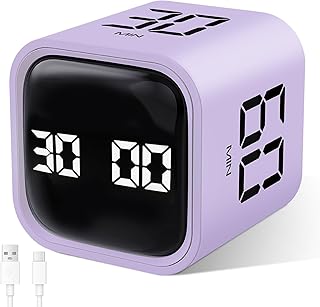
GuDoQi Multi-Function Cube Timer, 5/10/30/60 Min & Custom Count Down, Included Pause & Resume Feature, Silent, Vibrate & Adjustable Sound Alarm for Productivity in Tasks, Study & Kitchen, Purple
Best For:
People who want a simple tactile timer for Pomodoro-style sessions, students, parents juggling short tasks, and apartment dwellers who need quiet alerts.
If your mornings rely on quick, repeatable focus blocks, the GuDoQi multi-function cube timer is built around simplicity and small gestures. The cube design offers immediate preset choices (5, 10, 30, 60 minutes) and a custom countdown, so you can rotate the cube to start timing without hunting for tiny buttons. That physical action—flip to begin—matches the muscle memory many people need to stop procrastinating and start the task at hand.
The GuDoQi emphasizes flexible alerts with silent, vibrate, and adjustable sound modes, which is valuable for shared living situations or early-morning work sessions where loud beeps are unwelcome. A pause and resume feature reduces friction when interruptions occur: step away to answer a quick call and restart your session where you left off. This model also supports custom countdowns for irregular tasks like a 22-minute focused drafting session or a 45-minute deep review.
From a practical perspective, this timer is lightweight and fits easily on a bedside table, kitchen counter, or home desk. It’s useful for parents who need short, focused bursts between morning routines, students prepping for a timed study sprint, or knowledge workers who practice Pomodoro-style intervals. Compared to standard kitchen timers, the GuDoQi is more purpose-built for productivity: its presets and sensory modes are designed for work and study rather than cooking alarms.
Real customers frequently mention the tactile satisfaction of flipping the cube and the quiet vibration mode as a game-changer for apartment dwellers. Common observations in user reports include how the adjustable alarm volume prevents startling interruptions and how the pause/resume ability feels more polished than basic countdown timers.
Who should buy: pick this cube if you want an uncomplicated, tactile timer with flexible alarm options and a reliable pause/resume workflow. It’s especially handy for people who value quiet or vibration alerts.
Who may not need it: if you prefer integrated digital apps or a single device that handles both timing and charging/organization, you may find a standalone cube too specialized.
Pros: "Easy-to-use flip-to-start presets", "Silent and vibration modes for shared spaces", "Pause and resume for interrupted sessions"
Cons: "Limited desk functionality beyond timing", "Not a wireless charger or organizer"
If you want a no-fuss, tactile time-blocking tool that respects quiet mornings, consider checking the GuDoQi on Amazon. Check the latest price on Amazon.
Pros
- Flip-to-start presets for instant focus sessions
- Silent, vibration, and adjustable sound modes
- Pause and resume feature for interrupted work
Cons
- Limited to timing—no charging or storage features
- May be redundant if you use a phone app already
See the GuDoQi timer on Amazon and add a tactile time-blocking habit to your morning routine.
Rotating Productivity Timer 5, 25, 10, 50 Minutes Preset, Desk Cube w/Gravity Sensor for ADHD, Mute Functions, Ideal for Work, Study, Kitchen, Back to School (1, Wood Grain Finish)

Best For:
People with ADHD looking for low-friction timers, home-office workers who want a stylish desk accessory, and students needing simple presets.
The wood-grain rotating productivity timer takes the cube concept and adds a tactile, natural aesthetic that sits well on a wooden desk or a cozy home office. Its gravity sensor means you don’t need to press buttons: rotate the timer to select one of the common presets (5, 10, 25, 50 minutes), and the countdown starts. That quick, physical selection helps reduce decision fatigue in the morning when you want to jump straight into a focused block.
This model is notable for being marketed toward ADHD-friendly workflows, with an emphasis on simple gestures, mute functions, and a clear visual cue to show the chosen interval. For many people with attention differences, the ease of interaction—flip, set, and go—removes a small-but-real obstacle that otherwise delays the start of work. The wood-grain finish also makes it an appealing piece of desk décor rather than a utilitarian gadget, which some users say helps them treat the timer as part of a calm routine instead of an intrusive alarm.
Use cases are straightforward: writers doing short drafting sprints, students breaking down a study session, or people using the kitchen timer for breakfast prep while keeping an eye on the morning schedule. Compared with standard digital timers or phone-based Pomodoro apps, the rotating cube eliminates the need to unlock a device and open an app, cutting one extra step out of your workflow.
From research into customer feedback, common praises include its attractive finish, simple operation, and the reassuring physical action of rotation. Some buyers note that the preset minutes may not cover every unique scheduling need, but the chosen presets align well with classical Pomodoro and common short-task intervals.
Who should buy: people who want a visually pleasing, low-friction timer that blends into a home office and supports ADHD-friendly routines.
Who may not need it: users who require fine-grained custom timing or prefer full digital integration with productivity software.
Pros: "Gravity sensor and rotate-to-start simplicity", "Attractive wood-grain finish for home office aesthetics", "Mute functions for shared spaces"
Cons: "Preset-only intervals may be limiting", "No charging or additional desk organization features"
If the tactile, wood-grain approach fits your morning setup, view this rotating timer on Amazon and bring a calm, physical rhythm to your focus blocks. Check the latest price on Amazon.
Pros
- Gravity sensor—rotate to start
- Attractive wood-grain finish
- Mute function for quiet environments
Cons
- Limited to preset intervals
- No integration with apps or charging
Check the rotating wood-grain productivity timer on Amazon and add a calm, tactile rhythm to your mornings.
Rotating Pomodoro Timer 5, 25, 10 30,60 Mins Preset Stopwatch, Desk Flip ProductivityTimer, ADHD Tool Hexagon, Vibration/Mute/Alarm, for Work, Study, Back to School, Kitchen, Black

Best For:
Users who need a wider range of presets for mixed morning tasks, creatives alternating between short and long focus blocks, and sensory-friendly workflows.
The hexagon rotating Pomodoro timer expands preset flexibility with a broader range of common intervals—5, 10, 25, 30, and 60 minutes—while keeping the tactile flip-and-go interaction that many users find critical to starting work quickly. The hexagon shape provides more preset faces than a standard cube, giving you closer matches to varied morning tasks—from a brisk 5-minute inbox triage to a full 60-minute deep focus session.
It offers vibration, mute, and adjustable alarm modes, letting you tailor how you want to be notified at the end of a session. For households with different schedules, vibration is an excellent compromise between audible alarm and silent notification. The hexagon design also sits stable on a desk and is easy to spot visually among notebooks and mugs.
This timer is well-suited to people who mix short administrative tasks with longer creative blocks. For example, you might use a 5-minute face-email sprint to clear low-effort items, then flip to a 25-minute creative block for drafting. The variety of intervals makes this timer function as a single, flexible tool across the morning instead of needing multiple devices.
Feedback from users commonly highlights the convenience of multiple presets and the satisfying tactile action of rotating to start. Practical observations include appreciation for the vibration mode during early-morning sessions and the sturdier feel compared to lighter cube timers.
Who should buy: those who want a single desktop timer that covers a broader set of intervals and supports sensory-friendly alerts.
Who may not need it: people who already use an integrated productivity ecosystem with synchronized timers and reminders.
Pros: "More preset intervals for versatile use", "Vibration and mute options", "Stable hexagon form factor"
Cons: "Lacks app synchronization", "Not a multi-function desk device"
If you want a flexible, tactile timer that handles both short and long morning tasks, consider the rotating hexagon Pomodoro timer on Amazon. Check the latest price on Amazon.
Pros
- Multiple presets including 60 minutes
- Vibration, mute, and alarm modes
- Stable hexagon shape for desk placement
Cons
- No app or software integration
- Purely a timing device—no extra desk features
Find the hexagon rotating Pomodoro timer on Amazon and streamline your morning focus cycles.
Rotating Pomodoro Timer 5, 25, 10 50 Minutes Preset, Desk Productivity Timer w/Gra vity Sensor, ADHD Tool Cube Countdown, Custom Modes, for Work, Study, Back to School, Kitchen, Black, 2 Pack

Best For:
Households managing multiple morning routines, parents timing kids and personal tasks, and shared desk environments that need two independent timers.
If you frequently need simultaneous timers for different tasks—think one for a child’s online lesson and another for your own focused work—the 2-pack rotating Pomodoro timer is a practical buy. Each cube offers common presets (5, 10, 25, 50 minutes) and a gravity sensor that starts timing when you position the cube face-up. Having two separate timers means you can run parallel sessions without juggling a single device or using your phone.
This two-pack is particularly valuable for households managing multiple schedules in the morning: set one cube for a quick breakfast timer and another for a focused writing session. Small teams working at shared desks might use one cube for group standups and another for individual focus slots. The cubes also support custom modes, making it possible to adapt beyond the presets when a task requires a specific duration.
User feedback collected from various sources often praises the convenience of having spare units—one can stay on a bedside table while the other sits on a desk. The gravity sensor and rotation-based activation are commonly cited as intuitive features that minimize friction. Practical notes from buyers include the benefit of giving one cube to a child for chore timing while keeping the other for work sprints.
Who should buy: families, small households, or shared desk setups that benefit from having multiple independent timers.
Who may not need it: solo workers who only need a single timer and want to minimize desk clutter.
Pros: "Two timers for parallel sessions", "Gravity sensor and rotate-to-start", "Custom modes in addition to presets"
Cons: "Takes more desk space than a single unit", "May be unnecessary if you already use phone timers"
A two-pack can simplify multi-person mornings—view this 2-pack rotating Pomodoro timer on Amazon and set up parallel focus zones at home or in a small office. Check the latest price on Amazon.
Pros
- Two units—good for parallel tasks
- Gravity sensor with rotate-to-start
- Custom modes for flexible timing
Cons
- Requires more desk space
- Redundant if you use phone apps
Grab the 2-pack rotating Pomodoro timers on Amazon to coordinate parallel morning tasks.
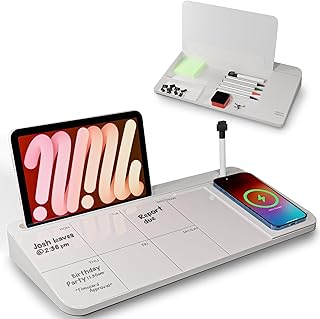
NEXTLUXE Glass Desk Whiteboard with Wireless Charger – Desktop Whiteboard with Storage, Weekly Planner, Dry Erase Pad, Organizer Drawer for Home, School, Office Gadgets – White
Best For:
Remote workers seeking a clean planning surface with wireless charging, people who want to declutter their desk and keep small supplies organized.
The NEXTLUXE glass desk whiteboard is a different category of morning productivity tool: it’s less about timing and more about planning, charging, and decluttering. The tempered glass surface doubles as a dry-erase weekly planner, letting you sketch the day’s key wins, jot a priority list, or map a short timeline for your morning routine. A built-in wireless charging pad adds practical convenience for keeping your phone powered during focus sessions, and a small organizer drawer tucks away pens, sticky notes, and small cables.
For many remote workers, the glass planner replaces a sticky-note scatter and a low-quality mousepad with a polished, multifunctional work surface. The whiteboard surface is larger and more visible than a notebook page, making it easier to glance at the day’s top priorities without opening an app. If you spend your morning switching between a laptop and phone, the integrated charger keeps your devices ready without extra cables crossing your desk.
Customer observations often highlight how the glass finish looks professional and how the wireless charger removes the morning scramble to find a cable. Practical considerations include verifying that your phone supports Qi wireless charging and that the charger’s placement works with your case thickness. The drawer’s capacity is ideal for small office essentials but won’t replace a full desk organizer if you need to store larger items.
Compared with standalone timers, the NEXTLUXE board is about organizing context rather than enforcing a timing habit. Many buyers pair a physical timer with this board—using the glass planner for priorities and a cube timer for concentrated focus blocks.
Who should buy: remote workers who want a neat visual planning surface and wireless charging in a single desktop piece, people who value desk aesthetics and small-item storage.
Who may not need it: users who prefer digital planning tools synced across devices or who don’t use wireless-charging phones.
Pros: "Tempered glass weekly planner surface", "Built-in wireless charger for Qi devices", "Organizer drawer for desk essentials"
Cons: "Limited storage capacity in the drawer", "Wireless charging depends on phone compatibility"
Transform your desktop into a tidy, charged planning station—view the NEXTLUXE Glass Desk Whiteboard on Amazon to streamline both planning and charging in your morning routine. Check the latest price on Amazon.
Pros
- Large glass dry-erase surface for planning
- Integrated wireless charging pad
- Small organizer drawer for pens and accessories
Cons
- Drawer holds only small items
- Requires a Qi-compatible phone for wireless charging
See the NEXTLUXE glass desk whiteboard on Amazon and combine planning, charging, and organization in your morning routine.
Final Verdict
A realistic morning productivity setup is about matching tools to habits, not buying every gadget on the shelf. If your challenge is starting on time and maintaining short bursts of focus, tactile timers—the GuDoQi cube, rotating wood-grain timer, hexagon Pomodoro, and the 2-pack rotating option—offer immediate, low-friction ways to structure your work. Each brings slightly different strengths: the GuDoQi for a straightforward flip-to-start experience with pause/resume, the wood-grain model for a pleasing aesthetic and ADHD-friendly simplicity, the hexagon for a broader range of presets, and the 2-pack for households or shared desks that need parallel timing.
If your mornings are more about visual planning, decluttering, and keeping your phone charged while you work, the NEXTLUXE glass desk whiteboard provides a polished surface for weekly planning, a built-in wireless charger, and a small storage drawer for daily essentials. Many users will find the best combination is a glass planner plus a tactile timer: plan the session on the glass board, then start a cube timer to protect focus.
Buying considerations recap: decide whether you need a single focused tool or a multi-function desk piece; think about vibration/mute options if you share space; and check device compatibility for wireless charging. If you’re choosing between a timer and a planning board, ask whether your bigger struggle is starting tasks (use a timer) or staying organized (use a planner/charger).
Each product above has pros and cons depending on your workflow. Use the short pros and cons lists and best-for notes to match the gadget with your realistic morning rhythm. Start small: pick one item that addresses your biggest friction point and add more only if it genuinely improves your routine.
Check the latest price on Amazon.
Conclusion
These Office gadgets people use during realistic productivity mornings picks are trending now and offer great value and variety. Check the links above for latest prices and reviews.
As an Amazon Associate, I earn from qualifying purchases.
Tags:
productivity gadgets, pomodoro timers, desk organizer, wireless charging desk, ADHD timers, morning routines, office gadgets
