Morning Office Accessories Creators Use Daily
As an Amazon Associate, I earn from qualifying purchases. This article may contain affiliate links, which means we may receive a commission at no extra cost to you.
Mornings set the tone for a creative workday. For many creators—podcasters, designers, writers, and YouTube hosts—small but thoughtful desk accessories cut through the clutter and help turn chaotic to-do lists into focused actions. This guide walks through five practical items that often appear in realistic creator setups: sticky memo boards that clip to monitors, compact daily and weekly notepads, and glass desk whiteboards that double as chargers and organizers. I’ve researched product details, specs, and common user feedback to highlight what works, what to watch out for, and which types of creators will benefit most. Whether you’re rolling out of bed to meet a sunrise deadline or preparing for a livestream, these accessories are meant to make a morning routine simpler and more repeatable.
Buying Guide
A morning-ready desk accessory must balance visibility, convenience, and a small footprint. Here’s what to consider when choosing between memo boards, notepads, and glass whiteboards:
– Desk footprint and mounting: If your workspace is small or you use a laptop, choose a clip-on memo board or slim notepad. Glass whiteboards and organizers add weight and storage but take more desk space.
– Visibility and ergonomics: Monitor-mounted memo boards put notes at eye level—great for running lines, reminders, or recurring tasks. Paper notepads are perfect for quick capture and habitual crossing-off, while glass whiteboards give a clean erasable surface for brainstorming.
– Material and durability: Refillable notepads and magnetic or glass boards last longer than single-use sticky notes. Glass whiteboards resist staining and ghosting better than cheap melamine boards but cost more.
– Multi-function features: Wireless charging stations, built-in drawers, or compartments for pens and phones reduce clutter. Consider whether you want a combined organizer/charger or prefer separate dedicated devices.
– Refill availability and paper quality: If you’ll use the notepad daily, look for thicker paper, easy-tearing perforations, and replacement packs. For weekly planners, undated sheets offer flexibility.
– Cleaning and maintenance: Dry-erase boards need compatible markers; glass boards typically wipe clean with a microfiber cloth. For adhesive memo boards, check whether the adhesive leaves residue or if they clip without damage.
– Aesthetic and noise: Creators who film or livestream want quiet, low-reflective accessories that look good on camera. Matte notepads and frosted glass boards reduce glare.
Choosing the right combo depends on your workflow. If you capture lots of fleeting ideas, a notepad plus a small glass whiteboard for visual planning may be ideal. If you juggle recurring tasks and timelines, a weekly undated notepad or a monitor-mounted memo board keeps priorities visible without interrupting creative flow.
MDOZQ Office Desk Accessories 2pcs Computer Monitor Memo Board Message Board Supplies for Women Men Sticky Note Holder Home Desktop Decor

Best For:
Streamers, podcasters, and remote creators who want short, glanceable prompts or reminders at eye level during recording.
The MDOZQ monitor memo boards are a pair of slim, attachable message panels designed to clip to the top edge of a computer monitor or sit on a desktop as a small standing board. For creators who often forget short talking points, daily priorities, or recurring reminders, these memo boards keep essential notes at eye level without crowding the keyboard. They’re marketed as a sticky-note holder and message board combo—useful for quick jots of text, procedural checklists, or a visible line like a livestream intro. The set includes two boards so you can separate categories (e.g., “Today’s Tasks” and “Quick Links”) or keep one at your camera-facing side for on-screen prompts.
Compared with traditional sticky notes that scatter and peel off, the MDOZQ memo boards offer a more permanent, reusable surface. If you alternate between a laptop and a desktop, the clip-on design makes them more portable than fixed cork boards. They’re especially handy for hybrid creators who switch setups frequently: clip one to your monitor at your studio and tuck another in a portable stand for remote shoots.
Use cases where these boards shine include: keeping a short list of podcast segments within easy sight during recording; placing camera cues during a livestream so you avoid looking down at paper; keeping a daily habit tracker visible while working; or organizing login shorthand and quick references during editing sessions. They aren’t meant to replace a full writer’s notebook or a project planner but function as an immediate visual anchor.
Practical considerations include adhesive and clip strength—make sure your monitor’s bezel can accommodate the clip or that the stand fits securely on a slim laptop display. The surface cleans with a soft cloth but may hold faint marker residue over time if used with permanent ink. For creators who value low-distraction setups, the slim profile and neutral design blend into most desk aesthetics.
Who should buy: Creators who need eye-level reminders during live or recorded sessions, or anyone who prefers a reusable, tidy alternative to loose sticky notes.
Who may not need it: Large-scale producers who rely on teleprompters, full studio cue systems, or those who prefer digital overlays and software-based reminders. Check the latest price on Amazon.
Pros
- Keeps reminders at eye level to reduce looking away from the camera
- Reusable and less messy than loose sticky notes
- Comes in a two-piece set for category separation or portability
Cons
- Clip fit depends on monitor bezel thickness
- Surface can hold faint residue if incorrect markers are used
Check the latest price on Amazon.
Taja To Do List Notepad – To Do List Notebook for Work with 52 Sheets, 9.8" x 6.5", Undated Daily Planner Perfect for Daily Tasks and Goal Setting, Notepad Suitable for Office, Home & School – Greenery Sway

Best For:
Solo creators, freelancers, and remote workers who prefer structured daily paper planning to stay organized and motivated.
The Taja To Do List Notepad targets creators who appreciate a disciplined daily capture habit. With 52 undated sheets in a compact 9.8" x 6.5" format, it’s sized to sit beside your keyboard or slip into a bag for on-the-go planning. Each page is structured for task entry and prioritization, which encourages a single-source list for the day’s most important items rather than scattering notes across multiple apps or sticky pads.
Compared to blank notebooks or generic notepads, this to-do list pad nudges you toward prioritizing: it’s built around short daily planning with space for top tasks, smaller action items, and a simple checkbox system for satisfying completion. Many creators say that crossing off tangible items early improves momentum during creative sessions—this pad is made to reinforce that ritual.
Real-life usage scenarios include: a video editor who breaks a project into daily editing milestones; a freelance writer planning chapter or article sections and tracking word counts; a creator who lists social posts, asset prep, and recording slots so nothing slips between devices. It’s also a good companion to a monitor memo board—use the pad for capturing and batching tasks, and pin only today’s critical items to your on-screen memo.
Practical buying considerations: the undated format is flexible but requires you to write the date; check paper weight if you prefer heavier stock (this pad favors quick jots and clean tear-off). The compact size is perfect for kitchens, coffee shops, and shared desks, while the design is unobtrusive enough for camera frames during casual vlogs.
Who should buy: Creators who want a dedicated daily capture tool that’s simple, structured, and easy to archive.
Who may not need it: Those who rely entirely on digital task managers with integrated calendars and notifications might find this redundant.
CTA: Check the latest price on Amazon.
Pros
- Structured layout encourages prioritization
- Compact size fits small desks or travel bags
- Undated pages for flexible use throughout the year
Cons
- Paperweight suited to quick notes; may bleed with heavy pens
- Undated format requires manual dating if you track days
Check the latest price on Amazon.
Weekly To Do List Notepad with 52 Undated Sheets(8.5"×11")- Undated Weekly Planner Notepad for Office Desk Accessories and Supplies – Midnight Lilac

Best For:
Content creators and social managers who batch-produce content and need a weekly visual plan.
The Weekly To Do List Notepad in Midnight Lilac takes a step back from day-by-day capture and gives creators a small weekly runway for planning. With 52 undated sheets sized at 8.5" x 11", it provides a familiar letter-sized surface that’s large enough for mapping out content schedules, recording blocks, and batch work sessions. Unlike single-page daily pads, a weekly notepad helps visualize workload across a few days so creators can allocate time for scripting, filming, editing, and posting.
Compared with digital calendars, the tactile weekly page reduces decision friction: at a glance you see how much editing remains, when you booked interviews, and which days are free for creative work. It’s also simpler than a full planner book because every sheet is detachable—archive, photograph, or reorder without committing to a bound volume.
Good use cases include: scheduling a week of short-form social clips with deadlines for recording and editing; planning a podcast release cadence with prep tasks and promotion slots; mapping a week of client work so you avoid overbooking creative time. The undated nature makes it forgiving—if plans change you can reuse or skip pages without wasted calendar space.
Buying considerations involve sheet quality and pen compatibility—if you sketch storyboards or mind maps, check that the paper takes ink and light marker without ghosting. The larger size is excellent for desk-based creators but less portable than smaller notepads.
Who should buy: Creators who batch produce content and need to visualize several days of work at once.
Who may not need it: Minimalists who prefer single-day focus or those who rely exclusively on cloud-based collaboration scheduling tools.
CTA: Check the latest price on Amazon.
Pros
- Large letter-size pages for multi-day planning
- Undated sheets for flexible scheduling
- Easy to tear off and archive weekly plans
Cons
- Less portable than smaller daily notepads
- Paper quality varies; check for bleed with heavy pens
Check the latest price on Amazon.
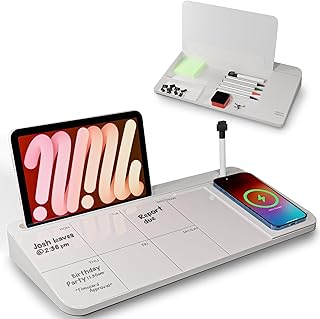
NEXTLUXE Glass Desk Whiteboard with Wireless Charger – Desktop Whiteboard with Storage, Weekly Planner, Dry Erase Pad, Organizer Drawer for Home, School, Office Gadgets – White
Best For:
Desk-based creators, educators, and livestreamers who want a camera-ready dry-erase surface plus wireless charging and storage.
The NEXTLUXE Glass Desk Whiteboard is a multifunctional organizer aimed at creators who want a sleek, camera-friendly surface plus the convenience of wireless charging. It combines a tempered glass dry-erase surface and an integrated wireless charging pad in a single desktop unit with storage compartments and a small drawer for pens or cables. The clean white finish photographs well and minimizes glare on video, making it a popular choice for creators who film at a desk or broadcast instructional content.
Where typical melamine whiteboards can ghost or feel cheap on camera, glass whiteboards resist staining and provide a smooth, precise writing surface for quick sketches or weekly plans. The NEXTLUXE also folds in organizational benefits: a lined weekly planner printed beneath the glass gives structure while the drawer and divider sections make it simple to stash a phone, SD cards, or markers. The built-in wireless charger reduces cable clutter, especially helpful when you need to keep a phone charged for notifications, scripts, or teleprompter apps.
Real-world examples include a tutorial host who diagrams steps on the glass during a recording, a livestreamer who keeps a running schedule and cue list at arm’s reach, or a remote instructor who uses the board to share quick equations and then wipes them clean between takes. Because the surface is glass, it wipes very clean compared with coated boards; however, you’ll want to buy compatible dry-erase markers to avoid ghosting.
Practical considerations: ensure your phone supports the included wireless charging standard and verify that the charger’s placement matches your typical phone placement on the desk. The unit is heavier than paper organizers, so it’s better suited for a permanent desk rather than frequent travel. Also measure your desk to ensure the combined footprint of board plus charging pad fits comfortably.
Who should buy: Creators who need a durable, camera-friendly dry-erase surface and value integrated charging and storage.
Who may not need it: Mobile creators who travel often or anyone with a compact desk that can’t accommodate a heavier organizer.
CTA: Check the latest price on Amazon.
Pros
- Tempered glass surface resists ghosting and looks great on camera
- Integrated wireless charging reduces cable clutter
- Built-in storage and drawer for small accessories
Cons
- Heavier and less portable than paper-based organizers
- Requires compatible wireless-charging phones and proper placement
Check the latest price on Amazon.
Varhomax Glass Desk Whiteboard with Storage, Desktop Organizer to-do List Memo Notepad Dry Erase White Board for Home Office and School Supplies (Gray)

Best For:
Multitasking creators who need both a reusable dry-erase surface and on-desk storage for accessories.
The Varhomax Glass Desk Whiteboard blends a minimalist glass dry-erase surface with modular storage to keep desk essentials neat and visible. Unlike large wall-mounted boards, Varhomax is designed for desktop use: it sits at a slight angle for comfortable writing and includes compartments for pens, sticky notes, and phones. The gray accent color reads neutral on camera and pairs well with modern studio setups.
For creators who like sketching quick diagrams, blocking camera shots, or writing short lists as they work, the glass surface offers a smooth writing experience and a low-maintenance clean-up. Compared to conventional cork or plastic boards, glass reduces staining and provides a more premium feel; compared to paper notepads, it’s instantly reusable and better for iterative planning. Many creators use this kind of organizer to draft shot lists, mark progress on editing tasks, or run a visible checklist during recording.
Practical use cases include: a photographer who lists remaining shots and lighting adjustments; a live presenter who keeps a visible cue sheet and small props organized; a content manager who drafts weekly editorial themes and tags social copy for each day. Because the board sits on the desk and includes storage, it’s well-suited to multi-tasking creators who need quick access to pens, SD cards, and a phone without digging through drawers.
Buying considerations: check writeability and compatibility with your markers—some users prefer fine-tip markers for neat lettering. The angle and size suit desks with moderate depth; measure your workspace if it’s particularly narrow. While visually cleaner than a pile of sticky notes, glass boards still require regular wiping to avoid faint residue over weeks of heavy use.
Who should buy: Creators who want a tidy desktop board with integrated storage and a premium writing surface.
Who may not need it: Minimalists with very tight desk real estate or creators who travel frequently and need portable solutions.
CTA: Check the latest price on Amazon.
Pros
- Premium glass surface for smooth writing and easy cleaning
- Integrated compartments keep small items organized
- Neutral design fits well in video frames
Cons
- Requires desk space and regular cleaning to avoid residue
- Not ideal for creators who frequently work away from a fixed desk
Check the latest price on Amazon.
Final Verdict
Mornings are when momentum builds, and the right combination of visual reminders, structured notepads, and a clean reusable surface can turn a scattered to-do list into an executable plan. For creators who need glanceable prompts during recording, the MDOZQ monitor memo boards provide a low-cost, low-profile solution. For daily capture and the satisfaction of crossing tasks off a list, the Taja To Do List Notepad is a compact, structured companion. When you need a multi-day overview, the Weekly To Do List Notepad expands your planning horizon with letter-size pages you can tear off and archive. If you want a premium desk centerpiece that doubles as a whiteboard and organizer, the NEXTLUXE glass board adds wireless charging and a camera-friendly finish. The Varhomax option delivers similar glass-board benefits with modular storage for pens and small accessories. Pair items based on your workflow: a monitor memo plus daily pad suits solo creators who need visible reminders and rapid capture; a glass board plus weekly pad fits batch producers and educators who plan several days ahead.
When deciding, weigh desk space, portability, and whether you prefer tactile paper versus reusable glass. Check marker compatibility, refill availability for pads, and charger specs for integrated units before buying. These accessories are modest investments that often yield big gains in focus and routine—particularly for creators who value calm, repeatable mornings. Check the latest price on Amazon.
Conclusion
These Office accessories creators use during realistic workday mornings picks are trending now and offer great value and variety. Check the links above for latest prices and reviews.
As an Amazon Associate, I earn from qualifying purchases.
Tags:
desk accessories, creator workflow, desktop organizer, glass whiteboard, to do list notepad, monitor memo board, morning routine
