Focus-Boosting Office Gadgets for Real Workflows
As an Amazon Associate, I earn from qualifying purchases. This article may contain affiliate links, which means we may receive a commission at no extra cost to you.
As attention becomes the scarcest resource in modern workdays, small, well-designed tools can change how you get things done. Whether you’re juggling deep work blocks, managing ADHD, or just trying to squeeze more focus out of a noisy open office, a handful of thoughtful gadgets—timers that respect your need for silence, a tracker that blends productivity with wellness, and a tidy desktop whiteboard that keeps priorities visible—can be the difference between reactive busyness and reliable progress.
Affiliate disclosure: As an Amazon Associate, I earn from qualifying purchases. This article may contain affiliate links, which means we may receive a commission at no extra cost to you.
This guide highlights five products often used in realistic focus workflows. I compiled these picks after reviewing product specs, feature lists, and patterns from verified customer feedback. The goal isn’t to push every gadget on the market but to show practical options that solve real problems: reliable timing without phone distractions, discreet alerts for sensory needs, micro-wellness prompts during long sessions, and a desk surface that doubles as a planning hub.
Read on if you want alternatives to smartphone timers and noisy kitchen timers, or if you’re building a distraction-resistant desk setup. Each product section explains who it’s best for, common use scenarios, pros and cons, and buying considerations so you can choose the right mix for your workflow.
Buying Guide
When choosing focus-focused office gadgets, consider these practical factors so your tools match how you actually work.
1) Noise and Alert Options: Many people reach for phone timers and get distracted by notifications. Look for dedicated timers with mute, vibration, and adjustable volume so the alert fits your environment—silent vibration for shared offices, a soft chime for home.
2) Presets vs. Custom Timers: If you follow the Pomodoro Technique, preset 25/5 cycles save effort. But flexible timers or custom countdowns are nicer for deep work or meeting prep. Choose devices that offer both presets and a custom option.
3) Physical Form Factor: Cubes and rotating timers are tactile: flipping or rotating them starts sessions without fumbling through menus. A compact footprint fits tight desks and minimizes visual clutter compared to a phone app.
4) Visibility and Ease of Use: A clear visual indicator—colored faces, LED countdown, or a large display—helps you monitor progress at a glance. For people with ADHD or anyone who benefits from concrete feedback, visibility reduces the mental load.
5) Wellness Integration: A timer that encourages short, curated wellness activities (micro-stretches, breathing, eye breaks) nudges you toward sustainable routines, not just hyper-productivity.
6) Desktop Organization: Combining function—like a whiteboard with a wireless charger and storage—reduces friction. If reaching for a sticky note or phone breaks your flow, a single desktop hub keeps essential tools within reach.
7) Battery and Portability: If you move between rooms or workspaces, a rechargeable timer or one with long battery life is worth the premium. Consider whether you need a hardwired solution or something pocketable.
8) Accessibility and Sensory Needs: If you or a teammate have sensory preferences, prioritize discreet vibration and visual cues. Many timers include multiple modes to accommodate different sensory profiles.
Finally, compare dedicated gadgets to software. Apps are cheap or free and highly configurable, but they live on the same device that causes distractions. Dedicated hardware reduces context switching—one reason many people report better adherence when they switch to a physical timer.
Use this guide alongside the product sections below to decide which combination of tools fits your desk and work habits.
Jack Pomodoro Timer – Productivity Cube, Visual Focus Timer, Mute & Vibration & Adjustable Sound Alert, for Office, ADHD, Study, Work, 3/5/10/25/30/60min & Custom Countdown – Black

Best For:
Students, remote workers, and people with ADHD who want a tactile, distraction-free timer with presets and vibration/mute options.
If you want a compact, tactile timer that eliminates the temptation to use your phone, the Jack Productivity Cube is a straightforward choice. The cube format means starting a session is as simple as placing the desired face up—no menus, no unlocking. It offers a wide range of presets (3, 5, 10, 25, 30, 60 minutes) plus a custom countdown mode, so whether you’re doing a quick sprint, a focused Pomodoro cycle, or a long deep-work session, the timing options are ready.
The Jack places usability first. Customers who value a quiet workspace will appreciate the graded alert system: mute, vibration, and adjustable sound levels let you pick a discreet vibration for open-plan offices or a louder chime at home. A visual element—often an illuminated face or clear indicator—acts as a persistent reminder of time left, which helps with checkpoint planning without checking your phone.
This timer is a solid alternative to smartphone apps and noisy kitchen timers. For students or knowledge workers who follow structured cycles, presets eliminate setup friction; the custom mode is a plus for nonstandard tasks like review sessions, calls, or 90-minute creative blocks. People managing ADHD frequently cite the tactile flipping and tangible countdown as helpful for starting tasks, breaking inertia, and following through on short windows of attention.
Buying considerations: check whether you prefer vibration-first alerts (good for shared spaces) or audible tones. Battery life and whether the unit is rechargeable can matter if you move between home and office. Also consider footprint—this cube is small and unobtrusive but tactile, so if you prefer a button-based timer, a different form factor might suit you better.
Who this is best for: focused knowledge workers, students, people with ADHD who benefit from tactile cues, and anyone who wants a dedicated device to prevent phone distractions. Those who prefer multi-function devices or mobile apps may not need a dedicated cube.
Check the latest price on Amazon.
Pros
- Easy tactile operation—flip to start presets
- Multiple alert modes: mute, vibration, adjustable sound
- Wide range of preset times plus custom countdown
Cons
- Limited to timing function—no integrated planner or tracking
- If you prefer app ecosystems, a single-purpose device may feel redundant
Want a simple, no-phone timer to build reliable focus sessions? Check the latest price on Amazon.
Rotating Pomodoro Timer 5, 25, 10 50 Minutes Preset, Desk Productivity Flip Timer, ADHD Tool Cube Countdown Stopwatch, Vibration/High/Low Volume/Custom Modes, for Work, Study, Back to School, White

Best For:
Students, teachers, and tactile learners who prefer a physical, screen-free way to manage focus sessions.
The Rotating Pomodoro Timer takes the tactile cube idea and adds a bit of mechanical charm: rotate to select, flip to begin. This unit focuses on keeping interactions simple—an advantage if you want a device that removes decision friction and stays out of your digital ecosystem. Presets include common intervals (5, 10, 25, 50 minutes) which cover quick tasks, standard Pomodoro cycles, and longer concentrated blocks like a pair of back-to-back Pomodoros.
One of the Rotating Timer’s strengths is the customization of alerts. You can choose vibration, high or low audible volumes, and even create custom modes—handy in workplaces where different sounds are appropriate for different tasks. The tactile rotation is more than novelty: it’s an intuitive way to pick time lengths without reading menus, and the physical action signals your brain that the work period has begun.
Compared to kitchen timers or smartphone apps, the rotating cube reduces temptation to check social feeds while setting timers. Customers who juggle study schedules or classroom sessions appreciate the ease of handing the cube between students or placing it on a communal desk. For ADHD users, the combination of touch, visual cue, and optional vibration reinforces start/stop transitions.
Practical considerations: the device’s mechanical parts create a satisfying user experience but check durability if you’re hard on desk gear. Battery type and replacement frequency are worth verifying—some users prefer rechargeable units to avoid small battery waste. Also consider whether you need a timer with logging or tracking: this is focused hardware, not a productivity analytics tool.
Who this is best for: people who want an intuitive, tactile timer with flexible alert modes—students, teachers, and those who prefer a screen-free workflow. Not ideal if you need integrated tracking or team sync features.
Check the latest price on Amazon.
Pros
- Intuitive rotate-and-flip interaction
- Multiple volumes plus vibration and custom modes
- Good preset range including longer 50-minute blocks
Cons
- Mechanical parts may feel less durable over time
- No built-in session logging or app sync
Like the simplicity of a tactile timer with flexible alerts? Check the latest price on Amazon.
Printers ack Pomodoro Timer – Productivity Cube, Visual Focus Timer, Mute & Vibration & Adjustable Sound Alert, for Office, ADHD, Study, Work, 3/5/10/25/30/60min & Custom Countdown – Silver

Best For:
Professionals and style-conscious workers who want a discrete, tactile timer that fits a modern desk aesthetic.
This silver Pomodoro Productivity Cube is a close sibling to other cube-style timers but is worth considering if aesthetics and color options matter on your desk. Functionally it offers the same convenience: multiple presets (3–60 minutes), custom countdown capability, and a selection of alert modes including mute, vibration, and adjustable sound. If your workspace is style-conscious—a modern office or minimalist home studio—the silver finish blends into a sleek desk arrangement without drawing attention.
Beyond looks, the cube remains a strong tool for managing flow. Visual time cues reduce the need to check screens, and vibration plus adjustable tones make it suitable for shared environments. A common user pattern: set a 25-minute Pomodoro for focused work, follow with a 5-minute active break, then use the custom mode for a 10–15 minute email triage window. That pattern is powerful for people who need structured intervals but don’t want to micro-manage timers on a phone.
This unit is ideal if you want a balance of form and function. Compared to a plain plastic option, a metal-tone or silver variant feels slightly more premium on a desk, which can matter if your workspace needs to look professional for video calls. Like many single-purpose timers it doesn’t track time spent across weeks—if you need analytics, pair it with a simple logging habit or a companion app for end-of-day review.
Buying notes: confirm whether the unit is rechargeable or battery-powered, and check the tactile feedback of its buttons or faces—some people prefer a firmer click. If noise is a major concern in your environment, prioritize the vibration-first modes.
Who this is best for: professionals who want a discreet, stylish timer for structured work cycles and people who value a dedicated device to avoid phone distractions. Not necessary for users who already rely on integrated time-tracking software.
Check the latest price on Amazon.
Pros
- Sleek design that blends with professional desks
- Same flexible presets and alert modes as other cubes
- Helps enforce structured work/break cycles
Cons
- Single-purpose device—no analytics or app integration
- May be redundant if you already use a preferred app
Prefer a timer that looks as good as it performs? Check the latest price on Amazon.
Mindsight Focused Activity Timer & Tracker | Promotes Work Life Balance & Productivity | Pomodoro ‘Plus’ w/ 5 Fixed timers + 5 curated Wellness Activities | Office Desk Accessory | Mindfulness | ADHD

Best For:
Workers who want focus paired with wellness prompts—creative professionals, those prone to burnout, and people managing ADHD who benefit from structured breaks.
The Mindsight Focused Activity Timer aims to be more than a stopwatch: it blends Pomodoro-style timing with short wellness prompts, helping you build sustainable work habits. It offers five fixed timers for common focus intervals alongside five curated wellness activities—think guided breathing, short stretches, or micro-mindfulness breaks—designed to interrupt the autopilot of long work sessions. For people who burn through long stretches of work and then feel depleted, this ‘Pomodoro Plus’ approach encourages recovery and sustained productivity.
Customers who balance creative and cognitively demanding tasks often report that small, structured breaks—when they actually happen—improve long-term output and reduce fatigue. The Mindsight unit is positioned as an on-desk coach: it’s a visual and interactive cue that nudges you toward both focus and recovery. The device also includes tracking features (session counts or badges on the unit) so you can see streaks or totals—useful if you want simple feedback without logging into an app.
Compared to a basic cube timer, Mindsight is for people who want a nudge toward healthier behaviors, not just harsher exploitation of attention. It pairs well with standing desks and afternoon slump strategies: set a 50-minute focus timer with a guided stretch at the end, or use the 25-minute focus + breathing break combo during intense meeting prep. For ADHD users, the added structure of a wellness prompt can make breaks feel purposeful rather than wasted time.
Buying considerations: if you want a minimalist timer without guidance, Mindsight may be more than necessary. Check how the unit displays tracking data and whether that aligns with your privacy or simplicity preferences. Battery life and portability are worth checking if you move between workspaces.
Who this is best for: professionals, creatives, and people who want gentle wellness prompts built into their focus routine—those who value recovery as much as output. Not the best pick for users who only want a silent, single-purpose timer.
Check the latest price on Amazon.
Pros
- Combines focus timers with curated wellness activities
- Simple tracking to encourage streaks and consistency
- Encourages healthier, sustainable work sessions
Cons
- More feature-rich than someone who only wants a simple timer
- May require getting used to the built-in prompts
Looking for a timer that nudges you toward healthy breaks? Check the latest price on Amazon.
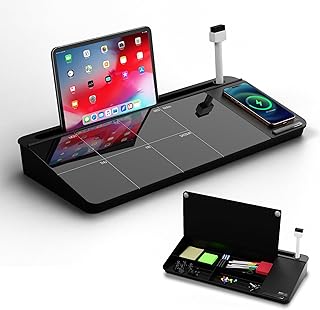
NEXTLUXE Glass Desk Whiteboard with Wireless Charger – Desktop Whiteboard with Storage, Weekly Planner, Dry Erase Pad, Organizer Drawer for Home, School, Office Gadgets – Black (Black)
Best For:
Hybrid workers, students, and anyone who prefers a consolidated desk hub with a planner, storage, and wireless charger.
The NEXTLUXE Glass Desk Whiteboard is a hybrid desktop organizer that combines a weekly planning surface, a dry-erase area, storage compartments, and a wireless charging pad. For many people building a realistic focus workflow, reducing friction—having a planner, phone charger, and a place for quick notes all in one—matters more than adding yet another single-purpose gadget.
Practically, the glass surface feels premium and erases cleanly compared to cardboard or plastic pads. The integrated wireless charger keeps your phone topped up without creating a cable tangle that tempts you to pick up the device. Storage cubbies and a small organizer drawer keep markers, pens, and a timer within reach so you can set up a Pomodoro cube and then start work without hunting for supplies. The weekly planner layout is helpful for mapping focus blocks across the week and visually balancing deep work, meetings, and administrative time.
Compared with using sticky notes and a phone for planning, the NEXTLUXE surface is more visible and fewer steps to update. It’s particularly useful for hybrid workers who switch environments—use it at a home desk to lay out weekly priorities, or in an office nook as an at-a-glance board. Students can earmark assignment deadlines, and project managers can sketch quick timelines during standing huddles.
Practical considerations: check the wireless charging power and compatibility with your phone; some heavier cases may interfere with charging. The desk footprint is larger than a single timer, so ensure you have the desk space. If you travel frequently, this isn’t the most portable solution.
Who this is best for: people who want a consolidated desk hub—those who appreciate a clean visual planner, built-in charging, and storage to keep focus tools handy. Not ideal for minimalists with very small desks or frequent commuters.
Check the latest price on Amazon.
Pros
- Combines weekly planning, dry-erase board, storage, and wireless charging
- Premium glass surface that erases cleanly
- Reduces friction by keeping essential items in one place
Cons
- Larger footprint—needs adequate desk space
- Wireless charging may be affected by thick phone cases
Want a tidy desk hub with planning and charging built in? Check the latest price on Amazon.
Final Verdict
There’s no single gadget that fixes interrupted attention by itself, but thoughtful combinations do. If your main problem is phone-motivated distraction, start with a tactile Pomodoro cube (like the Jack or the rotating model) to create phone-free focus windows. If you want to pair focus with recovery and reduce burnout risk, add the Mindsight timer to introduce short wellness activities into your routine. Finally, the NEXTLUXE glass desk whiteboard acts as an organizing surface that holds your timer, notes, and phone charger—reducing the small frictions that kill focus.
Match the device to your environment: choose vibration-first alerts for shared offices, louder chimes for home, and wellness-integrated timers if you struggle to remember breaks. Students and teachers often benefit from the rotating or cube formats for their simplicity, while professionals who value a polished workspace may prefer the silver cube or the NEXTLUXE hub. If you’re unsure where to start, pick one dedicated timer and pair it with a simple visual planner—consistency matters more than gadget count.
Each product highlighted here solves a real problem: reducing digital distractions, making start/stop transitions tangible, encouraging intentional breaks, and keeping your desk setup friction-free. Combine one timing device with a planning surface and you’ll likely notice better session adherence and fewer mid-day energy crashes. If you’ve been using a phone timer or sticky notes, switching to curated hardware and a consolidated desk organizer is a small investment that often pays off in clearer, more consistent focus.
Check the latest price on Amazon.
Conclusion
These Office gadgets people use during realistic focus workflows picks are trending now and offer great value and variety. Check the links above for latest prices and reviews.
As an Amazon Associate, I earn from qualifying purchases.
Tags:
pomodoro timer, focus gadgets, office productivity, ADHD tools, desk organizer, whiteboard charger, time management
