Desk Gadgets Creators Use for Focused Writing
As an Amazon Associate, I earn from qualifying purchases. This article may contain affiliate links, which means we may receive a commission at no extra cost to you.
If you write for a living or carve out daily blocks of creative time, the right low-friction desk gadgets can make the difference between scattered sessions and sustained focus. This guide highlights five compact tools that many creators and writers use to structure their work, capture fleeting ideas, and reduce the friction that breaks momentum. From refined Pomodoro-style timers to reusable notebooks and tactile fidgets, these items are selected for their practicality, portability, and ability to integrate into a writing routine.
Affiliate disclosure: As an Amazon Associate, I earn from qualifying purchases. This article may contain affiliate links, which means we may receive a commission at no extra cost to you.
What follows is a buyer-focused look at each product, realistic use cases, reasons why each gadget can help your writing flow, and who should — or shouldn’t — add it to their desk. I compiled this guide based on product features and patterns in user feedback so you can quickly decide what fits your workflow.
Buying Guide
Before diving into individual picks, here are practical buying considerations for writers and creators when choosing desk gadgets for focused work.
1) Purpose and friction: Ask what problem you’re solving. Do you need help structuring time (timer), reducing digital clutter (reusable notebook), or keeping small ideas accessible (desktop whiteboard)? Gadgets that reduce the steps between idea and capture will deliver the most value.
2) Size and placement: Desks are real estate. Compact devices like pocket timers, executive-size notebooks, and small desktop boards fit into tight setups without creating more clutter. If you sit in cafés, prefer items that travel well.
3) Integration with your workflow: If you already use digital tools, choose gadgets that complement them. Reusable smart notebooks that scan to cloud services, boards you can photograph and archive, or timers that pair with calendar workflows eliminate duplicate work.
4) Sensory preferences: Many writers benefit from tactile feedback or subtle sensory cues. Clicky fidget keys, tactile pen-and-paper, or gentle chimes on timers can help maintain momentum — but they may distract close coworkers, so consider your environment.
5) Durability and consumables: Some gadgets require replacements (markers, refill pages) or charging. Reusable notebooks lower long-term paper waste but need special pens and care. Choose devices with accessible replacements and straightforward maintenance.
6) Cost vs. lifetime value: Small gadgets are inexpensive relative to the hours of better-focused work they can unlock. Prioritize items you’ll use daily — an elegant timer for structured sessions or a trusty reusable notebook for quick capture is more valuable than a novelty you’ll ignore.
7) Accessibility and inclusivity: If you have attention differences, look for devices that explicitly support shorter or more flexible session lengths, tactile cues, or low-stimulus modes. Tools that allow customization of intervals and feedback will be more adaptable.
With these considerations in mind, the five products below cover a range of focus-related needs: timing and breaks, quick capture, visual planning, and sensory grounding.
Mindsight Focused Activity Timer & Tracker | Promotes Work Life Balance & Productivity | Pomodoro ‘Plus’ w/ 5 Fixed timers + 5 curated Wellness Activities | Office Desk Accessory | Mindfulness | ADHD

Best For:
Writers and creators who want a tactile, non-digital way to structure focused work and reminders for short wellness breaks; people with ADHD who benefit from externalized timing.
If your writing sessions veer between hyperfocus and distraction, a purpose-built activity timer can bring structure without adding screen time. The Mindsight Focused Activity Timer packages a Pomodoro-inspired approach with five fixed timers and five curated wellness activities so your work-to-break ratio becomes a habit, not another decision. The device is designed as a desktop companion: it’s simple to operate, gives clear auditory or visual cues, and includes short wellness prompts to encourage microbreaks that counteract fatigue.
Main benefits include predictable session lengths, built-in microbreak guidance (stretch, breathe, short walk), and an emphasis on work-life balance rather than relentless productivity. Compared with a generic kitchen timer or phone app, this device reduces the temptation to check notifications and keeps your timer visible so you don’t forget an ongoing sprint. It’s particularly useful for writers who follow structured techniques — Pomodoro starters, sprint-based drafting, or time-boxed editing passes.
Real-life usage scenarios are practical: set a 25-minute focused session to draft a blog section, followed by a 5-minute guided wellness break to reduce screen strain. Writers working with ADHD or anyone who benefits from externalized structure will appreciate the pre-set choices and the tactile convenience of a physical timer at the desk. Remote teams that coordinate co-writing sprints can use matching timers to sync bursts of work without noisy phone alarms.
This timer is valuable because it addresses two common problems: decision fatigue (which timer to use, how long to work) and unhealthy break habits (scrolling instead of stepping away). The wellness activities are a nice touch — they nudge you into restorative movement rather than passive downtime.
Things to consider: it’s a single-purpose gadget, so if you prefer app integrations or calendar syncing, a digital alternative might be better. Also, sound and chime volume matter in shared spaces — check the audio options if you work near others.
Who should buy: writers and creators who need physical, low-friction time structuring and those who prefer non-digital cues. Who may skip it: people who rely on deeply integrated digital productivity systems and need cross-device sync.
Check the latest price on Amazon.
Pros
- Physical timer reduces phone distractions
- Preset intervals and wellness activities simplify decision-making
- Compact desktop form to stay visible during sessions
Cons
- No calendar or app integrations
- Sound may be intrusive in shared offices
Check the latest price on Amazon.
Rocketbook Core Reusable Smart Notebook, Lined Pages For School, Work and Creative Projects, Letter Size 8.5×11, Gray – Premium

Best For:
Writers, students, and professionals who prefer handwriting but want instant cloud archiving; people who value sustainability and fewer paper notebooks.
Paper still wins for many writers when it comes to drafting, sketching, and quickly capturing stray thoughts. The Rocketbook Core reusable smart notebook offers the familiar feel of pen on page while supporting digital archiving to cloud services. The letter-size lined pages are roomy for long-form note-taking, outlines, and drafting, and the reusable surface wipes clean with a damp cloth when you’re ready to clear the page.
The notebook’s smart features let you pair handwritten notes with the Rocketbook app so you can scan pages to Google Drive, Dropbox, Evernote, or email. For writers who alternate between brainstorming on paper and finishing pieces on a laptop, this creates a low-friction bridge. It’s lighter and more flexible than paper pad stacks and avoids the waste of disposable notebooks. Compared to ordinary notebooks, Rocketbook removes the need to transcribe or carry multiple volumes; compared to full digital tablets, it preserves the tactile advantage of pen-and-paper without expensive hardware.
Use cases are numerous: outline a chapter on paper in a morning session, scan and upload to a project folder for your evening editing pass; sketch a mind map during a meeting and instantly share it with collaborators; keep a running daily idea log on your desk for quick reference during writing sprints. Teachers and students will also find the lined core helpful for structured notes.
Practical observations from user feedback point to excellent pocket portability, clear app scanning, and durable pages that withstand regular use. Small caveats: you’ll want to pair the notebook with compatible pens (special Pilot FriXion pens are commonly recommended) and follow cleaning guidelines to avoid ghosting. Heavy-handed erasing or noncompatible markers can shorten the surface’s lifespan.
Who should buy: writers who appreciate analog note-taking but want an easy way to archive and organize pages digitally. Who may not need it: those fully committed to digital tablets or fountain-pen enthusiasts seeking paper texture variations.
Check the latest price on Amazon.
Pros
- Reusable pages reduce paper waste
- Easy cloud scanning and organization
- Large letter-size pages for detailed notes
Cons
- Requires compatible erasable pens
- Surface may show wear with heavy use
Check the latest price on Amazon.
Quartet Glass Dry Erase White Board 18"W x 6"H, Compact Desktop Whiteboard with Storage Drawer, Dotted (GDP186D)

Best For:
Writers who benefit from visible visual reminders, quick sketches, and a low-clutter planning surface on their desk.
A small, clear-surface whiteboard on your desk is deceptively powerful for writers: it provides a visible scratchpad for to-do items, plot beats, word-goals, and micro-tasks that should remain top of mind. The Quartet Glass Dry Erase White Board is a compact desktop option with a dotted layout for neat alignment, a shallow storage drawer for markers and erasers, and a glass surface that resists staining better than standard melamine boards.
What sets a glass board apart is the clarity and longevity of the surface — markers wipe clean without ghosting, and the dotted grid subtly helps with handwriting alignment and layout. Compared with sticky notes or paper scraps, a dedicated whiteboard reduces visual clutter while keeping priorities prominent. Compared to larger wall boards, this desktop size fits in tight setups and is easy to photograph or scan to save progress at the end of a session.
Real-life usage examples include placing the board beside your monitor to list the three tasks you want to complete during a single writing sprint, sketching a quick timeline for a story scene, or jotting down immediate edits while reading printouts. If you collaborate, it’s also useful during remote writing calls — you can snap and upload the board’s contents to share ideas quickly.
Practical buying notes: the glass surface is heavier than typical whiteboards, so ensure your desk location supports the weight. The drawer is convenient for keeping a preferred marker and small sticky notes handy. If you prefer ultralight travel tools, a paper-backed notebook may be more portable.
Who should buy: writers who like visible, changeable reminders and quick visual planning on the desk; people who value a clean erase with minimal ghosting. Who may not need it: those who always work from a blank desktop or who rely purely on digital task trackers.
Check the latest price on Amazon.
Pros
- Glass surface resists staining and ghosting
- Compact size with storage drawer for markers
- Dotted layout for cleaner notes and alignment
Cons
- Heavier than standard boards — less portable
- Limited writing area for larger plans
Check the latest price on Amazon.
4-Key Keyboard Clicker Fidget Gadget with LED Lights, Stress Relief Tool for Office Desk & Focus, Satisfying Tactile Feedback Keychain for Adults (Black & White 2-Pack)

Best For:
Writers and creatives who like tactile fidgeting to sustain focus, especially those with restless energy or ADHD traits.
Small tactile habits can anchor focus without demanding attention. The 4-Key Keyboard Clicker Fidget Gadget is a pocket-sized set of pressable keys that mimic the feel of mechanical keyboard switches. It’s designed to give satisfying tactile feedback and gentle auditory clicks that many users find rhythmically calming during focused tasks.
Unlike aimless scrolling, a tactile fidget offers a purposeful sensory outlet that helps redirect excess energy while you write. Compared to more conspicuous fidget toys, a compact keyboard-style clicker is desk-friendly and can be used privately without standing or pacing. The included LED lights are a small novelty that can make short breaks feel more deliberate — though in many office setups you’ll likely keep the lights off to avoid distraction.
Use cases include keeping the gadget in your pocket during long editing sessions to maintain a steady breathing rhythm, using it between drafting sprints to reset focus, or tapping during brainstorming to maintain a thinking cadence. Writers who are sensitive to sensory input or who have habits that break concentration (nail-biting, constant phone checking) often appreciate a small, contained substitute.
Practical observations from user feedback point to durable construction for everyday clicking and the benefit of having a spare in a bag or desk drawer. Consider that not everyone will prefer audible clicks near coworkers — if you share a quiet office, the tactile-only feel models or quieter alternatives might be better. Also check battery needs for any LED functions.
Who should buy: writers who benefit from tactile stimulation to channel anxious energy or maintain a thinking rhythm; people who want a portable, low-effort fidget. Who may not need it: those easily distracted by clicking sounds or those in shared quiet environments.
Check the latest price on Amazon.
Pros
- Satisfying tactile feedback to anchor focus
- Portable and desk-friendly design
- Includes LED lights for a playful touch
Cons
- Click sound may distract nearby coworkers
- LED feature adds little to focus and uses batteries
Check the latest price on Amazon.
Rocketbook Core Reusable Smart Notebook, Dot Grid Pages For School, Work and Creative Projects, Executive Size 6×8.8, Black – Premium
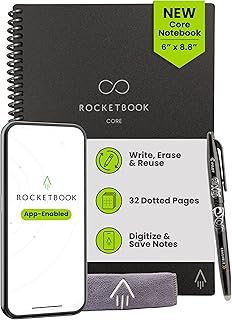
Best For:
On-the-go writers and creatives who want a compact reusable notebook with a versatile dot-grid layout for sketching, lists, and outlines.
For writers who prefer compact tools that live in a bag, the Rocketbook Core Executive-size with dot-grid pages offers a pocket-friendly balance of analog freedom and digital convenience. The dot grid lends itself to flexible layouts — bullet journaling, visual notes, sketching scenes, or tight columned outlines for articles — while the reusable surface wipes clean so you’re not carrying a growing stack of notebooks.
Executive size is ideal for those who switch between meeting rooms, cafés, and home desks. Compared to the larger letter-size Rocketbook, the executive model is easier to slip into smaller bags and requires less desk space. Compared to purely digital note apps, it keeps the writing experience tactile and immediate, avoiding the friction of booting a device or opening a new document.
Realistic use cases include keeping a daily idea log for story snippets, mapping scene structure during short breaks, or drafting quick email templates that you later scan and send. Many users praise the dot grid for helping create clean tables or aligned sketches without the look of heavy ruling. The Rocketbook app continues to be the bridge to your cloud storage — tag and route each scan to the right project folder for straightforward organization.
Considerations: you’ll need compatible erasable pens to get the most out of the reusable pages, and heavy inking or the wrong cleaning method can cause faint ghosting over time. If you prefer fountain pens or archival paper texture, a traditional notebook might still suit you better. The executive size is less suited to long-form handwritten drafts; it’s best for notes and outlines.
Who should buy: mobile writers who want tactile capture with easy digital organization; those who enjoy structured layouts using dot grids. Who may not need it: writers who produce primarily long handwritten drafts or those who prefer large-page spreads.
Check the latest price on Amazon.
Pros
- Compact and travel-friendly executive size
- Dot grid supports clean layouts and sketches
- Reusable pages with cloud scan capability
Cons
- Not ideal for longhand manuscript drafting
- Requires specific pens to erase cleanly
Check the latest price on Amazon.
Final Verdict
Small, purposeful desk gadgets can significantly improve how writers structure time, capture ideas, and maintain focus. The Mindsight timer brings structured Pomodoro-plus sessions and wellness nudges to prevent burnout. Rocketbook’s reusable notebooks (letter and executive sizes) offer the best of analog capture and cloud archiving for both large notes and compact idea logs. The Quartet glass board is an understated productivity surface that keeps priorities visible without clutter, and the keyboard-style fidget provides a tactile anchor for restless focus without escalating to disruptive movement.
When choosing, match the gadget to the specific friction in your routine. If you lose track of time, start with a dedicated physical timer. If ideas scatter across devices, a reusable smart notebook can unify capture and reduce transcription work. If visual reminders help you ship daily targets, a desktop whiteboard is an elegant, low-cost solution. Finally, tactile fidgets are underrated for maintaining a steady mental rhythm, but consider your workspace and coworkers when using audible models.
No single item will magically fix inconsistent workflows, but each of these tools addresses a concrete habit problem — and small habit improvements compound quickly. Use one or two complementary gadgets rather than stockpiling desk toys: a timer plus a capture system, or a whiteboard plus a small fidget, often delivers the best results.
If you’re ready to try something new, pick the gadget that most directly reduces a daily point of friction and give it a fair trial across a week of writing sessions. Good gear won’t replace discipline, but the right tool can make focused work noticeably easier.
Check the latest price on Amazon.
Conclusion
These Desk gadgets creators use during focused writing routines picks are trending now and offer great value and variety. Check the links above for latest prices and reviews.
As an Amazon Associate, I earn from qualifying purchases.
Tags:
desk gadgets, writing tools, focused work, Pomodoro timer, reusable notebook, desktop whiteboard, fidget gadget
