Desk Gadgets for Productive Mornings
As an Amazon Associate, I earn from qualifying purchases. This article may contain affiliate links, which means we may receive a commission at no extra cost to you.
Mornings are where a productive day is won or lost. For many people—parents getting kids ready, freelancers juggling client work, students trying to balance classes and study sessions—small, well-chosen desk tools can create structure and momentum. This guide looks at reliable, approachable gadgets that fit into realistic productivity routines: simple preset timers that nudge you back into focus, compact planners that prevent mental clutter, and a multifunctional desk whiteboard that doubles as a charger and organizer.
Affiliate disclosure reminder: As an Amazon Associate, I earn from qualifying purchases. This article may contain affiliate links that help support this research at no extra cost to you.
This article is a buyer’s guide that’s informed by product specs, common user feedback patterns, and practical use cases—rather than personal lab testing. Below you’ll find in-depth descriptions of five items that repeatedly show up in people’s morning setups, who they’re best for, and realistic ways to use them in a normal weekday routine.
Buying Guide
Choosing the right desk gadget for morning productivity depends on three simple criteria: ease of use, visibility (so it sits in your line of sight), and how it integrates with your workflow.
1) Timers: The Pomodoro technique and similar interval-based approaches are effective for many people. Look for preset options (5, 10, 25, 50 minutes) and simple tactile controls so you’re not fiddling with settings when your focus is fragile. Vibration or low-volume alert modes are nice if you share space.
2) Paper planners & pads: Paper still wins when you need quick capture and visible priorities. Choose undated pads with hourly or checklist layouts if your mornings combine short scheduled blocks (calls, school drop-off) and a to-do list. Thicker paper and tear-off sheets make it durable for repeated use.
3) Multi-purpose desk organizers: A dry-erase surface for a weekly snapshot, plus a place to stash pens and a wireless charging pad, reduces friction: one glance tells you today’s targets, your phone is topped up, and your desk stays tidy.
Practical considerations: battery life (or replaceable batteries) for timers, paper count for notepads (30–60 sheets is typical), and charger wattage for wireless stations. If you have ADHD or work in a distracting home environment, choose louder cues or vibration modes and high-contrast visual layouts.
Below are five products that cover a range of morning setups—from focused, time-blocked work sessions to flexible, paper-first planners and a desk organizer that doubles as a communication hub.
Rotating Pomodoro Timer 5, 25, 10 50 Minutes Preset, Desk Productivity Flip Timer, ADHD Tool Cube Countdown Stopwatch, Vibration/High/Low Volume/Custom Modes, for Work, Study, Back to School, Kitchen

Best For:
People who want a simple, tactile Pomodoro timer for focused sprints—students, remote workers, parents, and those seeking ADHD-friendly external cues.
This rotating Pomodoro-style cube is built for people who want a low-friction timer on the desk. Instead of tapping through menus, you flip or rotate the cube to a preset duration—5, 10, 25, or 50 minutes—and it starts counting down. That simplicity matters on mornings when you’re still waking up and don’t want to wrestle with apps or complicated settings.
Key features include multiple alert modes (vibration, high/low volume, and custom audio patterns) and a tactile design that sits well on a desk or kitchen counter. Because the unit supports vibration and lower-volume alerts, it’s a good option if you work near sleeping family members or in a shared workspace. The cube form factor is compact, which keeps it from crowding your most-used desk real estate.
Problems it solves: it stops you from doom-scrolling by enforcing short focus sprints, helps you estimate how much you can realistically finish before a meeting or school run, and acts as an ADHD-friendly external cue when attention drifts. It’s also less distracting than a phone timer with notifications and social temptations.
Real-life use cases: flip it to 25 minutes for a focused writing sprint after breakfast, set 10 minutes for a quick inbox sweep before a call, or use the 5-minute setting to break up chores while getting the kids ready. Students can pair the cube with a short review session between classes; parents can set the 50-minute block for uninterrupted work while a babysitter manages the morning routine.
Who should buy this: people who want an extremely simple, tactile timer—students, parents, remote workers, or anyone using Pomodoro intervals. Who might skip it: if you already use a deeply integrated digital workflow with app-based timers and habit tracking, this standalone device may add another gadget instead of simplifying things.
Practical observations and buying considerations: check battery type (rechargeable vs replaceable) and whether vibration is strong enough on your desk surface; wood-grain or matte finishes can visually match a warmer workspace. Compared with phone apps, this cube removes digital friction and temptation.
Check the latest price on Amazon.
Pros
- Instant preset times—flip and go
- Vibration and low-volume modes for shared spaces
- Compact, tactile cube that’s easy to see and handle
Cons
- Adds a physical gadget if you prefer app-only workflows
- Vibration strength varies with desk surface
Check the latest price on Amazon.
Rotating Productivity Timer 5, 25, 10, 50 Minutes Preset, Desk Cube w/Gravity Sensor for ADHD, Mute Functions, Ideal for Work, Study, Kitchen, Back to School (1, Wood Grain Finish)

Best For:
Buyers seeking a stylish, ADHD-friendly timer with tactile rotation and quiet modes—good for home offices and shared spaces.
This wood-grain rotating productivity cube shares many of the same strengths as the previous timer but leans into aesthetics and subtle sensory feedback. The gravity sensor starts and stops the countdown when you rotate the cube into a time position, which avoids accidental pauses and keeps your hands busy in a productive way. It’s marketed with ADHD-friendly cues and a mute function so you can choose between audible chimes, low-volume alerts, or silence with vibration.
Why it’s helpful on realistic mornings: mornings often include quick context switches—coffee, child prep, short meetings—so having an obvious, easy-to-operate timer prevents time from slipping away when you’re multitasking. The wood-grain finish helps the device blend with home furniture, making it feel less like a gadget and more like part of your desk decor. The compact size means you can tuck it near a planner or phone without cluttering the workspace.
Real-life scenarios: use the 25-minute setting for deep work while breakfast cooks, switch to 10 minutes for a short sprint to clear quick messages, or keep the timer muted with vibration when you’re in a co-working situation. Students balancing classes and assignments can allocate blocks for focused study or timed practice sessions.
Who should buy this: people who want a tasteful, unobtrusive timer that emphasizes form as well as function—ideal for home offices, creative desks, or shared living arrangements. Who might not need it: those who already rely on wearable device haptics or integrated digital timers may see overlap.
Practical considerations: check that the gravity sensor responds reliably (user reports vary depending on exact placement), and confirm how the device indicates remaining time at a glance. Compared with plain plastic cubes, the wood-grain model adds a warmer visual touch that suits many home setups.
Check the latest price on Amazon.
Pros
- Attractive wood-grain finish
- Gravity sensor for quick start/stop
- Mute and vibration options for discretion
Cons
- Gravity sensor sensitivity can vary
- Overlap with smartwatch or phone haptics for some users
Check the latest price on Amazon.
Taja To Do List Notepad – To Do List Notebook for Work with 52 Sheets, 9.8" x 6.5", Undated Daily Planner Perfect for Daily Tasks and Goal Setting, Notepad Suitable for Office, Home & School – Greenery Sway

Best For:
People who prefer a tactile, paper-first task list—students, busy parents, or anyone who benefits from visible daily priorities.
This Taja undated to-do list notepad is designed for people who prefer a paper-first approach to mornings. With 52 tear-off sheets and a readable 9.8 x 6.5 inch page size, it’s large enough to capture priorities but small enough to keep next to your laptop or coffee mug. The undated layout gives you flexibility—you can use a sheet every day, or only on the days you need a focused list.
Practical benefits: the pad’s layout typically prioritizes top tasks, quick checkboxes, and space for notes or motivational reminders. That lightweight structure makes it easy to do a five-minute brain dump at your desk, then organize the resulting list into three actionable priorities for the morning. It’s useful for sprint planning, habit tracking, and keeping visible reminders—particularly when your morning routine has multiple moving parts.
Real-life use cases: a freelance writer might list three article sections to finish before noon; a parent could use the pad to track school forms, breakfast, and a short work sprint. Students can turn the sheet into a study checklist: chapters to read, flashcards to review, and a timed practice test.
Who should buy this: people who benefit from seeing tasks on paper—those who get distracted by digital devices, prefer physical checklists, or like the ritual of tearing off a completed sheet. Who may skip it: if you prefer an app-based task manager with syncing, this analog notepad won’t replace cloud features.
Buying considerations: check paper weight if you like using gel or fountain pens, and confirm whether the layout includes sections for timing, priorities, or notes. Compared with bound planners, a tear-off pad gives visible progress and quick resets without commitment to a dated format.
Check the latest price on Amazon.
Pros
- Undated flexible layout
- Convenient tear-off sheets for visible progress
- Compact but roomy page size
Cons
- No digital sync for reminders
- May require frequent repurchase if used daily
Check the latest price on Amazon.
Task Planner & Activity Log Notepad – 60 Page Undated Daily & Hourly Planning Pad, To-Do List, Checklist, Track Time & Tasks, ADHD Tracker – Organize Workday, Boost Productivity – 8.5 x 11 Tear Sheets Life Charge

Best For:
Those who need hourly planning plus to-do tracking—project managers, freelancers, and people using time-blocking methods.
The Life Charge task planner and activity log pad is a larger, undated hourly and checklist pad designed to bring structure to a full workday. At 8.5 x 11 inches with 60 tear-off sheets, this pad offers hourly slots alongside to-do checklists and short tracking areas—useful if your mornings include scheduled calls, focused blocks, and a running task list.
Why this matters: many people underestimate how much context-switching their mornings involve. Having hourly slots on paper forces you to make trade-offs—should you check email at 9:00 or block 9:00–9:30 for deep work? This pad’s layout helps you map realistic time commitments and then track whether those commitments held, which is valuable feedback for building a better routine.
Real-world scenarios: a project manager can sketch a morning timeline with specific meeting prep times; a remote parent might block 8:00–8:30 for breakfast and 9:00–9:30 for focused work while someone else handles child drop-off. The activity log is also helpful for those tracking attention or emotional states—useful for ADHD strategies where noticing patterns helps you adjust.
Who should buy this: people looking to blend hourly scheduling with task lists—managers, freelancers who bill by the hour, and anyone who benefits from time awareness. Who may not need it: if your mornings are entirely unstructured and you prefer a simple checklist, the hourly format might feel too constraining.
Practical notes: check paper thickness if you use markers, and confirm whether the sheets are perforated for clean tearing. Compared with smaller pads, the 8.5 x 11 size gives more room for notes and makes it easy to reference alongside a laptop.
Check the latest price on Amazon.
Pros
- Hourly layout for realistic time mapping
- Large 8.5 x 11 pages with 60 sheets
- Activity log useful for pattern tracking
Cons
- Larger size takes more desk space
- Hourly slots may feel restrictive for highly flexible mornings
Check the latest price on Amazon.
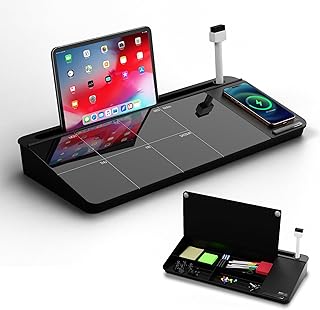
NEXTLUXE Glass Desk Whiteboard with Wireless Charger – Desktop Whiteboard with Storage, Weekly Planner, Dry Erase Pad, Organizer Drawer for Home, School, Office Gadgets – Black (Black)
Best For:
Anyone wanting a tidy, multi-purpose desktop hub—hybrid workers, students, and household organizers.
This glass-top desk whiteboard with a built-in wireless charger and storage drawer is a multifunctional hub aimed at reducing morning friction. The smooth glass surface doubles as a dry-erase weekly planner and quick note area, while the wireless charging pad keeps your phone topped up during long morning stretches. A small organizer drawer holds pens, sticky notes, or earbuds so the surface stays tidy.
Why it helps: mornings benefit from visual clarity. A weekly snapshot on the glass surface makes it easy to remind yourself of an upcoming meeting, a school event, or a priority deadline. The wireless charger removes one common friction point—forgetting to plug in your phone—and the storage keeps your essential tools within reach. Together, these features shorten the gap between intention and action.
Use cases: if you start your day with a 15-minute review, write the day’s top three items on the glass and set a timer for a focused sprint. Parents can keep a running list of school tasks and lunch notes; remote workers can place a short call agenda on the board so it’s visible during the conversation. The drawer stores chargers, pens, or a phone stand so you don’t waste time looking for small items.
Who should buy this: people who want an integrated, low-profile desktop organizer that combines planning, charging, and quick capture—ideal for hybrid workers, students, and household command centers. Who may skip it: if you already have a separate high-power wireless charger and prefer paper planners, this all-in-one may duplicate tools.
Practical considerations: check the charger wattage for compatibility with your phone and whether the glass surface accepts standard dry-erase markers cleanly. Compared with plastic whiteboards, the glass surface resists staining and looks sleeker on a desk.
Check the latest price on Amazon.
Pros
- Integrated wireless charger and dry-erase surface
- Built-in drawer for small-item storage
- Sleek glass finish resists staining
Cons
- May duplicate existing chargers
- Takes more desk footprint than a small notepad
Check the latest price on Amazon.
Final Verdict
Creating a realistic productivity morning usually isn’t about one miraculous gadget—it’s about combining a few thoughtful tools that reduce friction and keep your attention where it matters. Timers (especially tactile rotating cubes) offer simple, reliable cues for focused work. Paper pads—both compact to-do sheets and larger hourly planners—give visible priorities and time awareness without pulling you into app ecosystems. A multifunctional desk organizer with a dry-erase surface and wireless charging ties these elements together and keeps the workspace tidy.
If you’re building a morning routine, start with one timer and one capture tool: a Pomodoro cube plus a tear-off notepad or an hourly planner. Add the glass desk organizer if you value a single, neat surface for weekly planning and a built-in charger. Avoid overloading your desk—each extra item should remove one point of friction, not add another.
I selected these products based on feature sets that fit real-life morning patterns, common questions users ask, and practical considerations like alert modes, page count, and charging compatibility. Use the descriptions above to match tools to your workflow, and remember that modest, consistent improvements to your environment compound over weeks.
Ready to try one of these? Click any product link to learn more and see if it fits your desk setup. Check the latest price on Amazon.
Conclusion
These Desk gadgets people use during realistic productivity mornings picks are trending now and offer great value and variety. Check the links above for latest prices and reviews.
As an Amazon Associate, I earn from qualifying purchases.
Tags:
desk gadgets, productivity morning, pomodoro timer, to-do notepad, desk whiteboard
