Office Gadgets Creators Use for Focused Work
As an Amazon Associate, I earn from qualifying purchases. This article may contain affiliate links, which means we may receive a commission at no extra cost to you.
As an Amazon Associate, I earn from qualifying purchases. This article may contain affiliate links, which means we may receive a commission at no extra cost to you.
If you’re a creator, writer, designer, or anyone who needs to protect blocks of deep work from distraction, the right desk gadgets can make a big difference. Timers and small tactile tools are some of the simplest, most effective aids busy creators rely on to structure focus, manage breaks, and reduce the mental friction that comes with context switching. This guide looks at five practical accessories — visual Pomodoro timers, wellness-focused desktop trackers, and discreet fidget toys — that creators commonly reach for during focused work sessions. I researched product specifications, common use scenarios, and user feedback to highlight real-world benefits, potential drawbacks, and who should (or shouldn’t) consider each item.
Buying Guide
What to look for in focus gadgets: When choosing an office timer or fidget tool, prioritize simplicity, sound options, and visibility. Visual timers (those with a red disk or clear countdown display) are great when you want a nonverbal cue your brain can track without looking at a clock. For open-plan offices, silent or vibration alerts prevent interruptions. If you have ADHD or sensory preferences, adjustable sound profiles and tactile feedback matter more than flashy features.
Preset intervals vs. custom timers: Many creators swear by the Pomodoro method (25 minutes focused, 5 minutes break), so devices with common presets save setup time. But having a custom countdown is useful for longer creative flows or short micro-tasks. Consider whether you’ll use only preset lengths or need variable timing for different project phases.
Form factor and desk footprint: A small cube or puck takes up little space and is easy to flip or press. Visual timers with a face or disc offer at-a-glance tracking without checking a phone. Wellness-focused trackers that pair short guided activities can nudge you toward movement, breathing, or quick stretches—valuable for creators who tend to sit through long sessions.
Noise and alerts: Look for products with multiple alert modes—sound, vibration, and silent visual cues. In shared spaces, vibration or a gentle chime is preferable. If you need absolute silence, a purely visual timer (no alarms) is best.
Who should bother buying: If you struggle with starting tasks, keeping consistent focus, or remembering to take breaks, a simple timer or discreet fidget can rapidly improve output. If you already use digital apps successfully and never get distracted by your phone, a physical gadget is optional. Also weigh portability if you move between home and co-working spaces frequently.
Use-case checklist: short sprints (writing, editing), longer deep work (design, coding), meeting time-keeping, study sessions, and micro-wellness breaks. Read the product sections below to match features with your preferred flow.
Printers ack Pomodoro Timer – Productivity Cube, Visual Focus Timer, Mute & Vibration & Adjustable Sound Alert, for Office, ADHD, Study, Work, 3/5/10/25/30/60min & Custom Countdown – Silver

Best For:
Writers, students, and creators who prefer a tactile, screen-free timer for Pomodoro sessions and custom countdowns.
The Printers ack Pomodoro Timer cube is a compact, no-fuss visual timer built for creators who want an unobtrusive, tactile way to structure work without a phone. It looks like other popular timer cubes: flip it to start one of several preset intervals (3, 5, 10, 25, 30, 60 minutes) and watch the countdown, or use the custom countdown when a task calls for a nonstandard length. The silver finish keeps it neutral on a desk, and physical controls mean you won’t need to fumble through an app.
Why creators like it: the cube form factor is intuitive — a quick flip equals a commitment to a focus block. Adjustable sound alerts plus a vibration option make it flexible for home studios, shared offices, or quiet co-working spaces. The mute option is handy during recording sessions or when you want a purely visual reminder. Instead of relying on phone notifications that pull you into other apps, this timer keeps the cue simple and single-purpose.
Practical benefits and usage scenarios: writers who sprint for word counts can set 25-minute Pomodoro intervals and use the 5-minute breaks for quick stretches; video editors can use 60-minute timers for longer review passes; students can rely on short 10-minute bursts for concentrated reading. The custom countdown is useful during creative tasks that sometimes need unconventional lengths—like waiting for a render or letting creative ideas percolate for 17 minutes.
Problems it solves: reduces decision friction about when to stop and rest, replaces distracting phone timers, and provides a nonintrusive cue to return to work after breaks. For creators sensitive to sound, the adjustable alerts and vibration keep interruptions gentle.
Buying considerations: check that the preset intervals match your preferred rhythm. If you want a screen-based digital log of sessions, this standalone cube won’t provide that—it’s meant to be a simple physical anchor rather than a tracking app. Also note cube timers can feel similar across brands; choose based on alert modes and build quality.
Who should buy: creators who want a tactile, low-tech way to enforce time blocks—writers, illustrators, podcasters editing solo, and students. Who might skip it: those who already rely on a well-honed app habit with integrated tracking or teammates who need synced timing across devices.
Check the latest price on Amazon.
Pros
- Easy flip-to-start cube form factor
- Multiple presets and custom countdown
- Adjustable sound, vibration, and mute options
Cons
- No app sync or session logging
- Similar in form to many cube timers—choose by alert options
Check the latest price on Amazon.
Mindsight Focused Activity Timer & Tracker | Promotes Work Life Balance & Productivity | Pomodoro ‘Plus’ w/ 5 Fixed timers + 5 curated Wellness Activities | Office Desk Accessory | Mindfulness | ADHD

Best For:
Remote creatives and freelancers who want structured focus sessions with built-in wellness prompts to encourage restorative breaks.
Mindsight’s Focused Activity Timer positions itself as more than a Pomodoro device — it’s marketed as a small wellness and productivity companion for creators who want gentle prompts to both focus and recover. Instead of only offering countdowns, this model layers short curated wellness activities alongside work timers. Think of it as a ‘Pomodoro Plus’: five fixed timers for typical focus lengths and five guided micro-activities (breathing exercises, stretches, short mindfulness prompts) intended to make breaks restorative rather than wasted time.
Practical benefits: for creators who tend to skip real breaks or fill downtime with scrolling, the built-in wellness prompts can shift behavior. Designers and small-studio creators who struggle with physical stiffness or eye strain will appreciate reminders tied directly to the timer. The tracker aspect — a lightweight activity log — helps you see whether you actually took breaks, which is useful for freelancers balancing bursty schedules and wellbeing.
Real-world usage examples: use a 25-minute focused interval for a writing sprint, then follow the guided 5-minute breathing routine to reset before diving back into editing. If you run short review sessions, set a 10-minute focus block and take a mobility prompt to loosen shoulders. For neurodivergent creators, the combination of sensory cues and structured breaks can support sustained attention while preventing burnout.
Problems it solves: prevents passive breaks (i.e., doomscrolling), reduces physical strain from long sitting sessions, and encourages a healthier rhythm between work and rest. Unlike a plain visual timer, it nudges behavior change through short, actionable wellness steps.
Buying considerations: if you want deep analytics or app integrations, this won’t replace a full productivity suite. Also evaluate the type and pacing of wellness prompts to ensure they match your needs; some users prefer entirely silent visual cues rather than guided activities.
Who should buy: creators who want structure plus wellbeing nudges — remote workers, solo founders, and neurodivergent professionals who benefit from sensory variety. Who may not need it: those who prefer pure timing tools without wellness guidance or who use specialized fitness/wellness apps already.
Check the latest price on Amazon.
Pros
- Combines timers with curated wellness activities
- Simple tracking nudges to enforce breaks
- Good for reducing physical and mental fatigue
Cons
- No deep analytics or app ecosystem
- Guided activities may feel prescriptive for some users
Check the latest price on Amazon.
TIME TIMER Home MOD – 60-Minute Visual Timer, Home Edition, Silent Operation, for Homeschool Supplies, Study, Office & Meetings (Fern Green)

Best For:
Creators who prefer nonverbal visual cues and quiet operation—ideal for recording spaces, classrooms, and focused solo work.
The TIME TIMER Home MOD is part of a long-established line of visual timers known for their large red disk that shrinks as time elapses. For creators who respond best to visual, nonverbal cues, this 60-minute model is an elegant, silent option. Its simple face and quiet operation make it ideal for spaces where audible alarms would be disruptive — audio engineers, background-voice talents, or anyone recording videos will value the silent countdown.
Main benefits: the visual red disk is an excellent external cue for attention and time awareness without the anxiety some people feel from ticking clocks. Because it’s silent, it’s also easy to use during collaborative sessions (stand-ups, creative reviews) where a gentle visible reminder is preferable to beeping. The 60-minute maximum length works well for longer creative blocks like deep editing, design crits, or extended study sessions.
Real-life usage examples: set a 45-minute design sprint and keep the timer visible on your desk so you and collaborators can gauge how much runway remains without interrupting flow. Podcasters can use the silent mode during recording and rely on the visual countdown to wrap segments. Parents who juggle childcare and freelance work will find the visual cue easier for signaling transitions to children during homeschool sessions.
Problems it solves: prevents overrun meetings, supports sustained attention in a low-stress way, and removes the temptation to check a phone for the time. It’s particularly valuable for people who find audible alerts jarring or who work in audio-sensitive environments.
Buying considerations: this model is primarily visual and silent — if you need vibration or sound alerts, it won’t meet that requirement. Also, its design is straightforward; if you prefer digital customization or connectivity, look for more feature-rich alternatives.
Who should buy: creators and educators who benefit from nonverbal visual cues — video producers, teachers, and anyone recording audio. Who might skip it: users who want alarms, smartphone syncing, or session logs.
Check the latest price on Amazon.
Pros
- Large visual countdown that reduces phone checking
- Silent operation—no disruptive alarms
- Simple and easy to read from across a desk
Cons
- No sound or vibration alerts
- Not connected—no app or logging features
Check the latest price on Amazon.
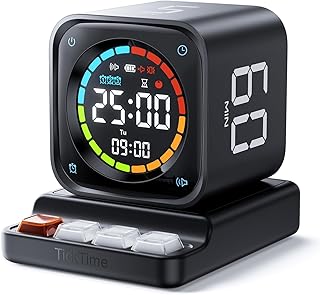
TK3 Pomodoro Timer Cube, Desk Productivity Timer with 5/10/30/60 Min Presets, Custom Countdown, Stopwatch, Clock, 3 Alarm, Silent, Vibrate & Sound Alert, for Task, ADHD, Study, Kitchen, Black
Best For:
Freelancers, consultants, and creators who want flexible timing tools plus a stopwatch and clock in a compact format.
The TK3 Pomodoro Timer Cube is a versatile desk accessory for creators who want presets plus additional utilities like a stopwatch and clock. With 5/10/30/60 minute presets, a custom countdown, and multiple alarm modes (sound, vibrate, silent), it covers the broad needs of writers, coders, and studio professionals. The black finish keeps it understated on a professional desk while the tactile cube design makes starting a session fast and deliberate.
Why it stands out: the extra features—stopwatch and clock—mean it’s useful beyond structured Pomodoro workflows. Use the stopwatch for time-boxed creative experiments or to track billable minutes in a pinch. The three alarm options let you tune notifications to your environment: a clear chime at home, vibration in shared spaces, or silent visual mode for recording.
Real-life usage scenarios: freelancers who bill by the hour can use the clock and stopwatch for quick time tracking while still enjoying Pomodoro presets for focused creative work. A motion designer could use 30- or 60-minute blocks for rendering or review sessions and switch to a custom 17-minute timer for concentrated ideation. For students with ADHD, the tactile activation and vibration cue can anchor attention in a noninvasive way.
Problems it solves: reduces context switching by replacing phone timers, offers flexible timing options for variable creative tasks, and supports discreet alerts in open offices. The stopwatch functionality also reduces the need for multiple devices on a crowded desk.
Buying considerations: if you want a strong visual countdown like the Time Timer’s red disk, this cube won’t provide the same large visual cue—its strengths are in tactile convenience and feature breadth. Check battery life and build quality if you plan to flip it multiple times a day.
Who should buy: multitasking creators who value both preset timers and additional clock/stopwatch tools—consultants, freelancers, and ADHD-friendly users. Who might skip it: those seeking a single, prominent visual timer for group visibility.
Check the latest price on Amazon.
Pros
- Multiple presets plus stopwatch and clock
- Three alarm modes including vibration
- Compact, tactile cube design
Cons
- Smaller visual feedback compared to large disk timers
- Can feel similar to other cube timers—evaluate build and alerts
Check the latest price on Amazon.
Fidget Toys Adults Stress Relief: 4 Pack Quiet Desk Fidget Clicker for ADHD Focus & Stress Relief, Sensory Desk Toy for Office, Meetings, Work, Travel

Best For:
Adults and creators who need discreet tactile stimulation to maintain focus or relieve stress during long sessions.
A small set of quiet clicker fidget toys is a low-cost, low-friction accessory for creators who benefit from mild physical stimulation while thinking. This 4-pack is aimed at adults looking for discreet desk fidgets that won’t disrupt calls or colleagues. The clicker mechanisms provide subtle tactile feedback, and the quiet design is intended to dampen noise compared with louder spinner or popper toys.
Why tactile tools matter: many creators report that hands-on micro-movements help channel restless energy into sustained attention. Designers sketching concepts, editors reading long transcripts, or coders deep in problem-solving often find that a small, recurring motion—without high sensory output—can keep their cognitive load steady. These quiet clickers offer that outlet without drawing attention.
Practical use cases: during long review sessions or meetings, a discreet clicker can reduce fidgeting that would otherwise lead to distraction. If you do livestreams or video recordings, a quiet fidget lets you keep your hands engaged without creating background noise. For creators with ADHD, having a variety of small fidgets available helps personalize sensory input across different tasks and moods.
Problems it solves: reduces the temptation to pick up a phone, chew on pens, or shift posture excessively. It can also serve as a calming anchor when approaching the end of a long creative block or during brief anxious moments before a performance or client call.
Buying considerations: not everyone needs fidgets—if you already have a healthy focus routine or prefer total stillness while working, these may be unnecessary. Also try different textures and resistance levels to find what feels best; a quiet clicker may still be audible in very silent rooms.
Who should buy: creators who benefit from tactile stimulation—writers, coders, and professionals with ADHD. Who might skip it: people who prefer complete silence or who find any movement distracting.
Check the latest price on Amazon.
Pros
- Quiet tactile feedback suitable for offices
- Pack of four gives options for variety
- Low-cost and portable
Cons
- May still make slight noise in very quiet environments
- Not useful for those who prefer total stillness
Check the latest price on Amazon.
Final Verdict
If you’re a creator looking to protect focused work sessions, these five tools offer practical, low-friction ways to structure attention and support wellbeing. The cube timers (Printers ack and TK3) give fast tactile activation and flexible presets, ideal for jump-starting single-person workflows. Mindsight stands out if you want a built-in nudge toward restorative breaks and short wellness routines that keep long days sustainable. The TIME TIMER Home MOD is the go-to when visual, nonverbal cues and silence matter most, especially in recording or teaching environments. Finally, a small pack of quiet fidget clickers is an inexpensive hedge against restless hands and a useful complement to any timing routine.
Choosing between these depends on what interrupts you and how you prefer to be cued back into work. If audible alarms are a problem, favor the Time Timer or any device with a mute/vibrate option. If you want healthier breaks rather than aimless scrolling, Mindsight’s wellness prompts can change behavior over time. If your workflow requires occasional time-tracking beyond Pomodoro patterns, the TK3’s stopwatch and clock are handy. Across all selections, prioritize the alert modes, preset options, and physical footprint that fit your desk and privacy needs.
In short: pick the tool that matches your environment and attention style rather than the one with the flashiest feature set. For creators who value minimal friction, a simple cube or visual timer will likely deliver the most consistent gains. For those who want wellbeing integrated into their workflow, the Mindsight model is worth prioritizing. Complement these with a quiet fidget if your hands need something to do while your mind stays on task. Check the latest price on Amazon.
Conclusion
These Office gadgets creators use during focused work sessions picks are trending now and offer great value and variety. Check the links above for latest prices and reviews.
As an Amazon Associate, I earn from qualifying purchases.
Tags:
Pomodoro timer, visual timer, office gadgets, focus tools, ADHD productivity, desk accessories, fidget toys
