Desk Accessories Creators Use for Focused Writing Mornings
As an Amazon Associate, I earn from qualifying purchases. This article may contain affiliate links, which means we may receive a commission at no extra cost to you.
A focused writing morning starts with the right setup: a clear head, a steady routine, and desk tools that funnel creativity into output instead of distraction. This guide covers five desk accessories creators commonly rely on to structure thoughts, capture ideas, and protect flow: two compact notepads for quick lists, a weekly planning notepad for higher-level organization, a small glass whiteboard with storage for short-term visual planning, a premium glass board that adds wireless charging, and a full-size erasable desk mat that doubles as a mouse pad. Whether you’re drafting chapters, scripting videos, or sketching a blog outline, these picks aim to help you reclaim writing time.
Before we dive in: As an Amazon Associate, I earn from qualifying purchases. This article may contain affiliate links, which means we may receive a commission at no extra cost to you.
Buying Guide
When choosing desk accessories for focused writing mornings, think about three core needs: capture, context, and comfort. Capture covers how quickly and reliably you can jot down a thought—this could be a small tear-off notepad by your keyboard or an erasable surface for recurring lists. Context is about planning horizon: a daily notepad keeps you on today’s priorities while a weekly planner helps you align writing goals with deadlines or content calendars. Comfort includes physical desk ergonomics: a desk mat that doubles as a mouse pad keeps wrist positioning consistent and protects finishes, while a whiteboard with a drawer or tray reduces tabletop clutter.
Material and maintenance matter. Paper notepads should be thick enough to resist bleed from gel pens and sized to fit your workflow—portable pocket pads are great for quick brain dumps, while 8.5"×11" weekly pads are better for layouting a content week. For reusable solutions, consider glass whiteboards and erasable mats: glass resists staining and generally cleans cleaner than melamine, but it can be heavier and more fragile. Desk mats vary by surface—cloth tops are forgiving for long mouse use but harder to write on directly; whiteboard-style mats are writable but may ghost without regular cleaning.
Extras to check: undated pages give flexibility if you skip a day; magnetic backing helps when you want vertical placement; wireless chargers are convenient but check Qi compatibility and alignment for thicker phone cases; included markers, cleaning cloths, and storage drawers add immediate value. Finally, balance aesthetic and size—choose pieces that support your desk footprint without turning your workspace into an obstacle course.
Taja To Do List Notepad – To Do List Notebook for Work with 52 Sheets, 9.8" x 6.5", Undated Daily Planner Perfect for Daily Tasks and Goal Setting, Notepad Suitable for Office, Home & School – Greenery Sway

Best For:
Creators who use short writing sprints and need a simple, tactile daily checklist beside their keyboard.
The Taja To Do List Notepad is a compact, undated daily planner designed to keep focused writing mornings on track. At roughly 9.8" x 6.5", it fits neatly beside a laptop or under your hand while you type. Each pad contains 52 sheets arranged to guide a single workday—spaces for priorities, a short schedule, and a little area for a brain dump or micro-goals. The undated format removes pressure: miss a day and the next sheet is fresh and ready. The paper weight is chosen to be friendly to gel pens and fine-liners without excessive bleed, and the greenery-inspired cover makes it unobtrusive on most desks.
Main benefits: this pad is all about single-session clarity. It solves the common problem of scattered notes during deep work by providing a consistent template for daily focus. Instead of toggling between apps or opening a new document, you can quickly jot a 60–90 minute writing block, note the top two priorities, and capture a stray idea without losing flow. Compared with digital tools, a tear-off notepad minimizes notification temptation and is instantly visible at a glance.
Real-life usage scenarios: place one pad to the right of your keyboard for morning freewriting and to capture quick edits; use the top section to define your “critical two” tasks before opening your document; after a sprint, tear off the sheet and file it in a project folder or photograph it into your notes app. It also works well beside a notebook during interviews or planning calls, where you can mark follow-ups and action items without breaking eye contact.
Why this product is valuable: it’s affordable, portable, and purpose-built. Writers who set short timed sprints (Pomodoro-style) will appreciate having a consistent format for tracking progress and preventing task creep. Creators who prefer tangible, tactile planning over purely digital systems will find it reinvigorates the start-of-day ritual.
Buying considerations and observations: the pad’s size is small enough for most desks but may feel cramped for those who like expansive layouts. If you rely on many sections (research links, multiple projects), you might prefer the larger weekly pad listed below. Paper is good for standard pens but fountain pen users may notice some show-through. For repeat daily use, keep a spare pad in a drawer so your routine isn’t interrupted.
Who it’s best for: freelance writers, bloggers, students, and creators who want a quick, dedicated space for daily priorities and short writing sprints. Who may not need it: people who live and die by a single, detailed digital task manager and prefer everything synced.
Pros:
– Compact, focused layout for daily tasks
– Undated sheets avoid wasted pages
– Pen-friendly paper and portable size
Cons:
– Limited space for multi-project tracking
– Single-use paper—adds to desk waste if not recycled
Check the latest price on Amazon.
Pros
- Compact, focused layout for daily tasks
- Undated sheets avoid wasted pages
- Pen-friendly paper and portable size
Cons
- Limited space for multi-project tracking
- Single-use paper—adds to desk waste if not recycled
Check the latest price on Amazon.
Weekly To Do List Notepad with 52 Undated Sheets(8.5"×11")- Undated Weekly Planner Notepad for Office Desk Accessories and Supplies – Midnight Lilac

Best For:
Writers and creators managing multiple projects or a content schedule who need a single weekly overview.
The Weekly To Do List Notepad (8.5"×11") is designed for creators who plan across multiple days rather than focusing solely on a single session. With 52 undated sheets, it functions like a year’s worth of weekly planning pads—lay out your content calendar, block writing sessions, and track progress against deadlines without committing to fixed dates. The larger page size gives room for short notes, weekly goals, and a habit or metrics column so you can track word counts, publish dates, or outreach activity.
Main benefits: this pad bridges the gap between daily sprints and longer-term planning. Writers who juggle series, guest posts, or episodic content will find the week-view helpful for balancing research and drafting. Instead of scattering sticky notes or opening multiple tabs, a single weekly sheet can show which days are dedicated to drafting, which are for editing, and which are for promotion. Compared to standard single-day to-do lists, the weekly pad gives perspective—helpful for preventing over-scheduling on heavy research days.
Real-life usage scenarios: block three mornings for drafting and reserve afternoons for editing and outreach; record estimated word-count goals for each draft to keep productivity measurable; use the notes column for quick references like sources, guest contacts, or image ideas. If you run a content channel, you can sketch headlines and assign tentative publish slots without locking in dates.
Why this product is valuable: it reduces context switching. Creators often lose minutes moving between calendar, notes, and task apps; the weekly pad keeps everything on a single sheet you can glance at while you write. It’s especially useful in hybrid workflows where you want physical planning but still digitize final notes for archiving.
Buying considerations and observations: 8.5"×11" fits most desks but might be bulky if you prefer an ultra-minimal setup. The undated format is flexible but requires you to write the week or dates manually. Paper weight and tear perforations matter—look for clean perforations for easy filing. If you need hourly scheduling, a dedicated hourly planner might serve better.
Who it’s best for: content creators, editors, and small-team freelancers who plan multiple projects each week. Who may not need it: people who strictly use time-blocked digital calendars or those who prefer daily-only focus.
Pros:
– Large page for multi-day planning
– Undated and flexible for irregular schedules
– Good for content calendars and habit tracking
Cons:
– Larger footprint on smaller desks
– Manual dating required for some users
Check the latest price on Amazon.
Pros
- Large page for multi-day planning
- Undated and flexible for irregular schedules
- Good for content calendars and habit tracking
Cons
- Larger footprint on smaller desks
- Manual dating required for some users
Check the latest price on Amazon.
TSJ OFFICE Small Desktop Whiteboard -Glass Dry Erase Board Computer Keyboard Stand White Board Surface Pad with Drawer, Desk Organizers with Accessories for Office, Home, School Supplies – White

Best For:
Writers who want a durable, reusable planning surface that also improves keyboard ergonomics and helps reduce desk clutter.
The TSJ OFFICE Small Desktop Whiteboard is a glass dry-erase surface that doubles as a keyboard stand and an organizational hub. Its tempered glass writing area is smooth to the touch and resists ghosting better than cheaper melamine boards. A shallow drawer or storage tray beneath the writing surface gives an immediate place for markers, sticky notes, or a small external drive—helpful for keeping your primary surface clear during a focused writing block. The whiteboard’s low profile also allows it to serve as a keyboard riser, improving laptop typing angle without adding bulky stands.
Main benefits: durable writable surface + decluttered desk. Many creators turn to sticky notes or browser tabs to capture micro-tasks; a glass whiteboard keeps those items visible and editable in real time. For writing mornings, this means you can map your outline visually—list chapter headings, cross out completed sections, and re-order points with a single swipe. The keyboard stand feature frees vertical space and brings your hands into a more comfortable position for long drafting sessions.
Real-life usage scenarios: use the top surface to sketch article flows or character arcs before you open your word processor; place sprint timers and key reminders on the corner of the board so they’re visible without leaving the page; stash a cue card in the drawer for recurring style notes or research links. If you collaborate, a small glass pad is a neat way to share a physical outline over a video call—camera-facing, easy to read, and instantly editable.
Why this product is valuable: it solves the scatter problem while protecting your keyboard area. Glass boards are easier to maintain over time and provide a premium, low-profile surface that feels intentional. Compared to paper, the erasable surface supports iterative planning and reduces paper waste.
Buying considerations and observations: glass is heavier and more fragile than plastic—handle with care and keep it on a stable desk. While glass resists staining, certain marker inks may require occasional deeper cleaning to avoid slight ghosting. Verify the drawer dimensions if you plan to store larger accessories. If you need a full-week planner integrated into the board, consider a larger model or a dedicated weekly pad alongside it.
Who it’s best for: creators who want a reusable planning surface that doubles as a keyboard riser—ideal for novelist outlines, scriptwriters, and office-based content creators. Who may not need it: mobile writers who prefer a minimal portable pack or those who require vertical whiteboards for heavy collaborative sessions.
Pros:
– Smooth glass surface reduces ghosting
– Built-in drawer keeps essentials tucked away
– Doubles as a keyboard stand for ergonomics
Cons:
– Heavier and more fragile than plastic boards
– May require occasional deeper cleaning to remove ghosting
Check the latest price on Amazon.
Pros
- Smooth glass surface reduces ghosting
- Built-in drawer keeps essentials tucked away
- Doubles as a keyboard stand for ergonomics
Cons
- Heavier and more fragile than plastic boards
- May require occasional deeper cleaning to remove ghosting
Check the latest price on Amazon.
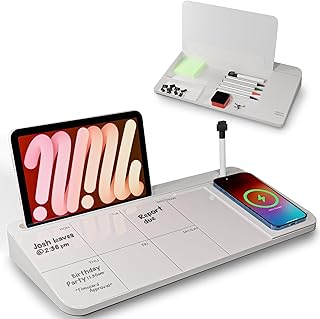
NEXTLUXE Glass Desk Whiteboard with Wireless Charger – Desktop Whiteboard with Storage, Weekly Planner, Dry Erase Pad, Organizer Drawer for Home, School, Office Gadgets – White
Best For:
Content creators and hybrid workers who value consolidated desk tools—whiteboard, weekly planner, and wireless charger in one premium unit.
The NEXTLUXE Glass Desk Whiteboard is a premium option for creators who want a multi-functional desktop centerpiece. It combines a tempered glass dry-erase surface with an integrated weekly planner layout and an embedded Qi wireless charger. There’s also a storage drawer for markers and small accessories. The result is a single object that organizes your short-term schedule, powers your phone without added cables, and gives you a smooth surface to iterate on ideas.
Main benefits: consolidation and convenience. The wireless charging element removes cable clutter and keeps your phone topped up during long writing sessions—handy if you use your phone for reference, timer apps, or voice memos. The built-in weekly grid lets you sketch a quick content plan, while the erasable glass surface is ideal for iterative outlining. Compared to separate components (charger, whiteboard, organizer), NEXTLUXE reduces visual noise and keeps essential tools within arm’s reach.
Real-life usage scenarios: start your morning by filling the weekly grid with three headline tasks, then charge your phone while you draft—no need to hunt for a cable. Use the board to map post structures and move sections around as ideas evolve. During calls, place short bullet prompts or questions on the board for quick reference. If you produce multimedia, you can sketch storyboard notes and use the charging pad to keep a camera or phone ready.
Why this product is valuable: it’s built for creators who value both aesthetics and utility. A single purchase replaces multiple desk items and supports an uninterrupted workflow. The tempered glass surface feels premium and wipes clean, keeping your workspace tidy and visually calming.
Buying considerations and observations: wireless chargers vary in alignment and output—check your phone’s Qi compatibility and case thickness for reliable charging. Glass is heavier, so consider desk weight capacity and placement. The cost is higher than a basic whiteboard, so weigh the convenience of consolidation against purchasing individual components. Also verify whether the included charger supports quick-charge standards if that matters for your device.
Who it’s best for: creators who want a sleek, all-in-one desk organizer with wireless charging—podcasters, social creators, and hybrid desk workers who use their phone frequently while writing. Who may not need it: those on a strict budget or who already have a trusted wireless charger and prefer separate components.
Pros:
– Integrated wireless charger reduces cable clutter
– Tempered glass surface with weekly planner grid
– Storage drawer keeps accessories tidy
Cons:
– Wireless charging requires proper phone alignment and case compatibility
– Higher price point than simple boards
Check the latest price on Amazon.
Pros
- Integrated wireless charger reduces cable clutter
- Tempered glass surface with weekly planner grid
- Storage drawer keeps accessories tidy
Cons
- Wireless charging requires proper phone alignment and case compatibility
- Higher price point than simple boards
Check the latest price on Amazon.
LOUKIN Erasable Dry Erase Desk Mat, 32"x14" Mouse Pad, Writing White Board, Non-Slip Desktop Protector for Office, Home, School (Includes 2 Wet Erase Markers & Cleaning Cloth)

Best For:
Writers and creators who want a large, continuous writable space that doubles as a mouse pad and desktop protector.
The LOUKIN Erasable Dry Erase Desk Mat is a large 32"x14" writable surface that doubles as a mouse pad and desktop protector. It’s designed for creators who want an expansive, reusable workspace where they can sketch ideas, plan sections, and keep most of their notes directly under their hands. The mat’s non-slip base holds steady during mouse movement, and it typically ships with two wet-erase markers and a cleaning cloth for easy maintenance.
Main benefits: scale and continuity. Instead of switching between sticky notes, notebooks, and loose sheets, the desk mat keeps your current session’s notes in one place, visible as you type. The large format allows for lengthy outlines, columned lists, and quick sketches. Because it functions as a mouse pad, it reduces the number of separate objects on your desk and gives a consistent tactile space for both cursor work and handwritten notes.
Real-life usage scenarios: map a long-form article’s structure across the mat before transferring sections into your document; use the area to track research links along the top edge and writing tasks below; dedicate a column to a running word-count tracker or daily targets. The non-slip backing makes it suitable for intensive mouse use—graphic writers who alternate between drafting and visual work will appreciate the continuity.
Why this product is valuable: it’s a high-visibility, reusable planning surface for extended projects. The large area is especially useful for writers who like to see a sprawling outline or storyboard without flicking between tabs. Compared to small whiteboards or single-page pads, the desk mat keeps everything in the same field of view for longer stretches of work.
Buying considerations and observations: 32"x14" takes up significant desk real estate—measure your workspace before buying to ensure it fits. The writable surface may ghost if markers are left for long periods; regular cleaning with the supplied cloth or a wet-erase approach helps. While wet-erase markers reduce accidental smudging, they require a slightly different cleaning routine than dry-erase pens. Also note that some high-DPI mice might feel different on the mat surface compared to cloth pads.
Who it’s best for: creators who like sprawling visual outlines, visual writers, and hybrid content producers who want a continuous writable surface under their mouse. Who may not need it: mobile workers or anyone with a compact desk who prefers distinct, smaller organizers.
Pros:
– Large, continuous writable surface
– Doubles as a mouse pad and desk protector
– Comes with markers and cleaning cloth for maintenance
Cons:
– Large footprint may not fit small desks
– Writable surface can ghost if not cleaned regularly
Check the latest price on Amazon.
Pros
- Large, continuous writable surface
- Doubles as a mouse pad and desk protector
- Comes with markers and cleaning cloth for maintenance
Cons
- Large footprint may not fit small desks
- Writable surface can ghost if not cleaned regularly
Check the latest price on Amazon.
Final Verdict
There’s no single magic tool for a productive writing morning, but the right combination of capture, context, and comfort can transform how much you get done. For quick daily focus and sprinting, the Taja To Do List Notepad is an inexpensive, tactile way to keep your top tasks visible. If you need multi-day perspective, the 8.5"×11" Weekly To Do List Notepad gives space for content calendars and habit tracking. For reusable planning and improved ergonomics, the TSJ Office glass whiteboard doubles as a keyboard stand and small organizer. If you want consolidation and a premium feel, the NEXTLUXE glass desk board adds wireless charging to a weekly planner surface. And for creators who think visually across wide areas, the LOUKIN desk mat provides a large writable surface that also functions as a mouse pad.
Choose based on your desk size, whether you prefer paper or erasable surfaces, and whether extras like wireless charging matter to you. If you want a minimal, low-cost start, grab a daily notepad and a small glass pad for outlines. If your workflow relies heavily on phone reference and you want everything consolidated, the NEXTLUXE is worth considering. For sprawling outlines and visual storyboards, the LOUKIN mat is hard to beat. No matter which you pick, these tools are intended to reduce context switching, protect your focus, and make the early-morning writing ritual smoother and more productive. Check the latest price on Amazon.
Conclusion
These Desk accessories creators use during focused writing mornings picks are trending now and offer great value and variety. Check the links above for latest prices and reviews.
As an Amazon Associate, I earn from qualifying purchases.
Tags:
desk accessories, writing desk organizer, dry erase desk mat, weekly planner notepad, wireless charging desk board, writer productivity tools, desk whiteboard
