Office Gadgets Creators Use for Focused Work
As an Amazon Associate, I earn from qualifying purchases. This article may contain affiliate links, which means we may receive a commission at no extra cost to you.
As creators, writers, designers, and solo founders, we all grapple with the same invisible enemy: distraction. The right desk gadget—especially a simple visual timer—can be the single upgrade that turns scattered sprints into predictable, productive sessions. Before we dive into the picks, a quick note: As an Amazon Associate, I earn from qualifying purchases. This article may contain affiliate links, which means we may receive a commission at no extra cost to you.
This guide focuses on five popular time-management and focus accessories people put on their desks to structure writing sprints, editing sessions, or focused coding blocks. I drew on product specs, customer feedback patterns, and common use cases among content creators and knowledge workers to shape the recommendations. Expect practical observations about real-life workflows—what works in noisy home offices, what helps with ADHD or intermittent concentration, and which gadgets are overkill for someone who prefers digital timers.
Read on for in-depth descriptions, pros and cons, realistic scenarios, and a compact buying guide to match your work style with the right timer.
Buying Guide
Why pick a dedicated desktop timer instead of a phone app? A physical timer reduces temptation: no social apps, no spontaneous email checks. Visual timers and tactile cubes excel because they provide an external cue for starting and stopping work. When selecting one, consider these factors:
– Mode and Alerts: Do you prefer a visual countdown (a shrinking colored disk), audible beeps, vibration, or a combination? Visual timers like the Time Timer MOD use a red disk that fades; cubes and compact devices often offer mute and vibrate modes for shared spaces.
– Presets vs Custom: Creators who work with strict Pomodoro cycles appreciate single-touch presets. If your sessions vary—longer focus blocks for editing, shorter bursts for email—look for custom countdown and stopwatch features.
– Silent Operation and Office Etiquette: If you work in a shared office or with sleeping family members, choose models with silent or vibration alerts. Silent visual-only timers still provide strong cues without noise.
– Portability and Power: Some timers run on batteries, others recharge via USB. If you move between home and co-working spaces, prioritize battery life and size.
– Extra Features: Wellness prompts, activity trackers, and built-in mindfulness options can help creators balance deep work with regular breaks and micro-exercises.
Who needs one? If you struggle with task transitions, hyperfocus that makes you forget breaks, or a habit of checking phones during sprints, a physical timer will likely help. Who might skip it? If you already have a disciplined, app-driven workflow or live in a chaotic environment where any gadget gets ignored, prioritize habit changes first.
Below you’ll find detailed write-ups for five well-regarded desktop timers and focused-work tools, each with realistic use cases and buying considerations.
Printers ack Pomodoro Timer – Productivity Cube, Visual Focus Timer, Mute & Vibration & Adjustable Sound Alert, for Office, ADHD, Study, Work, 3/5/10/25/30/60min & Custom Countdown – Silver

Best For:
Writers, designers, and creators who want tactile one-touch presets and discreet vibration alerts in shared spaces.
The Printers ack Pomodoro Timer nails what many creators want: a no-nonsense focus cube with both visual and tactile cues. At its core it’s a compact desktop cube with multiple preset durations—3, 5, 10, 25, 30 and 60 minutes—plus the ability to set a custom countdown. The cube’s faces give you one-touch selection, which makes starting a timed session as simple as flipping to the right side. For writers moving between drafting and editing, and designers switching from ideation to execution, those presets are convenient.
What stands out for many users is the combination of mute, vibration, and adjustable sound alerts. If you work in a shared studio or late at night, vibrating alerts provide a discreet nudge without interrupting others. The adjustable sound lets you dial the audio to a polite chime or a firmer alarm if you’re prone to ignoring soft beeps. The silver finish is subtle and pairs well with modern desks.
Practical scenarios: A freelance copywriter might use the 25-minute preset for focused drafting, flip to 5 minutes for a break stretch routine, then use the custom countdown when tackling research sessions that require flexible timing. For creators with ADHD, the tactile act of turning the cube and the vibration alert creates a multisensory cue that helps transition between tasks.
Compared with smartphone apps, this cube removes the temptation to switch apps mid-session. Against less configurable timers, it wins on flexibility: the custom timer is especially useful for people who split their work into uneven blocks. On the downside, it’s not a mindfulness tracker—if you want wellness prompts or activity logging you’ll need a companion tool.
Buying considerations: check battery type and expected runtime if you travel a lot. Also, assess whether you want a completely silent visual-only approach; if so, verify that the model supports mute and vibration-only modes. Overall, this timer is a practical, affordable desktop companion for creators who need clear starts and stops without digital distractions.
Best for: Creators who prefer tactile controls, people working in shared spaces who need vibration/mute options, and anyone who uses varied session lengths.
Who may not need it: Users already fully committed to a phone or desktop app workflow, or those who prefer minimalist visual-only timers.
Pros: one-touch presets and custom timer; mute, vibration, and adjustable sounds; compact and tactile. Cons: lacks activity logging or wellness features; depends on batteries or limited power info. Check the latest price on Amazon.
Pros
- One-touch preset timers and custom countdown
- Silent and vibration modes for shared environments
- Adjustable sound levels to suit preference
Cons
- No built-in activity tracking or wellness prompts
- Requires battery or charging—check runtime
Check the latest price on Amazon.
Mindsight Focused Activity Timer & Tracker | Promotes Work Life Balance & Productivity | Pomodoro ‘Plus’ w/ 5 Fixed timers + 5 curated Wellness Activities | Office Desk Accessory | Mindfulness | ADHD

Best For:
People who want Pomodoro timing plus guided wellness breaks and simple session tracking to improve work-life balance.
The Mindsight Focused Activity Timer & Tracker aims to be more than a clock: it’s positioned as a Pomodoro-plus device that nudges you toward healthier, more balanced work sessions. Where basic timers only count down, the Mindsight includes five fixed timers plus five curated wellness activities—short prompts and micro-routines that encourage movement, breathing, or screen breaks between concentrated sprints. This makes it appealing to creators who worry about long stretches sitting at a desk and want gentle cues to reset.
Design-wise it sits neatly on a desktop and offers clear controls for switching between work timers and wellness prompts. For artists who alternate between intense creative flow and repetitive technical tasks, the wellness cues can help avoid burnout by forcing a momentary physical break or a quick mental reset. People with ADHD who benefit from structured alternation between focus and recovery may find the mix especially useful.
Use cases: A content creator could run a 25-minute deep writing sprint, then follow the device’s 3-minute guided stretch or breathing prompt before returning. A developer knee-deep in bug-fixing might use the wellness activity to stand, hydrate, and return more alert. The tracker function records session counts so you can spot trends: are you moving enough between sessions? Are your longest focus blocks drifting later into the day?
Compared to plain timers, Mindsight’s added structure and tracking positions it closer to a behavior-change tool. It doesn’t replace sophisticated habit-tracking apps, but for desk-centered workflows it reduces friction: the prompts are right where you work. The trade-off is increased complexity—if you want a purely visual cue with zero interaction, this device might feel like overkill.
Buying considerations: confirm how the tracker logs data (on-device only or with companion app) and whether the wellness activities are customizable. If you prize a single-purpose, silent visual countdown, consider a simpler model. If you want to nudge better work-life balance and build micro-habits, Mindsight is an excellent candidate.
Best for: Creators seeking structure, people who forget breaks, and those aiming for sustainable focus with wellness prompts.
Who may not need it: Minimalists seeking a single visual timer without extra features.
Pros: blends Pomodoro timing with wellness activities; session tracking for habit insights; good for ADHD and long-sitting prevention. Cons: slightly more complex interface; check data tracking method. Check the latest price on Amazon.
Pros
- Includes curated wellness activities between sessions
- Session tracking to spot focus patterns
- Pomodoro-style presets with easy switching
Cons
- More complex than a basic visual timer
- Check how session data is stored and whether activities can be customized
Check the latest price on Amazon.
TIME TIMER Home MOD – 60-Minute Visual Timer, Home Edition, Silent Operation, for Homeschool Supplies, Study, Office & Meetings (Fern Green)

Best For:
Anyone who wants a clear visual countdown without sound—ideal for quiet studios, classrooms, and solo creators.
Time Timer’s MOD Home edition remains a classic for creators who want a purely visual, silent countdown that communicates remaining time at a glance. It replaces digital numbers with a brightly colored disk that visibly shrinks as time passes—no beeps or buzzes unless you choose an accompanying alert. This simplicity is the product’s greatest strength: it’s intuitive for collaborators, easy to place on a desk or shelf, and excellent for people who get distracted by notifications.
The 60-minute range fits a wide set of creative tasks: long editing passes, uninterrupted coding blocks, or multi-act rehearsal sessions. Because it operates silently, it’s ideal for shared workspaces, open studios, and households where audio alerts would be disruptive. The compact, attractive finish (this model in fern green) also doubles as a neat desk accessory.
Real-life use cases: A podcaster timing segment recording will appreciate seeing the remaining time without interrupting flow. A novelist could set the MOD for a 50-minute sprint and glance at the shrinking disk to pace themselves without glancing at a phone. Teachers and parents also like it for timing focused activities and transitions for kids.
Compared to the tactile one-touch cubes, the MOD’s value is its visual clarity and silent operation. It’s less configurable—no custom countdowns with multiple presets or vibration modes—but that lack of complexity keeps your workflow distraction-free. If your primary concern is off-screen cues or you’re managing group activities, the Time Timer MOD is a dependable choice.
Buying considerations: the MOD runs on battery power; check expected battery life if you plan heavy use. If you need vibration alerts or app pairing, this isn’t the right model. For many creators the trade-off is worth it: fewer features, less cognitive friction.
Best for: Creators who prefer visual-only cues, people working in quiet settings, and teams managing shared timed activities.
Who may not need it: Users who require multi-mode alerts (vibrate/sound) or built-in wellness prompts.
Pros: highly intuitive visual disk; silent operation for quiet environments; attractive, unobtrusive design. Cons: limited configurability and no vibration mode. Check the latest price on Amazon.
Pros
- Large visual countdown disk for at-a-glance timing
- Silent operation—no distracting beeps
- Simple, intuitive design that reduces decision friction
Cons
- Limited presets and no vibration/sound options
- Battery-powered—check runtime for heavy use
Check the latest price on Amazon.
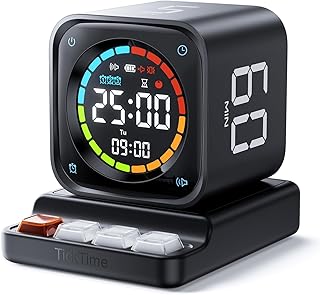
TK3 Pomodoro Timer Cube, Desk Productivity Timer with 5/10/30/60 Min Presets, Custom Countdown, Stopwatch, Clock, 3 Alarm, Silent, Vibrate & Sound Alert, for Task, ADHD, Study, Kitchen, Black
Best For:
Creators who want a versatile, multi-mode timer: stopwatch, clock, and preset Pomodoro intervals in one cube.
The TK3 Pomodoro Timer Cube follows the familiar productivity-cube layout but adds a few handy extras for creators who like multi-function desk tools. It includes five preset durations (5, 10, 30, 60 minutes plus a custom option), a stopwatch and clock mode, and three alarm styles. That versatility makes it a true multipurpose device: use it for short sprints, longer editing sessions, or as a visual cue while you keep a running stopwatch for tasks that need flexible timing.
A key advantage is its range of alert modes—silent, vibrate, and sound—so you can adapt it to your environment. The cube’s tactile interaction (flip to start) provides a satisfying ritual that can help cue your brain to shift into focus mode. Creators who value ritual—musicians, illustrators, and writers—frequently mention how small physical actions help set the stage for uninterrupted work.
Use cases: An animator blocking frames can start a 30-minute sprint to maintain momentum, then switch to stopwatch mode for detailed cleanup that’s harder to time. A teacher running hands-on activities may opt for the silent visual cue so students can see time remaining without noise. For people with ADHD, vibration and physical flipping can anchor attention and signal transitions.
Compared to single-purpose visual timers, the TK3 packs clock and stopwatch functionality into one small device, which reduces desk clutter. Compared with the more wellness-oriented Mindsight, TK3 is more focused on timing mechanics than behavior change. If you like a Swiss-army-knife gadget with straightforward controls, this one fits.
Buying considerations: check button durability—frequent flipping can wear inexpensive switches over time. Also consider whether you prefer a cleaner visual disk like the Time Timer or the multifunction approach of the cube.
Best for: Creators who want versatility—multiple timing modes and alarms—in a small, tactile device.
Who may not need it: Minimalists who prefer a single visual-only timer or users who want integrated wellness prompts.
Pros: multiple modes (stopwatch, clock, presets), three alarm styles, tactile cube ritual. Cons: physical switches may wear with heavy flipping; not a wellness tracker. Check the latest price on Amazon.
Pros
- Multi-mode: presets, stopwatch, and clock
- Three alarm styles including silent and vibrate
- Compact, tactile cube that encourages ritualized starts
Cons
- Mechanical switches can show wear over time
- Lacks guided wellness features
Check the latest price on Amazon.
Time Timer MOD – Home Edition – Individual Sized 60 Minute Visual Countdown Timer for ADHD, Adults, Students, and Pomodoro with Silent Operation (Metallic Midnight)

Best For:
Professionals and creators who value a minimalist, silent visual timer with a refined finish for focused work.
The Time Timer MOD Metallic Midnight model is a slightly more polished variant of the classic visual countdown timer, combining the same instantly readable colored disk with a sleeker colorway that suits modern desks. Its straightforward visual approach removes cognitive overhead: instead of reading minutes, you register the disk’s remaining section and adjust your pace accordingly. For creators who juggle multiple projects, that glanceable feedback helps prioritize the next small step without breaking flow.
This model focuses on silent operation and a 60-minute range, making it suitable for everything from sprinted drafting sessions to rehearsal blocks. The MOD’s durable casing and clean aesthetic make it an unobtrusive addition to a professional workspace. For folks with ADHD, the visible shrinking disk often provides a calming, externalized representation of time—less abstract than digits and more effective at prompting action.
Practical scenarios: A photographer on a solo retouching day can use the MOD to protect blocks of focus for color correction. A podcaster timing segments or transitions will gain the same non-intrusive time awareness. For co-working spaces, the MOD acts as a polite group cue: everyone can see how much time is left without competing alarms.
Compared with feature-rich cubes, the MOD’s minimalist strengths are obvious: reliability, ease of use, and a single purpose done well. If you want additional features—vibration, app sync, or wellness prompts—you’ll need to pair it with a complementary device or app. That said, many creators prefer this pared-back approach because it minimizes decision points and reduces tech clutter.
Buying considerations: ensure you’re comfortable with battery-powered operation and the single visual mode. The MOD is less versatile than some cubes but excels if your priority is silent, glanceable timing. For creators who value aesthetic and function equally, the Metallic Midnight finish is a nice touch.
Best for: Professionals and creators seeking a refined, silent visual timer for uninterrupted focus blocks.
Who may not need it: People who want multi-mode alarms or built-in tracking and wellness features.
Pros: sleek design, highly readable visual countdown, silent operation. Cons: single-mode visual timer, no vibration or tracking. Check the latest price on Amazon.
Pros
- Refined aesthetic that fits modern desks
- Clear, glanceable visual countdown disk
- Silent operation ideal for shared spaces
Cons
- No vibration or tracking features
- Single-mode—less versatile than multifunction cubes
Check the latest price on Amazon.
Final Verdict
Selecting the right focus gadget comes down to your workflow and environment. If you want a simple, silent visual cue that reduces screen time and is friendly in shared spaces, the Time Timer MOD (Home Edition or Metallic Midnight) is exceptionally reliable. If you prefer ritual and tactile interaction with a range of timing modes, the TK3 Pomodoro Cube and the Printers ack Pomodoro Timer offer handy presets, custom countdowns, and vibration options that fit noisy households and co-working spaces.
For creators who also want to build healthier habits around breaks, the Mindsight Focused Activity Timer & Tracker stands out by combining session timing with curated wellness activities and basic session logging. That makes it a sensible middle ground between strict timers and full habit apps.
No matter which model you choose, think about how the device will be used day-to-day: will it sit on a desk and be flipped often, or will it be a stationary visual cue visible across a room? Do you need vibration for discreet alerts, or is silence paramount? Answering those questions will narrow the options quickly.
If you’re uncertain, start with a simple visual timer (Time Timer MOD) to build the habit of timed sprints. If you find yourself needing more ritual or data, consider upgrading to a multifunction cube or the Mindsight tracker.
Check the latest price on Amazon.
Conclusion
These Office gadgets creators use during focused work sessions picks are trending now and offer great value and variety. Check the links above for latest prices and reviews.
As an Amazon Associate, I earn from qualifying purchases.
Tags:
pomodoro timer, visual timer, desk timer, productivity gadgets, focus tools, time management, ADHD timers, work timers
