Essential Desk Gadgets for Apartment Organization Resets
As an Amazon Associate, I earn from qualifying purchases. This article may contain affiliate links, which means we may receive a commission at no extra cost to you.
Apartment resets—those focused weekends when creators and productivity-minded people overhaul a cramped living space—are as much about mindset as tools. The right desk gadgets can turn chaotic countertops and overflowing drawers into a functional, calming workstation. In this guide I’ve gathered a set of compact, practical products that frequently appear in creator-recommended setups: a valet tray with wireless charging, a desktop glass whiteboard with storage, a wooden desk organizer with drawers, secure adhesive cord clips, and a weekly undated planner notepad.
Affiliate disclosure: As an Amazon Associate, I earn from qualifying purchases. This article may contain affiliate links, which means we may receive a commission at no extra cost to you.
This isn’t a list of gimmicks—these are small, everyday items that solve persistent problems like lost keys, tangled cords, unclear to-do lists, and inefficient desk real estate. Below you’ll find long-form, research-based descriptions for each product with real-life use cases, buying considerations, pros and cons, and who will benefit most. Whether you’re staging your apartment for better photos, organizing a multi-use living room desk, or just reducing daily friction, these picks help make the reset stick.
Buying Guide
Before committing to any desk gadget collection, think in terms of function + habit. Small spaces require multi-purpose items: something that corrals small objects but also complements a phone, another that keeps cables in check while staying removable for renters, and a paper planner that’s easy to glance at from your couch. Here are practical considerations that many creators weigh when assembling a reset kit.
1) Footprint and style: Measure the surface you’ll use. A valet tray or desk organizer should fit beside your laptop without crowding a monitor. Choose colors or materials that match your decor—creators often favor muted tones and natural wood to photograph well.
2) Material and durability: Adhesive cable clips, glass whiteboards, and vegan leather trays each have different lifespans. If you plan to move often, look for removable adhesives and scratch-resistant finishes. Glass whiteboards are easy to clean but heavier than plastic.
3) Multi-function vs single-purpose: Some people prefer a single all-in-one organizer, while others like modular pieces that can be moved. If you switch layouts frequently, lightweight, stackable organizers and desktop whiteboards with storage win.
4) Cable management: Cords create visual clutter and stress. Dual-spring cable clips with a secure clasp are preferable to flimsy single-snap clips, especially near a nightstand where devices get picked up and put down a lot.
5) Planning system: Undated weekly notepads are favored by creators for flexibility. You can start or pause anytime, tape pages to a mood board, or tear them off without waste.
6) Accessibility and habit formation: The goal is to reduce friction—put everyday items where you reach naturally. A valet tray with a wireless charging pad invites you to place your phone in the same spot nightly, which builds a habit and keeps surfaces tidier.
7) Budget vs longevity: Small gadgets are often inexpensive but not all are well-built. Read product construction notes, adhesive types, and included features (drawers, pen holders, built-in chargers) to balance cost against how long you want the item to last.
If you’re designing a creator-friendly setup, prioritize items that offer visible daily benefits—less time searching, neater images for social content, and more consistent routines. Below are detailed product write-ups to help you decide which pieces fit your reset plan.
Valet Tray, Built in Wireless Charging Pad, Nightstand Organizer, Two-Toned Premium Vegan Leather Desk Bedside Caddy Organizer Tray for Keys, Watch, Wallet, Jewelry (Black+Green)

Best For:
Creators and apartment dwellers who want a polished drop-zone that also charges a phone wirelessly; ideal for nightstands, small desks, and photo-friendly setups.
A valet tray that doubles as a wireless charging pad is a small but meaningful upgrade for any apartment reset. This two-toned premium vegan leather piece acts as a defined drop zone: it encourages the habit of placing keys, wallet, watch, and jewelry in one consistent spot, while a built-in wireless charger handles phones that support Qi charging. For creators and renters who live in small spaces, this kind of hybrid product helps consolidate visual clutter and prevents the morning scramble of hunting for everyday essentials.
Design-wise, vegan leather is a thoughtful choice for those wanting a polished look without animal materials. The two-tone finish (black with a green interior in this version) reads modern and photographable—something many creators appreciate when staging a desk or nightstand for quick photos or livestream backgrounds. The tray’s raised edges keep small items from rolling away, and a shallow footprint means it works on narrow console tables, dresser tops, or beside a laptop on a compact desk.
Functionally, the built-in wireless pad eliminates one extra cable on your surface and provides a single habitual resting place for your phone. Unlike standalone charging pads that get lost under papers, integrating the charger into a visible valet tray increases the chance you’ll leave your phone there overnight. For people juggling several devices, confirm that the wireless power output matches your needs: some integrated chargers supply standard 5W or 10W outputs while faster protocols may not be supported.
Who should consider this: creators who value a neat camera-friendly aesthetic, apartment dwellers with limited nightstand space, and anyone trying to build a decluttering routine. It’s particularly useful for those who routinely misplace small daily items or want to reduce cable visibility on camera.
Buying considerations: check the Qi compatibility with your phone model, confirm whether a power cable is included, and be mindful that wireless charging can be slower than wired fast-charging options. If you often charge phones with thick cases or use battery cases, verify clearance and charging performance in product Q&A sections.
Pros: a combined drop-zone and charger saves space; vegan leather offers a refined look; raised edges keep things contained. Cons: wireless charging may be slower than wired options; built-in chargers sometimes lack the highest fast-charging protocols. Check the latest price on Amazon.
Pros
- Combines tray and wireless charging to reduce cable clutter
- Premium vegan leather finish looks camera-ready
- Raised edges prevent items from rolling off
Cons
- Wireless charging can be slower than wired fast-charge
- May not support the highest fast-charging protocols for some phones
Check the latest price on Amazon.
Varhomax Desktop Whiteboard with Storage, Desk Organizer Dry Erase Glass White Board to-do List Memo Notepad for Home Office and School Supplies (Black)

Best For:
Creators, remote workers, and students who need a reusable planning surface with built-in storage that fits on a small desk or console.
A glass dry-erase desktop whiteboard with integrated storage changes how you plan and react during an apartment reset. It replaces sticky notes and torn scraps with a clean, reusable surface for daily to-dos, content ideas, or a shooting checklist. The Varhomax desktop glass whiteboard adds built-in storage—small trays or slots—to keep pens, erasers, and index cards at hand. For creators who switch between filming, editing, and planning in a single small living area, this model can act as a visual center for ongoing projects.
Glass whiteboards offer several advantages over plastic alternatives: they erase more cleanly (less ghosting), look sleeker on camera, and feel more substantial—qualities creators often call out in setup tours. The black-framed edge provides a subtle visual boundary that helps photographs and videos appear tidy. Because it’s desktop-sized, it sits upright behind a laptop or beside a monitor without taking wall space, which is especially helpful in renter-friendly setups.
The storage elements make this board more than a writing surface. Small compartments hold markers, sticky tabs, and a phone while you script or storyboard. That’s convenient during tight production cycles where you need to keep gear and notes within arm’s reach. As with any glass accessory, handle with care and be mindful of the weight if you plan to move it frequently.
Who should buy: solo creators, students, and remote workers who benefit from a writable visual planning surface that also stores essential accessories. It’s great for people who prefer reusable planning tools over paper and for anyone staging a compact workflow.
Buying considerations: check the board’s dimensions to ensure it fits behind your laptop or on a narrow shelf; confirm that the included mounting or freestanding hardware suits your desk layout. For renters, the desktop model is preferable to wall-mounted options that require drilling.
Pros: clean, low-ghosting glass surface; integrated storage keeps tools handy; sleek look for on-camera work. Cons: heavier and more fragile than plastic; may be overkill for lightweight note-takers. Check the latest price on Amazon.
Pros
- Glass surface erases cleanly with minimal ghosting
- Integrated storage keeps markers and notes organized
- Sleek, camera-ready aesthetic
Cons
- Heavier and more fragile than plastic boards
- Not ideal if you only need occasional jotting space
Check the latest price on Amazon.
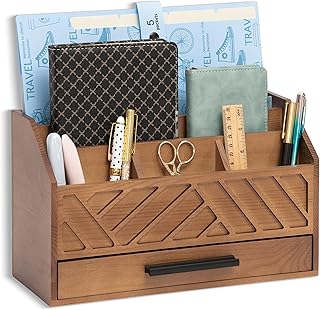
dreampossible Brown Wood Desk Organizer and Accessories with Drawer, Bill Mail Organizer and File Mail Holder for Office Supplies, Modern Desk Accessories & Workspace Organizers for Desk Organization
Best For:
Creators and home office users who want a stylish, multi-compartment organizer with a drawer for hiding small clutter and organizing mail or accessories.
A wooden desk organizer with multiple compartments and a small drawer is a timeless choice when resetting a multi-use apartment desk. The dreampossible brown wood organizer combines the warmth of natural-looking wood with practical segmentation: pen cups, phone ledges, small drawers for receipts or SD cards, and vertical slots for mail or notebooks. This layered organization model helps separate transient items (daily mail, loose cables) from permanent tools (notebooks, pens), reducing the visual noise that often makes small desks look cluttered in photos.
Creators who film desk setup videos or flat-lays often choose wooden organizers because they photograph well and add texture to flat surfaces. The drawer hides things you don’t need visible—charging bricks, small cables, or business cards—without adding a separate box. Vertical slots are handy for holding tablets or planners upright during a shoot, which can double as a backdrop element or a usable document holder during work sessions.
In practice, this organizer works well on a desk, console, or entryway table. Use the pen cups for styluses and highlighters, the drawer for SIM tools and small clutter, and the mail slots to triage incoming envelopes. For those who like modularity, the organizer’s separate sections can typically be repurposed across different rooms—one piece becomes a bathroom tray for skincare, another a bedside catchall.
Who should buy: people who prefer a natural material aesthetic and need multiple compartments for different object sizes—creatives, freelancers, and anyone who receives regular mail or packages. It’s particularly helpful for those who want an intentionally styled desk for social posts.
Buying considerations: confirm the actual dimensions to make sure it fits your surface; check whether assembly is required and whether the finish resists scratches and stains. If your decor is ultra-minimal or industrial metal, a wood tone may not match as neatly as a neutral vegan leather or metal organizer.
Pros: warm, camera-friendly wood look; multiple compartments and a drawer for hidden storage; versatile for different rooms. Cons: bulkier footprint than single-tray solutions; wood finish may scratch or discolor over time. Check the latest price on Amazon.
Pros
- Multiple compartments for pens, mail, and small items
- Drawer provides hidden storage for clutter
- Wood aesthetic looks great in photos
Cons
- Larger footprint than minimal trays
- Wood finish can scratch or stain if not maintained
Check the latest price on Amazon.
8Pack Cord Organizer [Dual Spring & Clasp, Max Secure] Cable Clips – Chfeila Cable Management, Adhesive Phone Charging Wire Holder for Nightstand/Wall, Home Office Desk Accessories Decor Essentials
![8Pack Cord Organizer [Dual Spring & Clasp, Max Secure] Cable Clips - Chfeila Cable Management, Adhesive Phone Charging Wire Holder for Nightstand/Wall, Home Office Desk Accessories Decor Essentials](https://m.media-amazon.com/images/I/81yRryG9oKL._AC_UL320_.jpg)
Best For:
Anyone needing low-cost, renter-friendly cable management—perfect for nightstands, desks, and media consoles to keep cords accessible and tidy.
Cable clips are an inexpensive but high-impact ingredient in any apartment reset, and a set of eight dual-spring clasp clips covers multiple spots—desk edges, nightstands, bedside walls, or behind a media console. These chfeila cable clips emphasize a dual-spring and clasp design intended to hold cords securely without letting them slip free when you yank a phone cable out. For renters, adhesive-backed clips that use removable foam tape or 3M-style adhesives allow temporary installation without permanent damage.
Practical benefits are immediate: your phone charging cable isn’t loose and dangling, earbuds aren’t sliding under the couch, and visual clutter is dramatically reduced. Creators who film desk tours note that tidy cable lines make a setup feel more intentional and less chaotic. Because this set includes multiple clips, you can route power and data cables along a desk edge, label each clip for different devices, and create a clean path for charging stations.
Installation is usually tool-free: peel and stick, press for a minute, and you’re done. For heavier cables or thicker braided cords, choose clips with stronger adhesives and a wider clasp. Also consider temperature and humidity: adhesives perform best on clean, dry surfaces and may not stick well to textured walls or porous finishes.
Who should buy: anyone with multiple cables who wants a neat, low-cost cable-management solution—streaming creators, gamers, students, and remote workers. It’s especially useful near nightstands and desks where devices are picked up often.
Buying considerations: confirm adhesive type and whether replacement pads are available; check the inner clasp width to ensure it fits your cable thickness; if you need a permanent solution, look for screw-mounted alternatives. For frequent renters, removable adhesives or command-style strips are preferable to permanent glue.
Pros: inexpensive way to tame multiple cables; secure dual-spring clasp reduces slips; easy tool-free installation. Cons: adhesive strength varies by surface and may fail on textured walls; smaller clips may not fit very thick braided cables. Check the latest price on Amazon.
Pros
- Affordable and effective cable control
- Dual-spring clasp design holds cords securely
- Easy, tool-free peel-and-stick installation
Cons
- Adhesive performance varies by surface
- May not fit very thick braided cables
Check the latest price on Amazon.
Weekly To Do List Notepad, Undated Planner with 52 Sheets (8.5”x11”), Desk Weekly Planner for Women & Man, Home School & Work

Best For:
People who prefer tactile weekly planning—creators, remote workers, and parents managing home and work tasks looking for a flexible, undated system.
An undated weekly to-do list notepad is a low-tech but powerful tool in an apartment reset. This 52-sheet planner gives you a year’s worth of weekly pages without committing to calendar dates, making it flexible for creators who prefer project-based planning over rigid schedules. The 8.5"x11" size is large enough to scribble daily goals, content ideas, and quick shot lists, yet it lays flat on a desk or leans against a monitor for easy reference during work blocks.
Creators often pair a physical weekly notepad with a desktop whiteboard: the notepad captures actions and deadlines, while the glass board holds high-level themes and ideas. The tactile act of crossing off a line is satisfying in a way digital checkboxes aren’t, and for many the notepad becomes a ritual object during a reset weekend—one sheet per week helps preserve momentum and provides a physical record of progress.
Use-case scenarios include weekly content planning (map video topics per day), household management (meal plan, bills, laundry triage), and focused production sprints (assign shoot days, editing slots, and upload windows). Undated planners are forgiving if you skip a week, and individual sheets can be torn off to tape into a project binder or stick to a mood board.
Who should buy: anyone who benefits from a visible, tactile weekly planning habit—suitable for creators, parents organizing home-school schedules, and remote workers blending personal and professional tasks. If you prefer all-digital planning or need an annual dated layout for detailed scheduling, a different planner might suit better.
Buying considerations: check paper quality (ink bleed-through can be an annoyance with markers), whether the pad has a tear-off glue binding for clean removal, and how much space each day gets for writing. For people who like to archive weeks, choose a pad with perforated sheets.
Pros: flexible undated format; large writing area for detailed weekly plans; satisfying physical habit that reinforces routines. Cons: paper can be less convenient than digital reminders for recurring alarms; single-sheet format may require storage if you keep records. Check the latest price on Amazon.
Pros
- Flexible undated layout you can start anytime
- Large 8.5×11 format for detailed entries
- 52 sheets gives a full year of weekly pages
Cons
- Paper lacks digital reminder functions
- May require physical storage for archived weeks
Check the latest price on Amazon.
Final Verdict
When creators stage an apartment reset, they look for small tools that solve everyday friction: places to drop phones, clean surfaces for scripting and brainstorming, compartments for mail and tools, a reliable way to tame cables, and a simple weekly planner to keep the new system alive. Each product in this guide addresses one of those frictions while complementing a camera-friendly aesthetic.
If you’re building a compact creator setup, start with one or two items that solve your biggest pain points: a valet tray with wireless charging if your phone and keys are always adrift, a glass desktop whiteboard if you need a reusable visual hub, and cable clips if cords are the primary eyesore. The wooden organizer adds personality and hides clutter; the undated notepad helps translate the reset into a weekly routine.
Not every item is necessary for every person. Minimalists who already use digital tools may only need cable clips and a small valet tray. People who rely on detailed calendar scheduling might forego the undated notepad. Consider your daily habits, desk footprint, and whether you prefer tactile or digital systems before purchasing.
Combined, these five affordable gadgets create a layered approach to apartment organization: visible systems to reinforce good habits, discrete storage for things you don’t want in shots, and cable management that makes a setup look intentional. Use the checklist approach here: identify the one or two daily frustrations you want to fix, pick the product that addresses them best, and add complementary items over time.
If you’re resetting your apartment to be more functional and camera-ready, these pieces are a smart place to start. Happy organizing, and here’s to a calmer, more productive desk area.
Conclusion
These Desk gadgets creators use during apartment organization resets picks are trending now and offer great value and variety. Check the links above for latest prices and reviews.
As an Amazon Associate, I earn from qualifying purchases.
Tags:
desk organization, apartment reset, creator setup, cable management, desk organizers, wireless charging tray, desktop whiteboard
