Top Gaming Accessories for Cozy Setup Creators
As an Amazon Associate, I earn from qualifying purchases. This article may contain affiliate links, which means we may receive a commission at no extra cost to you.
Cozy gaming setups — think plush couches, warm lighting, and a cup of tea within reach — have become a creative niche for streamers, content creators and casual players. If you prefer playing from the couch or bed, or you’re curating a calming, photo-ready corner for videos and live streams, the right accessories can make all the difference. Below you’ll find a curated selection of five trending items that consistently appear in cozy setup builds: an ergonomic lap desk/USB hub, a portable monitor for dual-screen convenience, two styles of RGB corner floor lamps for mood lighting, and a compact controller/headphone stand for keeping accessories organized.
Before we dive in, a quick note about shopping: As an Amazon Associate, I earn from qualifying purchases. This article may contain affiliate links, which means we may receive a commission at no extra cost to you.
Buying Guide
How to choose accessories for a cozy gaming setup
Space and posture: Cozy setups often sacrifice formal desk ergonomics for comfort. Look for lap desks with wide, stable platforms and wrist support (like thick foam or contoured edges) so you’re not straining wrists or shoulders after long sessions. If you frequently switch between couch/bed and a desk, choose something light but sturdy.
Power and connectivity: For tech accessories (portable monitors, RGB lamps), check power requirements and connection types. USB-C monitors that support single-cable video and power are the most convenient for modern laptops, but confirm compatibility with older machines. Lamps with app and remote control add convenience but require Wi-Fi or Bluetooth pairing; consider whether you prefer local IR remotes for privacy or smart integration for automation.
Lighting characteristics: RGB lamps vary in color richness, diffusion and placement. RGBIC or individually addressable LEDs give more dramatic effects (stripes, gradients) compared with standard RGB, while softer diffusers are better for background ambience and streaming because they avoid hard hotspots on camera.
Build quality vs. portability: If you move your setup often (e.g., streaming from different rooms or traveling), prioritize lighter monitors with protective cases and foldable kickstands. For stationary setups, heavier, sturdier lamps and lap desks with larger platforms are worthwhile.
Compatibility and software: Read product descriptions for required drivers or apps. Some portable monitors need drivers for full functionality; RGB lamps may require a specific app. Check recent user feedback for app stability and firmware updates.
Alternatives to consider: A traditional desk with a monitor arm and dedicated desk lamp gives more adjustability and permanence. But if you want warmth, photo-ready backgrounds and low-effort comfort, the items below bridge style and functionality.
Buying considerations checklist: confirm dimensions, connectivity (USB-C vs. HDMI), power source, required drivers, app compatibility, and return policy. Keep in mind that images and specs matter, but user feedback on build quality and long-term reliability often reveals the most useful practical insights.
Couchmaster CYCON³ HORIZONLIGHT Bar, Ultimate Ergonomic USB-Hub Gaming Lap Desk for Couch and Bed, Large, Stable and Compatible with All Keyboards and Mouse/Mice, Laptops, PCs, PS4/5, Xbox

Best For:
Couch and bed gamers who want desktop-class keyboard/mouse stability and a neat peripheral hub without moving to a desk.
If you spend long sessions gaming or streaming from a couch or bed but miss the control and stability of a desk, the Couchmaster CYCON³ HORIZONLIGHT Bar is built specifically for that gap. It’s a wide lap desk platform designed to support full-size mechanical keyboards, mice and small laptops while putting fewer demands on your wrists and shoulders. The device integrates a USB hub so peripherals connect cleanly to your console or PC without messy cable runs across cushions. The platform’s width and shallow depth are deliberately balanced to keep mouse movement comfortable while seated on soft furniture.
Why it works for cozy creators: The CYCON³’s padded underside conforms to laps without shifting, and the stable top keeps high-sensitivity mouse movements consistent — essential if you play competitive shooters or precision-based indie titles. Buyers often mention how the wide surface eliminates the common problem of sliding keyboards when you lean back, and how the built-in cable-management channels reduce tangles for controllers, wired headsets and phone chargers. The lap desk also reduces the need to hunch forward, helping posture when paired with a supportive pillow behind your lower back.
Practical use-cases: Couchstreamers who want a compact “command center” for keyboard and mouse; players who alternate between console and PC and need reliable peripheral connections; anyone who likes to work on a laptop in bed but needs an improved input surface. Creatives living in small apartments can use it as a portable desk for digital art or editing while staying comfortable.
Considerations and comparisons: Compared with a folding tray or a generic laptop pillow, the Couchmaster prioritizes stability, cable routing and a laptop-friendly top. It’s heavier and bulkier than inflatable lap desks, so it’s less ideal if you’re constantly traveling. There’s also a premium feel and price compared with simple trays, but the added USB hub and thoughtful ergonomics justify it for those who truly want couch-based productivity.
Who should buy: Those who prioritize comfort over a formal desk setup, streamers who want a neat on-camera setup from the couch, and anyone who needs a reliable surface for full-size peripherals without converting a whole room.
Who might skip it: Minimalists who rarely use keyboards on the couch, or users who prefer a standing desk or permanent desk setup will likely not get the most value from this product.
Pros: Wide, stable surface for full keyboards; integrated USB hub for cleaner connections; padded underside for lap comfort; cable routing reduces clutter.
Cons: Bulkier and heavier than simple lap pillows; higher price than basic trays; not for users who prioritize portability above stability.
If your goal is a comfortable, practical command center that keeps keyboard and mouse performance intact on soft furniture, the Couchmaster CYCON³ is a strong choice. Check the latest price on Amazon.
Pros
- Wide, stable platform for full-sized keyboards
- Built-in USB hub simplifies connections
- Padded underside conforms to laps for comfort
- Cable routing reduces tangles and clutter
Cons
- Bulkier than simple lap pillows (less portable)
- Higher price than basic trays and cushions
If you want an ergonomic, stable solution for gaming or working from the couch, this Couchmaster setup makes a noticeable difference — Check the latest price on Amazon.
KYY 15.6" Laptop Screen Extender, 1080P FHD IPS Portable Monitor, One Cable USB-C Triple Monitor, Dual Travel Screen for 12"-17” Laptops, 360° Rotation & Kickstand,X90D (Driver Need)

Best For:
Streamers, traveling creators, and remote workers who need a lightweight second screen for chat, monitoring, or quick editing.
A compact portable monitor is one of the fastest ways to upgrade a cozy gaming or content-creation setup. The KYY 15.6" Laptop Screen Extender offers a 1080p IPS panel with good viewing angles and a slim footprint that clips or sits beside most laptops. It’s designed for one-cable USB-C setups when your laptop supports video over USB-C, and it can extend your workspace to create an effective triple-monitor layout in combination with a primary display.
What stands out: The full-HD IPS screen keeps colors consistent across wide angles, which is useful when you’re watching video, editing footage, or monitoring chat while streaming. The monitor advertises 360° rotation and an integrated kickstand, so you can switch between portrait and landscape modes — handy for vertical chat windows, long-form code, or scrolling feeds. One important note: this model lists a driver requirement for certain operating systems, so check compatibility if you rely on plug-and-play convenience.
Real-life scenarios: If you stream from a couch with a laptop on your lap, the KYY gives you a second display for alerts, music controls, or a chat window without crowding your main screen. For remote workers who also game, it’s an easy way to split work and play: video conferencing or documents on one screen, your game on the other. Traveling creators will appreciate the relatively light weight and included protective sleeve for mobile editing or monitoring on the go.
Comparison and trade-offs: Portable monitors compete on brightness, color accuracy and connection simplicity. Compared with a stationary 24" monitor, the KYY is less bright and smaller but massively more portable. Compared with other portable screens, it stands out for its rotation and kickstand flexibility but requires attention to drivers — which can introduce setup complexity on some older laptops.
Who should buy: Streamers and content creators who need an extra screen for chat, OBS scenes, or monitoring; remote workers seeking a portable second display; travelers who want a compact editing monitor.
Who might skip it: Desktop users who already have a large dual- or triple-monitor rig; users with older laptops that can’t output video over USB-C and who don’t want to deal with driver installs.
Pros: 1080p IPS panel with wide viewing angles; USB-C one-cable option (when supported); 360° rotation and kickstand for flexible layouts.
Cons: Some setups may require driver installation; not as bright as full-size desktop monitors.
A portable monitor like this KYY model is a practical, space-saving way to add screen real estate to your cozy setup. Check the latest price on Amazon.
Pros
- 1080p IPS panel with wide viewing angles
- One-cable USB-C option simplifies setup
- 360° rotation and integrated kickstand for versatility
Cons
- May require drivers for some systems
- Not as bright or color-accurate as larger desktop monitors
Interested in a portable second screen to expand your cozy setup? This KYY 15.6" extender is worth a look — Check the latest price on Amazon.
LED Floor Lamp, 63-Inch RGB Corner Light with Music Sync, Smart App Control, 16 Million Colors, Remote Control for Living Room, Bedroom, Gaming Room (2 Pack)

Best For:
Creators and gamers who want broad, camera-friendly ambient light and flexible color control for backdrops.
Ambient lighting is the signature of a cozy setup — it sets mood, improves camera backgrounds and makes long sessions feel more pleasant. This 63-inch RGB corner lamp arrives as a two-pack, which is appealing if you want symmetrical lighting on both sides of a couch or to use one lamp behind your streaming backdrop and another for general room ambience. The lamp supports sixteen million colors and includes music-sync capabilities so the LEDs pulse or shift with audio — a fun feature for party nights or high-energy stream transitions.
How it fits into a cozy build: Corner lamps are subtle and unobtrusive, tucking into unused space and washing walls with soft color. The 63" height provides a generous light spread without being overpowering on camera. App control and remote options let you change scenes quickly; presets make it easy to set up a “chill” scene for relaxed play and a “hype” scene for more intense streams. Users commonly pair these lamps with diffused backdrops or plants to soften the scene and reduce glare.
Real-world use cases: Use both lamps for a balanced two-tone background behind your couch; put one near a bookshelf for layered light; employ music sync during co-op game sessions to amplify atmosphere. The included remote offers immediate control without opening an app, which is handy when you just want to dim or switch color while on-camera.
Comparison and practical notes: Compared to single-strip or desktop LED bars, full-length corner lamps deliver broader, softer illumination. They won’t provide focused task lighting for reading, so pair them with a desk lamp if you need bright, directional light. Also check whether the app plays nicely with your smart-home ecosystem if that integration matters to you.
Who should buy: Streamers and cozy setup creators who want wide, adjustable color washes and easy scene control; renters who need plug-and-play mood lighting without permanent installation.
Who might skip it: People looking for precise desk task lighting or those with very low ceilings where the height could be overwhelming.
Pros: Large, soft color wash ideal for backgrounds; music sync and app + remote control; two-pack provides symmetrical lighting options.
Cons: Not a substitute for bright task lighting; app stability can vary depending on firmware and updates.
For stylish, camera-friendly ambient lighting that’s easy to place in a small living area, this 63-inch RGB corner lamp pair is a versatile choice. Check the latest price on Amazon.
Pros
- Two-pack for balanced, symmetrical lighting
- Music-sync and app + remote control
- Large color range for varied moods
Cons
- Not suitable as primary task lighting
- App stability can vary across devices
Want soft, immersive ambient lighting to elevate your cozy setup? These 63" corner lamps are an easy upgrade — Check the latest price on Amazon.
59" Smart LED Corner Floor Lamp, RGBICW Color Changing Ambient Lighting, App Control Music Sync Mood Light, Modern Dimmable Room Decor for Bedroom, Living Room, Gaming Setup, Black

Best For:
Streamers and creators who want advanced LED effects and useful white-tuning for on-camera work.
If you’re aiming for sharper, more dynamic lighting effects in a cozy corner, this 59" Smart LED corner floor lamp touts RGBICW technology — which means the strip supports independently addressable LEDs for gradients and moving patterns, plus white tuning (the ‘W’) for warm to cool whites. That makes it more flexible than standard RGB strips when you want both colorful ambiance and natural-looking white light for reading or filming.
Why creators appreciate RGBICW: Individually addressable LEDs let you create flowing color transitions, colorful waves or split-color looks that add motion and depth to a background. The white-tuning range also helps when you need neutral tones for skin tones on-camera. App control and music-sync let you automate scenes or react to audio moments during streams. At 59", the lamp is slightly shorter than some alternatives but still tall enough to create a pleasing wash on most walls.
Examples in the real world: Use RGBIC effects to frame a streamer’s shot with animated color bands that change with game events; set neutral whites for late-night content creation when accurate color reproduction matters; or schedule “wake-up” lighting scenes that gradually shift to warmer whites in the morning. The lamp’s modern black finish typically blends into urban decor while still being visually striking on camera.
Comparison: RGBICW gives a creative advantage over single-zone RGB lamps because it can display multiple colors simultaneously. Versus a longer 63" lamp, the 59" model may be slightly less dominating, which is useful in smaller rooms or lower-ceiling environments.
Who should buy: Creators and streamers who want more advanced lighting effects and white tuning; users who prioritize cinematic, animated backgrounds.
Who might skip it: Buyers who only want simple single-color ambience or who need a taller fixture for larger rooms.
Pros: RGBICW for advanced multi-color effects plus white tuning; app control and music sync; modern design that fits most interiors.
Cons: Slightly shorter than other corner lamps; more advanced features may be overkill for casual users.
For creators who want cinematic, animated backgrounds with useful white light options, the RGBICW 59" lamp is an excellent middle ground between fancy effects and practical lighting. Check the latest price on Amazon.
Pros
- RGBICW supports multi-color effects and white tuning
- App control and music-sync for dynamic scenes
- Stylish black finish that suits many interiors
Cons
- Slightly shorter than some corner lamp alternatives
- Advanced features may be unnecessary for casual users
If animated light effects and white tuning matter for your streaming backdrop, this 59" RGBICW lamp is a compelling pick — Check the latest price on Amazon.
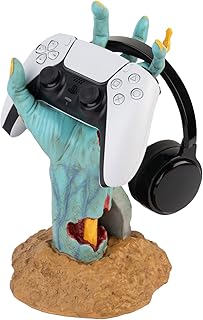
Grupo Erik Gaming Controller Holder One More Life | Controller Holder Figure | Headphone Stand & Controller | Gaming Accessories for Desk | Gamer Gifts | Halloween Decorations
Best For:
Streamers and gamers who want an easy, decorative way to store controllers and headphones in plain sight.
Small organizational accessories often make the biggest difference in keeping a cozy setup tidy and camera-ready. The Grupo Erik Gaming Controller Holder is a novelty figure that doubles as a controller stand and headphone holder — a compact, decorative item that helps keep controllers and headsets off cushions where they can be lost or damaged. It’s a playful accent piece that also addresses the practical problem of clutter in small living spaces.
Why it matters: Controllers left on couches, coffee tables or tangled in cables are a perennial annoyance. A dedicated holder keeps a controller within arm’s reach and elevates it visually for a streamer’s background. The figure’s sculpted form is designed to cradle most standard controllers and many over-ear headsets, turning an otherwise random pile of devices into a deliberate part of your setup’s aesthetic.
Use-case scenarios: Place the holder on a small side table by the couch to keep your current controller handy during breaks; use it on a desk as a combined headphone and controller stand to keep work and play peripherals separated; incorporate it as a character prop in stream overlays or scenes for personality. It’s also an affordable gift for friends who build cozy gaming corners.
Comparison with simple hooks: Unlike adhesive hooks or wall mounts, a freestanding holder is non-permanent and portable. It’s not as space-saving as wall solutions but is far simpler to reposition when you rearrange furniture. If you want a minimal look, choose a holder that matches your room’s finish instead of a bright novelty color.
Who should buy: Gamers and streamers who want neat, accessible storage for controllers and headphones, or anyone who appreciates a themed prop to personalize their background.
Who might skip it: Users who prefer hidden storage solutions or who already use wall-mounted hooks and charging docks.
Pros: Keeps controllers/headsets organized and on display; decorative addition to a cozy setup; portable and easy to reposition.
Cons: Not a charging dock; may take up tabletop space compared with wall hooks.
A small, themed holder like this is an inexpensive upgrade that helps keep your cozy corner presentable and functional. Check the latest price on Amazon.
Pros
- Helps keep controllers and headsets organized
- Fun decorative element for stream backgrounds
- Portable and non-permanent
Cons
- Doesn’t charge controllers (not a dock)
- Takes up tabletop space compared with wall mounts
Looking for a tidy, themed way to display controllers and headsets? This holder adds charm and utility to any cozy setup — Check the latest price on Amazon.
Final Verdict
Curating a cozy gaming setup is about balancing comfort, functionality and visual personality. The five items covered here each solve a common problem: the Couchmaster restores desktop-level stability and peripheral organization for couch and bed play; the KYY portable monitor adds valuable screen real estate without committing to a full desk; the 63" corner lamps provide broad, soft ambience for camera-friendly backgrounds; the 59" RGBICW lamp adds more advanced animated effects plus accurate whites for on-camera work; and the Grupo Erik controller holder keeps clutter down while adding character.
If you prioritize comfort and streaming-friendly visuals over a formal desk arrangement, these accessories are practical, style-forward choices. For those who prefer maximal ergonomics and a multi-monitor desk rig, some of these items will feel redundant — but they still offer portable, mood-enhancing alternatives for living-room gaming and content creation.
Remember to check compatibility (USB-C video support, required drivers, lamp app functionality) and to factor in the physical footprint of corner lamps and lap desks relative to your space. Read recent user feedback for app stability and long-term reliability before you commit.
As an entry plan, pair the Couchmaster or the controller holder with one corner lamp; add the portable monitor later once you’re sure you need the extra screen. If you want more dynamic background effects, choose the RGBICW lamp. These buys can be mixed and matched according to how much of your living area you want to dedicate to a cozy, camera-ready corner.
As an Amazon Associate, I earn from qualifying purchases. This article may contain affiliate links, which means we may receive a commission at no extra cost to you.
Check the latest price on Amazon.
Conclusion
These Gaming accessories trending among cozy setup creators lately picks are trending now and offer great value and variety. Check the links above for latest prices and reviews.
As an Amazon Associate, I earn from qualifying purchases.
Tags:
cozy gaming setup, RGB corner lamp, portable monitor, gaming lap desk, controller holder, streaming accessories, ambient lighting
