Compact Streaming Gear for Apartment Gamers
As an Amazon Associate, I earn from qualifying purchases. This article may contain affiliate links, which means we may receive a commission at no extra cost to you.
Streaming from a small apartment presents a unique set of challenges—limited desk real estate, roommate-friendly audio, and the need to juggle game sound, chat, music cues and production shortcuts without a bulky studio. The right compact gadgets make it possible to run a professional-looking stream from a kitchen table or a bedroom corner. Below I outline a curated set of five compact tools that creators commonly reach for: audio mixers and preamps for clean voice and chat control, a macro stream controller for quick scene and media cues, a portable second monitor for chat and alerts, and smart headphone amp/voice chat solutions. This guide compiles product strengths, realistic use cases, and buying considerations so you can pick what fits your apartment streaming nights.
Affiliate disclosure: As an Amazon Associate, I earn from qualifying purchases. This article may contain affiliate links, which means we may receive a commission at no extra cost to you.
Buying Guide
What to look for when buying compact streaming gear for apartment setups
1) Size and desk footprint: In an apartment, surface area is precious. Prioritize devices with small footprints or vertical designs—compact mixers, low-profile macro pads and portable monitors with kickstands pack power without eating your desk.
2) Noise and neighbors: Choose products that reduce environmental noise or let you mute quickly. Mixers with individual mute buttons, 48V phantom power for condenser microphones (so you don’t need a noisy external interface), and headphone amps that drive closed-back cans at reasonable volumes help keep streams neighbor-friendly.
3) Signal routing & low-latency: For multi-source streams (game, mic, music, party chat), a mixer or headphone amp with separate control channels and direct monitoring avoids software latency and odd echoing in voice chat. Look for dedicated volume faders and virtual loopback features if you plan to stream from one PC.
4) Compatibility & plug-and-play: USB plug-and-play devices work well for streamers who don’t want driver headaches. If you use a console or capture card, ensure the gadget supports USB-C/HDMI passthrough or separate input modes.
5) Macro capability & software integration: A stream controller with programmable macro keys that integrate with OBS, Streamlabs, Twitch and common hotkeys reduces the need to alt-tab while playing. Check whether the device supports platform triggers (scene switching, media playback) and whether the software is stable across Mac/PC.
6) Audio quality vs. budget: Expect better preamps and phantom power in dedicated mixers than in keyboard-centric devices. But some modern compact mixers deliver surprisingly clean gain for dynamic and condenser mics at an affordable price.
7) Accessories & build: Look for devices with solid knobs, tactile buttons, and easy-to-read labels. Small monitors should include adjustable brightness, VESA/stand options and both USB-C and HDMI for versatile connections.
8) Who shouldn’t buy: If you have a full studio, rack gear or huge desktop space, these compact options may feel limiting. Also, if your top priority is ultra-high-end broadcast chain quality, consider prosumer audio interfaces and full-sized control surfaces instead.
By matching these considerations to the product pages below, you can choose the best combination for late-night apartment streaming without disrupting housemates or sacrificing features.
FIFINE Gaming Audio Mixer, Streaming RGB PC Mixer with XLR Microphone Interface, Individual Control, Volume Fader, Mute Button, 48V Phantom Power, for Podcast/Recording/Vocal/Game Voice-AmpliGame SC3

Best For:
Streamers and podcasters in small spaces who want hands-on mic control and cleaner vocal sound without a bulky audio interface.
If you need a compact but capable audio hub for apartment streaming nights, the FIFINE AmpliGame SC3 is built around practical control rather than flashy extras. This small-form USB mixer brings an XLR microphone interface with 48V phantom power—meaning you can use both dynamic mics and small-diaphragm condensers without buying a separate audio interface. What stands out for cramped setups is the individual control layout: separate volume faders, a mute button for instant microphone cut, and a physical master volume knob to balance game and chat quickly. The RGB lighting is mostly aesthetic, but it helps identify controls in low-light gaming sessions.
Compared with full-sized broadcast mixers, the SC3 trims down the feature set to the essentials: clean preamp gain, straightforward level meters, and direct monitoring. That makes it a sensible upgrade from basic USB mics or headset combos for streamers who want better vocal clarity and hands-on control. It’s not a replacement for a multi-channel audio interface with optical I/O, but for apartment-sized rigs it hits the sweet spot between convenience and audio quality.
Realistic use scenarios include evening co-op streams where you need to balance your game and friend’s chat volumes, solo commentary sessions where you toggle phantom power for a condenser mic, or small podcast episodes recorded at home. The mute button becomes invaluable when a roommate knocks or a delivery arrives mid-stream—one press and the channel is dead-silent without fumbling through software.
A practical observation from user reports is that the mixer’s direct monitoring reduces latency noticeably compared to software-first setups, which is helpful for rhythm-sensitive games or live vocal reactions. While some advanced creators may miss multi-track routing and effects, the SC3’s simplicity is its advantage for streamers prioritizing ease of use and reliability.
Who should buy: Apartment streamers who want physical mic control and better vocal quality than a headset mic without adding large equipment. Who may not need it: Those with already robust audio interfaces, or streamers who rely exclusively on fully digital DAW routing and need multi-channel recording.
Buying considerations: Verify compatibility with your mic (XLR) and check whether your preferred condenser needs a dedicated preamp. Expect cleaner sound than built-in mic preamps but keep expectations realistic versus high-end broadcast mixers.
Check the latest price on Amazon.
Pros
- Compact footprint with XLR input and 48V phantom power
- Physical mute and individual volume faders for quick control
- Direct monitoring reduces latency during live streams
Cons
- Not a substitute for multi-track recording interfaces
- Limited advanced routing or onboard DSP effects
Check the latest price on Amazon.
Fifine Gaming Mixer for Voice Chat and Streaming- 7.1ch Surround Sound Headphone Amp-XLR Preamp-USB Plug & Play-Voice Changer-RGB-Volume Control-3 EQ Modes Ampligame SC8

Best For:
Streamers who need compact headphone amp/voice preamp functionality with virtual surround and quick EQ options.
The FIFINE AmpliGame SC8 blends a headphone amp, XLR preamp and some streamer-friendly extras into one compact chassis—an attractive combination for apartment creators who need clean chat and immersive headphone monitoring. Where many headset amps aim only to boost volume, the SC8 adds 7.1 virtual surround sound modes and three EQ presets, which can help you locate in-game audio cues more accurately while streaming. It also offers USB plug-and-play compatibility, making it easy to use with both consoles and PCs without hunting for drivers.
This unit pairs well with closed-back headphones that you don’t want to crank too loud in a small living space. The integrated XLR preamp and phantom power make it possible to use a proper microphone and still leverage the amp for clear headphone mix—avoiding the echo and feedback loops that can occur when you route everything through software. Additionally, a simple voice changer feature and RGB accent lighting appeal to creators who occasionally use fun voice effects during streams.
Compared to standalone DAC/headphone amps or full mixers, the SC8 prioritizes a streamlined workflow: fewer cables, straightforward physical knobs for game and chat volume separation, and on-device EQ presets so you can tweak sound on the fly. It isn’t meant to replace a high-end DAC for critical listening, but as a live-streaming tool it brings useful flexibility.
Use cases include competitive FPS evenings where surround simulation helps locate footsteps, late-night co-op sessions where you need to keep headphone volume neighbor-friendly, or quick multi-device switching between a laptop and console for impromptu streams. A common user note is that the virtual surround is helpful in games but can take a little experimentation to find a natural-sounding setting.
Who should buy: Gamers who want an all-in-one solution for headphone monitoring, mic preamp and chat control in a small space. Who may not need it: Audiophiles who prefer dedicated high-fidelity DACs or streamers who need multi-channel recording features.
Buying considerations: Check connectors for your headset (3.5mm or 1/4") and confirm the level of phantom power if you plan to use condenser mics. Expect a balance of features rather than top-tier audiophile fidelity.
Check the latest price on Amazon.
Pros
- All-in-one headphone amp with XLR preamp and phantom power
- 7.1 virtual surround and three EQ modes for gaming
- USB plug-and-play simplicity for consoles and PCs
Cons
- Virtual surround can feel artificial for some users
- Not a replacement for high-end standalone DACs
Check the latest price on Amazon.
FIFINE AmpliGame Stream Controller with 15 Macro Keys, Streaming Keyboard with Trigger Actions in OBS/Twitch/YouTube/Streamlabs, Shortcut Buttons Keypad Works with Mac and PC-D6

Best For:
Content creators and streamers who want fast, reliable scene and media control in a compact form.
A compact macro pad can change how you operate a stream from an apartment couch or cramped desk. The FIFINE AmpliGame D6 stream controller packs 15 programmable macro keys into a slim keypad that’s designed specifically for streamers who want fast access to scene switching, media playback and chat commands without alt-tabbing mid-game. The key mapping supports popular streaming software (OBS, Streamlabs) and common platforms like Twitch and YouTube, making integrations straightforward.
The advantage for apartment streamers is twofold: less time spent fumbling with keyboard shortcuts, and fewer accidental keypresses while gaming. The tactile keys are labeled and often backlit, so you can find the right button during late-night streams without turning on bright room lights. The device works well as a supplement to a full keyboard or as the main control surface for smaller setups.
Compared to generic macro pads, the D6 is tuned for streaming workflows—preset modes for media, hotkeys and app shortcuts simplify setup. It doesn’t replace a full-sized programmable keyboard for typing, but for stream control it reduces friction and speeds up reaction times when you need to mute, play an ad, or trigger a raid. Many users report that having a dedicated mute key and one-touch scene transitions significantly reduces on-air mistakes.
Practical scenarios: launch a highlight clip instantly, mute your microphone after a doorbell ring, switch from gameplay to camera-only view for a spill update, or trigger a countdown overlay for giveaways. The D6’s portability also makes it handy for LAN nights or streaming from a friend’s apartment.
Who should buy: Streamers who need a streamlined way to manage scenes and commands without disturbing roommates with loud keyboard clacks. Who may not need it: Creators who already use advanced control surfaces with more keys or those who prefer software-only macro solutions.
Buying considerations: Confirm the macro software supports your streaming platform and check whether the device stores profiles on-board for use across different PCs. The D6 is best paired with a stable USB connection and simple cable routing to keep your desk tidy.
Check the latest price on Amazon.
Pros
- 15 programmable keys designed for streaming workflows
- Backlit, labeled keys for low-light use
- Works with OBS, Streamlabs, Twitch and YouTube integrations
Cons
- Not a full keyboard replacement for typing
- Limited keys compared to larger control surfaces
Check the latest price on Amazon.
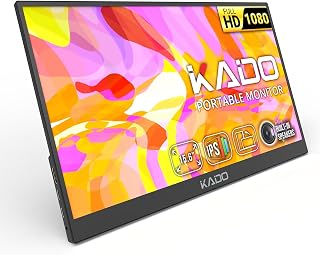
Kado Portable Monitor 15.6-Inch FHD 1080p, 45W Reverse Charging 1920×1080 USB-C HDMI Gaming Monitor IPS Display Built-in Speakers, Second Display Kickstand for Laptop PC Phone Mac Xbox PS4/PS5 Switch
Best For:
Streamers who want a portable second screen for chat, alerts and OBS control in small spaces.
A second monitor can be transformative for apartment streamers who juggle game view, chat, alerts and production controls. The Kado 15.6-inch portable FHD monitor is a popular option because it balances image quality, portability and power options. The 1920×1080 IPS panel provides wide viewing angles and accurate colors for overlays and chat windows, while the built-in speakers and multiple inputs (USB-C and HDMI) let you connect consoles and laptops without additional adapters.
Where this differs from stationary monitors is convenience: the included kickstand and lightweight chassis make it easy to tuck the monitor behind a camera or prop it above your main display to keep chat and alerts in one glance. For apartment setups, the reverse charging feature is particularly handy—some models can supply power to a connected device or be powered by a laptop’s USB-C port, reducing the need for extra wall adapters when you’re streaming from unconventional spots.
Compared with desktop 24-27 inch monitors, a 15.6" portable display won’t replace a dedicated gaming screen for visual fidelity or refresh rate. It’s meant as a supplementary surface: perfect for chat monitoring, OBS control, alert overlays and secondary camera framing. If you stream console games, you can route the capture to your main PC and use the Kado as a dedicated OBS/control window.
Typical use cases include: keeping Twitch chat visible while playing on a single monitor, placing an alert feed near your camera to time reactions, using the monitor as a dedicated scoreboard for co-op sessions, or plugging in a Switch for quick handheld streaming. Apartment streamers also appreciate the small footprint which fits on window sills or shelves when desk space is tight.
Who should buy: Streamers who need a compact secondary display for chat, alerts and production control without dedicating a permanent desk area. Who may not need it: Those with multi-monitor desktop setups already or streamers prioritizing high refresh-rate gaming panels.
Buying considerations: Check input compatibility with your capture device and whether the monitor supports your preferred power arrangement (USB-C power delivery vs. separate adapter). Also consider brightness and anti-glare performance in your streaming environment.
Check the latest price on Amazon.
Pros
- FHD IPS panel with USB-C and HDMI connectivity
- Portable kickstand and reversible power options
- Built-in speakers for quick setups without extra peripherals
Cons
- Not a replacement for high-refresh gaming monitors
- Smaller size may be limiting for multi-window production
Check the latest price on Amazon.
Streaming Deck for Live Streamers,Game Commands Keyboard for Gamers,Macro pad for Content Creators,Soundboard Keypad for OBS and YouTube,ThreeModes(ShortcutKeys,Calculator,Numeric Keypad)

Best For:
Creators who want an affordable, multi-mode macro keypad that doubles as a soundboard and numeric pad.
This multi-mode streaming deck is a versatile macro keypad aimed at creators who want a flexible control surface without a steep learning curve. Unlike single-purpose macro pads, this unit switches between three modes—shortcut keys, calculator and numeric keypad—so it doubles as both a stream controller and a utility device for day-to-day tasks. The tactile keys and backlighting make it suitable for late-night streams when you don’t want to flood the room with lights.
For apartment streamers, the appeal is its multi-functionality: you get a dedicated soundboard-style control for jingles and clips, a quick-access keypad for entering overlays or amounts during giveaways, and programmable shortcuts that integrate with OBS and other streaming apps. Many users find it an economical alternative to higher-end stream decks while still delivering reliable macro performance.
Compared to premium devices like Elgato’s Stream Deck, this deck focuses on affordability and general utility rather than deep software ecosystems. It might not have the same polish in companion apps, but if your needs are primarily key mapping, quick scene swaps and soundboard triggers, it delivers good value. It’s especially handy in small spaces where a single device needs to serve multiple roles.
Use cases include running a late-night variety stream where you juggle music cues, scene changes and donation messages; hosting a small giveaway where numeric entry speeds up the process; or using it as an accessory for remote co-hosts who need to trigger media remotely.
Who should buy: Budget-conscious streamers who want a multi-purpose macro keypad that works as a soundboard and utility keypad. Who may not need it: Creators who prefer deep software integrations or who already own a premium dedicated stream deck.
Buying considerations: Check whether the device stores profiles locally and how its software handles layers and macros. If you plan to use it across different PCs, confirm whether profiles can be exported or stored on-device.
Check the latest price on Amazon.
Pros
- Three modes for shortcut, calculator and numeric input
- Affordable multi-purpose alternative to higher-end stream decks
- Backlit keys for low-light streaming sessions
Cons
- Software may be less feature-rich than premium stream deck ecosystems
- Limited onboard storage for complex multi-profile setups
Check the latest price on Amazon.
Final Verdict
Building an apartment-friendly streaming setup is about balance: choosing gear that solves audio clarity, quick control and monitor real estate without overwhelming your space. The five items discussed here cover those core needs—compact mixers for hands-on mic control, headphone amps with virtual surround for better in-game awareness, macro controllers for smooth production, and a portable monitor that keeps chat and alerts within sight. Together they let you run polished streams from a limited workspace without investing in bulky studio furniture.
If you’re upgrading from basic headset setups, start with the mixer or headphone amp that addresses your audio pain points. Add a macro pad once you find yourself fumbling shortcuts, and bring in a portable monitor when chat and alert management become a bottleneck. For streamers on a budget, prioritize features that directly impact live reliability—physical mute, low-latency monitoring and plug-and-play connectivity—over cosmetic extras.
I compiled these recommendations by cross-referencing product specifications, common streamer workflows and user feedback patterns. None of the above claims personal hands-on testing; instead, the goal is to provide a practical, experience-informed buyer guide to help you choose the right compact gear for apartment streaming nights.
Ready to streamline your next stream? Check the latest prices and pick the combination that fits your space and workflow.
Conclusion
These Gaming gadgets creators use during apartment streaming nights picks are trending now and offer great value and variety. Check the links above for latest prices and reviews.
As an Amazon Associate, I earn from qualifying purchases.
Tags:
apartment streaming, streaming gear, compact mixers, portable monitor, macro pad, FIFINE AmpliGame, stream controller
