Gaming Stream Setup Gear Creators Use
As an Amazon Associate, I earn from qualifying purchases. This article may contain affiliate links, which means we may receive a commission at no extra cost to you.
As an Amazon Associate, I earn from qualifying purchases. This article may contain affiliate links, which means we may receive a commission at no extra cost to you.
For creators who want a more realistic, production-grade stream, the right accessories make the difference between a casual broadcast and a show that feels polished and intentional. From programmable macro controllers that keep you in control of scenes and audio, to flattering on-camera lighting and reliable USB mics that capture a natural-sounding voice, the gear covered here is what many streamers and content creators choose to build a dependable setup. This buyer-focused guide looks at five widely used products — why creators pick them, what practical problems they solve, realistic use-case scenarios, and who will benefit most (or least) from each."
Buying Guide
Choosing streaming accessories can feel overwhelming because the ecosystem blends hardware and software in ways that matter more than raw specs. Start by identifying the production gaps you want to fix: do you need smoother scene switching, cleaner sound, better lighting, or simple productivity shortcuts? Prioritize the problem you solve most often and match the category of accessory to that need.
– Stream controllers and macro pads: These replace keyboard shortcuts and let you trigger OBS scenes, mute audio, send chat messages, or play sound effects without tabbing away. Compare LCD-key devices (visual feedback) with tactile keypads (cheap, simple). If you run complex productions, choose a deck with audio control and multi-action macros.
– Lighting: On-camera lighting beats software filters. Look for lights that offer color temperature control and diffusion for natural skin tones. Smaller, desk-mounted lights are great for tight spaces; panel lights suit bigger rooms.
– Microphones: USB mics are easiest to set up; look for selectable polar patterns if you sometimes record with co-hosts. Consider software or hardware monitoring and basic onboard controls (gain, mute) for quicker adjustments mid-stream.
– Brand and software support: Good integration with OBS, Streamlabs, Twitch, and common editing apps multiplies the value of the hardware. Software reliability and updates matter — a well-supported app reduces configuration headaches.
Budget is important, but don’t skimp on the single item that most affects your viewers. For example, prioritizing a good mic often provides a larger perceived production value increase than the flashiest controller. Below are five products that cover common streamer needs, with practical observations and buying considerations based on reported customer experiences and feature sets.
FIFINE AmpliGame Stream Controller with 15 Macro Keys, Streaming Keyboard with Trigger Actions in OBS/Twitch/YouTube/Streamlabs, Shortcut Buttons Keypad Works with Mac and PC-D6

Best For:
Budget-focused streamers and podcasters who want tactile, dedicated macro controls without the cost of LCD-key stream decks.
If you want a dedicated macro pad without investing in a pricey LCD-based stream deck, the FIFINE AmpliGame D6 is a practical, button-forward alternative. It brings 15 programmable macro keys and straightforward trigger action support for OBS, Twitch, YouTube and Streamlabs. The core idea behind this device is simplicity: physical buttons mapped to shortcuts make live switching, sound triggers and multi-action macros immediate and tactile, which is especially useful during high-energy streams.
Who this solves problems for: Many creators struggle with keyboard combinations or awkward scene changes when something unexpected happens. The D6 provides single-press control for common tasks — mute/unmute, start/stop recording, switch scenes, launch audio clips, or run complex multi-step sequences — without jumping between windows. Because it supports both Mac and PC, it’s also a useful tool for mixed-platform teams or creators who move between systems.
Real-life usage: A variety streamer might keep this on the left side of their desk, mapped to scene changes, chat prompts and a few one-touch overlays. A variety/IRL streamer could assign rapid scene cuts and emergency mute to dedicated keys, while a podcaster could map each participant’s mic mute and recording start to separate buttons. Streamers who do regular short-form clips can set a key to trigger highlight markers so that post-production is far easier.
How it stacks up: Against LCD decks, the FIFINE D6 lacks visual key labels and dynamic icons, but that trade-off comes with a significantly lower price and a focus on tactile reliability. Users accustomed to mechanical-feel keys tend to appreciate the instantaneous feedback compared with touchscreen or soft buttons. The software configuration can be simpler: a lightweight app or keyboard-mapping method often suffices rather than installing a large ecosystem app.
Buying considerations: Expect a more basic build and fewer integrations than top-tier decks. If you need on-device displays for complex visual feedback or plan to run dozens of multi-action macros, a Stream Deck with screens might be a better fit. However, if you want a compact, cost-effective way to centralize critical stream controls with minimal fuss, the FIFINE D6 is a smart pick. It’s also a good secondary device for creators who already own a primary deck but want extra physical controls.
Who should buy it: Budget-minded streamers, hobbyists, multi-game streamers who prefer tactile keys, and podcasters who want quick mute/record controls.
Who may not need it: Streamers who require dynamic, icon-based feedback on each button or full ecosystem integrations for professional-grade production may prefer a higher-end LCD stream deck.
Check the latest price on Amazon.
Pros
- 15 physical macro keys for immediate, one-touch control
- Compatible with OBS, Streamlabs, Twitch and YouTube on Mac and PC
- Affordable alternative to LCD-key stream decks
Cons
- No LCD icons or visual feedback on individual keys
- Basic software and fewer integrations than premium decks
Check the latest price on Amazon.
Logitech for Creators Litra Glow Premium LED Streaming Light with TrueSoft- Computer lighting for video conferencing, Zoom meetings, with adjustable mount and desktop app control for PC/Mac – Graphite

Best For:
Desktop streamers and presenters who want compact, flattering facial lighting with easy app control.
Lighting is one of the fastest ways to elevate the perceived quality of your stream, and the Logitech Litra Glow focuses on delivering flattering, natural-looking light optimized for on-camera faces. It’s a compact desktop LED with Logitech’s TrueSoft technology, which is designed to keep skin tones looking more natural and reduce harsh shadows that can distract viewers. Adjustable color temperature and brightness controlled through a desktop app make it simple to tweak the look of your broadcast without grabbing a softbox.
Practical benefits: For creators who stream from desks, home offices or small studios, a smaller light that mounts to monitors or sits on a desk is often more practical than a full-sized panel. Litra Glow’s adjustable mount and compact profile mean you can position it close to the camera for even, flattering illumination. The desktop app control for PC/Mac lets you dial in temperature and intensity, saving presets for different times of day or different shooting scenarios.
Real-life usage examples: A solo streamer who plays in a dim room can place the Litra Glow behind or beside their camera to avoid face shadows and keep catchlights in the eyes. A work-from-home presenter doing weekly streams or webinars can switch quickly between warmer and cooler tones depending on the mood of the content. Because it’s small and portable, it’s also useful for creators who travel between setups or shoot on location where a big lighting kit would be impractical.
Comparisons and considerations: Compared with ring lights, Litra Glow offers a more directional, less conspicuous form factor that reduces reflections on glasses and avoids the flattened light sometimes associated with ring lighting. Compared to larger panel lights, it won’t fill a whole room, so if you have a wide camera angle or multiple people to light, consider supplementing it with an additional panel. Customers often praise the natural skin tones and ease of use, but note its output is best for close-range use rather than lighting a large studio.
Who should buy it: Streamers and video creators looking for a compact, flattering desk light to improve skin tones and facial illumination without bulky equipment.
Who may not need it: Those who already own a full lighting panel setup or who regularly film multi-person shots across wider scenes may need larger lights instead.
Check the latest price on Amazon.
Pros
- TrueSoft lighting for natural-looking skin tones
- Compact, adjustable mount suited to desk setups
- Desktop app control and presets for PC/Mac
Cons
- Not powerful enough to light wide or multi-person scenes alone
- Full feature control depends on desktop app access
Check the latest price on Amazon.
Elgato Stream Deck +, Audio Mixer, Production Console and Studio Controller for Content Creators, Streaming, Gaming, with customizable touch strip dials and LCD keys, works with Mac and PC

Best For:
Serious creators and small productions that need integrated audio control, visual key feedback, and multi-action macros for live shows.
The Elgato Stream Deck + is designed for creators who want a consolidated production console combining tactile control, visual feedback and integrated audio controls. It expands the Stream Deck ecosystem with an audio mixer and touch strip dials alongside crisp LCD keys that provide dynamic icons and labels. For anyone who runs multi-scene broadcasts, frequently adjusts audio, or needs on-screen production cues, the Stream Deck + acts as a central hub for both macro commands and real-time control.
Key practical benefits: The physical and visual feedback offered by LCD keys helps reduce mistakes during live shows. Instead of remembering which button maps to which scene, each key’s icon visually represents the action — perfect for performers who prefer glanceable feedback. The integrated audio mixer is particularly valuable for creators who don’t have a separate audio interface; it lets you quickly adjust microphone volumes, game sound, and music levels without jumping into menus. The touch dials offer intuitive control for fades and precision adjustments.
Real-life usage scenarios: A solo streamer doing a multi-segment show might map intros, interstitials, overlays, and frequently used chat commands to the Stream Deck +. Meanwhile, a creator who co-produces remote interviews can use the audio mixer to balance guest volume, trigger lower-thirds and switch camera feeds in tight moments. Live event producers appreciate being able to run transition macro sequences — start stream, set scene, play intro — with a single keystroke.
How it compares: Compared with entry-level keypad controllers, the Elgato Stream Deck + is more expensive but brings professional features that reduce friction in live production. Compared with competing consoles or software-only solutions, its combination of hardware tactile controls and Elgato’s mature software ecosystem gives it a practical edge. Users frequently praise the build quality and the time saved in live operations, though some note a learning curve for advanced customizations.
Buying considerations: Expect to invest time in customizing profiles and integrating plugins (OBS, audio apps, chat tools). If you run more complex streams or want to minimize post-production time, the Stream Deck + is a strong fit. If you primarily do casual, single-scene streams, the extra features may be more than you need.
Who should buy it: Professionals and serious hobbyists who run multi-scene streams, need hardware audio control, or want the convenience of visual button feedback.
Who may not need it: Casual streamers who prefer minimal hardware and those on tight budgets who won’t use advanced audio mixing or many macros.
Check the latest price on Amazon.
Pros
- LCD keys provide clear visual feedback for complex setups
- Built-in audio mixer and touch dials for precision control
- Deep integration with streaming software and plugins
Cons
- Higher price point and learning curve for advanced setups
- May be overkill for very casual or single-scene streamers
Check the latest price on Amazon.
Elgato Stream Deck Mini – Control Zoom, Teams, PowerPoint, MS Office and Boost Productivity with Seamless Integration for Daily Apps, Set Up Shortcuts Easily, USB, Compatible with Mac and PC

Best For:
Beginners, streamers with simple scene needs, and creators who want a compact productivity tool for editing and presentations.
The Elgato Stream Deck Mini is a compact, six-key controller that spreads well beyond streaming into productivity and creative tasks. While small compared with full-size decks, it excels at giving you immediate, tactile control for repetitive actions — launching scenes, controlling simple audio cues, switching camera sources, or firing commonly used macros in editing and office applications. For creators who want a no-fuss controller that’s also a daily productivity booster, this Mini model is a sensible compromise between functionality and desk footprint.
Practical benefits: The Mini’s little footprint means it fits in tight setups where desk space is at a premium. Each key is programmable with icons and shortcuts via Elgato’s software, and it integrates with common apps like OBS, Streamlabs, and even office tools. This makes it useful not only during streams but also when recording tutorials, running online classes, or managing multi-app workflows.
Real-life usage examples: A streamer who primarily toggles between a gameplay scene and face-cam scene might use the Mini for those two scene switches plus a mute and a highlight marker. A content creator editing video might map export presets, render shortcuts or frequent timeline actions to the keys to shave minutes off repetitive tasks. A remote presenter using Zoom or Teams can store meeting layouts, mute toggles and slide navigation on the deck for professional, seamless delivery.
Comparisons and considerations: Compared to the larger Stream Deck +, the Mini lacks the advanced audio controls and dials but is far more affordable and simpler to learn. Customers often appreciate it as a first deck — it’s plug-and-play and provides an immediate productivity uplift, though the limited number of keys means you’ll need to be selective about what you dedicate to them.
Who should buy it: Beginners to streaming, creators who want a compact macro device, and professionals who want a small productivity enhancer for repetitive tasks.
Who may not need it: Producers who require larger key counts, integrated audio mixing or dynamic controls should look at full-size stream decks.
Check the latest price on Amazon.
Pros
- Small footprint and easy setup
- Programmable LCD keys for visual shortcuts
- Affordable entry into Stream Deck ecosystem
Cons
- Only six keys limits complex multi-action workflows
- No integrated audio mixer or dials
Check the latest price on Amazon.
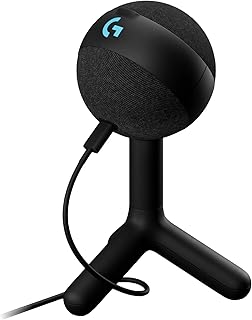
Logitech G Yeti Orb Condenser RGB Gaming Microphone with LIGHTSYNC, USB Mic for Streaming, Cardioid, USB Plug and Play for PC/Mac – Black
Best For:
Streamers and content creators who want plug-and-play USB audio with solid voice clarity and convenient onboard controls.
Audio quality is a pillar of good streaming; your viewers will forgive average video but poor sound becomes distracting fast. The Logitech G Yeti Orb is a USB condenser microphone aimed at streamers who want clear, broadcast-friendly audio with plug-and-play convenience. It features a cardioid pickup pattern well-suited to single-person streams, RGB LIGHTSYNC for visual flair, and onboard controls for quick gain and mute access. Its design prioritizes both sound clarity and a streamer-centric user experience.
Practical benefits: The USB interface removes the need for an audio interface or mixer, making it especially attractive for solo creators, hobbyists, and streamers who want to minimize setup complexity. Built-in mute and gain controls let you react quickly mid-stream — a key advantage when a doorbell rings or you need to quiet background noise. The cardioid pattern helps reject off-axis sounds, reducing ambient room noise when positioned correctly.
Real-life scenarios: A gamer who streams solo will find the Yeti Orb picks up voice clearly even when game audio is louder, provided the mic is positioned properly. Podcasters and interviewers who record from a single seat can use the cardioid mode for clear speech, while creators who occasionally co-host might switch patterns (if supported) or position the mic to best capture both voices. The RGB LIGHTSYNC adds a visual cue for viewers and can match the rest of a streamer’s themed setup.
Comparisons and considerations: Compared with XLR microphones and interfaces, USB mics are less flexible for multi-mic setups and professional studio tasks, but they offer enormous convenience and cost savings. Customers often report that the Yeti Orb provides solid raw sound suitable for live streaming and content creation, though room treatment and mic placement still matter a lot.More advanced users who want broadcast-grade preamps and multi-channel mixing might prefer an XLR mic and audio interface. Also, built-in RGB is decorative rather than functional — useful for aesthetics but not a substitute for proper audio treatment.
Who should buy it: Solo streamers, new podcasters, content creators who value easy setup and reliable USB audio with quick onboard controls.
Who may not need it: Multi-person shows, studio producers who prefer XLR chains, or users who need the absolute highest-tier preamp and conversion quality.
Check the latest price on Amazon.
Pros
- USB plug-and-play setup with onboard gain and mute
- Cardioid pickup optimized for solo streaming
- Attractive RGB lighting options to match setups
Cons
- Less flexible than XLR setups for multi-mic studios
- Performance still depends on proper placement and room acoustics
Check the latest price on Amazon.
Final Verdict
Building a realistic streaming setup is less about flash and more about solving the specific production problems you face on a regular basis. A tactile macro controller or deck reduces cognitive load and keeps you focused on the performance; a compact, high-quality light makes you look better on camera without endless color correction; and a reliable USB mic delivers the one sensory channel your audience listens to most. Together, the products covered here — the FIFINE AmpliGame controller, the Logitech Litra Glow, Elgato’s Stream Deck + and Mini, and the Logitech G Yeti Orb — cover those core needs at different price and feature points.
If you’re just starting, prioritize the mic and a simple controller like the Stream Deck Mini so you sound good and can manage scene changes without fumbling. If you’re stepping up production value for multi-scene broadcasts, the Stream Deck + with its audio mixer and visual keys unlocks faster, safer live operations. And don’t underestimate the role of good lighting: a compact solution like the Litra Glow can transform how viewers perceive your stream without taking over your workspace.
When considering upgrades, think about how each addition will reduce friction during live sessions. Does a macro button save you 10 seconds every time you use it? Does a visual key prevent a mistake that would otherwise require a clip to be edited out? Those small operational wins compound into more professional streams and less post-production stress. Hopefully this guide helps you pick the piece of gear that most directly improves your workflow and viewer experience.
If you found one of these tools useful for your setup, follow the product links to learn more details and choose what fits your workflow. Good luck building a setup that keeps you focused on entertaining and connecting with your audience.
Conclusion
These Gaming accessories creators use during realistic streaming setups picks are trending now and offer great value and variety. Check the links above for latest prices and reviews.
As an Amazon Associate, I earn from qualifying purchases.
Tags:
streaming gear, stream deck, streaming microphone, stream lights, content creator setup, streaming accessories, gaming streaming
