Best RGB L-Shaped & Standing Gaming Desks for Cozy Setups
As an Amazon Associate, I earn from qualifying purchases. This article may contain affiliate links, which means we may receive a commission at no extra cost to you.
As an Amazon Associate, I earn from qualifying purchases. This article may contain affiliate links, which means we may receive a commission at no extra cost to you.
If you’re building a cozy RGB gaming corner, the desk you choose is just as important as the monitor, lights, and speakers. The right desk creates a base for tidy cable management, gives you space for multiple monitors, integrates power and lighting, and can even improve ergonomics during long sessions. In the last few years, L-shaped setups and feature-rich desks with LED accents and built-in outlets have become a favorite among streamers, content creators, and anyone who wants their battlestation to feel curated.
This guide walks through practical choices—five desks that blend lighting, storage, and user-focused details—plus a buying guide to help you match a desk to your space and workflow. I’ve relied on product specs, typical user feedback patterns, and real-life use-case scenarios to give realistic guidance on what each desk does well, who should buy it, and what to watch out for.
Buying Guide
Choosing a gaming desk for a cozy RGB setup is more than picking the flashiest light strip. Think about three practical dimensions first: space, functionality, and long-term comfort.
Space: Measure your room and visualize how the desk will sit. L-shaped desks are excellent for corner setups, giving you a dual-surface arrangement—one side for monitors and the other for streaming gear, consoles, or a workspace. If you have a narrow room, consider the smaller footprint of an L-shape that tucks into a corner. Standing desks with a 55" width require more clearance but offer posture benefits over time.
Functionality: Modern gaming desks add features beyond a flat surface. Look for integrated LED lighting if you want synced RGB ambience without extra strips, built-in power outlets for easy charging, headphone hooks, storage bags or shelves for controllers and cables, and an extended mouse pad or carbon fiber surface for a consistent gaming feel. Under-desk cable trays or grommets keep RGB strips and monitor cables organized—this matters if you stream or want a clean on-camera background.
Ergonomics and materials: Surface finish, weight capacity, and keyboard tray options influence comfort. Carbon fiber or laminate tops are durable and wipe clean; a stable T-shaped or reinforced frame reduces wobble when you type or use a heavy monitor arm. For standing desks, check the lift mechanism—electric motors should be smooth and quiet and support the weight of monitors and peripherals.
Who shouldn’t compromise: If you regularly run heavy triple-monitor mounts, prioritize a high weight capacity and a rigid frame. If you rarely add accessories, skip overbuilt desks and save setup time. Assembly and tools: most feature-packed desks require time and patience; read assembly notes and have a partner for larger L-shaped desks.
Use the features list to cross-reference your needs: do you want reversible layouts, keyboard trays, or a music-sensing app for LEDs? Those matters shape how your RGB setup will feel. Below are five desks that hit different balances of price, features, and room-fit for cozy RGB creators.
SEDETA L Shaped Gaming Desk, Reversible Computer Desk with Power Outlet and Pegboard, Gaming Desk with Led Lights, Keyboard Tray and Storage Bag for Home Office, Black

Best For:
Streamers and small-space multitaskers who want a corner workstation with built-in lighting, power access, and storage options.
The SEDETA L-shaped gaming desk is aimed at builders who want an all-in-one corner workstation that blends practical storage with ambiance. It’s a reversible L-shaped surface, meaning you can assemble the longer wing on either side to fit a left- or right-handed corner. That flexibility helps if you’re rearranging furniture or optimizing your RGB lighting direction.
Key hardware you’ll notice right away is the integrated power outlet—handy for plugging a monitor, lamp, or charger without crawling under the desk—and an LED strip that runs the perimeter for mood lighting. A pegboard-style panel adds organization options: hang headphones, small shelves, or clip-on accessories to keep controllers and cables off the desktop. The inclusion of a keyboard tray frees up surface space for a large mouse pad and multiple monitors.
Compared with standard flat desks, the SEDETA combines utility and presentation. If you normally tack LED strips behind your monitor, this desk saves a step by providing synced-looking lighting built into the frame. It’s also more storage-focused than many minimalist gaming tables; the storage bag and hooks give quick access to controllers and cables without permanent shelving.
Who this solves problems for: streamers and multitaskers who need different zones (monitor zone vs. peripherals zone), students who share a room and need a compact corner setup, or anyone who wants built-in cable power without relying on a wall outlet. The pegboard is useful for hobbyists who like to keep tools or accessories within arm’s reach.
Potential trade-offs: assembly can take time—L shapes usually require two people—and the desk’s LEDs are better for ambient glow than for intense color calibration if you’re using lighting to affect camera exposure. The desk’s particleboard or laminate finish (check product specs) will differ from higher-end solid wood or metal tops; if you expect a heavy-duty workbench feel, consider a steel-reinforced alternative.
Practical use cases:
– A streamer who needs a neat background on camera and wants headphone hooks and a storage bag for controllers during breaks.
– A remote worker who switches between spreadsheets and a gaming session and wants a keyboard tray to keep the surface tidy.
– A college student building a compact cockpit with a monitor, lamp and phone chargers plugged into the integrated outlet.
If you like corner efficiency with built-in lighting and organization, this desk balances convenience and presentation well. Check the latest price on Amazon.
Pros
- Reversible L-shape fits left or right corners
- Integrated power outlet and LED ambient lighting
- Pegboard and storage bag keep accessories organized
- Keyboard tray frees up desktop space
Cons
- Assembly can be time-consuming with a larger footprint
- LEDs are ambient rather than high-end RGB sync
Check the latest price on Amazon.
AODK L Shaped Desk Gaming Desk with LED Light & Power Outlet, 53 Inch Reversible L Shaped Computer Table with Shelf & Storage Bag & Hook for Home Office, Black
Best For:
Casual gamers and hybrid workers who need a compact L-shaped desk with LED lighting, a power outlet, and light storage.
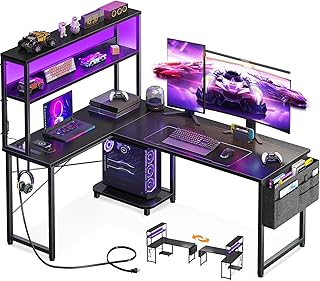
The AODK 53-inch L-shaped gaming desk positions itself as a practical solution for gamers who want a tidy, illuminated corner station without elaborate add-ons. At 53 inches, it’s a bit more compact than some 55" desks, making it a comfortable fit for smaller rooms where you still want a dedicated left or right wing.
Function-wise, the desk shares familiar conveniences: LED lighting to set the mood, a built-in power outlet so you avoid hunting for wall sockets, and a small shelf plus storage bag that’s ideal for controllers, external drives, or a mic stand when you’re not streaming. The hook is small but handy—perfect for hanging headphones or a headset when you step away. The reversible design lets you choose which side the long return sits on, and the surface finish tends toward the easy-clean laminate most gamers prefer.
Compared to a basic desk, AODK’s model brings the organization features that make an RGB setup look intentional. You don’t need to run additional strips for a pleasing glow, and the shelf helps elevate speakers or a streaming cam to clear line-of-sight.
Who benefits most: casual streamers and gamers who want a corner base with the essentials—lighting, a power socket, and quick storage. It’s also a good pick for hybrid users who switch between office work and gaming in the same spot, since the shelf provides a simple place for a webcam or plant without eating desk real estate.
What to consider: the shelf and storage bag are convenient but not as heavy-duty as built-in cabinetry—don’t expect heavy server-grade equipment storage. If you plan to mount several monitors on arms, confirm weight ratings and bracket compatibility. Customers frequently note that assembly is manageable but a two-person job for alignment of the L-shape.
Real-life scenarios:
– A content creator who uses the shelf to raise a webcam and keeps microphones in the storage bag when not in use.
– A daytime worker who needs a compact home office and an evening gamer who wants LEDs without extra wiring.
– A renter who wants a reversible desk that won’t block a window or door when repositioned.
This desk is an attractive, budget-conscious way to get L-shaped functionality with the essential RGB flair. Check the latest price on Amazon.
Pros
- Compact 53" L-shape fits smaller rooms
- Built-in LED and power outlet streamline setup
- Shelf and storage bag add tidy organization
Cons
- Storage components are lightweight—not for heavy equipment
- May require two people to assemble correctly
Check the latest price on Amazon.
GTPLAYER 55 Inch Gaming Desk with LED Lights, Large Computer Desk with Mouse Pad for Home Office, T-Shaped Carbon Fibre Surface PC Game Workstations with Headphone Hook
Best For:
Competitive and casual gamers who want a wide, stable desktop with a full-surface mouse pad and simple ambient lighting.
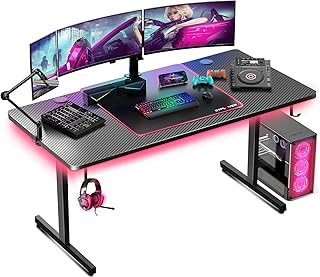
If you prefer a straightforward, roomy desktop with a defined gaming aesthetic, the GTPLAYER 55-inch desk is built around a large carbon-fiber-style surface and a full-width mouse pad. The T-shaped frame focuses on stability—a major plus if you rig multiple monitors, a mechanical keyboard, and a heavy microphone arm.
The carbon fiber finish isn’t literal carbon fiber but a textured laminate that resists scratches and looks sportier than standard wood grain desks. One standout here is the full-desk mouse pad: rather than forcing you to buy an oversized pad, this desk gives you a smooth, consistent tracking surface across most of the desktop—a practical win for FPS players or anyone who values a consistent mouse glide.
A built-in LED strip offers ambient lighting to complement monitor glow, and a headphone hook keeps your headset handy and off the desk. Compared with L-shaped desks, the GTPLAYER’s single-plane layout means better accessibility for multiple players or straightforward streaming setups where you want to center the camera directly in front of your monitors.
Who should consider this desk: competitive gamers who need a stable surface and a full-width mouse area, content creators who want a minimalist single-plane setup with tidy cable routing, and anyone replacing a cramped office desk with something more purpose-built for gaming.
Practical observations: the T-shaped base reduces wobble, but if you push on the edges while gaming the desk still moves more than a heavy steel-frame workstation. Monitor arms are easily mounted if the desk thickness and clamp reach are compatible—measure your arm clamp and desk edge before ordering. Assembly is usually straightforward, and the included mouse pad simplifies setup.
Use cases:
– An FPS player who needs consistent mouse tracking across a wide surface.
– A streamer who wants a centered camera and a clean background with ambient LEDs.
– A home worker who uses the desk for both long typing sessions and gaming.
If your priority is a broad, stable surface with integrated mouse pad and lighting, this desk is a sensible, no-frills choice. Check the latest price on Amazon.
Pros
- Large carbon-fiber-style surface and full-width mouse pad
- T-shaped frame for improved stability
- Headphone hook keeps desk surface clear
Cons
- Not as modular as L-shaped desks for multi-zone use
- Laminate surface is durable but not premium solid-surface material
Check the latest price on Amazon.
ODK 53 Inch L Shaped Gaming Desk with LED Lighting, Reversible Desk with Power Outlets, Cornor Computer Table with Storage Shelves & Bag & Iron Hook, Home Office Table for Writing, Study, Black

Best For:
Buyers who prioritize integrated storage and a tidy corner workstation with LED ambiance and accessible power outlets.
The ODK 53-inch L-shaped gaming desk mixes a practical corner footprint with focused storage options—shelves, a storage bag, and a small iron hook—that make it a good choice if organization is high on your priority list. Like other L-shaped desks in this list, it’s reversible so you can fit it to left- or right-hand configurations without major fuss.
LED lighting gives your setup a finished look and reduces the need for add-on strips, while power outlets on the desk frame simplify plugging in monitors, lamps, and phone chargers. The key difference between the ODK and other 53-inch desks is the emphasis on shelving: if you like visible storage for books, consoles, or decor, these shelves give you that capability without stacking items precariously on the desktop.
Compared to minimalist gaming tables, ODK trades a completely flat aesthetic for utility. The shelves and bag mean you’ll have less desktop clutter, which helps if you stream or take video calls and want a predictable background. The iron hook is a small but thoughtful addition for hanging headphones or a light bag.
Who benefits: people who want deliberate storage integrated into an L-shaped desk—think students, hobbyists with a small console collection, or hybrid workers who need a place for textbooks and external drives. The desk is also attractive for renters who move frequently and want a reversible layout.
Considerations: shelving reduces potential legroom in one corner—if you need deep under-desk space for tower PCs or a full leg stretch, examine the shelf placement before buying. The LEDs are ambient and decorative rather than professional-grade RGB; they’re perfect for atmosphere but won’t replace a lighting rack if you rely on calibrated studio lights.
Real-world use cases:
– A student who keeps textbooks on the shelves and uses the main surface for a laptop and a second monitor.
– A gamer with a small console who needs an accessible shelf for controllers and cartridges.
– A remote worker who wants a dedicated spot to stage files and office supplies away from the main surface.
If built-in shelves and a versatile corner design matter more than a completely minimalist desktop, the ODK desk gives a strong, storage-first approach. Check the latest price on Amazon.
Pros
- Integrated shelves and storage bag for organized gear
- Reversible L-shape fits different room layouts
- Built-in power outlets and LED lighting
Cons
- Shelving can limit under-desk legroom
- LEDs are decorative rather than professional studio lighting
Check the latest price on Amazon.
Gaming Standing Desk with LED Lights & Host Shelf, 55" x 24" Gaming Table with Music Sensing APP Control, Underdesk Cable Storage Electric Standing Desk, Black Carbon Fiber PC Table for Home Office

Best For:
Hybrid workers, streamers, and ergonomics-minded gamers who want an electric standing desk with music-reactive LEDs and built-in cable storage.
This 55" electric standing gaming desk brings the benefits of height adjustability to an RGB-friendly platform. If you’re building a setup that doubles as a health-conscious workstation and a gaming station, an electric lift with a host shelf and music-sensing LED control is a compelling combination.
The desk features an under-desk cable storage tray to hide power bricks and excess wires—ideal for streamers who want a clean on-camera look. The music-sensing app control for LEDs is a playful feature: lights pulse with sound, which creates immersive ambience for music-driven content or energetic multiplayer sessions. The host shelf gives you a raised area for cameras or speakers, freeing the main surface for keyboards, controllers, and mice.
Compared to fixed desks, the standing desk prioritizes ergonomics. The ability to shift between sitting and standing reduces fatigue during long workdays and can make marathon gaming sessions more comfortable. The electric mechanism should be checked for stability and rated weight—55" wide surfaces often hold multiple monitors and should have a quiet, stable motor.
Who should buy: hybrid users who split time between long workdays and gaming, streamers who want a dynamic on-air desk, and anyone focused on ergonomics. The music-sensing LEDs are particularly attractive to content creators who layer their visuals with audio-reactive effects.
What to watch for: confirm the desk’s lifting capacity and that the under-desk storage fits your cable blocks. Electric desks are more complex to ship and assemble; look for reviews that mention motor noise and reliability. If you’re only gaming seated and don’t plan to change posture, a dedicated fixed desk might be simpler and cheaper.
Use cases:
– A remote worker who stands for morning tasks and sits for evening gaming sessions.
– A streamer who uses music-reactive LEDs to add energy to live streams.
– A multitasker who needs discreet cable storage for chargers, capture devices, and a console power brick.
If ergonomics plus RGB interactivity are high on your list, this electric standing desk combines the two in a package designed for modern streamers and workers. Check the latest price on Amazon.
Pros
- Electric height adjustment for sit-stand flexibility
- Music-sensing LED control via app for immersive lighting
- Under-desk cable storage keeps power bricks hidden
Cons
- More expensive and complex than a fixed desk
- Verify motor noise and weight capacity before extended use
Check the latest price on Amazon.
Final Verdict
Creating a cozy RGB gaming setup is as much about surface, storage and cable management as it is about lights and peripherals. The five desks covered here offer distinct approaches: the SEDETA and ODK focus on L-shaped corner efficiency with integrated power and storage; AODK delivers a compact L-shape for smaller rooms; the GTPLAYER favors a wide, stable single-plane surface and a full mouse pad for competitive play; and the 55" electric standing desk is for users who want ergonomic flexibility plus audio-reactive lighting.
Your best pick depends on how you balance space and features. Choose an L-shaped desk if you need two distinct zones (one for monitors, one for peripherals or work). Opt for a T-shaped or single-plane desk if you want a centered streaming camera and a roomy mouse surface. If long sessions tire your back, the electric standing desk is worth the complexity for sit-stand transitions.
Assembly, weight capacity, and LED quality are common decision drivers. Read product specs closely: confirm desk thickness for monitor arm clamps, check motor ratings for standing desks, and measure your room before committing to an L-shaped footprint. Remember that built-in LEDs are mainly for ambiance; serious studio lighting still requires dedicated lamps.
All of these desks bring practical wins over basic office tables—power outlets, hooks, and cable trays cut setup time and reduce clutter. If you prioritize simple, wide surfaces for FPS play, the GTPLAYER is a smart pick. If you want corner storage and a tidy background for streaming, consider SEDETA or ODK. For a small room that still needs functionality, AODK is compact and efficient. And if ergonomics plus showmanship matter, the electric standing desk ties them together.
Whichever you choose, pairing the desk with good cable management, a stable monitor arm, and complementary RGB elements will help you craft a cozy, camera-friendly battlestation. Happy setup building—and check each product page to confirm specs and compatibility.
Conclusion
These Gaming desks trending among cozy RGB setup creators picks are trending now and offer great value and variety. Check the links above for latest prices and reviews.
As an Amazon Associate, I earn from qualifying purchases.
Tags:
gaming desk, RGB desk, L-shaped gaming desk, standing gaming desk, LED gaming desk, ergonomic desk, computer desk
