Best Desk Accessories for Focused Writing Sessions
As an Amazon Associate, I earn from qualifying purchases. This article may contain affiliate links, which means we may receive a commission at no extra cost to you.
If you spend hours writing — whether fiction, research papers, reports, or long email threads — the right desk accessories can quietly improve focus, reduce friction, and keep your head in the zone. This guide pulls together five compact, practical items people use during focused writing sessions: keyboard shortcut desk pads, clear motivational desk signs, desktop glass whiteboards with organizers, compact dry-erase boards for quick notes, and a simple undated to-do notepad for daily priorities.
Affiliate disclosure: As an Amazon Associate, I earn from qualifying purchases. This article may contain affiliate links, which means we may receive a commission at no extra cost to you.
I researched product specs, feature lists, and common user feedback to highlight how each accessory helps reduce interruptions, speeds up routine tasks, and supports clarity while writing. The aim here is to give realistic buying guidance so you can pick the right additions for your setup without wading through dozens of unrelated gadgets.
Buying Guide
What to look for when choosing desk accessories for writing
1) Purpose-first design: Identify the problem you want to solve. Do you lose time hunting for keyboard shortcuts? Do you need a place to jot down fleeting ideas, or do you want a visual reminder of priorities? Pick tools that solve a single friction point well rather than “all-in-one” items that compromise performance.
2) Size and desk real-estate: Writers often work in limited space. Measure available area before buying large pads or organizers. A large desk mat can unify the workspace, while a small dry-erase board or notepad sits tucked to one side.
3) Material and longevity: Look for durable surfaces that resist stains and ghosting (for whiteboards), stitched or anti-fray edges for desk pads, and quality paper for notepads to avoid bleed-through with fountain pens.
4) Ease of use: Accessories should be low-friction — easy to reach, simple to clean, and quick to update. If a whiteboard needs too many accessories to function, you’ll avoid using it.
5) Visual and mental ergonomics: Successful focus accessories reduce visual clutter. Choose neutral or matte finishes and subtle motivational cues rather than bright, busy designs that can distract.
6) Price-to-value: Cheap items can work, but consider durability and replaceable parts (markers, erasers). Accessories that streamline repeated tasks (like shortcut desk pads) often pay for themselves in saved time.
Who shouldn’t buy these: If you prefer an entirely digital workflow and never use pen-and-paper or physical desk cues, many of these items may be unnecessary. Conversely, if you have a very large desk and already use a full standing whiteboard and digital task manager, you might opt for just one specialty item.
Windows, Word, Excel & PowerPoint Cheat Sheet Desk Pad, Large Mouse Pad, Keyboard Shortcut Desk Mat, Large Matt Desktop for Office Supplies(Win+Office)

Best For:
Writers, students, and office professionals who frequently use Windows and Microsoft Office and want quick, low-friction access to keyboard shortcuts.
Why this helps: Writing is part craft, part tool mastery. The Windows + Office cheat sheet desk pad places commonly used keyboard shortcuts right under your wrists so you can stop searching menus or opening help windows mid-flow. This large mouse pad doubles as a desk mat, giving you a matte surface for mouse movement and a low-profile reference that’s readable at a glance.
Design and real-life use: The pad is printed with categorized shortcuts for Word, Excel, PowerPoint, and general Windows navigation. For writers working with research documents and spreadsheets (think: outlining, tracking sources, making quick tables), having shortcuts displayed near the keyboard speeds up formatting, navigation, and copying tasks. The mat’s size fits most laptop-and-external-mouse combinations and provides a consistent tactile surface that reduces small, irritating mouse slips — nice when you’re trying to keep rhythm while writing.
Practical scenarios: Use it when you’re drafting a long article and need repeated actions like applying styles, inserting comments, or jumping between windows. It’s also helpful during editing sessions when copy-pasting, finding/replace, or navigating track changes quickly saves time. Students writing papers with frequent citation or formatting requirements will find it a subtle productivity booster.
Materials and durability: These types of desk pads are generally made with a fabric top and rubberized non-slip backing. Expect easy cleaning with a damp cloth and edges that resist rolling if stored flat. They tend to be thinner than desk blotters, which makes them lightweight and portable between workspaces.
Comparison with alternatives: Unlike laminated cheat-sheet cards that require picking up or shuffling, this full-size desk mat stays in place and presents shortcuts continuously. Compared with an on-screen cheat overlay, the physical pad doesn’t clutter your monitor and is faster to scan visually.
Who it’s best for: Writers, students, editors, and productivity-focused professionals who use Windows and Office regularly and want small, incremental time savings without changing software.
Who may not need it: Mac users, people who never use Office apps, or those who rely solely on customizable keyboard remapping tools may see less benefit.
Pros: Quick visual access to common shortcuts; large, stable surface for mouse use; reduces context switching.
Cons: Printed shortcuts are static — apps update and you can’t customize the layout; not useful for macOS users.
Check the latest price on Amazon.
Pros
- Continuous, glanceable shortcut reference
- Large, stable surface for mouse and keyboard
- Easy to clean and reposition
Cons
- Static printed shortcuts; not customizable
- Less useful for macOS or non-Office users
Check the latest price on Amazon.
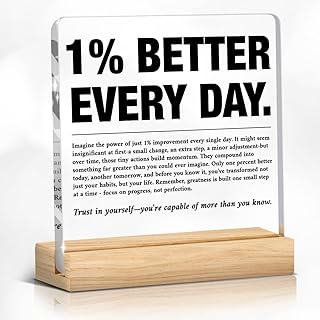
Inspirational Gift Ideas, Desk Accessories 1% Better Every Day Motivational Quote Clear Desk Sign Decor Appreciation Gifts for Coworkers Friends Employee Staff Encouragement (4 x 4 In)
Best For:
Anyone who benefits from gentle motivational cues — writers, students, and colleagues as a small gift.
Why this helps: Focus isn’t only about gear — it’s also about mindset. A small, clear desk sign with a short motivational line (in this case "1% Better Every Day") provides a quiet nudge without being a screen-based distraction. Placed near your monitor or on a shelf, it acts as a micro-reminder to favor tiny, sustainable improvements over perfection.
Design and real-life use: The minimalist clear acrylic sign is compact (around 4 x 4 inches) and has a tidy footprint, which makes it suitable for even small workstations. It’s visually subtle, so it won’t compete with your screen for attention but still sits in your peripheral vision when you need a boost. Writers who struggle with procrastination find that a gentle, positive cue can help them restart a session after interruptions.
Practical scenarios: Use it at the start of a focused writing block as a trigger — glance at the sign, take three deep breaths, and begin. During long editing days it can remind you to aim for steady iteration (a single paragraph or section at a time). Teams also use these signs as small appreciation gifts that double as motivational décor for coworker desks.
Materials and durability: Clear acrylic or glass signs are low-maintenance. They won’t tear or stain like paper cues, and they keep a clean aesthetic. Because the phrase is permanent, choose a message that resonates with you; if a slogan feels cheesy, the effect is lost.
Comparison with alternatives: Unlike sticky notes or elaborate posters, a small acrylic sign is less likely to clutter your workspace and can be positioned where it’s visible but unobtrusive. It’s more durable than paper-based reminders and more subtle than large wall art.
Who it’s best for: Writers who respond to gentle behavioral nudges, people setting long-term productivity habits, or anyone looking for a tasteful gift for colleagues.
Who may not need it: If motivational statements annoy you or you prefer purely functional accessories, this is decorative rather than function-first.
Pros: Minimal visual footprint; durable and attractive; helpful behavioral reminder.
Cons: Adds no direct functional benefit (no storage or utility); message may feel generic to some.
Check the latest price on Amazon.
Pros
- Small and unobtrusive
- Durable acrylic construction
- Subtle psychological nudge
Cons
- Decorative rather than functional
- Message is permanent and may not suit everyone
Check the latest price on Amazon.
SELEAD Desktop Glass Whiteboard with Calculator & Built-in Mirror, Dry Erase White Board Computer Pad Keyboard Stand with Organizer Drawer, Desk Accessories for Home, School, Office

Best For:
Writers and professionals who want a compact, writable surface with integrated storage and a lifted keyboard platform.
Why this helps: A desktop glass whiteboard that doubles as a keyboard stand brings your short-term notes and priorities into arm’s reach while slightly elevating your typing surface. The SELEAD unit adds a built-in calculator and a mirrored panel for quick checks, plus an organizer drawer for pens, sticky notes, or small hardware. For writers who juggle ideas, deadlines, and reference snippets, this kind of hybrid accessory reduces the need to switch to another device or stand up from your desk.
Design and real-life use: The tempered glass surface gives a smooth dry-erase experience with minimal ghosting compared with cheaper boards. You can write quick outlines, jot down a single-sentence thesis, track word counts, or sketch a paragraph structure right in front of you. The keyboard stand aspect improves ergonomics slightly by raising the keyboard to a gentler angle — helpful during multi-hour writing sessions. The slim drawer stores markers, erasers, index cards, or a phone, keeping the desktop surface cleaner.
Practical scenarios: When drafting, use the top surface to list the next three actionable steps (e.g., “outline intro,” “cite source A,” “check stats”), then erase as you go. In research-heavy writing, paste a small reference card in the drawer so you don’t lose essential facts. The built-in calculator is handy for budget write-ups or quick unit conversions.
Materials and maintenance: Tempered glass is durable and wipes clean with a microfiber cloth and a mild cleaner. The mirror portion is a nice aesthetic touch but avoid using it if it creates unwanted reflections in your monitor. Drawer mechanisms vary by model; look for smooth glides and solid construction.
Comparison with alternatives: Traditional cork or felt boards hang on the wall and require standing up; laptop risers offer elevation but no writable surface. This desktop glass whiteboard combines elevation, quick-note capability, and small-item storage in one compact footprint.
Who it’s best for: Writers who like to keep ephemeral notes within reach, professionals who alternate between drafting and simple calculations, and anyone who values a tidy, multi-functional desktop.
Who may not need it: If you prefer a fully digital note workflow or already use a large wall-mounted whiteboard, this tabletop hybrid might be redundant.
Pros: Smooth glass surface with minimal ghosting; integrated drawer and calculator; improves desk organization.
Cons: Mirror can reflect light; larger footprint than a simple notepad.
Check the latest price on Amazon.
Pros
- Smooth dry-erase glass resists staining
- Built-in drawer for pens and accessories
- Adds slight ergonomic elevation
Cons
- Mirror may cause reflections
- Takes more desk space than a simple notepad
Check the latest price on Amazon.
HURUC Small Glass Desktop Whiteboard with Storage,15.3"x7.08"x2.16" inch Desktop Dry Erase Board with Markers & Duster, Desk White Board Buddy Organizer for Home, Office, School (Black)

Best For:
Writers and students who want a compact, high-quality dry-erase surface for short notes and sprint goals.
Why this helps: Sometimes the fastest way to get back into a writing flow is to make a quick physical note — a single line to remember, a deadline, or a short list of steps. The HURUC small glass desktop whiteboard offers a compact, high-quality surface for those moments. It includes storage for a marker and duster and is sized to tuck beside your keyboard without crowding your workspace.
Design and real-life use: This glass board has a low-profile stand and a black frame that helps it blend into most setups. Writers often use it to capture sudden ideas, track micro-deadlines (word counts, section targets), or doodle structure maps when outlining. Because the board is glass, it cleans very cleanly and resists the staining that cheap melamine boards suffer from — it’s especially useful for those who write with fine-tip dry-erase markers and prefer a legible, streak-free surface.
Practical scenarios: Use it during focused sprints: write the sprint goal ("500 words"), set a visible timer, and erase at the end. For academic writers, keep a short list of citation keys or page numbers on the board as a working reference. It’s also handy during brainstorming calls; write a takeaway in a minute and return instantly to typing.
Materials and size considerations: At about 15.3 x 7.08 inches, this board is larger than sticky notes but small enough to remain unobtrusive. The included marker and duster make it plug-and-play. If your desk is very narrow, ensure you have at least 8–10 inches of lateral space for comfortable placement.
Comparison with alternatives: Compared to paper sticky notes, the glass board is reusable and more eco-friendly. Against bigger desktop whiteboards or wall-mounted options, it’s more personal and nearer to your typing area, making it faster to update.
Who it’s best for: Writers who want a clean, reusable surface for short notes and micro-planning during writing sprints.
Who may not need it: Those who only jot notes digitally, or who already have a larger whiteboard that they prefer to keep nearby.
Pros: Compact and reusable; resistant to ghosting; includes marker and duster.
Cons: Limited writable area for extensive notes; needs desk space to sit comfortably.
Check the latest price on Amazon.
Pros
- Glass surface cleans cleanly with minimal ghosting
- Compact footprint fits beside most keyboards
- Includes marker and duster for immediate use
Cons
- Smaller surface limits extended notes
- Requires a bit of desk clearance
Check the latest price on Amazon.
Taja To Do List Notepad – To Do List Notebook for Work with 52 Sheets, 9.8" x 6.5", Undated Daily Planner Perfect for Daily Tasks and Goal Setting, Notepad Suitable for Office, Home & School – Greenery Sway

Best For:
Writers and professionals who prefer a tactile, low-friction way to prioritize daily tasks and track progress.
Why this helps: A simple, undated to-do notepad focuses attention on the day’s most important work without the overhead of a digital task manager. The Taja To Do List notepad provides a tactile place to prioritize tasks, plan short writing sprints, and check off completed items — small rituals that help maintain momentum and provide satisfying micro-rewards as you cross items off.
Design and practical use: The pad’s layout is designed for daily prioritization: a section for top tasks, secondary items, and short notes. Because it’s undated, you won’t feel guilty about missed days — just flip to a fresh sheet and start. The 9.8 x 6.5 inch size slots easily beside a keyboard or beneath a laptop stand. The paper weight tends to be a practical balance: sturdy enough for ballpoint, gel pens, and light marker use without consistent bleed-through.
Practical scenarios: Use a single sheet to plan a focused morning session: list two high-impact writing tasks (e.g., “draft Methods section”, “revise conclusion”), set a 60-minute timer, and cross off items as you finish them. For longer projects, use the pad to track daily progress (word counts, sections completed). It’s also useful during editing: list specific passes like grammar sweep, style consistency, and referencing checks.
Comparison with digital alternatives: Digital task apps are powerful for reminders and complex projects, but they can introduce friction: notifications, context switching, or the temptation to optimize tools rather than do the work. A simple notepad removes those frictions and provides a physical satisfaction when you tick boxes.
Who it’s best for: Writers who benefit from tactile planning, anyone building consistent daily habits, and people who want a low-friction way to prioritize their day without relying on devices.
Who may not need it: If you already manage tasks meticulously in a digital system with recurring reminders and collaborative features, this might be redundant.
Pros: Undated and flexible; compact and portable; helps build small daily habits.
Cons: Paper is consumable and needs replacement; not ideal for complex projects or collaborative task management.
Check the latest price on Amazon.
Pros
- Undated format avoids guilt for missed days
- Portable size fits most desks
- Encourages focused daily planning
Cons
- Requires replacement over time
- Not suited for complex project tracking
Check the latest price on Amazon.
Final Verdict
Small, well-chosen desk accessories can dramatically lower the friction of focused writing. A cheat-sheet desk pad keeps shortcuts at your fingertips so you spend less time searching menus. Small motivational signs provide gentle behavioral nudges without becoming another screen. Tabletop glass whiteboards — whether the multi-feature SELEAD unit or a compact HURUC board — keep ephemeral notes and sprint goals instantly accessible and wipe clean when you’re done. And a simple undated to-do notepad helps translate intentions into actionable micro-steps that you can complete and check off.
When choosing, prioritize the single friction point you want to remove: are you losing time to repetitive tasks, forgetting micro-deadlines, or needing a tiny motivational cue? Pick one or two accessories that directly solve that problem and fit your desk footprint. For most writers, the combination of a physical quick-note surface (glass board or notepad) and a subtle reference or motivational item yields the biggest day-to-day improvement.
Check the latest price on Amazon.
Conclusion
These Desk accessories people use during focused writing sessions picks are trending now and offer great value and variety. Check the links above for latest prices and reviews.
As an Amazon Associate, I earn from qualifying purchases.
Tags:
desk accessories, writing tools, desktop whiteboard, to-do notepad, keyboard shortcuts, productivity, writing desk, office organization
