Minimalist Daily Organization Gadgets Guide
As an Amazon Associate, I earn from qualifying purchases. This article may contain affiliate links, which means we may receive a commission at no extra cost to you.
As an Amazon Associate, I earn from qualifying purchases. This article may contain affiliate links, which means we may receive a commission at no extra cost to you.
Living with less doesn’t mean doing less—it means choosing tools that remove friction, not add it. This guide focuses on compact, well-designed gadgets that help you organize your day, tech and workspace without creating clutter. From reusable planners that cut down paper piles to small pouches and simple cable ties that keep chargers untangled, these are items you can realistically incorporate into a minimalist daily routine. The selections below were chosen for their practical value, thoughtful design, and broad appeal to people who want simple systems that actually work.
Buying Guide
How to pick minimalist organization gadgets that actually help
1. Prioritize function over novelty: Minimalist tools should simplify a single task well rather than try to do everything. Look for planners with clear sections (daily, weekly, goals) or organizers that solve specific pain points like cable tangles or travel chaos.
2. Size and portability matter: If you commute or travel, compact and lightweight items (pouch dimensions, planner page size, strap length) make a big difference. Letter-size or A4 work well if you mostly use the product at a desk; smaller options suit on-the-go needs.
3. Reusability and sustainability: Reusable planners (microwavable or erasable pages), recycled materials, and durable fabrics reduce long-term waste—key for anyone aiming to own fewer, longer-lasting items.
4. Material and build quality: Silicone cable straps, sturdy zippers, water-resistant interiors and quality paper (bleed-resistant for pens) determine whether a gadget stays useful after a few months.
5. Simplicity of system: Pick gadgets that fit into one habit—daily planning at morning coffee, tucking chargers into a single pouch after work, or bundling cords after unplugging. Tools that require complex maintenance often fall out of use.
6. Compatibility with your tools: If you use specific tech (thicker power bricks, long braided cables), confirm dimensions. For planners, decide between undated and dated: undated pads offer flexibility; dated planners drive discipline.
7. Compare to standard alternatives: A reusable planner competes with single-use paper planners and digital apps. The physical act of writing can help focus, while apps offer reminders. Cable straps are simpler than bulky cable boxes; tech pouches are more portable than large electronics organizers.
Buying considerations checklist: portability, durability, eco-friendly materials, layout ergonomics (for planners), internal pockets (for pouches), and ease of use. If you can, read multiple product descriptions and Q&A sections to confirm fit and dimensions—those details matter for a minimalist setup that lasts.
Rocketbook Fusion Reusable Undated Productivity Planner, Letter Size 8.5×11, Gray – Goals, Monthly and Weekly Calendar, Daily To-do List, Lined and Dotted Notes Pages

Best For:
People who prefer handwriting but want a reusable planner and easy digital archiving; students, freelancers, and environmentally-minded planners.
Why it stands out: The Rocketbook Fusion is designed for people who love pen-and-paper planning but want the flexibility of reusing pages and syncing notes digitally. With a mix of templates—monthly calendars, weekly spreads, daily to-do lists, goal pages, and both lined and dotted notes—this letter-size planner serves as a hybrid between a traditional planner and a digital notebook.
Main benefits: The Fusion uses erasable pages paired with a Pilot FriXion pen (write, scan, then erase with a damp cloth). That reuse factor is a big draw for minimalists because it reduces paper accumulation while keeping the tactile benefits of handwriting. Integrated icons allow you to send written content to cloud services like Google Drive, Evernote or Dropbox. The variety of sections makes it easy to keep goals and daily actions in one place rather than scattering sticky notes or multiple notebooks around your workspace.
Real-life use cases: Use the monthly calendar pages to block out recurring commitments, the weekly spreads for time-blocking work hours, and the daily to-do layouts for a prioritized checklist. Students or freelancers can keep class notes or client details on the lined/dotted pages and archive them digitally after scanning. The letter size fits neatly into a slim backpack or under a laptop, making it practical for people who work in cafes, co-working spaces or alternate between home and office.
How it compares: Against standard paper planners, Fusion’s reusable pages cut down on waste and long-term notebook clutter. Compared to fully digital apps, it preserves handwriting’s cognitive benefits and avoids screen fatigue. The trade-off is the need to care for the special pen and to occasionally clean pages; it’s not as quick as opening a phone app but feels more intentional.
Who should buy it: Minimalists who appreciate handwriting, people who want a single physical planner that can be archived digitally, and anyone trying to reduce paper waste without sacrificing structure.
Who may skip it: If you rely on real-time notifications, calendar integrations as your primary system, or prefer disposable paper planners that you keep for physical archives, this might feel like an extra step.
Practical observations and buying considerations: The Fusion is best paired with the recommended FriXion pen and a reliable scanning app. Consider whether letter size fits your bag; if you need something more pocketable, a smaller Rocketbook model might be better. Some buyers report a short learning curve for sending pages to cloud folders but appreciate the long-term reduction in paper piles.
Check the latest price on Amazon.
Pros
- Reusable erasable pages reduce paper waste
- Multiple templates (monthly, weekly, daily, notes) in one book
- Cloud-send feature for easy digital archiving
Cons
- Requires specific erasable pen and occasional page cleaning
- Letter size may be too large for pocket carry
Find it on Amazon—Check the latest price on Amazon.
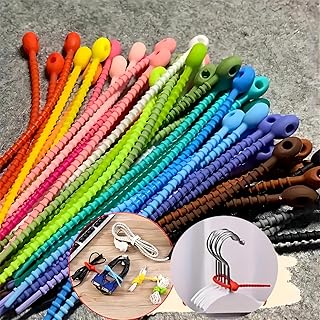
30 PCS Silicone Cable Straps Cord Organizer for Bundling Earphone, Reusable Cable Management Organizer, Organizer in Home,Office,Kitchen,School, Multiple Colors 5.91 in
Best For:
People wanting inexpensive, low-profile cable control—travelers, students, home office users, and families who color-code cables.
Why it stands out: These simple silicone cable straps are exactly the kind of low-cost, low-effort tools that make a minimalist life function better. They’re designed to bundle cords neatly without adding bulk and come in multiple colors to help you color-code cables at a glance.
Main benefits: Made from flexible silicone, each strap wraps around cables and secures with a small snap or loop, preventing tangles and reducing time spent untangling cords. Because they’re reusable and easy to slip on or off, they work for earphones, phone chargers, braided cables and small power cords. Unlike one-size-fits-all bulky cable boxes, these straps maintain the low-profile look that minimalists prefer.
Real-life use cases: Use several straps to keep laptop chargers coiled neatly in your work bag, attach a labeled color strap to each family member’s cable, or group your entertainment system cords behind a TV so dusting becomes quicker. They’re handy for travelers who want to roll cables into a neat bundle for a tech pouch or suitcase. For students, straps help keep earbuds from tangling inside backpacks.
How it compares: Compared with Velcro wraps or bulky cord organizers, silicone straps are softer, less abrasive, and less likely to scratch devices. They’re more flexible than rigid cable clips and less obtrusive than cable boxes, though they won’t hide a power strip’s entire mess. Their low cost and replaceability make them ideal as a minimalist’s first step into organized cables.
Who should buy it: Anyone looking for an inexpensive, unobtrusive way to manage multiple small cords—travellers, remote workers, students, and families.
Who may skip it: If you need to manage large bundles of thick power cables or want an all-in-one box that hides and routes multiple cords, these straps won’t replace more structured cable management systems.
Practical observations and buying considerations: Check the strap length (5.91 in) against the cables you plan to bundle; very thick cables may require doubling up or a different solution. The color set can be useful for quick identification but won’t help with complex cable routing behind desks. Because silicone is flexible, straps can degrade over many years if exposed to UV or excessive heat, but for most indoor use they’re long-lasting.
Check the latest price on Amazon.
Pros
- Flexible silicone won’t scratch devices
- Reusable and easy to apply
- Multiple colors for simple organization
Cons
- Not suitable for managing large, thick power cords
- Limited support for complex desk cable routing
Grab a set on Amazon—Check the latest price on Amazon.
Native Union Stow Lite Organizer W.F.A Tech Organizer – Minimalist Travel Pouch Made of Recycled Materials for Everyday Accessory Storage & Protection – Stores Cables, Chargers & More (Slate Green)

Best For:
Light travelers, commuters, and anyone needing an organized, sustainable tech pouch for daily essentials.
Why it stands out: The Native Union Stow Lite Organizer combines clean lines and practical internal layout in a compact travel-friendly pouch. Made with recycled materials and a water-resistant finish, it targets users who want a sleek, sustainable solution for daily tech carry without extra bulk.
Main benefits: The Stow Lite offers dedicated pockets, elastic loops and a padded interior to keep cables, power bricks, small hard drives and earbuds organized and protected. Its compact footprint slips into a laptop sleeve or daypack, and the exterior loop makes grabbing it easy when moving between workspaces. The recycled fabric and subtle branding keep the look minimal while supporting sustainable design choices.
Real-life use cases: For a commuter who carries a laptop, a small power brick, USB-C cables and wireless earbuds, the Stow Lite makes it easy to pull everything out in a cafe without rummaging through a larger bag. Photographers and content creators can use it for spare batteries, memory cards, and a small charger. If you frequently switch between home, office and co-working spaces, the pouch helps you maintain a consistent set of essentials.
How it compares: Compared to bulkier tech organizers with dozens of compartments, the Stow Lite focuses on a concise internal layout that prevents overpacking. Versus soft zip pouches that lack structure, its elastic loops and padding offer better protection. Its sustainable materials put it ahead of many cheap nylon pouches, though premium multi-layer organizers still offer more modularity for power-heavy setups.
Who should buy it: Minimalists who travel light with a few essential accessories, remote workers who commute, and anyone who prefers sustainable materials in everyday gear.
Who may skip it: Power users with many large chargers or photographers with sizable accessory kits may need something bigger and more modular.
Practical observations and buying considerations: Double-check internal dimensions against your largest charger or hard drive to ensure a comfortable fit. The water-resistant exterior helps protect electronics from light rain or spills, but it’s not a waterproof case for submersion. Users often pair this pouch with small cable straps to keep the interior tidy. The clean design makes it suitable for both casual and professional contexts.
Check the latest price on Amazon.
Pros
- Compact, structured interior with elastic loops
- Made from recycled materials with a water-resistant finish
- Sleek minimalist design fits professional settings
Cons
- May be too small for users with many large chargers
- Not fully waterproof for extreme conditions
See it on Amazon—Check the latest price on Amazon.
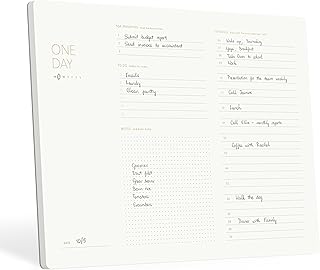
Pinesman – One Day, Elegant Daily Desk Planner, Gold Foiled, Minimalist Productivity Planner Pad, Time Blocking Hourly Schedule, To Do List Notepad, A4, 52 Pages, FSC™ Certified
Best For:
People who practice time-blocking and want a simple daily ritual—knowledge workers, freelancers, and those who prefer a tidy desk setup.
Why it stands out: The Pinesman One Day desk planner is a single-purpose, elegantly designed pad focused on daily time-blocking and task capture. Its A4 size and gold-foiled minimalist layout make it a visually pleasing addition to a tidy desk while providing practical structure for a productive day.
Main benefits: Each sheet includes an hourly schedule for time blocking, a to-do list segment with priority markers, and a small notes area. This stripped-back approach makes it easy to start each morning with a clear plan—no distractions, no excess sections that go unused. The pad format also lets you keep a simple, dated stack of past days if you decide to file or review progress.
Real-life use cases: Use the Pinesman pad at your desk with a morning routine: block focused work periods, schedule short breaks, and capture three must-do tasks. Designers and knowledge workers who rely on focused deep work will appreciate the hourly columns for protecting uninterrupted time. For people who enjoy crossing off tasks physically, the tear-off format provides a satisfying closure to the day.
How it compares: Compared with full planners with monthly and yearly sections, this pad is laser-focused on daily execution. It competes with popular to-do apps by offering a tactile ritual—writing, time-blocking, and tearing off the sheet at day’s end. Unlike generic notepads, the printed layout nudges you toward prioritization and realistic scheduling.
Who should buy it: Those who want a daily, time-blocking habit without committing to long-term dated planners—freelancers, focused professionals, and anyone who prefers a clean desk aesthetic.
Who may skip it: If you require long-term project planning, calendar syncing, or prefer a single bound planner with long-term tracking, this day pad may feel limited.
Practical observations and buying considerations: A4 sheets are larger than pocket-size pads—great for a dedicated desk but less portable. The paper is FSC-certified which appeals to eco-minded buyers; if you use dark or heavily wet ink, check for bleed-through. Because it’s undated per sheet, you control when to create a new day entry without wasted pages.
Check the latest price on Amazon.
Pros
- Focused daily layout for time blocking
- Elegant, minimalist A4 design with FSC™ certified paper
- Tear-off pad format supports a daily ritual
Cons
- Not suitable for long-term project tracking
- A4 size is less pocketable
Purchase on Amazon—Check the latest price on Amazon.
Taja To Do List Notepad – To Do List Notebook for Work with 52 Sheets, 9.8" x 6.5", Undated Daily Planner Perfect for Daily Tasks and Goal Setting, Notepad Suitable for Office, Home & School – Greenery Sway

Best For:
People who want a compact, undated to-do pad for daily task capture—students, commuters, and casual list-makers.
Why it stands out: The Taja To Do List Notepad is a compact, undated pad built for straightforward daily task capture. With 52 sheets sized just under 10" x 6.5", it blends portability with enough space to list priorities, secondary tasks, and quick notes without visual clutter.
Main benefits: The pad’s undated format and clearly arranged list sections help you focus on the day’s immediate priorities. Because it’s lightweight and small, it fits into a planner, laptop sleeve or the front pocket of a tote. The greenery-themed cover and subtle layout make it appropriate for both home and office use.
Real-life use cases: Keep a sheet beside your laptop as a daily checklist and carry the pad in a commuter bag to capture errands between meetings. Parents juggling household tasks and work can use the pad to separate morning priorities from evening chores. Students can use it to break assignments into smaller tasks for focused study sessions.
How it compares: Versus larger daily planners, the Taja pad trades comprehensive layouts for simplicity and portability. Compared with digital task apps, it offers the immediacy of a physical checklist without setup time and avoids notification clutter. It’s a low-commitment option for people who want to improve daily focus without buying an elaborate planner.
Who should buy it: Casual list-makers, commuters, students, and anyone who wants a pocket-friendly daily checklist to keep task momentum.
Who may skip it: If you need detailed calendar integration, long-term habit tracking, or extensive note sections, a bound planner or app may be a better fit.
Practical observations and buying considerations: Check paper thickness if you use fountain pens or markers to avoid bleed. The 52-sheet count is suitable for weekly seasonal use but may require repurchasing if used heavily; that can be an intentional part of a minimalist rotation. Pair this pad with a slim clipboard or a simple magnetic board on the fridge for household task management.
Check the latest price on Amazon.
Pros
- Compact and portable 9.8" x 6.5" size
- Simple undated layout for flexible daily use
- Lightweight and easy to stash in bags or planners
Cons
- Limited sheet count for heavy daily users
- Not a substitute for calendar integration
Buy it on Amazon—Check the latest price on Amazon.
Final Verdict
Minimalist organization is more about choosing a few reliable habits and the right small tools to support them than buying every trending product. The Rocketbook Fusion works well for people who want the feel of handwriting with the convenience of digital archiving; the silicone cable straps are a negligible-cost improvement that reduces daily friction; the Native Union Stow Lite is an elegant, sustainable pouch that keeps your essentials ready to go; the Pinesman One Day pad supports a focused time-blocking ritual at your desk; and the Taja pad is a pocket-ready checklist for immediate tasks.
Together, these items cover the key friction points most minimalists encounter: planning your day, keeping cables under control, transporting essential tech, and capturing short-term tasks. If you adopt just two—one planning tool and one accessories solution—you’ll likely see the biggest immediate gains in clarity and ease. Consider your daily patterns, bag size and whether you prioritize digital backups or tactile rituals when choosing among these items.
Check the latest price on Amazon.
Conclusion
These Minimal lifestyle gadgets people use during daily organization picks are trending now and offer great value and variety. Check the links above for latest prices and reviews.
As an Amazon Associate, I earn from qualifying purchases.
Tags:
minimalist gadgets, daily organization, productivity tools, cable organizer, reusable planner, tech pouch, to-do notepad
