Top Streaming Accessories Creators Use
As an Amazon Associate, I earn from qualifying purchases. This article may contain affiliate links, which means we may receive a commission at no extra cost to you.
Streaming now blends performance, production, and personality. Whether you’re broadcasting gameplay, hosting collaborative shows, or recording high-quality clips for social media, the right accessories make your setup look and sound professional without breaking the bank. This guide highlights the most practical tools creators rely on in realistic streaming setups: studio lighting, macro keypad controllers, multi-channel production consoles, compact control pads, and a versatile USB microphone. Below you’ll find clear explanations of what each product does, who benefits most, real-life usage scenarios, and buying considerations to help you choose the right combination for your workflow.
Affiliate disclosure: As an Amazon Associate, I earn from qualifying purchases. This article may contain affiliate links, which means we may receive a commission at no extra cost to you.
Buying Guide
Key considerations when building a creator-grade streaming setup
1) Prioritize clarity (audio + lighting). Viewers stick around when they can clearly see and hear you. A directional condenser mic or a well-diffused LED light is the first upgrade most creators make.
2) Control and efficiency. Stream decks and macro keypads cut the friction of live production. Look for programmable keys, robust software, and low latency integration with OBS, Streamlabs, Twitch, and common audio tools.
3) Space and ergonomics. A large control console is powerful but needs desk real estate. Compact options exist for creators with limited space or portable setups.
4) Integration and software. The ecosystem matters. Devices that play nicely with major streaming apps and offer customizable profiles save time. Investigate plugin support and firmware updates.
5) Budget tiers. You can build a capable stream with midrange gear; premium devices add convenience (physical dials, multi-channel mixing) and polish but may duplicate functions you already get from software.
6) Future-proofing. Pick products with active software support and community workflows—these get new features and compatibility fixes over time.
7) Noise and lighting control. LED panels with diffusion and true-to-life color temperature reduce post-production work. Microphones with cardioid patterns and gain control limit room noise without fancy soundproofing.
How to mix and match: If you start with audio and lighting, add a compact controller like a mini Stream Deck for hotkeys. Upgrade to a full Stream Deck + when you want tactile dials and integrated audio mixing. Macro keypads are a cost-effective bridge for creators who need many macros without the price of a full console.
Logitech for Creators Litra Glow Premium LED Streaming Light with TrueSoft- Computer lighting for video conferencing, Zoom meetings, with adjustable mount and desktop app control for PC/Mac – Graphite

Best For:
Streamers and remote professionals who need a small, flattering LED light for on-camera appearances and video calls.
The Logitech Litra Glow is a compact LED designed for creators who want flattering, adjustable on-camera lighting without elaborate rigs. It combines TrueSoft diffusion with variable color temperature and brightness, controlled via a desktop app for PC and Mac. Unlike large panel lights or ring lights that take up desk or floor space, this unit clips to monitors or attaches to a small adjustable mount for a low-profile setup. The light is tuned to reduce harsh shadows and highlight skin tones realistically, which helps streamers, podcasters, and meeting hosts maintain consistent appearance across different room lighting conditions.
Main benefits include a small footprint that fits tight streaming desks; app-based presets for color temperature and intensity; and a diffuser built into the head that produces softer falloff than bare LED arrays. Compared with entry-level ring lights, the Litra Glow focuses light directionally and avoids the overly bright and flat look that some creators dislike. Compared with bulky softboxes, it’s travel-friendly and easier to position for mixed setups (dual monitors, single monitor and capture rig, or laptop streaming).
Real-life usage scenarios: a solo streamer using an adjustable mount to light their face while keeping RGB backlighting as ambiance; a hybrid worker who needs flattering light on Zoom calls in a dim home office; a content creator vlogging from a compact desk, where a full lighting kit would be impractical.
Who should buy: Creators and streamers who need reliable, flattering on-camera light without a complex multi-light kit. Also excellent for remote professionals who want better video calls. Who may not need this: studios already equipped with multi-point lighting or creators who prefer ambient room lighting for cinematic looks.
Buying considerations: confirm mount compatibility with your monitor/laptop bezel, check that desktop app controls suit your workflow, and pair the Litra Glow with a subtle background light to avoid flat visuals. Many buyers note that the TrueSoft diffusion reduces post-editing and helps complexion look natural on camera.
Check the latest price on Amazon.
Pros
- Compact, low-profile design fits tight desks
- TrueSoft diffusion for natural skin tones
- App-based color temperature and brightness control
Cons
- Limited output compared to larger panel lights
- Requires mount compatibility check for some monitors
Check the latest price on Amazon.
FIFINE AmpliGame Stream Controller with 15 Macro Keys, Streaming Keyboard with Trigger Actions in OBS/Twitch/YouTube/Streamlabs, Shortcut Buttons Keypad Works with Mac and PC-D6

Best For:
Newer streamers and budget-focused creators who want a physical macro keypad to speed up live production.
The FIFINE AmpliGame Stream Controller is a 15-key macro keypad aimed at creators who want a cost-effective way to manage live production without juggling menus or multiple apps. It bridges the gap between keyboard shortcuts and a full-fledged Stream Deck by providing physical buttons you can program for OBS transitions, chat commands, scene changes, audio mutes, and more. The device works with Mac and PC and integrates with popular streaming tools, offering a straightforward way to layer macros—tap a key to trigger complex sequences or toggle persistent states.
Where this keypad shines is simplicity and value. Compared with larger consoles, it sacrifices an LCD display and nested menus for more direct tactile control, which many streamers prefer for muscle-memory workflows. It’s an excellent companion for creators who already use a microphone and camera but need a dedicated hardware layer for live switching and rapid responses. The small form factor and USB connectivity make it easy to add to a portable setup or a cluttered desk.
Real-life examples: a variety streamer who maps scene swaps, muting, and highlight markers to set keys for quick execution during fast-paced gameplay; a talk-show host using multi-step macros to launch guest introductions and overlay graphics; a creator on a laptop who wants physical controls without a bulky console.
Who should buy: Budget-conscious streamers, newcomers moving beyond keyboard-only shortcuts, and creators who prefer direct button presses to touchscreen menus. Who may not need it: users who already own a Stream Deck with programmable LCD keys or those relying purely on software-based hotkeys and a second keyboard keypad.
Buying considerations: check macro software compatibility with your streaming platform, plan key layout before programming to avoid conflicts, and factor in whether you’ll later migrate to a larger console if your workflow expands. Buyers often praise the tactile feedback and the convenience of dedicated controls when under pressure on live streams.
Check the latest price on Amazon.
Pros
- Affordable way to add tactile macro control
- Compact and portable
- Works with major streaming platforms
Cons
- No LCD icons for each key
- Limited to 15 physical buttons (may be restrictive)
Check the latest price on Amazon.
Elgato Stream Deck +, Audio Mixer, Production Console and Studio Controller for Content Creators, Streaming, Gaming, with customizable touch strip dials and LCD keys, works with Mac and PC

Best For:
Advanced streamers and small production teams who want a single console to handle audio, scene control, and macros.
The Elgato Stream Deck + is a high-end production console that combines programmable LCD keys with tactile dials and an integrated audio mixer, designed for creators who want a central hub for live shows. It elevates the classic Stream Deck experience with physical controls—dials and touch strips—so you can make on-the-fly adjustments to audio levels, effects, and transitions without switching windows. The LCD keys remain highly customizable, allowing icons and nested folders for scene management, macros, and system shortcuts.
Compared to entry-level decks, the Stream Deck + focuses on consolidating multiple control layers into one device. Instead of juggling a separate audio interface, mixer, and keypad, creators can route audio channels through the console and use the dials for fine-grained control. This saves time and desk space while offering a tactile, performance-ready layout. The software ecosystem is robust, with native plugins for OBS, Streamlabs, Elgato Capture, and many third-party apps—making it a favorite in pro-am setups.
Real-world uses: a multi-game streamer juggling overlays, camera angles, and guest calls while mixing microphone, game, and music levels in real time; a small production team where one person handles playback cues and live audio adjustments; a content creator producing multi-segment shows who benefits from quick scene stacks and folder-based key management.
Who should buy: Serious creators, podcasters, and streamers who want an all-in-one control surface with professional workflow features. It’s especially useful if you mix multiple audio sources and want hands-on control. Who may not need it: hobbyists or budget builders who can accomplish most tasks with keyboard shortcuts, a smaller deck, or dedicated audio gear.
Buying considerations: confirm desk space and USB ports, evaluate if the integrated audio mixer replaces existing gear, and review plugin availability for your streaming apps. Many users report that the tactile dials and integrated mixer make live adjustments faster and more confident than software sliders alone.
Check the latest price on Amazon.
Pros
- Integrated audio mixer and tactile dials
- Customizable LCD keys with nested folders
- Strong plugin and software ecosystem
Cons
- Higher price point than compact decks
- May duplicate functions if you already own dedicated audio gear
Check the latest price on Amazon.
Elgato Stream Deck Mini – Control Zoom, Teams, PowerPoint, MS Office and Boost Productivity with Seamless Integration for Daily Apps, Set Up Shortcuts Easily, USB, Compatible with Mac and PC

Best For:
Users who want a small, reliable control pad for core streaming or productivity shortcuts without the bulk of a full console.
The Elgato Stream Deck Mini is a compact, 6-key control pad that brings instant productivity and production shortcuts to creators and professionals alike. It’s smaller than the full Stream Deck but retains the same intuitive drag-and-drop software for assigning actions, switching scenes, launching apps, and running complex macros. The Mini works well in constrained workspaces or as part of a layered control strategy alongside a microphone and camera.
Why pick the Mini? First, it’s a balance between functionality and footprint. Compared with a full-sized Stream Deck, its fewer keys encourage leaner workflows—great if you prefer a curated set of essential controls (mute, scene switch, record, highlight marker, and a macro). It’s also excellent for hybrid workers who want shortcuts for Zoom, Teams, PowerPoint, and common office tools without memorizing dozens of keyboard combos.
Real-life applications: a solo streamer who maps scene transitions, mic mute, and chat-pinned messages to six keys for reliable on-stream performance; a remote presenter using dedicated buttons for screen share, slide advance, and camera toggles; a gamer who wants minimal, high-value hotkeys close at hand during intense play.
Who should buy: creators and professionals who want a small, reliable control surface to streamline common tasks. It’s ideal for newcomers who want the feel of a Stream Deck without the larger investment. Who may not need it: producers requiring many layers of shortcuts or creators who already use a full Stream Deck or extensive keyboard macro setups.
Buying considerations: decide your essential key layout before purchase, check compatibility with your streaming and meeting apps, and consider pairing with a macro keypad if you need more buttons later. Users often praise the Mini’s build quality and the immediate productivity gains from having dedicated physical shortcuts.
Check the latest price on Amazon.
Pros
- Compact and well-built
- Intuitive software with drag-and-drop actions
- Great for productivity and streaming essentials
Cons
- Limited number of keys
- Not ideal as a sole solution for complex production setups
Check the latest price on Amazon.
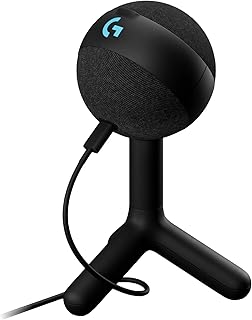
Logitech G Yeti Orb Condenser RGB Gaming Microphone with LIGHTSYNC, USB Mic for Streaming, Cardioid, USB Plug and Play for PC/Mac – Black
Best For:
Streamers and podcasters who want a straightforward USB microphone with good vocal clarity and on-device controls.
The Logitech G Yeti Orb is a USB condenser mic designed for streamers and podcasters who want a simple, plug-and-play path to clearer voice capture with a polished presentation. It offers a cardioid pickup pattern optimized to focus on your voice while minimizing room noise, plus RGB LIGHTSYNC accents to match the rest of a gaming desk aesthetic. The Yeti Orb bridges ease-of-use with useful on-device controls like gain adjustment and a headphone output for zero-latency monitoring.
Compared to basic headset mics or laptop microphones, the Yeti Orb provides fuller, more natural vocal presence and better background noise rejection. Compared to XLR setups, it’s far simpler—no interface required—making it ideal for creators who prefer straightforward USB workflows. The built-in controls and plug-and-play compatibility with PC and Mac mean you can set it up quickly for streaming or recording podcasts.
Practical uses: a solo streamer upgrading from a headset mic to achieve clearer commentary and audience engagement; a podcaster recording in a home setup who needs reliable, consistent voice capture; a hybrid content creator who wants a visually appealing mic on camera as part of their desk setup.
Who should buy: creators who want improved audio quality without learning audio interfaces or investing in XLR gear. Great for new streamers, podcasters, and video creators who need dependable USB convenience. Who may not need it: studios already using high-end XLR microphones and mixers, or creators in very noisy environments that demand complex acoustic treatment.
Buying considerations: pair with a shock mount or boom arm for vibration isolation, consider a pop filter to reduce plosives, and verify that the cardioid pattern aligns with your mic placement. Many buyers report immediate improvement in clarity and audience feedback after upgrading from onboard or headset mics.
Check the latest price on Amazon.
Pros
- Plug-and-play USB convenience
- Cardioid pickup for focused voice capture
- On-device gain and monitoring
- Attractive RGB accents for desk setups
Cons
- Not as flexible as an XLR studio rig
- Can pick up desk vibrations without a proper mount
Check the latest price on Amazon.
Final Verdict
Building a realistic streaming setup is about balancing quality, control, and workspace constraints. Start by locking down clear audio and flattering lighting—these directly impact viewer retention. For control, choose a compact solution like the Stream Deck Mini or a budget macro keypad if you’re just beginning. If you run multi-source shows or want tactile control over audio and scenes, the Elgato Stream Deck + provides a consolidated, production-ready workflow. Each of the products covered here serves a practical role in modern streaming: the Litra Glow for natural on-camera lighting, the FIFINE macro keypad for budget-friendly tactile macros, the Stream Deck + for all-in-one production, the Stream Deck Mini for essentials-driven control, and the Logitech G Yeti Orb for straightforward vocal capture. Consider your desk space, the apps you use, and how much you want hardware to replace or complement software tools. If you’re building up gradually, pair the Litra Glow and Yeti Orb as foundational upgrades, add a Mini for immediate hotkey improvements, then scale to a Stream Deck + for advanced mixing and deeper control. These steps help you create polished, dependable streams that look and sound professional without needing a full studio.
Check the latest price on Amazon.
Conclusion
These Gaming accessories creators use during realistic streaming setups picks are trending now and offer great value and variety. Check the links above for latest prices and reviews.
As an Amazon Associate, I earn from qualifying purchases.
Tags:
streaming accessories, stream deck, streaming microphone, streaming light, macro keypad, creator gear, Elgato, Logitech
