Minimal Desk Setups for Productivity Creators
As an Amazon Associate, I earn from qualifying purchases. This article may contain affiliate links, which means we may receive a commission at no extra cost to you.
Minimal desk setups have become a decisive trend among productivity creators, remote workers, and students who want to reduce visual clutter and improve focus. Clean surfaces, intentional accessories, and versatile organizers do more than look good — they change how you work. This guide walks through a small selection of carefully chosen pieces that fit the minimalist aesthetic while solving everyday problems: protection for your desk, a writable planning surface that doubles as storage, and compact organizers that keep essentials within reach.
Before we dive into the specific products, a quick note on approach: the recommendations below are curated from product specifications, manufacturer details, and aggregated customer feedback to highlight practical benefits and realistic use cases. Whether you’re building a pared-back home office, a neat student workspace, or a creative studio with a lot of visual breathing room, these picks aim to balance form, function, and value.
Buying Guide
Why minimal desk gear matters
A minimal desk setup isn’t just about looks. It’s about reducing cognitive load, protecting your workstation, and creating predictable workflows so you can focus on deep work. When choosing minimalist desk accessories, consider three main factors: surface protection, functional surfaces (like a whiteboard or planner), and storage/organization that keeps items out of sight but readily accessible.
Materials and durability
Look for materials that balance durability and subtlety. Cork and PU leather desk mats are soft under wrists, protect against scratches and spills, and provide a warm, understated texture compared with glossy plastic mats. Glass whiteboards look sharp and stay cleaner over time compared with melamine boards, while built-in storage features on the base help keep pens and notes tucked away.
Size and desk proportion
Small desks benefit from compact solutions: a 24 x 14-inch mat covers a keyboard and mouse without dominating the surface, while a desktop whiteboard that doubles as a monitor riser can free up horizontal space. Measure your desk and the typical layout of monitor, keyboard, and laptop to make sure a mat or organizer doesn’t interfere with ergonomics.
Versatility and multi-function
Minimalist gear should work in multiple modes: a reversible desk pad offers two looks (cork one side, leather the other), while a glass whiteboard with a wireless charger or storage drawer replaces several single-purpose items. Prioritize items that consolidate functions — they reduce the total number of pieces you need.
Aesthetics vs. maintenance
Glass and leather-like surfaces are easy to wipe but show dust differently; cork hides small crumbs but can be more textured and less slick for precise mouse tracking. If you’re sensitive to frequent cleaning, choose materials that match your tolerance for upkeep.
Price and value
Minimal doesn’t mean expensive. Functional organizers and pads can be budget-friendly if they replace multiple items and last several years. Read product dimensions, verify compatibility with your gear, and consider whether a reversible or multi-use product will save you money and desk real estate over single-use alternatives.
What to avoid
Avoid overly ornate organizers that add visual clutter, mats that are too large for your desk, or thin whiteboards that ghost quickly. Instead, pick moderate sizes, solid materials, and features like anti-slip bases, cable management, or a small drawer to keep daily tools out of sight.
This guide below walks through five specific options that align with these principles, showing who each product suits and how it can be used in real life.
AFIING Cork Desk Mat 23.6 x 13.7, Dual-Sided Cork & PU Leather Desk Pad, Waterproof Non-Slip Desk Protector for Home Office, Study Desk & Minimalist Workspace Beige

Best For:
Remote workers, students, and creatives who want a reversible, low-profile desk protector that balances warmth (cork) and easy cleaning (PU leather).
The AFIING Cork Desk Mat aims to deliver two looks in one subtly designed pad: a natural cork face and a PU leather reverse. At 23.6 x 13.7 inches, it’s sized to hold a keyboard and mouse or to act as a neat workspace protector for a laptop and notebook. The cork side brings a warm, tactile feel that hides small scuffs and dampens sound from key taps. Flip to the PU leather side when you want a sleeker, more uniform surface that’s easier to wipe clean.
This mat is a practical fit for anyone building a minimalist desk where surfaces should feel intentional and tidy. The non-slip backing keeps the pad steady on many desktop finishes, and the waterproof top layer helps prevent coffee rings and ink spots from reaching the desk beneath. Compared with plain mouse pads or single-material mats, the dual-sided design reduces the need to replace the pad when tastes or seasons change, and it presents a more finished, cohesive look than a mismatched fabric mouse mat.
Real-life use cases: place the cork side up for a softer feel when you’re writing or sketching by hand; swap to the PU leather side for long typing sessions and easier mouse glide. Because the dimensions are compact, the mat is also convenient for shared desks or small home offices where you don’t want a large footprint. Photographers and creators who shoot flat-lays will appreciate the neutral beige tone that complements product photos without reflecting harsh highlights.
Buying considerations: this mat prioritizes visual coherence and surface protection over specialized gaming-grade tracking. If you need a high-DPI mouse surface for competitive gaming, a dedicated cloth or hard gaming mat may perform better. Also note that cork can darken slightly over time and may collect fine particles; occasional gentle brushing or wiping keeps it looking fresh.
Who should buy: remote workers, students, creatives, and anyone who wants a reversible, low-profile desk protector that looks intentional in a minimalist setup. Who may skip it: competitive gamers or users who require ultra-smooth, friction-optimized mouse pads.
Check the latest price on Amazon.
Pros
- Dual-sided design offers two looks in one
- Waterproof and non-slip for everyday protection
- Compact size fits small desks and shared workspaces
Cons
- Cork surface may collect fine particles and need light maintenance
- Not optimized for high-DPI competitive gaming
Check the latest price on Amazon.
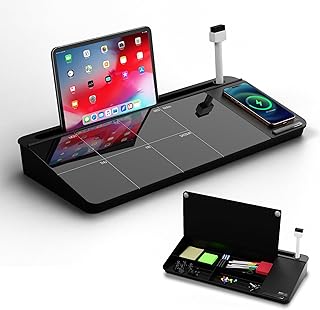
NEXTLUXE Glass Desk Whiteboard with Wireless Charger – Desktop Whiteboard with Storage, Weekly Planner, Dry Erase Pad, Organizer Drawer for Home, School, Office Gadgets – Black (Black)
Best For:
Productivity creators, remote professionals, and students who want an elegant desk planner with built-in wireless charging and hidden storage.
A glass desktop whiteboard can dramatically change workflow by turning a portion of your desk into a reusable planning surface while staying visually minimal. The NEXTLUXE Glass Desk Whiteboard goes further by integrating a wireless charger and a small storage drawer under a tempered glass dry-erase surface. The black finish reads modern and discreet on darker desks, and the clean lines fit a Scandinavian or contemporary minimal aesthetic.
Tempered glass whiteboards feel premium and resist ghosting more effectively than cheaper melamine boards. Writing with a dry-erase marker wipes away cleanly, which is ideal for weekly planning, writing quick reminders, or sketching layout ideas. The built-in wireless charger reduces cable clutter and keeps a phone powered without extra adapters, while the shallow drawer provides a place for markers, erasers, or small pens — keeping those essentials concealed rather than strewn across the desktop.
Practical scenarios: a content creator can use the glass surface as a weekly planner and shoot flat-lays with the sleek glass producing a reflective but controlled backdrop; a remote worker can place the whiteboard in front of their monitor to jot quick reminders during meetings; a student can use it for quick math practice or to-do lists. The wireless charger supports a single device and is best for phones that are Qi-compatible — it’s a neat consolidation feature for those who charge their phones at the desk.
Comparisons and caveats: compared to portable melamine whiteboards, glass is easier to clean and looks more refined, but it is heavier and less flexible to reposition. If you need a very large writing surface, this desktop model won’t replace a wall-mounted whiteboard. Also verify the wireless charger’s power output and compatibility with your phone model — it’s a convenience feature, not a replacement for a high-speed charging brick.
Who should buy: creators and professionals who appreciate a tidy, multi-functional desktop and want to consolidate charging, planning, and storage into one compact piece. Who may skip it: people who need extensive writing area or those who prefer an ultra-light, portable board.
Check the latest price on Amazon.
Pros
- Tempered glass resists ghosting and wipes clean easily
- Built-in wireless charger reduces cable clutter
- Integrated drawer keeps markers and small items concealed
Cons
- Heavier and less portable than melamine boards
- Wireless charging may be slower than a dedicated fast charger
Check the latest price on Amazon.
TSJ OFFICE Small Desktop Whiteboard -Glass Dry Erase Board Computer Keyboard Stand White Board Surface Pad with Drawer, Desk Organizers with Accessories for Office, Home, School Supplies – White

Best For:
Laptop users with external keyboards, writers, and students who want an ergonomic riser that doubles as a dry-erase planning surface.
The TSJ OFFICE Small Desktop Whiteboard is a multi-function glass pad that doubles as a keyboard riser and an organization hub. Its elevated surface works as a monitor stand to improve ergonomics while the glass dry-erase top offers a quick place for notes, daily targets, or doodles when you need to think visually. Underneath, a compact drawer keeps markers, sticky notes, or cables tucked away to preserve a clean desktop silhouette.
Glass surfaces look crisp and are easier to sanitize than felt or fabric; they also take fine-tipped markers well for precise writing. As a keyboard stand, the board lifts the typing surface a few inches, which can help align your hands for a more comfortable typing angle when paired with a separate keyboard. That makes it a smart pick for those who use external keyboards with laptops and want to reduce neck strain by raising the monitor to eye level.
Use cases: if you’re a writer or developer working with many open tabs and quick ideas, the glass pad becomes an always-available scratchpad for reminders and short diagrams. Designers can quickly sketch composition notes while using the top for reference. Students working from a smaller desk can place books or a small monitor on top, using the drawer for pens and calculators.
Buying considerations: the product’s compact footprint makes it ideal for small desks, but it won’t accommodate very wide monitors. The glass surface is sturdy but heavier than plastic alternatives, so consider placement carefully. If you prefer a soft mouse surface, you’ll still want a separate mouse pad since glass can be slippery for some mice.
Who should buy: laptop users who pair an external keyboard and want a clean, elevated monitor area with a writable surface. Who may skip it: users who need a large mounting area for multiple monitors or who prefer a fabric writing surface.
Check the latest price on Amazon.
Pros
- Elevates monitor/keyboard for better ergonomics
- Glass surface is easy to clean and write on
- Hidden drawer reduces desktop clutter
Cons
- Not large enough for wide multi-monitor setups
- Glass can be heavy to reposition
Check the latest price on Amazon.
YSAGi Leather Desk Protector, Office Mat, Large Mouse Mat, Non-Slip PU Leather Blotter, Laptop Pad, Waterproof Writing Pad for Office and Home (Grayish Green, 23.6" x 13.8")

Best For:
Professionals and creators seeking a low-maintenance, stylish PU leather desk mat with smooth mouse tracking and waterproof protection.
The YSAGi Leather Desk Protector is a single-material PU leather blotter designed to offer a smooth, water-resistant surface for writing, typing, and mouse use. Sized at approximately 23.6 x 13.8 inches, it covers the area most people use for a keyboard and mouse without overwhelming a smaller desk. The grayish-green tone is a muted, modern option for minimal desks that want a subtle color without being visually loud.
PU leather has a consistent wipe-clean surface that hides small spills and keeps a neat appearance with minimal maintenance. For creators who prioritize a refined look and low upkeep, a leather-style mat reads more formal than cork and is less textured, which some people prefer for mouse tracking and general cleanliness. The non-slip base ensures the mat stays in place, and the slightly cushioned feel is comfortable for wrists while typing.
Real-world use cases: place this under a compact mechanical keyboard to create a cohesive desk zone, or use it as a laptop pad to prevent sliding and protect your table from heat and scratches. It also serves well in client-facing spaces where presentation matters — the uniform surface looks deliberate in video calls and product shots. Because it’s waterproof, it’s forgiving of an occasional coffee drip or ink spill.
Comparisons and caveats: compared with cork or fabric mats, PU leather is easier to clean but may show fingerprints or surface creases over time. It won’t offer the acoustic dampening of cork, but it trades that for a sleeker appearance and smoother mouse tracking. If you’re sensitive to synthetic materials, you may prefer a natural leather alternative (though that typically comes with higher cost and more maintenance).
Who should buy: professionals, remote workers, and content creators who want a low-maintenance, stylish desk mat with good mouse performance. Who may skip it: those who prefer natural cork textures or vegan shoppers who avoid synthetic materials (review material content carefully).
Check the latest price on Amazon.
Pros
- Smooth PU leather surface is easy to wipe clean
- Waterproof and non-slip for daily protection
- Comfortable size for keyboard and mouse without taking over desk
Cons
- Synthetic material may not appeal to all buyers
- Can show fingerprints or surface creases over time
Check the latest price on Amazon.
gianotter Desk Organizers and Accessories, Monitor Stand with Drawer and 2 Pen Holder, Desktop Organizer Suitable for Offices and Dormitories (Black)

Best For:
Students, small-space workers, and anyone who wants a modest monitor riser that adds small storage for pens and cables.
The gianotter Desk Organizer is a compact monitor stand that combines a raised platform with a small drawer and twin pen holders. Its minimal black finish lets it blend with most monitor bezels and desk palettes while elevating a monitor or laptop slightly to improve screen angle. The drawer is shallow but roomy enough for cables, sticky notes, or a phone, and the pen holders keep writing tools visible but contained.
This organizer is built for people who want to reclaim desk surface area by stacking intelligently. Raising a monitor frees lower space for a keyboard, a slim notebook, or an under-desk docking station. The dual pen holders are a small but meaningful convenience for those who frequently jot down short notes. The overall footprint is modest, making it suitable for dorm desks or compact apartment workstations.
Use cases: a student can use the gianotter stand to create a neat study zone with pens, highlighters, and a phone tucked into the drawer. A home office worker who uses a single monitor will find the platform helpful for achieving a better viewing height. Creators who stage simple video calls can keep the front of their desk visually clean while keeping small props or tools handy under the stand.
Comparisons and buying notes: compared with larger monitor stands that double as full-width drawers, this unit is more space-efficient but stores less. If you have a wide ultrawide monitor, you’ll need to check the dimensions to ensure stability. Materials and build quality vary between brands; verify weight capacity if you place a heavier monitor or an all-in-one PC on top.
Who should buy: buyers with small to medium monitors who want a compact, functional stand with modest storage. Who may skip it: users with very large or heavy monitors who need industrial-strength stands or those who prefer a full-width desk shelf.
Check the latest price on Amazon.
Pros
- Compact monitor stand frees up front-of-desk space
- Small drawer and pen holders keep essentials organized
- Neutral black finish fits most desk aesthetics
Cons
- Limited storage capacity compared to full-width stands
- Not suitable for very heavy or oversized monitors
Check the latest price on Amazon.
Final Verdict
Building a minimal desk setup is about choosing a few versatile, well-made items that solve practical problems: protect the surface, provide a reusable planning area, and hide small essentials so your mind stays focused on the work. The selections above range from dual-sided mats that give you texture and easy maintenance, to glass writing surfaces that double as organizers and risers, to compact stands that reclaim front-of-desk space. Each product is aimed at people who prefer intentional simplicity: creators who shoot content, remote workers who need reliable planning and ergonomics, students managing limited desk real estate, and anyone looking to reduce visual distractions.
When assembling a minimal setup, measure your desk, prioritize multi-function tools, and choose materials that fit your maintenance habits. If you want to consolidate items, a glass whiteboard with storage and a wireless charger can replace a separate planner, phone charger, and pen cup. If you prefer warmth and acoustic dampening, a cork-sided mat delivers nuance that a slick leather pad won’t.
If you’re upgrading a cluttered space, pick one item first — a desk mat or a riser — and feel how your workflow changes before adding more pieces. Minimalism scales best when you remove redundancies rather than layer new single-use gadgets.
Check the latest price on Amazon.
Conclusion
These Minimal desk setups trending among productivity creators lately picks are trending now and offer great value and variety. Check the links above for latest prices and reviews.
As an Amazon Associate, I earn from qualifying purchases.
Tags:
minimal desk setup, desk organizers, productivity creators, home office essentials, glass whiteboard, desk mat, monitor stand
