Minimal Desk Setups for Productivity Creators
As an Amazon Associate, I earn from qualifying purchases. This article may contain affiliate links, which means we may receive a commission at no extra cost to you.
Minimal desk setups have become a staple for creators, remote workers, and anyone who wants a calm, productive workspace. Clean lines, pared-down accessories, and multifunctional pieces help reduce visual clutter and make it easier to focus for longer stretches. This guide highlights five thoughtfully designed desk essentials—desk mats, memo boards, and desktop whiteboards with storage—that trend among productivity creators because they balance aesthetics with practical function.
Affiliate disclosure: As an Amazon Associate, I earn from qualifying purchases. This article may contain affiliate links, which means we may receive a commission at no extra cost to you.
Use this guide if you want to build a minimalist workspace that feels intentional without sacrificing comfort or organization. I researched product specs, listings, and common user feedback to present useful buying considerations, realistic use cases, and practical pros and cons for each item. These picks range from natural cork pads to glass planning boards with wireless charging—each chosen to help you reduce desk chaos and improve focus.
Buying Guide
What to look for when choosing minimalist desk accessories
Surface protection and feel: A desk mat should protect your desk from scratches and spills while offering a pleasant surface for writing and mousing. Materials like cork, PU leather, and laminated fabrics offer different balances of grip, warmth, and durability. Cork gives a natural, tactile feel and absorbs small impacts; PU leather looks cleaner and wipes easily.
Size and fit: Measure your desk and keyboard layout. A 23.6 x 13.7" pad is a common compact size that fits many small desks and laptop setups without swallowing the workspace. If you use a full-size keyboard and a large mouse area, look for larger dimensions.
Organization vs minimalism: Minimal setups rely on a few multipurpose tools rather than many single-use accessories. Desktop whiteboards that double as storage trays or wireless chargers are useful for keeping essentials within reach while maintaining a tidy look.
Visibility and planning: For creatives and content planners, a daily or weekly planning surface (glass or dry-erase) visible on the desk encourages keeping tasks in sight without sticky note clutter. Tempered glass whiteboards stay smudge-resistant and feel premium; glass also resists ghosting better than some cheaper dry-erase surfaces.
Build and maintenance: Waterproof and non-slip surfaces reduce maintenance time—wiping up spills and keeping things steady. Non-toxic adhesives and rounded corners are nice-to-have details that improve longevity and safety.
Who should prioritize which features:
– Remote workers and heavy typists: go for comfortable, slightly cushioned mats with non-slip backing.
– Creatives and planners: prioritize writable planning surfaces and clear weekly layouts.
– Minimalist aesthetes: choose neutral tones (beige, grayish green, black) or natural cork for a calm palette.
Buying considerations: double-sided mats increase versatility; glass organizers with drawers add hidden storage; smaller memo boards work well for visually-oriented reminders but aren’t a replacement for a full planner. Think about how you move across your desk, whether you use an external monitor, and whether you need a charger built into your setup.
AFIING Cork Desk Mat 23.6 x 13.7, Dual-Sided Cork & PU Leather Desk Pad, Waterproof Non-Slip Desk Protector for Home Office, Study Desk & Minimalist Workspace Beige

Best For:
Remote workers, students, and creators who want a compact, dual-texture desk pad that looks premium and protects surfaces.
If you want a minimal desk pad that blends natural texture with easy maintenance, the AFIING Cork Desk Mat is a quiet, practical choice. This dual-sided pad pairs a warm cork surface on one side with a smooth PU leather finish on the other, giving you two aesthetic and tactile options without adding bulk. The 23.6 x 13.7" footprint suits compact desks, laptop stations, and small home offices where a full-sized desk pad would overwhelm the space.
Practical benefits shine through: cork’s natural texture helps keep small items from slipping and provides a forgiving surface for writing, while PU leather wipes clean quickly and resists water. The pad is described as waterproof and non-slip, which matters in daily use—coffee ring accidents and papers nudged by wrist movement are less likely to create ongoing problems. Compared with thin mouse pads or bare desks, this mat protects surfaces from scratches and stabilizes keyboards and notebooks.
Real-life usage scenarios: put the cork side up when you want a warmer, organic look behind a laptop and a place to rest pens and a phone; flip to the PU leather while doing focused typing or digital drawing to enjoy a smoother glide for a mouse. Students can use the cork side as a light bulletin area for a couple of thumbtacked notes or paper clips, while professionals may prefer the leather face for client calls and a sleeker background on video.
Who this pad is best for: remote workers, students, and creators who want a compact mat that feels premium without needing constant care. It’s also a good option if you rotate between analog and digital tasks and like the idea of two different textures in one product. Compared with full-size cloth or neoprene pads, this pad keeps a minimalist footprint while still offering protection and style.
Buying considerations: check your desk measurements so the 23.6 x 13.7" size fits your keyboard and mouse layout. If you rely on an oversized mouse pad area for sweeping mouse movements—common among gamers or designers—you may prefer a larger alternative. Also look for edges that are sealed or well-bonded; cork can flake with cheap construction over time.
Pros: natural cork texture, reversible design, waterproof surface. Cons: smaller footprint than full desk pads, cork may soften with heavy moisture exposure.
Check the latest price on Amazon.
Pros
- Dual-sided: natural cork and PU leather for versatility
- Waterproof and non-slip surface for daily use
- Compact size fits small desks and laptop stations
Cons
- Smaller footprint may not suit users who need wide mouse movement
- Cork can be sensitive to prolonged moisture if not cared for
Check the latest price on Amazon.
MDOZQ Office Desk Accessories 2pcs Computer Monitor Memo Board Message Board Supplies for Women Men Sticky Note Holder Home Desktop Decor

Best For:
Micro-organizers, creators, and students who prefer a tidy spot for short reminders without wall mounting.
Minimalist desks benefit from a few decisive visual cues that guide your day; the MDOZQ 2-piece monitor memo board set aims to be exactly that. These compact memo boards are intended to sit on your desktop or attach near your monitor as a place to park short reminders, sticky notes, or index cards. Rather than scattering Post-its around, you can have a single, curated spot for daily priorities.
Practical benefits include lightweight portability and quick visibility. For creators who work with multiple screens or move between a laptop and a monitor, the memo boards serve as temporary staging areas for script notes, social post captions, or meeting prompts. Compared to large corkboards or wall calendars, these memo boards keep the action at eye level without requiring a wall or extra hardware. They’re especially useful when combined with a weekly planning surface—use the memo board for micro-tasks and the planner for bigger objectives.
Real-life use cases: a podcaster can place show bullet points on the memo board near their monitor; a content creator can use it for daily caption ideas or hashtags to reference while editing; a student can put assignment deadlines or formula cheats on the board for quick access. Because the boards are small and unobtrusive, they suit tiny desks and shared spaces where wall mounting isn’t possible.
Who should buy this set: people who like micro-organization and visual reminders in a minimal setup. If you already use a heavy digital task manager and prefer no physical notes at all, you may not need this accessory. Also, if your workflow depends on large sketching or brainstorming sessions, a larger whiteboard or cork panel would be more appropriate.
Buying considerations: check how the boards mount or stand—adhesive options can affect desk finishes, and removable mounting is friendlier for renters. Inspect the surface finish if you plan to use erasable markers; not all memo boards handle wet-erase pens equally. Compared with adhesive Post-its scattered across the workspace, this set offers more intentionality and fewer random paper trails.
Pros: keeps reminders in sight, compact and portable, good for micro-organization. Cons: limited writing area, adhesive or mounting may affect some surfaces.
Check the latest price on Amazon.
Pros
- Compact and unobtrusive—fits small desks
- Creates a single visible spot for quick reminders
- Good for multi-screen or flexible setups
Cons
- Limited surface area—only for short notes
- Mounting adhesives may not suit all desk finishes
Check the latest price on Amazon.
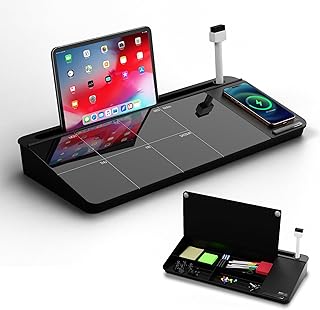
NEXTLUXE Glass Desk Whiteboard with Wireless Charger – Desktop Whiteboard with Storage, Weekly Planner, Dry Erase Pad, Organizer Drawer for Home, School, Office Gadgets – Black (Black)
Best For:
Creators and productivity-focused users who want planning, charging, and hidden storage in one sleek desktop unit.
A premium option for minimal desks that want both planning power and hidden organization, the NEXTLUXE Glass Desk Whiteboard integrates a tempered glass dry-erase surface, a built-in wireless charger, and a small organizer drawer. This combination appeals to creators who want to keep key tools visible and charged while hiding cables and stationery in a tucked-away drawer.
Glass whiteboards bring a smooth, satisfying write-and-erase experience that resists ghosting better than many cheaper melamine surfaces. The weekly planner layout printed beneath or on the glass gives structure to your week without relying on sticky notes or digital reminders alone. The addition of wireless charging modernizes a planning surface—place a Qi-compatible phone on the charger and free up desk outlets. An organizer drawer beneath the writing area is ideal for pens, charging cables, flash drives, or even small external drives, keeping things out of sight but within reach.
Real-world scenarios: content creators who plan shoots or edit schedules can sketch timelines on the glass, keep camera batteries and SD cards in the drawer, and charge a phone between takes. Remote workers can map a week’s priorities and keep a headset adapter or USB hub tucked away. Students preparing for exams might use the glass for quick formulas while storing highlighters or flashcards in the drawer.
Who is this for: creatives and productivity-driven users who want a single desktop unit that blends planning, charging, and storage. If you prefer an ultra-light minimalist desk with zero visible accessories, a slim planner or digital app might be a better fit; this product intentionally adds one consolidated object to your surface. Also check compatibility if you rely on non-Qi charging standards or exceptionally large phone cases that can interfere with charging.
Buying considerations: ensure the wireless charging pad supports your device and that the drawer dimensions meet your storage needs. Glass surfaces can feel cold under the wrist for some users—consider pairing with a small wrist pad if you type directly on it frequently. Compared with separate accessories (a charger, whiteboard, and drawer box), a consolidated unit reduces visual clutter and cable spaghetti.
Pros: premium tempered glass surface, built-in wireless charging, integrated drawer for tidy storage. Cons: heavier than plastic organizers, glass can show fingerprints and feels cooler to the touch.
Check the latest price on Amazon.
Pros
- Tempered glass for smooth erase and reduced ghosting
- Built-in wireless charger consolidates devices
- Hidden drawer keeps small items tidy
Cons
- Heavier than standalone organizers
- Glass surface shows fingerprints and can feel cool under the wrist
Check the latest price on Amazon.
YSAGi Leather Desk Protector, Office Mat, Large Mouse Mat, Non-Slip PU Leather Blotter, Laptop Pad, Waterproof Writing Pad for Office and Home (Grayish Green, 23.6" x 13.8")

Best For:
Aesthetes and professionals who want a sleek, easy-care desk mat that supports tidy, minimalist setups.
For a minimalist setup that leans modern and refined, the YSAGi Leather Desk Protector delivers a smooth PU leather surface in a muted grayish green that pairs well with neutral color palettes. At 23.6" x 13.8", this mat closely matches common compact desk dimensions, offering a large mouse surface and a comfortable area for a laptop and notebook without overfilling the desk.
The non-slip backing and waterproof PU surface mean it performs well under day-to-day conditions: accidental drink spills wipe away, and a desk lamp or keyboard stays firmly in place. The leather-like finish provides a nicer look than basic fabric pads and contrasts with cork or wood surfaces. Compared with cloth mouse pads, the PU leather surface offers less friction for sweeping mouse movements while still supporting precise cursor control for office tasks and light design work.
Use cases: a remote professional who alternates between typing and note-taking will appreciate the smooth writing surface and stable base for a laptop. Designers who don’t require a full gaming-style mouse area can still use a precise mouse on this mat. If you film short videos or product shots on your desk, the muted grayish green gives a tasteful, non-distracting background.
Who should buy this: people who value aesthetics and easy maintenance—especially those with a neutral or Scandinavian-inspired setup. If you need a plush wrist rest for heavy typing or a huge mouse area for wide gaming sweeps, consider a larger or cushioned alternative. Also be mindful that PU leather can crease over time if rolled or stored improperly.
Buying considerations: check edge finishing for potential peeling, and look for mats with stitched or sealed edges for longevity. If you sit with cold hands, the leather finish can feel cooler than fabric; a small wrist cushion can help. Compared to natural cork pads, PU leather offers easier cleaning but less organic texture.
Pros: stylish muted color, waterproof and non-slip, good mouse glide. Cons: PU leather can crease over time, may feel cool to the touch for some users.
Check the latest price on Amazon.
Pros
- Muted, stylish color complements minimalist desks
- Waterproof PU surface that’s easy to wipe clean
- Generous mouse area for compact desks
Cons
- PU leather may crease with improper storage
- Can feel cool to the touch during long typing sessions
Check the latest price on Amazon.
TSJ OFFICE Small Desktop Whiteboard -Glass Dry Erase Board Computer Keyboard Stand White Board Surface Pad with Drawer, Desk Organizers with Accessories for Office, Home, School Supplies – White

Best For:
Students, remote workers, and creators who want a compact writable surface combined with storage and an optional keyboard stand.
The TSJ OFFICE Small Desktop Whiteboard is a compact organizer that blends a dry-erase writing surface with a drawer and the ability to double as a keyboard stand. For minimalist creators and home office users, it’s a practical way to keep short notes and small supplies off the desk while creating a slightly raised surface for keyboards or laptops.
A tabletop whiteboard gives you the flexibility to jot quick priorities, sketch ideas, or draft a caption without reaching for sticky notes. The included drawer tucks away pens, erasers, and charging cables, reducing visible clutter. Compared with wall-mounted boards, this desktop version is portable and doesn’t require hardware, making it suitable for renters or people who switch workstations.
Real-life scenarios: use it as a quick weekly or daily reminder board while working through tasks, and keep a couple of markers and a microfiber cloth in the drawer. If you like to film tutorial videos, the raised platform can help with camera angles or keep your keyboard at a more ergonomic height. Students benefit from the ability to scribble formulas and then erase them after practice.
Who should buy this: anyone who wants a compact, multi-purpose desk organizer with a writable surface. It’s particularly helpful for those with small desks who need both organization and a planning surface. If your primary need is a large planning calendar or a glossy, ghost-free glass surface, a larger or glass-specific option could be preferable.
Buying considerations: check tray dimensions to ensure it holds the items you plan to store. The dry-erase surface quality varies across models—look for reviews noting ghosting or marker compatibility. Compared to premium glass boards, this product is a budget-friendly way to get a writable surface and storage in one.
Pros: multi-functional (writing surface, drawer, keyboard stand), portable, good for small desks. Cons: smaller writing area, surface may show ghosting over time.
Check the latest price on Amazon.
Pros
- Multi-functional: dry-erase surface, drawer, and stand
- Portable and renter-friendly—no wall mounting required
- Keeps supplies tucked away for a tidy desk
Cons
- Smaller writing area than wall boards
- Dry-erase surface may show ghosting over time
Check the latest price on Amazon.
Final Verdict
Creating a minimal desk setup is as much about removing distractions as it is about choosing the right, multipurpose pieces. The five products reviewed here cover a range of needs: the AFIING cork/PU reversible mat and the YSAGi PU leather protector are excellent for surface protection and refined aesthetics; the MDOZQ memo boards are great for micro-notes without clutter; the NEXTLUXE glass whiteboard brings premium planning plus wireless charging and hidden storage; and the TSJ OFFICE desktop whiteboard serves as a compact organizer and keyboard stand for tight spaces.
If your goal is a calming, productive desk, prioritize surfaces that match how you work—whether you need a warm cork texture for analog notes or a smooth leather surface for precision mousing. Choose a consolidated unit like the NEXTLUXE if you want to centralize charging and planning, or pick smaller, separate pieces if you prefer modularity. Keep in mind that minimal does not mean minimal functionality: the best minimalist accessories simplify decisions and reduce visual friction, letting you focus on the work itself.
Before you buy, measure your desk, think about mouse travel and keyboard size, and consider storage needs for pens and small tech. If you’re sensitive to surface temperature or need extra wrist support, plan for a wrist pad or a different material. Finally, remember that a tidy setup is a process—start with one or two thoughtful pieces and expand only if they genuinely reduce clutter and improve your focus.
Check the latest price on Amazon.
Conclusion
These Minimal desk setups trending among productivity creators lately picks are trending now and offer great value and variety. Check the links above for latest prices and reviews.
As an Amazon Associate, I earn from qualifying purchases.
Tags:
minimal desk setup, desk mat, desk organizer, desktop whiteboard, productivity accessories, minimalist workspace, home office
