Focus-Boosting Office Accessories for Creators
As an Amazon Associate, I earn from qualifying purchases. This article may contain affiliate links, which means we may receive a commission at no extra cost to you.
As an Amazon Associate, I earn from qualifying purchases. This article may contain affiliate links, which means we may receive a commission at no extra cost to you.
If you’re a creator, writer, designer, or someone who needs long stretches of concentrated work, the right mix of small desktop accessories can make a surprising difference. In this guide I’ll walk through a curated set of tools—timers, glass whiteboards and desk organizers—that people commonly use to structure focus sessions, reduce friction, and protect creative momentum. Each product below is chosen for practical value during focus-driven workflows, with clear use cases, buying considerations, and realistic pros and cons drawn from product specs and user feedback.
Buying Guide
Why the right accessories matter
When you’re trying to protect a window of focused time, the environment and the cues you use matter as much as the work itself. Small, tactile products—countdown timers that sit in your peripheral vision, a writable glass surface for rolling thoughts, and a compact organizer that keeps essentials within reach—help reduce switching costs and avoid the mental friction of hunting for supplies or losing a train of thought.
Key features to consider
– Visibility and ease of use: For timers, choose simple controls, clear visual feedback and audible or vibration alerts that won’t startle you. An angled display or cube form factor can make elapsed time obvious without leaning forward.
– Surface quality and maintenance: Glass whiteboards feel premium, erase cleanly, and resist staining better than cheap melamine boards. Look for tempered glass and a smooth finish if you want one that remains ghost-free over time.
– Storage and footprint: Desk organizers that double as whiteboards or have integrated drawers keep small items like markers, sticky notes, and a phone charger within reach. Consider overall depth and height so you don’t interfere with keyboard or monitor placement.
– Customizability: Creators often prefer timers that support multiple preset intervals (Pomodoro 25/5, longer deep work sessions, or custom timers) and devices that include wellness prompts to encourage micro-breaks.
– Noise tolerance and alert types: If you work in a shared space, mute and vibration options are valuable. Likewise, wireless charging or a drawer for cables helps keep clutter low.
Who should invest in these tools?
– Freelancers and remote workers who need structure without rigid schedules.
– Students and knowledge workers using Pomodoro-like techniques or needing visible timers.
– Creatives who iterate visually and benefit from a glass surface for sketches, planning, or daily priorities.
Who might not need them?
– Workers whose days are filled with back-to-back meetings rather than independent focus blocks.
– People who use full-sized planning systems or digital apps and prefer minimal desk accessories.
Practical buying considerations
– Measure your desk first: ensure the accessory won’t crowd your keyboard or monitor riser.
– Check replaceable/refillable parts: marker tips and duster pads are often consumables on whiteboards.
– Read the alert options carefully: vibration-only, mute, adjustable volume—pick what fits your workspace.
Next, each product breakdown includes realistic use cases, what problems it solves, and who benefits most. The picks below span compact timers and multifunctional glass boards that creators often reach for during focus sessions.
Jack Pomodoro Timer – Productivity Cube, Visual Focus Timer, Mute & Vibration & Adjustable Sound Alert, for Office, ADHD, Study, Work, 3/5/10/25/30/60min & Custom Countdown – Black

Best For:
Creators and knowledge workers who prefer a tactile, distraction-free timer for Pomodoro-style sessions; students and people who benefit from vibration alerts.
This compact productivity cube is designed around the Pomodoro method and short focus sessions. It offers fixed presets (3/5/10/25/30/60 minutes) plus a custom countdown, and gives visual, vibration and adjustable sound alerts so you can pick a notification style that suits your environment. The cube form factor sits squarely in your peripheral vision, so you can glance at remaining time without pulling focus from a task.
Main benefits
The Jack Pomodoro Timer is useful when you want a physical cue to start and stop deep work without touching a phone or laptop. The audible alerts are adjustable—helpful in shared spaces—and a vibration mode means you can use it discreetly. Compared with phone apps, this hardware timer removes app notifications and the temptation to check other things during break time.
Real-life usage examples
– A freelance writer uses the 25-minute preset for writing sprints, switching to a 5-minute break and then a longer 30-minute session for editing.
– A student with ADHD pairs vibration alerts with short 10-minute sprints to build momentum and reduce overwhelm.
– A designer places the cube to the right of their monitor so the countdown light is visible while sketching.
Why this product is valuable
Physical timers create a stronger behavioral cue than software for many people. This cube’s tactile presence and simple interface reduce friction: no unlocking a phone, no app setup. The option to mute and use vibration is a thoughtful inclusion for shared offices or libraries. Compared to commodity egg timers or single-mode timers, the Jack cube’s multiple presets and custom countdown make it flexible for varied workflows.
Buying considerations and realistic observations
Customers often praise the clarity of presets and the convenience of vibration, but note the importance of placement—if tucked away, the visual cue is lost. Also consider that small desktop devices can be misplaced easily, so pair it with a consistent spot on your desk. If you prefer full-featured tracking and analytics, this cube won’t replace a time-tracking app; it’s made to be a low-friction, in-the-moment tool.
Who should buy
Ideal for creators who want a low-distraction, tactile timer: writers, students, remote workers and anyone using Pomodoro-style focus blocks. Not ideal for users who need integrated digital logs or analytics.
Check the latest price on Amazon.
Pros
- Multiple preset timers and custom countdown
- Mute and vibration options for shared spaces
- Tactile cube form is visible without checking a screen
Cons
- No digital logging or analytics
- Small size can be misplaced if not given a consistent spot
Check the latest price on Amazon.
HURUC Small Glass Desktop Whiteboard with Storage,15.3"x7.08"x2.16" inch Desktop Dry Erase Board with Markers & Duster, Desk White Board Buddy Organizer for Home, Office, School (Black)

Best For:
Visual creators and planners who need a clean, reusable scratch surface and small-item storage on the desk.
This HURUC glass desktop whiteboard combines a sleek writable surface with integrated storage—a shallow tray and compartments for markers, erasers and small desk tools. The tempered glass surface resists staining and usually erases more cleanly than melamine boards, making it a nice upgrade for creators who jot ideas rapidly or sketch quick wireframes during short bursts of focus.
Main benefits
Having a portable, angled glass board right on your desk reduces the cognitive overhead of switching to a separate notebook or hopping into a digital app to capture a thought. The built-in organizer keeps markers and a duster handy so you can record quick to-dos, map a session’s priorities, or sketch layout ideas and then wipe them away without residue.
Real-life usage examples
– A content creator lists their sprint tasks and priorities on the glass board before starting a 25-minute writing session, then erases and updates the board during short breaks.
– A developer sketches a function flow on the glass board for 10–15 minutes to validate an idea before coding.
– A small remote team places the board near a laptop during a co-working session to share quick notes and sync points.
Why this product is valuable
Compared with standard dry erase pads or sticky notes, a tempered-glass surface looks and feels more durable, resists staining, and allows for more expressive pen strokes. The storage compartments are especially practical if your desk is otherwise cluttered—everything you need for short focus sessions is within arm’s reach.
Buying considerations and realistic observations
Buyers often note the premium look and the clean erase of the surface, though you should verify marker compatibility and occasional deeper cleans for ghosting. If your desk layout is shallow, check the board’s footprint to make sure it doesn’t interfere with a keyboard or wrist space. The board’s angled design is great for standing notes but may not lay flat if you prefer a horizontal writing plane.
Who should buy
Best for creators who work visually: designers, product managers, developers and writers who like a physical scratchpad within reach. Less useful for people who prefer only digital note-taking.
Check the latest price on Amazon.
Pros
- Tempered glass resists staining and erases cleanly
- Integrated storage for markers and small tools
- Sleek, professional look fits modern desks
Cons
- Footprint may be too large for compact desks
- Occasional deep cleaning may be needed to avoid ghosting
Check the latest price on Amazon.
Mindsight Focused Activity Timer & Tracker | Promotes Work Life Balance & Productivity | Pomodoro ‘Plus’ w/ 5 Fixed timers + 5 curated Wellness Activities | Office Desk Accessory | Mindfulness | ADHD

Best For:
Creators and remote workers who want timers plus wellness nudges to make breaks restorative and protect long-term focus.
The Mindsight Focused Activity Timer & Tracker is a hybrid desk accessory that blends Pomodoro-style timers with curated wellness prompts. It typically offers five fixed timers coupled with short activities—breathing exercises, stretches, or quick mindfulness breaks—designed to promote sustainable focus and reduce burnout during long creative sessions.
Main benefits
This device is aimed at creators who want structure for work blocks plus gentle nudges toward healthier habits. Instead of only timing work and breaks, the inclusion of wellness activities helps make breaks more restorative: a 5-minute break that prompts a guided stretch or breathing exercise can feel more beneficial than scrolling on your phone.
Real-life usage examples
– A remote animator uses the fixed 50/10 rhythm during animation passes, with the device reminding them to do wrist stretches during breaks.
– A content strategist uses the curated wellness activities to decompress during a long planning day, reporting fewer headaches and improved posture.
– Students with hyperfocus tendencies set shorter timers and use the mindfulness prompts to transition out of intense study sessions.
Why this product is valuable
Compared with a basic kitchen timer or simple Pomodoro cube, the Mindsight device is more than a stopwatch: it’s a small behavior-change tool. If you recognize the habit of spending breaks on social media, a device that prescribes a short guided activity can break that loop and return you to work feeling refreshed. Many buyers appreciate that it nudges wellness alongside productivity—especially remote workers and creators who might otherwise skip restorative micro-breaks.
Buying considerations and realistic observations
While many users praise the concept, note that a wellness-curated timer isn’t a replacement for a full meditation app or physical therapy. Check the verbosity of prompts and whether the alerts include vibrations or adjustable volume. If you rely on detailed analytics for time tracking, this device focuses on behavior nudges over detailed logs.
Who should buy
Great for creators who want structured focus blocks plus guided micro-breaks: remote workers, freelancers, and people managing screen fatigue. Not aimed at users who need deep analytics or integrated software logging.
Check the latest price on Amazon.
Pros
- Combines Pomodoro timing with guided wellness activities
- Helps reduce passive, unproductive breaks
- Designed for sustainable, balanced work sessions
Cons
- Not a substitute for detailed time-tracking analytics
- Wellness prompts may feel basic for experienced meditators
Check the latest price on Amazon.
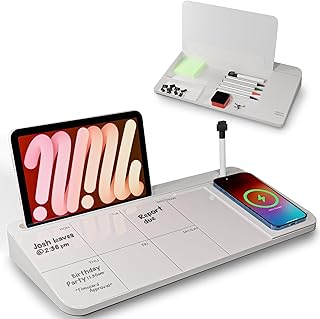
NEXTLUXE Glass Desk Whiteboard with Wireless Charger – Desktop Whiteboard with Storage, Weekly Planner, Dry Erase Pad, Organizer Drawer for Home, School, Office Gadgets – White
Best For:
Creators who want a consolidated desk hub that combines planning, note-taking, storage and wireless charging.
NEXTLUXE’s glass desk whiteboard brings together a writable surface, an integrated weekly planner, storage compartments and a wireless charging pad—an appealing combination for creators who want to condense several desk functions into one elegant accessory. The tempered glass panel doubles as a dry-erase surface while the base stores markers, cards and small tools. The addition of wireless charging means your phone can sit on the board while it powers up between focus sessions.
Main benefits
This multi-function piece reduces desktop clutter by combining planning, note-taking and phone charging. The weekly planner layout helps creators set a high-level view of goals and deadlines before diving into focused sessions, while the drawer keeps frequently used items close. Compared to standalone chargers or separate planners, the NEXTLUXE design streamlines your workflow into a single footprint.
Real-life usage examples
– A social media manager wires up a charging phone while jotting daily content priorities on the weekly planner and using the drawer for spare SD cards and markers.
– A podcaster writes episode notes on the glass pad during recording prep, keeping mic accessories in the organizer drawer.
– A remote worker uses the planner each morning to map out three priority tasks, then uses a nearby timer to block focused work.
Why this product is valuable
The combination of writable glass and wireless power addresses two daily frictions: capturing ephemeral ideas and keeping devices powered without extra cables. The weekly planner is especially helpful for creators who balance multiple projects and need an at-a-glance view before sitting down for deep work.
Buying considerations and realistic observations
Check the wireless charging compatibility and placement—some phones require exact alignment. Also confirm the board’s dimensions relative to your desk depth; multi-function pieces can become too dominant on smaller surfaces. Review marker compatibility and the robustness of the sliding drawer if you plan heavy use. Some buyers report the wireless pad is convenient but not as fast as a dedicated fast charger.
Who should buy
Ideal for creators who want a consolidated desk hub: people who juggle planning, quick notes, and phone charging during work sessions. Less practical for minimalists who avoid multi-function accessories or for those who prefer separate, high-speed charging solutions.
Check the latest price on Amazon.
Pros
- Multi-functional: planner, glass board, storage and wireless charger
- Helps reduce desk clutter and centralize workflow
- Tempered glass surface looks premium and erases cleanly
Cons
- Wireless charging alignment and speed can vary by phone
- Larger footprint may overwhelm small desks
Check the latest price on Amazon.
TSJ OFFICE Small Desktop Whiteboard -Glass Dry Erase Board Computer Keyboard Stand White Board Surface Pad with Drawer, Desk Organizers with Accessories for Office, Home, School Supplies – White

Best For:
Creators and students with compact desks who need a dual-purpose keyboard stand and writable surface with small storage.
The TSJ OFFICE small desktop whiteboard is a glass dry-erase surface that also functions as a keyboard stand and desktop organizer. Its slim profile can double as a protective pad beneath a keyboard, while the built-in drawer offers a place for markers, sticky notes or small cables. The hybrid design targets creators who need to save space but still want an accessible writable surface and small-item storage.
Main benefits
If your desk is limited in depth, a dual-purpose accessory that serves as both a keyboard riser and writing surface can be a clever space-saver. The TSJ OFFICE board makes it easy to swipe a quick note or draw a tiny sketch without reaching for a separate notepad. The drawer reduces desktop clutter and keeps essentials tucked away but reachable.
Real-life usage examples
– A copywriter uses the board as a wrist-friendly keyboard stand and writes daily micro-tasks on the edge while working in short bursts.
– A UX researcher places sticky notes in the drawer and sketches quick user-flow ideas on the glass surface between interviews.
– A student uses the board to protect a laptop from spills while maintaining a quick scratchpad for formulas or definitions.
Why this product is valuable
Compared with single-purpose boards, the TSJ OFFICE model is a thoughtful compromise for small desks. It’s more functional than a simple pad and less bulky than a full desktop organizer. The glass surface feels nicer to write on and is less likely to stain than cheap whiteboard materials.
Buying considerations and realistic observations
Measure your desk and keyboard dimensions: using the board as a keyboard stand changes your typing angle, which some users may love and others may not. The drawer is useful but fairly shallow—best for slim items. If you frequently write large diagrams, a bigger horizontal surface might be better.
Who should buy
Perfect for creators working on compact desks who want both a writing surface and a keyboard riser: writers, students, and remote workers with limited space. Avoid if you need a large whiteboard area or deep storage.
Check the latest price on Amazon.
Pros
- Space-saving dual-purpose design (keyboard stand + whiteboard)
- Glass surface erases cleanly and looks premium
- Includes a small drawer to reduce desktop clutter
Cons
- Drawer is shallow and limited to slim items
- Typing angle may not suit everyone
Check the latest price on Amazon.
Final Verdict
Small, purposeful desk accessories can change how your focus sessions feel and flow. Timers like the Jack Pomodoro cube and Mindsight tracker create clearer start/stop cues without dragging you into a phone, while glass whiteboards from HURUC, NEXTLUXE and TSJ OFFICE provide writable surfaces that encourage quick planning, sketching, and zero-friction note capture. Multi-function pieces that add storage or wireless charging help consolidate your workflow, whereas single-purpose timers keep distractions minimal.
When choosing, prioritize the features that remove the most friction from your routine: a visible timer if you lose track of time, a glass board if you often sketch or need a reusable capture surface, or a combined charger/organizer if your desk is crowded. Creators who value tactile cues and visible reminders will see the biggest benefit; those who prefer a minimalist setup or rely exclusively on digital task managers may find less value.
If you’re building a productivity kit for focus sessions, a simple combination to start with is a tactile timer plus one glass whiteboard that fits your desk depth. From there, consider adding a multi-function organizer with wireless charging if you frequently juggle devices. Each of the products reviewed here targets common focus frictions—time management, idea capture, and desk clutter—with practical trade-offs between functionality and footprint. Choose the item that solves your current workflow bottleneck and build from there.
Check the latest price on Amazon.
Conclusion
These Office accessories creators use during focus work sessions picks are trending now and offer great value and variety. Check the links above for latest prices and reviews.
As an Amazon Associate, I earn from qualifying purchases.
Tags:
focus accessories, Pomodoro timer, glass whiteboard, desk organizer, productivity tools, creators desk, ADHD focus
