Top Phone Accessories for Creator Setup Videos
As an Amazon Associate, I earn from qualifying purchases. This article may contain affiliate links, which means we may receive a commission at no extra cost to you.
As creator-focused content has shifted toward more authentic, “real room” setups—think kitchen counters, bedroom corners, and cozier studio corners—phone accessories have evolved to be compact, versatile, and visually unobtrusive. Whether you’re filming a 60-second social clip, a sit-down tutorial, or a mobile vlog, the right combination of mic, stabilizer, light and grip can transform everyday footage into something that looks polished without feeling staged.
As an Amazon Associate, I earn from qualifying purchases. This article may contain affiliate links, which means we may receive a commission at no extra cost to you. Below you’ll find a researched buyer’s guide and five well-rounded accessory picks that regularly appear in realistic creator setup videos. I’ve drawn on product specs, verified feature lists, and common customer feedback to explain what each item does, who should consider it, and how it compares with more basic alternatives like phone mics built into the device or a tabletop ring light.
If you want to move beyond shaky handheld footage, thin audio, and flat lighting—without turning your space into a professional studio—this guide will help you choose the accessories that matter most for authentic, everyday creator videos.
Buying Guide
Why these accessories matter in realistic creator setups
Creators who prioritize relatable, everyday aesthetics often aim for content that feels candid and human, but still sounds and looks professional. The three most common deficits in phone-shot videos are shaky motion, poor audio, and unflattering light. The accessories in this guide address those directly—wireless lav mics for clear voice capture without cables; compact gimbals and tracking tripods to keep motion smooth; and small, tunable lights to match ambient tones.
Key buying considerations
1. Compatibility and connections: Most modern accessories support both iPhone and Android, but check for specific connector types (Lightning, USB-C), Bluetooth pairing steps, or companion apps. If you use a phone case, confirm that magnetic mounts or MagSafe-compatible grips will still attach securely.
2. Size vs. performance: In realistic setups you’ll prefer compact solutions that tuck away when you’re not filming. That makes lightweight gimbals, mini lavalier transmitters, and magnetic grips attractive. Larger ring lights and studio tripods are powerful but can break the casual vibe.
3. Battery life and charging: Look for accessories with swappable batteries or good internal battery life. Many creators film multiple short takes throughout the day—quick recharge times and USB charging are practical priorities.
4. Ease of use and learning curve: Tools with quick setup, simple mounting systems, and reliable auto-tracking let you focus on content rather than fiddling with settings. Conversely, if you plan to use advanced features (custom E-Ink displays, multi-mic arrays, DMX-like light control), allow some time to learn the software.
5. Audio vs. on-camera mics: The built-in mic on phones is serviceable for casual clips but picks up room reverb and background noise. A wireless lavalier or compact shotgun mic will dramatically improve dialog clarity in most home environments.
Comparing to standard alternatives
– Built-in phone audio vs. wireless lavs: Built-in will capture everything; a lav isolates voice and reduces room noise. Expect a leap in perceived production value.
– Tripod + phone vs. auto face tracking tripods: Static tripods are cheaper and stable; face-tracking tripods add movement and dynamic framing without a second operator.
– Desktop LED vs. RGB fill lights: Basic LEDs give consistent daylight-balanced light; RGB panels let you add personality (gels, brand colors) but require more setup.
How to prioritize purchases
– If audio is the weakest link: prioritize a wireless lav mic system.
– If movement or b-roll is your goal: get a 3-axis gimbal or auto-tracking tripod.
– If lighting ruins your skin tones: invest in a small RGB-adjustable fill light.
The product profiles that follow dig into real features, typical use cases, and who should (and shouldn’t) buy each accessory so you can assemble a creator kit that fits your style and budget.
Insta360 Mic Pro Transmitter, Wireless Mini Lavalier Microphone for iPhone/Camera/Android, Video Recording, Bluetooth, Customizable E-Ink Display, 3-Mic Array, 32-bit Float Internal Recording

Best For:
Mobile vloggers, solo creators and interviewers who need reliable, clear voice capture and a small, unobtrusive transmitter.
If audio clarity is the first thing you notice in a creator’s video, a compact wireless lav like the Insta360 Mic Pro transmitter is often the reason. This tiny transmitter pairs with phones, cameras and other devices using Bluetooth and can be clipped close to your shirt collar for immediate vocal clarity. Its unique selling points include a customizable E-Ink display that can show channel or name labels, a 3-mic array to improve capture flexibility, and internal 32-bit float recording—useful in case a Bluetooth link drops or you want a higher-quality local backup.
Main benefits
The most practical benefit is consistent voice capture without the hassle of long cables or a bulky transmitter pack. Compared with the phone’s internal mic, a lav delivers clearer dialogue and better isolation from ambient room noise. The 32-bit float internal recording acts as an insurance policy for creators who occasionally push levels—this format captures a wide dynamic range so loud peaks and soft passages are preserved better than standard compressed tracks.
Real-life usage examples
– A cooking creator filming at a cluttered kitchen counter can clip the micro transmitter to an apron or neckline to keep their voice forward while pots and pans rattle in the background.
– A long-form tutorial recorded in one take benefits from internal backup recording: if Bluetooth pairs poorly mid-shot, you still have a high-quality local track to sync in editing.
– Fast-moving interview or run-and-gun vlogging where the subject moves between rooms—small size and reliable clipping mean fewer retakes.
Why it’s valuable
Compared to simple clip-on lavs that route directly into a phone via a cable, the wireless Insta360 Mic Pro reduces snagging and allows more freedom of movement. The E-Ink display is a practical touch for creators who swap mics between people or want a quick visual confirmation of channel settings without opening an app.
Who should buy it
– Best for solo creators, vloggers, interviewers and mobile journalists who want broadcast-style voice capture without complicated rigs.
– Also useful for creators who film multi-location content and need a dependable backup recording.
Who might skip it
– If you only film very short, casual clips in quiet rooms, the built-in phone mic may be fine and a wireless lav could be overkill.
– Studio podcasters who already have XLR setups won’t benefit as much from this mobile-focused unit.
Practical observations and buying considerations
Customers often praise the clarity upgrade over onboard microphones and the convenience of the E-Ink label. When researching, confirm which companion apps and file transfer workflows are required for the 32-bit float files and check battery life estimates for continuous recording. Consider how you’ll mount the transmitter—some users add small velcro straps when filming active content.
Pros: ["Compact wireless lavalier reduces cable clutter","32-bit float internal recording as a backup","E-Ink display for quick channel labeling"]
Cons: ["Bluetooth can be less reliable than hardwired options in crowded RF environments","Higher-end XLR systems still outperform for dedicated studio recording"]
Check the latest price on Amazon.
Pros
- Compact wireless lavalier reduces cable clutter
- 32-bit float internal recording as a backup
- E-Ink display for quick channel labeling
Cons
- Bluetooth can be less reliable than hardwired options in crowded RF environments
- Higher-end XLR systems still outperform for dedicated studio recording
Check the latest price on Amazon.
Hohem iSteady M6 Kit Smartphone Gimbal Stabilizer, Magnetic AI Tracking Sensor Fill Light, OLED Display, 3-Axis Phone Gimbal for iPhone Android, Phone Stabilizer for Video Recording, YouTube TikTok

Best For:
Creators who shoot while moving—travel vloggers, lifestyle video makers, and anyone adding motion-driven clips to their feed.
A 3-axis gimbal is a staple for creators who move while filming or want buttery-smooth pans that make mobile footage look cinematic. The Hohem iSteady M6 Kit positions itself as a compact, user-friendly gimbal with a few modern extras: a magnetic AI tracking sensor and a small fill light to keep faces well exposed during movement, plus an OLED display for quick mode checks. It’s designed to be easy to fold away between takes and light enough to handhold for longer b-roll runs.
Main benefits
Stabilization is the obvious win—handheld footage without the jarring shakes that betray amateur shooting. The magnetic tracking sensor allows the gimbal to auto-follow a subject, keeping framing tight without needing a second operator. The built-in fill light is modest but useful for low-light spontaneous shoots where you don’t want to rig a separate panel.
Real-life usage examples
– A creator walking through a farmer’s market can hold the phone on the gimbal and get smooth follow shots while the AI tracking sensor keeps their face centered as they move.
– Fashion and outfit-of-the-day creators who need stable full-body pans can use the gimbal for consistent motion across different indoor locations.
– B-roll-heavy lifestyle videos—coffee pours, product close-ups, and candid neighborhood shots—benefit from handheld stability while preserving a handheld feel.
Why it’s valuable
Compared with cheaper handheld stabilizers or relying on a phone’s electronic stabilization, a 3-axis gimbal provides far more natural motion and extended control over tilt, roll and pan. The iSteady M6’s additional features, like the magnetic tracking sensor and small light, make it a more complete tool for creators who want to capture dynamic clips without extra gear.
Who should buy it
– Best for creators who film on the move: travel vloggers, lifestyle creators, wedding or event shooters working solo, and TikTok creators focused on motion-driven clips.
Who might skip it
– Static interviewers or creators who mainly shoot on tripods in controlled lighting may find a gimbal is less frequently used and could delay purchase.
Practical observations and buying considerations
Balance and phone weight limits matter: confirm that your phone (and any case or lens attachment) falls within the gimbal’s supported weight. Battery longevity and foldability for travel are practical points to weigh; many customers appreciate quick setup and reliable tracking more than a fancy app with steep learning curves. If you plan to shoot long sessions handheld, test comfort and grip options.
Pros: ["Smooth 3-axis stabilization for cinematic motion","Magnetic AI tracking keeps subjects framed","Built-in fill light for quick low-light shots"]
Cons: ["Adds weight to handheld setups","Learning advanced gimbal modes can take time"]
Check the latest price on Amazon.
Pros
- Smooth 3-axis stabilization for cinematic motion
- Magnetic AI tracking keeps subjects framed
- Built-in fill light for quick low-light shots
Cons
- Adds weight to handheld setups
- Learning advanced gimbal modes can take time
Check the latest price on Amazon.
Vlogging Kit for iPhone/Android, YouTube Starter Kit with Wireless Microphone/Camera Tripod/Flexible Tripod/RGB Fill Light, Content Creator Essentials Kits for TikTok Vlog Video Recording

Best For:
New creators and mobile-first YouTubers or TikTokers who want an all-in-one starter kit covering audio, lighting, and basic tripods.
Starter kits bundle multiple accessories that work together for creators who want an all-in-one solution without choosing components separately. This Vlogging Kit typically includes a wireless microphone, a compact tripod for table-top interviews or low-angle shots, a flexible Gorillapod-style tripod for uneven surfaces, and an RGB fill light to set mood and proper exposure. Bundles like this are attractive for creators building a first serious kit or those who want coordinated components that match in size and portability.
Main benefits
The convenience of a curated kit is the first draw: you get audio, lighting, and basic stabilization in one purchase. For creators transitioning from casual to semi-professional content, it removes the guesswork about what to buy together and often includes small accessories—phone clamps, cold shoe mounts, and carrying pouches—that matter for day-to-day use.
Real-life usage examples
– A new YouTuber filming talking-head videos can use the tabletop tripod and RGB light for face illumination, then clip on the wireless mic for clean audio.
– Street content creators who film at markets and festivals can use the flexible tripod to anchor on a post or a bench, while the wireless mic reduces noise pickup.
– TikTokers shooting short lifestyle skits can switch between the compact tripod and flexible mount depending on scene composition.
Why it’s valuable
Buying components separately can be more flexible but also more expensive and time-consuming. Kits like this often offer balanced components in one box—useful when you want to start producing better-looking content right away. Compared with single-item purchases (e.g., a ring light alone), a kit ensures you don’t end up with good lighting but poor audio.
Who should buy it
– Ideal for beginners, content creators setting up a mobile-first kit, and anyone who values convenience and portability.
Who might skip it
– Creators who already own a quality microphone or tripod may prefer buying specific upgrades instead of a full bundle.
Practical observations and buying considerations
Confirm the quality of each included piece—some bundles emphasize value by including entry-level components. Look for details on the wireless mic’s range, battery life, the tripod’s maximum height and load, and whether the RGB light offers both color temperature and hue control. Customers often report that the wireless mic is a major upgrade over phone mics, while the included tripods are sufficient for tabletop and casual field use but not heavy-duty studio mounting.
Pros: ["Convenient all-in-one starter kit","Balanced audio, lighting and basic stabilization","Good portability and coordinated accessories"]
Cons: ["Individual components may be entry-level","Less flexible than picking premium separate items"]
Check the latest price on Amazon.
Pros
- Convenient all-in-one starter kit
- Balanced audio, lighting and basic stabilization
- Good portability and coordinated accessories
Cons
- Individual components may be entry-level
- Less flexible than picking premium separate items
Check the latest price on Amazon.
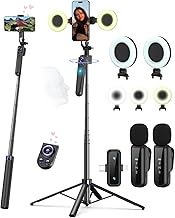
Vlogging Kit for iPhone/Android, 63”Auto Face Tracking Tripod for iPhone with Light, Wireless Microphones, Scrolling Remote Control for TikTok, Content Creator Kit for YouTube Starter
Best For:
Solo presenters, fitness instructors, and creators who need tall, hands-free tracking for standing or moving shots.
An auto face tracking tripod is a powerful time-saver for creators who often film solo and need the camera to follow them as they move. This kit combines a tall (up to 63") tripod with auto face-tracking, integrated lighting, wireless microphones, and a scrolling remote—features aimed at TikTok creators, live streamers, and YouTubers who film solo presentations or product demos.
Main benefits
The big benefit is the hands-off framing: you set the tripod, enable tracking, and the phone motor adjusts to keep your face centered as you walk, demonstrate a product, or stage a tutorial. The integrated light helps maintain consistent exposure, and the included wireless microphones prioritize dialog clarity without tethering you to a fixed spot.
Real-life usage examples
– A craft or DIY creator can move between a workbench and a demonstration table; the tracking tripod follows their motion while the microphone picks up instructional voiceover.
– Fitness or yoga instructors recording solo sessions can step away from a static frame and still remain centered without a camera operator.
– Small business owners filming product demos in-store or at a pop-up can use the tall tripod for elevated framing and the scroll remote for quick scene changes.
Why it’s valuable
Compared with a static tripod or a simple tabletop stand, an auto-tracking kit replaces the need for a second person or repeated reframing. For creators who film standing up or need full-body shots, the extended height provides flexibility in composition. The inclusion of a remote and wireless mics makes it a near-complete solo production kit.
Who should buy it
– Best for solo presenters, fitness instructors, educators, and creators who need hands-free tracking for standing or moving shots.
Who might skip it
– Creators whose content is mostly seated, static interviews, or close-up tabletop product shots might not use the tracking feature often enough to justify the kit.
Practical observations and buying considerations
Check the tripod’s stability at full extension, especially with added phone clamps or light attachments. Some users recommend using the tracking feature in well-lit areas for more accurate face recognition. Also evaluate the microphone range and the remote’s responsiveness for live streaming scenarios.
Pros: ["Auto face tracking for hands-free framing","Tall 63" height for full-body shots","Included wireless mics and remote simplify solo shoots"]
Cons: ["Larger footprint than compact tripods","Tracking accuracy can drop in low light or cluttered backgrounds"]
Check the latest price on Amazon.
Pros
- Auto face tracking for hands-free framing
- Tall 63" height for full-body shots
- Included wireless mics and remote simplify solo shoots
Cons
- Larger footprint than compact tripods
- Tracking accuracy can drop in low light or cluttered backgrounds
Check the latest price on Amazon.
TELESIN Fun Shot Magnetic Phone Camera Grip + C03 Magnetic Selfie Light (Silver) Bundle Kit Compatible with iPhone Magsafe & Android, Creator Kit for Selfies/Photography/TikTok/Zoom Calls/Video

Best For:
Micro-influencers, lifestyle vloggers and remote workers who need a compact grip and portable fill light for selfie-style filming.
Magnetic grips and selfie lights have become nearly ubiquitous in trending creator videos because they are unobtrusive, pocketable, and quick to deploy. The TELESIN Fun Shot Magnetic Phone Camera Grip plus C03 Magnetic Selfie Light bundle is built around MagSafe-style magnetic compatibility (and adapters for some Android phones), offering a slim camera grip that improves handheld stability and a compact round LED selfie light for flattering close-up illumination.
Main benefits
A small, tactile grip changes how steady handheld footage looks—better framing and reduced jello effect—without the bulk of larger rigs. The magnetic selfie light clips on instantly and offers adjustable brightness and color temperature that helps correct for poor overhead lighting, especially for close-up talking-heads or product shots.
Real-life usage examples
– Influencers shooting quick face-to-camera clips at home use the magnetic grip to keep compositions steady while speaking directly to camera.
– Remote workers and streamers use the selfie light during video calls to maintain even skin tones and avoid grainy low-light video.
– Street photographers or travel creators use the grip for one-handed shooting and the light for fill-in during evening shots.
Why it’s valuable
Compared with bulkier phone rigs or professional lights, a MagSafe grip and mini light preserve a minimalist aesthetic that fits into realistic creator setups. They’re easy to store, rarely intimidate subjects in casual interview situations, and help maintain consistent results when you need to shoot on a moment’s notice.
Who should buy it
– Best for creators who rely on spontaneous or portable filming—lifestyle vloggers, micro-influencers, remote professionals, and anyone who wants a quick stability and light boost without a large kit.
Who might skip it
– Creators who need heavy-duty stabilization or studio-grade lighting will outgrow the grip and mini light.
Practical observations and buying considerations
Magnetic mounts are convenient but check compatibility with your particular phone model and case. Evaluate the selfie light’s battery life and charging method, and verify the grip’s ergonomics for extended use. Feedback from buyers commonly highlights how much a small grip improves one-handed control and how useful the light is for desk-based filming.
Pros: ["Pocketable magnetic grip improves handheld stability","Portable selfie light with adjustable color temperature","Quick MagSafe-style attachment for rapid setup"]
Cons: ["Not a replacement for heavy-duty stabilizers or studio lights","Magnetic attachment depends on case/phone compatibility"]
Check the latest price on Amazon.
Pros
- Pocketable magnetic grip improves handheld stability
- Portable selfie light with adjustable color temperature
- Quick MagSafe-style attachment for rapid setup
Cons
- Not a replacement for heavy-duty stabilizers or studio lights
- Magnetic attachment depends on case/phone compatibility
Check the latest price on Amazon.
Final Verdict
Putting together a creator setup that looks natural and performs well comes down to picking the right small investments: reliable audio, practical stabilization, and flexible lighting. For many creators who favor realistic, lived-in setups, the five accessories covered here address those exact needs without turning your filming area into a gear cave.
If audio is your weakest link, the Insta360 Mic Pro-style wireless lav offers a clear, broadcast-like improvement over onboard mics plus the security of local 32-bit float recordings. For creators who move while filming, a compact 3-axis gimbal such as the Hohem iSteady M6 provides cinematic motion control and tracking that feels effortless once learned. All-in-one vlogging kits are excellent starting points—ideal when you want a coordinated set of tools without hunting for individual pieces. Auto face tracking tripods change the solo-creator game by enabling elevated, full-body shots without a camera operator. And finally, the TELESIN magnetic grip and selfie light bundle is the minimalist boost: small, portable, and immediately useful for handheld and desk filming.
When choosing between these options, prioritize the problem you most want to solve: audio, motion, or light. If budget allows, combine one audio upgrade with one stabilization or lighting piece for the most dramatic overall improvement. If you often film on the move, pick the gimbal or tracking tripod first. If you film stationary talking-heads, prioritize the lavalier and a small, tunable light.
These accessories reflect what many creators use in authentic, everyday videos—small, unobtrusive tools that elevate production value without stealing the scene. Use the guidance above to mix and match items suited to your shooting style.
Check the latest price on Amazon.
Conclusion
These Phone accessories trending in realistic creator setup videos picks are trending now and offer great value and variety. Check the links above for latest prices and reviews.
As an Amazon Associate, I earn from qualifying purchases.
Tags:
phone accessories, creator setup, vlogging kit, wireless lavalier, phone gimbal, auto face tracking tripod, magnetic phone grip
