Top Office Accessories for Focused Work Sessions
As an Amazon Associate, I earn from qualifying purchases. This article may contain affiliate links, which means we may receive a commission at no extra cost to you.
Finding a productive rhythm during deep work sessions is as much about your environment as it is about your habits. Creators, writers, designers and knowledge workers increasingly turn to a handful of small, well-designed desk accessories to reduce friction, limit distractions and make focus time feel intentional. This guide looks at five practical, affordable office accessories — from dedicated Pomodoro timers to glass whiteboard desk pads with built-in charging — that can help you steer a distracted workday back on course. The recommendations below are based on product specifications, common customer feedback, and realistic use scenarios rather than personal hands-on testing. Before each product section you’ll find who it’s best for, realistic use cases, and balanced pros and cons to help you decide.
Buying Guide
How to choose focus-friendly office accessories (short guide)
1) Start with a problem, not a product: Decide whether your distraction is time management, context-switching, or a cluttered desk. A visual timer helps with attention lapses, while a desktop whiteboard and organizer reduce cognitive load from loose notes and cables.
2) Prioritize ease of use: Accessories are only useful if they’re effortless. Look for one-touch timers with clear visual cues, glass boards that clean easily, and organizers with drawers or compartments that fit your everyday items.
3) Size and footprint matter: If you have a compact setup, choose slim keyboard-stand whiteboards or compact timers. Larger desks can accommodate combined wireless-charger whiteboards with storage.
4) Multi-function vs. single-purpose: Single-purpose gadgets like dedicated Pomodoro cubes are distraction-free and reliable. Multi-function desk pads (whiteboard + wireless charging + storage) reduce clutter but check that each function is implemented well.
5) Accessibility and sound options: If you work in shared spaces, vibration and mute options on timers are essential. For at-home creatives, audible alerts can reinforce routines.
6) Materials and maintenance: Glass whiteboards resist ghosting and look professional but are heavier than melamine. Check that markers and erasers are included or compatible.
7) Read real user feedback for durability: Common themes in reviews reveal whether a drawer sticks, a charger runs hot, or a timer’s battery lasts. Use that to set expectations.
8) Who should skip: If you already have a polished digital workflow with time-blocking apps and a clutter-free desk, a physical timer or whiteboard might be redundant. However, many creators find physical cues add a tactile layer that digital tools can’t replicate.
With these points in mind, the product sections below break down real use cases, likely buyers, and practical pros and cons so you can match the right accessory to your work style.
Mindsight Focused Activity Timer & Tracker | Promotes Work Life Balance & Productivity | Pomodoro ‘Plus’ w/ 5 Fixed timers + 5 curated Wellness Activities | Office Desk Accessory | Mindfulness | ADHD

Best For:
Writers, content creators, remote workers, and people with ADHD who benefit from timed focus sessions paired with micro-wellness breaks.
If you find traditional Pomodoro timers too rigid or too bare-bones, the Mindsight Focused Activity Timer & Tracker positions itself as a Pomodoro ‘plus’ — a compact desk device designed for focused work blocks and built-in wellness nudges. Rather than offering one-size-fits-all intervals, it brings five fixed timers and five curated wellness activities to the desktop. That mix makes it more than a countdown device: it’s a short routine manager for creators who want productivity and balance.
This device is designed for people who struggle with prolonged attention or those who benefit from short, regular reset moments. The five preset timers cover common rhythms (short sprints, medium sessions and longer deep-focus windows). The wellness activities — which can include breathing breaks, stretches or micro-meditations depending on the mode — are an intentional design choice for anyone who wants to avoid burnout during long editing or writing days.
Real-life use cases include a freelance copywriter breaking down a 4-hour work block into reproducible intervals, a content creator using the wellness prompts to stand and reset in between recording takes, or a remote team member using the tracker to protect meeting-free focus time. The tracker function helps you see session regularity over days or weeks, which is useful if you’re building a habit and want tangible reinforcement.
Compared to a standard kitchen timer or a smartphone app, Mindsight reduces friction: no fumbling with apps, no notifications from other software, and fewer opportunities to drift into social media. It’s also friendlier than single-purpose timers because it nudges you toward micro-recovery — an increasingly recommended practice for creatives and people with ADHD.
Who should buy this: Creators who want structure with gentle wellness reminders, remote workers who need habit feedback, and people building a sustainable focus routine.
Who may not need it: If you already use a robust time-tracking app with analytics, or if you prefer a completely silent environment, this may add unnecessary hardware.
Practical buying considerations: Confirm battery type/charging method and whether the device’s wellness prompts match your preferences (some users want more customizable intervals). Look for reviews about durability and the clarity of the display. The device’s visual design is compact and desk-friendly, and it pairs especially well with a minimalist workspace.
Pros:
– Combines Pomodoro intervals with wellness prompts to reduce burnout
– Tracker feature provides simple habit feedback over time
– Simple physical device — no phone distractions
Cons:
– Less customizable than some app-based timers
– May be redundant for users who prefer digital tracking tools
Check the latest price on Amazon.
Pros
- Pomodoro-style presets plus wellness activities
- Physical device reduces phone distractions
- Tracker gives simple habit visibility
Cons
- Limited customization compared with apps
- Not ideal if you want completely silent operation
Check the latest price on Amazon.
NEXTLUXE Glass Desk Whiteboard with Wireless Charger – Desktop Whiteboard with Storage, Weekly Planner, Dry Erase Pad, Organizer Drawer for Home, School, Office Gadgets – White
Best For:
Freelancers, social media managers, photographers, and creatives who want a combined planning surface and wireless charging station to keep the desk tidy.
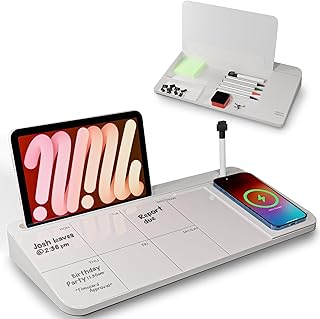
A glass desk whiteboard that doubles as a wireless charging station sounds like a small luxury, but for many creators it’s a practical upgrade: it replaces sticky notes and a tangle of chargers with a sleek, easy-to-clean surface that organizes and powers your daily devices. The NEXTLUXE glass desk whiteboard folds a dry-erase planning surface into a desktop organizer with a dedicated wireless-charging pad and a pull-out drawer to house markers, cables and small gadgets.
The primary benefit is environmental polish: glass resists staining and ghosting better than traditional melamine boards, making it look new longer in a creative studio or client-facing workspace. The built-in weekly planner layout offers a quick visual of priorities without opening a calendar app — handy for creators who sketch ideas, map content schedules, or sketch out shot lists for a week of filming.
Practical use cases include a photographer who maps shoot days and charges their phone while prepping equipment, a social media manager who outlines a week’s posts while keeping planners and styluses in the drawer, or a product designer who uses the glass surface as a temporary sketchpad and keyboard stand. The wireless charger keeps your phone top-of-desk and screen-on for reference photos or timers without cable clutter.
Compared with a standard desktop whiteboard or a separate wireless charger, this integrated approach saves desk real estate and reduces decision friction: where to put your phone, where to jot a reminder, where to stash pens. On the flip side, multi-function products sometimes sacrifice the performance of individual elements. Check reviews for wireless charging reliability and drawer build quality to ensure it meets your expectations.
Who should buy this: Creatives with limited desk space who want a professional-looking, low-maintenance planning surface and a clutter-free charging solution.
Who may not need it: If you prioritize the highest-power fast-charging or prefer a lightweight, highly portable whiteboard, a standalone fast charger or slim melamine pad might be better.
Pros:
– Elegant glass surface resists ghosting
– Built-in wireless charger reduces cable clutter
– Drawer and organizer compartments keep essentials tidy
Cons:
– Wireless charging speed may be slower than dedicated fast chargers
– Heavier than plastic alternatives
Check the latest price on Amazon.
Pros
- Glass surface resists staining and cleans easily
- Integrated wireless charging reduces cables
- Includes organizer drawer for small items
Cons
- May not charge as quickly as specialized fast chargers
- Heavier and less portable than plastic boards
Check the latest price on Amazon.
TSJ OFFICE Small Desktop Whiteboard -Glass Dry Erase Board Computer Keyboard Stand White Board Surface Pad with Drawer, Desk Organizers with Accessories for Office, Home, School Supplies – White

Best For:
Students, writers, and anyone with a small desk who wants a durable dry-erase surface that also functions as a keyboard stand.
If your desk is small and you need a multi-purpose work surface that’s simple and affordable, the TSJ OFFICE small desktop glass whiteboard offers a compact solution. It combines a glass dry-erase surface with a keyboard-stand design and a small storage drawer beneath — ideal for those who want to keep notes, keyboard ergonomics and small supplies in one footprint.
Glass boards are a noticeable step up from basic melamine pads: they erase cleanly and keep your planning area looking crisp over time. The keyboard stand aspect raises your typing angle a touch, which some users find helps wrist comfort during longer writing or editing sessions. The storage drawer is perfect for markers, sticky notes, a phone cable and a few small accessories.
Common user scenarios include a novelist who uses the glass surface to jot chapter notes while drafting, a student who tucks flashcards and highlighters inside the drawer during study blocks, or a remote worker who keeps meeting notes and a small notepad by the keyboard without cluttering the desk.
Compared to larger, multi-feature desks pads, the TSJ board is compact and budget-friendly. It’s best for those who want the benefits of glass without a big footprint. The trade-offs are obvious: limited surface area means less room for big weekly layouts, and the drawer won’t carry larger items. If you depend on a large visual planner, consider a wider desktop whiteboard instead.
Who should buy this: People with compact setups who want a clean, durable dry-erase surface that integrates with keyboard use and keeps small items organized.
Who may not need it: If you frequently use a large paper planner or need extensive sketch space, the small surface may feel restrictive.
Pros:
– Compact glass surface wipes clean without ghosting
– Keyboard-stand design improves desk ergonomics
– Underboard drawer stores markers and small tools neatly
Cons:
– Surface area is limited for larger planning needs
– Drawer space is small and not suited for bulkier items
Check the latest price on Amazon.
Pros
- Compact and affordable glass whiteboard
- Integrated drawer for small supplies
- Raises keyboard for potential ergonomic benefits
Cons
- Limited writing/planning area
- Drawer capacity is small
Check the latest price on Amazon.
Jack Pomodoro Timer – Productivity Cube, Visual Focus Timer, Mute & Vibration & Adjustable Sound Alert, for Office, ADHD, Study, Work, 3/5/10/25/30/60min & Custom Countdown – Black

Best For:
Students, people with ADHD, coders, and anyone who responds well to tactile, low-friction time cues.
The Jack Pomodoro Timer is a small, tactile productivity cube that simplifies time management into a visual and ergonomic action: flip the cube to select a preset session length. What sets it apart is a focus on flexible alerts — mute, vibration and adjustable sound — and a range of preset intervals including 3, 5, 10, 25, 30 and 60 minutes as well as a custom countdown option.
This kind of tactile timer is great for people who find the act of physically flipping a device helps seal the intent to focus. It reduces the temptation to open a phone app, and the vibration mode makes it office-friendly when you’re co-working with others. Creators with ADHD often highlight the value of immediate, low-friction tools that cut down decision fatigue; a cube timer is about as low-friction as it gets.
Practical scenarios include students using 25-minute sprints for study interleaved with 5-minute breaks, a developer who switches between focused coding bursts and short pull-request reviews, or a designer timing iteration passes while keeping their phone out of reach. The custom countdown is useful for irregular tasks — like a 17-minute audio edit pass — while adjustable alert levels help match your environment.
Compared to an app, the Jack cube eliminates screen interruptions. Compared to other hardware timers, it’s versatile thanks to multiple time presets and silent vibration. Look for customer feedback on build quality, button responsiveness, and battery life when deciding.
Who should buy this: Students, coders, creatives and people who benefit from a tactile, low-friction way to start timed focus sessions.
Who may not need it: If you prefer visual timers with large displays or analytics-heavy apps that log time automatically, you might prefer a different solution.
Pros:
– Fast, tactile time selection (flip-to-set)
– Vibration & mute options for shared spaces
– Multiple presets plus custom countdown
Cons:
– Small device may be easy to misplace
– Limited analytics — it’s a timer, not a time tracker
Check the latest price on Amazon.
Pros
- Flip-to-set simplicity
- Vibration and mute modes for quiet environments
- Multiple presets and custom option
Cons
- No built-in time analytics
- Easy to misplace due to small size
Check the latest price on Amazon.
SELEAD Desktop Glass Whiteboard with Wireless Charger Station, Dry Erase Board Computer Pad Keyboard Stand with Organizer for Home, School, Office Desk Accessories, Black

Best For:
Remote workers, content creators, and students who want a tidy all-purpose desktop surface with built-in wireless charging.
The SELEAD desktop glass whiteboard combines the visual clarity of a glass dry-erase surface with a wireless charging pad and an organizer-forward layout designed for everyday creators. It positions itself as an all-in-one desk pad that doubles as a keyboard stand, with compartments to keep pens, cables and small devices tidy while your phone charges at the top of the board.
For creators who balance sketching, notetaking and phone-based reference work, this hybrid offers a neat solution: your phone stays charged and visible for timers or reference photos while the glass surface serves as a temporary board for ideas. Compared with plain desk pads or separate charging stands, the SELEAD unit consolidates three functions into one footprint — planning surface, phone charging and small-item organization.
Use cases include a remote content producer who keeps shot lists and notes on the board while their phone is on-camera remote and charging, a student who writes quick formulas on the glass while their devices charge, or a UX designer who scribbles wireframe ideas beside a working device and needs easy access to styluses and markers.
As with other combo units, check the wireless charging performance against your phone’s recommended specs; some multifunction chargers charge at standard speeds while dedicated chargers support faster protocols. Glass is durable and resists ghosting, but the overall weight and size should be considered if you rearrange your workspace frequently.
Who should buy this: Creatives and remote workers who want a unified desk solution for note-taking, charging and small-item organization.
Who may not need it: If you rely on a full-size planner or need the highest possible charging speed for power-hungry phones, a dedicated fast charger and larger board might be a better fit.
Pros:
– Consolidates whiteboard, wireless charging and storage
– Glass surface resists staining and looks professional
– Organizer keeps small desk items accessible
Cons:
– Wireless charging may be slower than specialized chargers
– Larger and heavier than simple desk pads
Check the latest price on Amazon.
Pros
- Three-in-one desk solution (whiteboard + charger + organizer)
- Professional glass appearance
- Keeps phone visible and charged during work sessions
Cons
- May charge slower than dedicated fast chargers
- Heavier and less portable
Check the latest price on Amazon.
Final Verdict
Creating a focused work session is often less about a single perfect tool and more about reducing friction across multiple small decisions. A tactile timer like the Jack Pomodoro or the Mindsight Focused Activity Timer provides low-friction starting cues and encourages short, sustainable work sprints. Glass desktop whiteboards from NEXTLUXE, TSJ OFFICE and SELEAD bring a durable, clean planning surface to your desk while consolidating chargers and small-item storage to reduce visual clutter. If your primary challenge is attention, a simple tactile timer can be transformative. If your desk is the source of chaos, a glass whiteboard with integrated storage and charging will likely pay dividends in reduced cognitive load.
For most creators, a combination of one timer and one desk organizer/whiteboard will cover the majority of focus-session needs: the timer gets you started, while the whiteboard keeps priorities visible and tools within reach. Evaluate each product based on your desk size, need for charging speed, and desire for multi-function consolidation. Wherever possible, check real user feedback on longevity, charging performance and build quality. Thoughtful small upgrades can make creative work less noisy and a lot more productive.
Check the latest price on Amazon.
Conclusion
These Office accessories creators use during focus work sessions picks are trending now and offer great value and variety. Check the links above for latest prices and reviews.
As an Amazon Associate, I earn from qualifying purchases.
Tags:
focus accessories, desk whiteboard, Pomodoro timer, wireless charger desk, productivity tools, glass desk pad, office organizers
