Workspace Tools Creators Use: Top Meeting & Task Notepads
As an Amazon Associate, I earn from qualifying purchases. This article may contain affiliate links, which means we may receive a commission at no extra cost to you.
If you’re a creator—podcaster, content producer, designer, or solo entrepreneur—your workflow depends on small rituals that keep ideas moving and tasks from piling up. A dependable meeting notebook or a focused daily planner can be the difference between scattered notes in a drawer and clear action items you actually complete.
As an Amazon Associate, I earn from qualifying purchases. This article may contain affiliate links, which means we may receive a commission at no extra cost to you.
Below you’ll find a lineup of notebooks and pads that many creators use during organized workflow routines: meeting-style notebooks with action-item tracking, undated daily pads for flexible schedules, hourly planners for time-blocking, and weekly dashboards for an at-a-glance plan. The picks here are based on product specs, layouts, and patterns in customer feedback rather than direct hands-on testing. Each product section describes who it’s best for, realistic use cases, and practical buying considerations so you can match a tool to your habits.
Buying Guide
Choosing the right notebook or planning pad for a creative workflow comes down to three things: layout, portability, and how it fits your process. Layout: Do you prefer meeting-style pages with spots for action items and attendees, or a freeform dotted page you can sketch on? Meeting notebooks (agenda + action items) help turn meeting chatter into assignable tasks; hourly pads are ideal for creators who time-block recording, editing, or client calls.
Undated vs dated: Undated pages (like tear-off pads or undated planners) add flexibility—great for irregular schedules or ADHD-friendly routines. Dated planners force habit by design but can be wasteful if your weeks are uneven. Paper and binding: If you carry a pad between studio and co-working space, a sturdy binding and tear-ready sheets save frustration. Look for pads with micro-perforations if you share notes or hand action-item lists to collaborators.
Size and visibility: Larger desk pads (8.5" x 11" or similar) act as visual dashboards—place one by your monitor to remind you of priorities. Compact notebooks (around 7" x 10") fit into bags, good for creators on the go who attend early meetings or location shoots.
Integration with digital tools: If you pair analog notes with apps, choose layouts that make it easy to convert notes into calendar events or task lists—clear action-item sections, checkboxes, and space for deadlines help. Finally, consider who the product is for: solo creators, small teams, or students have different needs—pick something that reduces friction, not adds another routine to maintain.
Below are five options that cover a range of workflows—from structured meeting minutes to flexible weekly dashboards.
Taja Meeting Notebook for Work Organization – Work notebook with action items, Meeting Minutes Planner Notebook, Perfect Office Supplies for Men & Women – Green

Best For:
Creators who regularly run or attend meetings and need a structured place to capture decisions, action items, and next steps.
This Taja Meeting Notebook is framed around the classic meeting-minutes approach: each spread typically includes sections for agenda, attendees, discussion points, decisions, and action items. For creators who juggle client calls, collaborator check-ins, and episodic planning, that structure helps convert conversation into clear next steps rather than fragmented notes.
Main benefits: The notebook’s meeting-focused layout reduces the cognitive load of deciding where to write down follow-ups. Instead of a blank page, you’re given labeled spaces for decisions and owners—practical when you need to assign editing, asset creation, or follow-up interviews. The green cover and professional design make it suitable for client-facing use, so it doesn’t feel out of place in formal calls.
Real-life usage examples: A podcast producer can use this notebook during episode planning sessions to list segment ideas, note guest follow-ups, and mark deadlines for show notes. A freelance designer could use the action-item area to keep track of deliverables and who’s responsible for file handoffs. The page format also works well for hybrid meetings where you need to jot down both creative ideas and logistical next steps.
Why this product is valuable: Compared with plain notebooks or loose pads, this meeting planner nudges you toward assignable outcomes. Many customers appreciate the ease of scanning meeting pages later—action items are grouped and easier to convert to calendar tasks. Paper quality appears adequate for gel and rollerball pens; while it isn’t premium artist paper, it’s perfectly fine for everyday office pens and highlighters.
Who should buy it: This notebook suits creators who regularly attend or run meetings—producers, creative directors, project leads, and freelancers who want neat, actionable meeting notes. It’s especially useful if you share meeting follow-ups with a team and need a consistent format to reference.
Who may not need it: If you prefer freeform sketching, wireframing, or a blank page to brainstorm without constraints, this structured layout might feel limiting. Also, if you do most of your scheduling inside apps, a meeting notebook is more of a complementary tool than a primary planner.
Practical observations: The size balances portability with space to write. Look for features like perforated pages or a numbering system if you want to archive or reference pages later. Based on customer feedback, the layout speeds up post-meeting follow-up because action items are already highlighted.
Check the latest price on Amazon.
Pros
- Structured meeting layout with sections for action items and decisions
- Professional look suitable for client-facing meetings
- Good size for note-taking without being bulky
Cons
- Not ideal for freeform sketching or brainstorming
- Paper is standard office weight, not premium artist stock
Check the latest price on Amazon.
Task Planner & Activity Log Notepad – 60 Page Undated Daily & Hourly Planning Pad, To-Do List, Checklist, Track Time & Tasks, ADHD Tracker – Organize Workday, Boost Productivity – 8.5 x 11 Tear Sheets Life Charge

Best For:
Creators who time-block, bill by the hour, or want a day-by-day tear-off planning system for focused production sprints.
This Task Planner & Activity Log pad is designed for day-by-day focus: undated hourly slots, checklists, and a simple activity log make it a practical tool for creators who time-block or who benefit from tracking short bursts of focused work. The 8.5 x 11 tear sheets offer a large workspace that doubles as a visible desk dashboard.
Main benefits: The undated layout removes pressure to use it daily—tear off a sheet on heavy production days and skip quieter ones without wasting pages. Hourly sections and an activity log help you see where time is spent, which is particularly useful for creators billing by the hour or trying to balance content creation with admin tasks. The included ADHD-friendly tracker elements (short blocks and checkboxes) are a plus for anyone who benefits from micro-commitments and visible progress.
Real-life usage examples: A video editor might use this pad to block time for rough cuts, fine edits, and export tasks while keeping a running checklist of file backups and render settings. A content creator juggling sponsorship deadlines can list deliverables and use the hourly timeline to slot in recording and editing windows. The tear-off feature makes it easy to hand a collaborator a one-page brief or to file finished day sheets.
Why this product is valuable: Compared with a bound planner, a tear-pad is flexible—use a sheet as a one-off sprint plan and start fresh each day. This pad’s combination of hourly planning and a simple activity log bridges high-level scheduling with micro-task tracking, which many creators find helps maintain momentum during focused sessions.
Who should buy it: Creators who rely on time-blocking, bill hourly, or want an accessible, single-day snapshot of progress. It’s especially helpful for people who prefer decluttering after each workday with a fresh sheet.
Who may not need it: If you prefer a continuous, dated planner for habit-building or need a bound archive of weeks and months, a tear-pad might feel ephemeral.
Practical observations: The paper size makes it easy to write clearly, and customers often mention that checkboxes and hourly divisions help reduce scattered notes. Consider pairing it with a lightweight clipboard if you toss sheets between locations.
Check the latest price on Amazon.
Pros
- Undated hourly layout for flexible time-blocking
- Tear-off sheets act as a visible desk dashboard or brief to share
- Includes checklists and an activity log for tracking progress
Cons
- Not an archival system—sheets can be lost or scattered
- May not suit those who want a continuous, dated planner
Check the latest price on Amazon.
Meeting Notebook for Work Organization – Work Planner Notebook with Action Items, Agenda Planner for Note Taking, 160 Pages (6.9" X 9.9") Project Organizer for Men & Women – Pink

Best For:
Project-based creators and small teams who want a single, bound place to track meeting notes, decisions, and action items across a project.
This pink Meeting Notebook focuses on meeting agendas, action items, and project notes across a larger 160-page run. Its compact 6.9" x 9.9" footprint makes it portable enough to carry to client sites, co-working sessions, or recording locations while providing enough space to document multiple meetings or project stages.
Main benefits: The substantial page count and meeting-oriented format make this notebook a single place to consolidate project-related conversations over weeks or months. The consistent layout encourages accountability—action items and owners are clearly called out, which helps when following up on deliverables like assets, approvals, or episode scripts.
Real-life usage examples: A small creative team might use one notebook per project—tracking initial briefs, meeting notes, and iteration requests in chronological order. A solo creator could use it as their “production bible,” logging guest contact details, episode outlines, and post-production action items all in one place. Its size also fits neatly in a studio bag or camera case.
Why this product is valuable: Compared to loose notes or scattered digital notes, a bound workbook centralizes meeting history. That continuity is helpful when projects span months and you need to trace decisions or find the moment a change was agreed upon. The pink cover provides a personal touch for those who like a more colorful workspace.
Who should buy it: Creators managing multi-step projects, producers who want a chronological record, or anyone who prefers a single bound reference for meeting outcomes.
Who may not need it: If you prefer very large writing surfaces (desk pads) or totally blank sketch pages, this structured, mid-sized notebook isn’t the right fit.
Practical observations: With 160 pages, this notebook becomes a natural project archive—consider dating each entry and keeping an index page at the front for quick reference. Customers report the page layout makes follow-ups faster because responsibility and deadlines are clearly noted.
Check the latest price on Amazon.
Pros
- 160 pages for long-term project tracking
- Portable size that still offers structured meeting layouts
- Good for creating a chronological project archive
Cons
- Not ideal for large-format sketching or whiteboard-style brainstorming
- Bound format means you can’t tear out pages as easily as a pad
Check the latest price on Amazon.
Weekly Productivity Planner – 8.5" x 11" Dashboard Desk Notepad Has 6 Focus Areas to List Tasks for Goals, Projects, Clients, Academic or Meal-Organize Your Daily Work Efficiently, 54 Weeks, Green

Best For:
People who want a weekly at-a-glance dashboard to balance multiple focus areas across clients, projects, and personal goals.
This Weekly Productivity Planner is a desk-focused notepad designed to act as a weekly dashboard with multiple focus areas for goals, projects, clients, or meals. With around 54 weeks of pages in an 8.5" x 11" format, it’s meant to sit by your monitor and act as a single reference for the week’s priorities.
Main benefits: The multi-focus sections let creators split attention cleanly—one box for weekly goals, another for client tasks, and another for personal priorities. This is valuable for people who balance creative work with administrative duties. The desk notepad format is inherently visible: when it’s open on your desk, it functions as a physical reminder of what matters that week.
Real-life usage examples: A freelance content strategist could dedicate sections to client deliverables, content calendar items, and prospecting tasks. A creator who records weekly videos can track script milestones, filming days, and editing windows in separate focus boxes. For students or creators balancing meal prep with deadlines, one section can become a practical meal or self-care tracker.
Why this product is valuable: Compared to single-column to-do lists, a dashboard-style weekly planner helps you maintain balanced attention across multiple areas. It’s also easier to spot conflicts—when both client and creative tasks overlap on the same days.
Who should buy it: Creators who benefit from seeing an entire week at a glance and who juggle several ongoing priorities (clients, projects, personal goals).
Who may not need it: If you prefer daily micro-planning or strict hourly time-blocking, a weekly dashboard won’t replace a daily pad or hourly planner.
Practical observations: The tear-off desk format keeps your workspace tidy and your priorities visible. If you need long-term tracking, consider pairing it with a bound planner for monthly or quarterly archives.
Check the latest price on Amazon.
Pros
- Dashboard layout supports multiple focus areas
- Large 8.5" x 11" size keeps the week visible
- 54 weeks worth of pages ideal for long-term weekly planning
Cons
- Less useful for strict hourly scheduling
- Not archived like a bound planner
Check the latest price on Amazon.
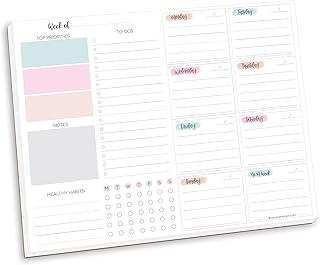
bloom daily planners Horizontal Weekly To Do List Notepad with 60 Undated Sheets – Weekly Desk Planner or Chore Pad with Priorities & Habit Tracker – 8.5” x 11” – Pastel
Best For:
Writers, makers, and side-hustle creators who want a gentle weekly planner with priorities and habit tracking to build consistency.
The bloom daily planners horizontal weekly notepad is a pastel-themed, undated weekly to-do list with priority slots and a habit tracker. The horizontal layout gives a slightly different visual flow compared with vertical columns—some creators find it easier to scan and map out tasks when the week is spread left-to-right.
Main benefits: The undated nature and habit tracker make this pad a blend of weekly planning and habit-building. If you’re working on a creative habit—daily writing, a stitch of practice, or regular social media posting—the habit tracker gives daily micro-goals that reinforce consistency. The pastel design is understated and calming, which can help reduce the friction of opening a planner on a busy morning.
Real-life usage examples: A freelance writer could use the priority slots to mark top story pitches, use the habit tracker for daily writing minutes, and assign days for research vs. drafting. A small creative studio could use multiple sheets to align a two-week sprint: one sheet as the team’s shared visible board and another for individual focus.
Why this product is valuable: Compared with generic sticky notes or ad-hoc lists, a structured weekly notepad with a habit tracker helps convert intentions into repeatable behavior. The undated format avoids pressure and works well when weeks are irregular or when you want to jump in mid-week without feeling you’ve wasted pages.
Who should buy it: Creators who want a light, encouraging weekly planner that supports habit formation and priority-driven work—ideal for writers, makers, and side-hustle creators.
Who may not need it: If you require a heavily structured hourly schedule or prefer a bound archival planner, this loose weekly pad may feel too lightweight.
Practical observations: The pastel design keeps it pleasant to display on a desk or pin to a wall. Keep in mind that because sheets are undated, you’ll need to date them yourself if you want a reference timeline. Users often pair this pad with a digital calendar for time-specific events.
Check the latest price on Amazon.
Pros
- Includes habit tracker to support consistency
- Undated weekly format reduces pressure on usage
- Pastel design is visually calming and desk-friendly
Cons
- Undated sheets require manual dating for records
- Not ideal for strict hourly scheduling or archival tracking
Check the latest price on Amazon.
Final Verdict
A few simple, well-structured analog tools can streamline a creator’s workflow in ways a thousand digital reminders can’t. Meeting notebooks (like the Taja and the pink Meeting Notebook) help convert conversations into assigned action items and create an auditable trail of project decisions. Tear-off daily pads and hourly planners excel at focused, single-day sprints—useful for billing, time-blocking, and short production runs. Weekly dashboards and habit-tracking pads are best when you need balance across projects and a gentle nudge toward consistent practice.
Pick the meeting-style notebook if you’re frequently in collaborative sessions and need clear follow-up. Choose an hourly tear-pad if you time-block or bill by the hour. Opt for a dashboard or habit-focused weekly pad if you’re juggling multiple focus areas and want an at-a-glance plan.
All five options highlighted here serve slightly different roles in a creator’s toolkit—many creators combine two or more (a meeting notebook for call notes and a weekly pad for visible priorities). Think about how you like to capture work: do you want a physical archive, quick tear-away briefs, or a visible weekly board? Match the tool to that habit, and the tool does the work for you.
Check the latest price on Amazon.
Conclusion
These Workspace items creators use during organized workflow routines picks are trending now and offer great value and variety. Check the links above for latest prices and reviews.
As an Amazon Associate, I earn from qualifying purchases.
Tags:
workspace planner, meeting notebook, weekly planner, task planner, productivity notepad, hourly planner, habit tracker
