Productivity Tools for Small Apartment Offices
As an Amazon Associate, I earn from qualifying purchases. This article may contain affiliate links, which means we may receive a commission at no extra cost to you.
Small apartments force creative choices: your desk might double as a dining table, and every gadget needs to pull its weight. Whether you work remotely, study in short bursts, or juggle household tasks with deadlines, compact productivity tools can help you carve focus out of limited space. This guide walks through five practical items—timers and a simple notepad—that fit apartment offices without overwhelming them. Before we dive in, a quick disclosure: As an Amazon Associate, I earn from qualifying purchases. This article may contain affiliate links, which means we may receive a commission at no extra cost to you.
Across the selections below you’ll see a mix of visual timers, silent modes for shared living spaces, magnetic or adhesive backs for small desks, and a simple daily notepad for keeping tasks visible without bulky planners. The goal isn’t flashy features; it’s practical consistency: better focus, gentler transitions between tasks, and a physical cue to start or stop work. Each product section covers what the tool does, realistic apartment use cases, who benefits most, and a balanced pros-and-cons list to help you decide.
Buying Guide
What makes a productivity tool useful in a realistic apartment office? Space, noise sensitivity, and multitasking are the big constraints, so look for the following characteristics:
– Size and footprint: Choose timers that stand upright or lie flat against a monitor or fridge—small cubes and slim hourglass designs save desk space. If your desk is also a dining surface, choose something that’s easy to tuck away.
– Sound and vibration options: In apartments with roommates or thin walls, audible alerts can be disruptive. Timers with mute, vibration, or gentle LED cues are preferable. Several compact timers include silent modes and adjustable volume or brightness.
– Preset intervals and customizability: Pomodoro-style presets (like 5/25 or 10/50) speed adoption. If you rely on a particular rhythm, check for programmable ranges (1–99 minutes or custom presets).
– Mounting and placement: Magnetic backs or adhesive strips let you attach a timer to a metal filing cabinet, a fridge, or a monitor arm—useful when desk space is tight. A nightstand-friendly digital hourglass or a cube that sits on the edge of a desk are both practical.
– Visibility and feedback: Large digits, color changes, or tactile rotation help you know how much time remains at a glance. For ADHD or concentration issues, visual cues paired with vibration can be more effective than sound alone.
– Battery and reliability: Replacing batteries frequently becomes annoying in small spaces—check battery life or rechargeability. Also read product Q&A about long-term reliability and sensor consistency.
– Simplicity vs. features: If you just need to split your work into chunks, a simple preset cube or notepad beats a complex app. For people who prefer a non-screen approach, physical timers avoid app fatigue.
Compare with standard alternatives: smartphone apps are free and flexible but can invite distraction. Smart speakers are hands-free but can be noisy and require an always-on device. The compact timers below aim for a low-distraction, dedicated hardware approach that’s easy to integrate into a modest apartment setup.
Who should consider a physical timer and a to-do notepad? Remote workers, students, parents managing interrupted work sessions, and people with attention challenges who benefit from tactile, visual, or vibrating cues. Who might skip these? If you already have a disciplined digital routine, use a calendar with integrated focus modes, or rely on a team-driven schedule, a physical timer may be redundant.
Below are five carefully chosen items that balance performance with small-space practicality. Each entry explains how it fits into a real apartment office and what to watch for when buying.
Productivity Timer 1, 5, 10, 30, 60 Minutes Preset, Desk Cube Timer with Gravity Sensor/Mute/Vibration for ADHD, Work, Study, Kitchen, Back to School (Luxe Orange)

Best For:
People who want a tactile, screen-free Pomodoro-style timer for short-focus sessions in noise-sensitive apartments.
This compact cube timer is aimed squarely at focused short-session work in cramped environments. With five common presets—1, 5, 10, 30 and 60 minutes—it’s built for people who alternate quick sprints with longer stretches: think a morning email sprint, a mid-day concentrated writing block, or a 30-minute laser-clean of the home office before a call. The gravity sensor makes it intuitive: flip the cube to start a preset, flip it back to pause or stop. That keeps your workflow tactile and screen-free, which many apartment workers appreciate when trying to avoid phone distractions.
Noise-sensitive households will like the mute and vibration features. If you have thin walls or sleeping roommates, the ability to run timed sessions quietly is a major plus. The luxe orange finish is bright enough to be visible on a busy desk but small enough to stash in a desk drawer. It’s also light to carry, so if you set up at the kitchen counter for a quick session, it won’t take up space.
Compared with smartphone Pomodoro apps, this cube removes notifications and temptations—no social media just because a timer sits on screen. Compared with complicated digital timers, the preset approach is intentionally limited: it’s faster to use for people who want an immediate start without configuring minutes and seconds. However, it might feel restrictive to users who prefer fully custom times or timers longer than an hour.
Who is this best for? Remote workers, students, or parents who need a low-friction, tactile way to structure short work bursts. It’s particularly useful for people with ADHD who respond well to physical cues and vibration. Who might skip it? If you require a fully programmable or app-synced timer, or you need audible alarms louder than the cube provides, this may not meet those needs.
Buying considerations: check battery type and expected life, test the gravity sensor sensitivity if possible (some users report differences in flip responsiveness), and confirm the vibration strength aligns with your environment. If you value an immediate, screen-free focus tool that tucks into a small apartment office, this cube is a practical and friendly option.
Check the latest price on Amazon.
Pros
- Quick, intuitive gravity-sensor operation
- Preset intervals remove configuration friction
- Silent/vibration mode for shared living spaces
Cons
- Limited to five presets—less flexible for custom schedules
- Not app-connected for syncing across devices
Check the latest price on Amazon.
Pomodoro Timer Cube for Productivity — 5/25/10/50 Minutes Preset, Digital Gravity Sensor Desk Visual Timer for ADHD, Silent Mode, Ideal for Office, Study, Kitchen & Kids

Best For:
Students, remote workers, and parents who prefer a simple, visible Pomodoro timer with silent operation.
This Pomodoro-oriented cube follows the classic work/rest rhythm with presets like 5/25 minutes and additional options such as 10 and 50 minutes. The digital gravity sensor and visual countdown make it easy to check remaining time at a glance—handy when your desk is cluttered or when you’re working from the couch. The visual display is designed to be readable from a short distance, and the silent mode is a blessing for apartment dwellers who can’t rely on loud alarms.
Compared to analog kitchen timers, this cube leans into modern needs: precise digital display, clear presets tailored to common productivity cycles, and a silent option that complements co-living scenarios. It works well as a family tool too—kids learning time management can physically flip the cube to set a session, and parents can mute the beep during naptime. The size is pocketable, so you can move it between different apartment zones without clutter.
As with other hardware timers, the trade-off vs. phone apps is simplicity at the cost of integration. There’s no calendar sync or cloud backup, but for many people that’s an advantage: a dedicated device reduces screen time and the temptation to multitask. Some users may find the available presets ideal; others who need exact minute control or program sequences may see the preset approach as limiting.
Who should consider this? Students and knowledge workers who want a no-friction Pomodoro timer with a readable display and a quiet mode. Also useful for parents helping children build focus habits. Who may not need it? Those who rely on integrated digital workflows, team-based timers, or complex interval sequences that require app programming.
Practical notes: check how bright the display is for your workspace lighting, test the flip sensitivity, and confirm battery requirements. For a small apartment office that needs a reliable, low-distraction timer, this cube is a sensible pick.
Check the latest price on Amazon.
Pros
- Classic Pomodoro presets built-in
- Readable digital countdown for quick glances
- Silent mode suitable for shared living spaces
Cons
- Preset-only approach limits exact custom timings
- No app integration or syncing
Check the latest price on Amazon.
BlueSnail Kitchen Timer with LED Digital Display Smart Efficana for Home Classroom Gym Office, Volume and Brightness Adjustable Productivity Timer (Silvery)
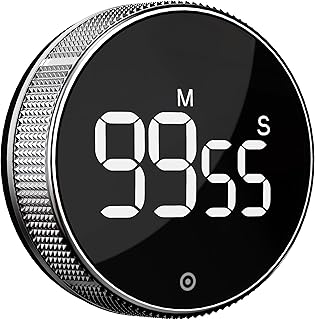
Best For:
Users who want control over volume and brightness—ideal for shared apartment rooms and multi-use routines.
The BlueSnail LED digital timer brings adjustable volume and brightness to the small-space timer category—two overlooked features that matter in apartment offices. If you alternate between bright afternoon work sessions and late-night writing, the ability to tone down the LED brightness prevents glare and reduces evening stimulation. Likewise, adjustable volume lets you pick a sound level that works for your room because what’s audible in a studio apartment is different from a two-bedroom.
This timer’s larger LED display makes it easier to read from across a small living room or from the kitchen counter. It’s not just for cooking: the volume/brightness controls make it a true multi-use device for study, gym sets, or focused work sprints. For someone who moves between spaces—sitting at a desk, standing at the counter, or working with a laptop on a couch—this flexibility is valuable. The form factor is compact but solid, and it tends to feel like a more “serious” digital timer compared with novelty cubes.
Compared to simple preset cubes, BlueSnail’s customization feels like the middle ground between minimal hardware and fully programmable devices. It’s still straightforward to use but gives you more control over alerts and visibility. That said, it may be larger than the smallest desk cubes and takes up a bit more surface area. If absolute portability or a tiny footprint is the top priority, a pocket cube may be better.
Who is it for? People who need adjustable alerts for shared living spaces and who appreciate a bright, clear display that can be dimmed. Home fitness users who time sets and rest intervals will also value the larger digits and volume control. Who might skip it? Minimalists who want the smallest possible device, or users who prefer tactile flipping actions rather than button control.
Buying considerations: verify battery life and whether the unit uses replaceable or rechargeable batteries; test the clarity of alerts and the effectiveness of dimming in both daylight and low light. If you want a versatile, visible timer that adapts to different lighting and sound needs, this is a useful option.
Check the latest price on Amazon.
Pros
- Adjustable volume and brightness
- Large, clear LED display
- Versatile for fitness, kitchen, and focused work
Cons
- Bigger footprint than pocket cubes
- May be overkill if you only need simple presets
Check the latest price on Amazon.
Gravity Digital Hourglass Timer, 1-99 Minutes Magnetic-Backed Hourglass Timer with Customisable Timing Settings Ideal for Kitchen use, Office Productivity, Study Sessions, Gift (White)

Best For:
Users who want flexible timing (1–99 minutes) with a magnetic mount and a visual hourglass ritual.
The Gravity Digital Hourglass blends familiar hourglass aesthetics with customizable digital timing—an appealing mix for apartment offices where visual cues help set a rhythm. Rather than a fixed preset cube, this model supports a wider range (1–99 minutes) so you can tailor sessions to your needs, whether that’s a short 7-minute warm-up, a focused 42-minute writing session, or an unconventional interval that standard Pomodoro presets don’t cover.
A magnetic back is a practical detail for small spaces: attach it to a file cabinet, a metal shelving unit, or even the side of a refrigerator to free up desk real estate. The hourglass style provides a visual metaphor—flip it to start—and the digital display ensures precision. For people who like the symbolic start/stop of turning an hourglass but also want accurate minute tracking, this is a compelling hybrid.
Compared with minimal cubes, the big advantage here is customizability and mounting options. Compared with smartphone timers, it remains distraction-free. The downside may be complexity for users who want an instantaneous flip-and-go without menus: some might prefer fewer options and quicker access. Also check how intuitive the controls are; on some hybrid devices there’s a learning curve to set custom minutes.
Who benefits most? Creatives and writers who prefer flexible timing, people who alternate between many different interval lengths, and apartment residents who want a magnetic mount to save space. It’s especially well-suited to those who like a visible, tactile ritual but often need nonstandard durations. Who might not need it? Users satisfied with standard Pomodoro splits or those looking for the smallest possible timer.
Buying considerations: look at how the controls are laid out and whether settings are easy to change repeatedly, verify magnet strength if you plan to mount it vertically, and check the screen readability under your room lighting. If you want a versatile, attractive timer that works like an old-school hourglass but with modern precision, this is a strong choice.
Check the latest price on Amazon.
Pros
- Fully customizable interval range
- Magnetic back saves desk space
- Hourglass design combines ritual with precision
Cons
- Slight learning curve for custom settings
- Larger than mini cubes when used on a desk
Check the latest price on Amazon.
Taja To Do List Notepad – To Do List Notebook for Work with 52 Sheets, 9.8" x 6.5", Undated Daily Planner Perfect for Daily Tasks and Goal Setting, Notepad Suitable for Office, Home & School – Greenery Sway

Best For:
People who prefer tactile daily checklists and simple, undated planning without screens.
A compact, undated daily to-do notepad can be one of the most effective productivity tools in a small apartment office. The Taja To Do List Notepad offers 52 sheets sized at 9.8" x 6.5", which is large enough to plan a day but small enough to sit on a narrow shelf or tuck beside a laptop. Because it’s undated, you use it when you need it without feeling guilty about missed days—a mental advantage for people managing irregular schedules.
Paper-based lists have tangible benefits: writing tasks down helps encode priorities, and a physical tear-off sheet gives a small satisfaction checkpoint when you finish the day. This notepad is especially useful if you run focus sessions with one of the timers above—the visible list sits beside the timer so you can start a session with a clear, short objective. It’s also great for hybrid routines where you switch between household chores and work tasks and need to keep both in view without flipping between apps.
Compared to full-size planners, the notepad is lighter and less committal. Compared to digital to-do apps, it’s distraction-free and doesn’t require a screen. The paper format won’t sync or store history, so if you need long-term tracking or habit analytics, combine the notepad with a digital backup.
Who should buy it? Remote workers who like a daily tactile checklist, people building simple morning routines, and anyone who benefits from writing things down to remember them. It’s also a good fit for parents keeping track of quick household tasks and schoolwork. Who may not need it? If you prefer heavily structured digital systems or require reminders and cloud sync, a notepad alone won’t replace those features.
Buying considerations: check paper thickness if you write with wet inks, look for a layout that supports priority flags or time-blocking if you do those techniques, and confirm the page count suits your cadence (52 sheets = roughly a year of weekly sheets or two months of daily use). For apartment workers who want low-friction, screen-free structure, this notepad is a quietly powerful companion.
Check the latest price on Amazon.
Pros
- Undated, flexible daily use
- Compact size fits small desks and shelves
- Simple tear-off pages for a clean reset each day
Cons
- No digital sync or history tracking
- Paper not ideal for long-term analytics
Check the latest price on Amazon.
Final Verdict
Choosing the right compact productivity tools for an apartment office comes down to how you balance visibility, sound sensitivity, and customization. If you want the simplest, most tactile route, a preset timer cube gives immediate structure without screens. For classic Pomodoro cycles the dedicated Pomodoro cube is tuned to that workflow; for people who need adjustable sound and brightness the BlueSnail offers useful controls. If your sessions vary widely, the Gravity Digital Hourglass gives the widest minute range and mounting flexibility. Pair any of these with a small undated notepad to capture daily priorities without a phone.
All five picks prioritize low-distraction focus, small footprints, and features that matter in shared living spaces—mute or vibration modes, magnetic backs, readable displays, and an easy-to-use physical interaction. Think about where the device will live (desk, fridge, shelf), how you’ll start a session (flip, press, or touch), and whether you need custom minute ranges or simple presets. For many apartment workers, the best setup is a pocketable timer for quick bursts, a more visible LED timer for longer sessions and fitness use, and the notepad to keep day-to-day priorities in view.
If you want one recommendation to start: pick the cube that matches your preferred preset rhythm (classic Pomodoro or the 1/5/10/30/60 set) and add the notepad to capture tasks. Once you’ve established short, repeatable habits, you can decide if you need more flexibility or a louder alert.
Check the latest price on Amazon.
Conclusion
These Productivity tools trending in realistic apartment office setups picks are trending now and offer great value and variety. Check the links above for latest prices and reviews.
As an Amazon Associate, I earn from qualifying purchases.
Tags:
apartment office, Pomodoro timer, productivity timer, ADHD-friendly timer, desk accessories, digital hourglass, daily notepad
