Top Amazon Tools Creators Use to Simplify Daily Routines
As an Amazon Associate, I earn from qualifying purchases. This article may contain affiliate links, which means we may receive a commission at no extra cost to you.
As an Amazon Associate, I earn from qualifying purchases. This article may contain affiliate links, which means we may receive a commission at no extra cost to you.
If you make things for a living—or just try to keep a busy household running—routines are the scaffolding that hold everything together. Creators, parents, caregivers, and anyone juggling projects and people often rely on a mix of tactile planners and digital command centers to build consistent habits and reduce friction. This guide pulls together five widely used Amazon picks that help structure cleaning, chores, schedules, meal plans, and creative focus. I researched product features, typical customer experiences, and practical use cases so you can pick tools that actually fit your workflow.
In the sections that follow you’ll find who each product is best for, how it helps in real life, sensible pros and cons, and clear buying considerations. Whether you want a paper checklist designed for neurodivergent brains, a wall-mounted touchscreen family hub, or a short, idea-packed book on building rituals, there’s a tool here to make routines easier and less stressful. Read on for a breakdown of each item, and use the included links if one sounds like the missing piece in your daily setup.
Buying Guide
Choosing the right routine-building tool depends on three things: how you prefer to interact (paper vs. touch), who’s using it (one person, a family, or a team), and how much automation or syncing you need.
Paper planners remain powerful because they reduce decision fatigue. A simple cleaning or chore notebook with daily/weekly/monthly checkboxes can turn vague intentions into repeatable actions—especially for people with ADHD or anyone who benefits from visual structure. Look for planners with clear layouts, space for notes, habit trackers, and durable binding so they last through frequent use.
Digital family organizers—10.1" touchscreens that double as photo frames and wall calendars—work well when multiple people need to stay coordinated. Important features to check: third-party calendar sync (Google, Outlook), touch responsiveness, wall-mount options, alarm reminders, and whether the device stores photos locally or requires cloud accounts. These devices act like a communal command center for chores, meal plans, and appointments. They’re especially useful for households where partners, kids, or caregivers need shared visibility.
For creatives and solo entrepreneurs, books and idea-driven guides provide frameworks rather than checklists. When choosing a book, consider whether you want tactical exercises, short essays, or research-backed tactics for focus and habit formation. Books won’t automate reminders, but they help you design a system that a planner or digital calendar can then operationalize.
Other practical buying considerations: compatibility with your existing calendars, battery or power requirements for digital devices, readability from a distance (font size), and ease of setup. If you’re pairing tools—say, a routine book plus a digital calendar—think about how the advice in the book maps to the features of the calendar (like recurring reminders or shared chore lists).
Finally, think about long-term commitment. A planner you enjoy using and a calendar everyone agrees to check will save more time than a feature-packed device that ends up unused. Match the tool to the person who’ll actually use it, and prioritize simplicity over bells and whistles.
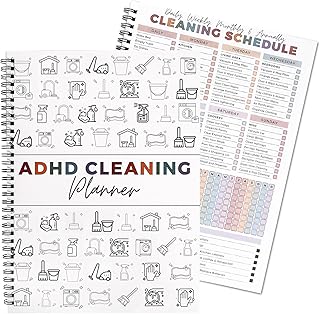
Adhd Cleaning Planner for Adults and Teens Adhd Cleaning and Organizing Planner Cleaning Schedule and Checklist Notebook List Daily Weekly Monthly for Home Chore Chart Adhd Daily Planner
Best For:
Adults, teens, and neurodivergent users who need tactile, checklist-driven cleaning schedules and simple habit structure.
If you or someone in your household struggles to turn vague intentions into finished chores, a dedicated cleaning planner built with ADHD-friendly structure can make a surprisingly big difference. This Adhd Cleaning Planner is a paper notebook designed around daily, weekly, and monthly checklists that break household tasks into bite-sized steps. It doesn’t promise automated reminders or cloud sync, but that’s exactly the point: tactile checklists reduce friction for people who find digital systems overwhelming or who benefit from the satisfaction of physically crossing off completed tasks.
The planner’s layout emphasizes simple, repeating rhythms—small tasks grouped by room or routine, space for notes, and slots to track progress over time. That helps with two common problems: starting tasks (the planner reduces decisions about what to do next) and keeping momentum (the visual progress of checkboxes nudges completion). For teens learning household responsibility, adults with ADHD who need external structure, or families wanting an easy printable-like system, a physical planner can become a single, portable reference.
Use cases are concrete: set a 20-minute morning “quick tidy” checklist, map weekly deep-clean rotations (bathrooms on Tuesday, kitchen on Friday), or create a “move-in/move-out” checklist for busy months. Parents can hand a teen a laminated page with their weekly tasks; freelancers who share living space can use it to balance chores alongside work deadlines. Because it’s a notebook, it works offline and doesn’t require setup—ideal for those who prefer low-tech reliability.
What to know before buying: paper planners require you to transfer info if you also use a digital calendar, and long-term tracking depends on how regularly you fill it out. If you want reminders and shared access across devices, pair this planner with a simple digital calendar. But if you need structure you’ll actually use right now, this kind of focused, checklist-first planner is often more effective than a generic notebook. Check the latest price on Amazon.
Pros
- Clear checklist layout reduces decision fatigue
- Portable, offline, and instantly usable—no setup required
- Designed around daily/weekly/monthly routines that build consistency
Cons
- No digital reminders or sharing capability
- Requires discipline to keep using consistently
Check the latest price on Amazon.
Calendar Digital 10.1 Inch, Digital Frame Combined Smart Touch Screen Electronic Wall Planner Family Organizer Chore for Family Schedules Gift for Mother Mom Women Grandpa

Best For:
Busy families, caregivers, and creators wanting a shared home hub that combines calendar, chores, and photos.
A 10.1-inch digital calendar that doubles as a photo frame can function as the family’s visual command center. This model combines a responsive touch screen with calendar views, chore and meal planning boards, and space to display photos—so it’s attractive on a kitchen wall while serving practical needs. For creators who work from home or blended families where visibility is key, this screen helps centralize appointments, reminders, and shared tasks.
Unlike a paper planner, the device offers interactive elements: touch-to-set reminders, visual reminders for chores and meals, and potentially third-party calendar sync depending on the setup. That means your Google Calendar appointments, a shared chore list, and a rotating gallery of family photos can live in one place. Typical household use-cases include syncing kids’ activities with parents’ work schedules, posting a weekly meal plan so everyone knows dinner responsibilities, and keeping a visible medication or appointment checklist for older relatives.
From a practical perspective, buyers often highlight the ease of seeing the day at a glance—especially when placed in a high-traffic zone like the kitchen. Creators and freelancers use the display to keep project deadlines and studio schedules in sight without opening an app on their phone. Setting recurring reminders reduces the “Did you remember?” back-and-forth that drains time and attention.
Considerations: these devices require Wi‑Fi and some initial configuration, so if the household is sensitive to tech setup it may take a short learning curve. The screen is smaller than a tablet, so font size and the number of visible items at once are limited. Also check whether the model supports the calendar services you already use; third‑party sync is a must if you want true cross-device coordination.
If you want a stylish, communal hub that keeps routines visible and actionable, this type of digital calendar is a modern upgrade to a wall calendar or a crowded fridge. Check the latest price on Amazon.
Pros
- Combines calendar, chore lists, meal plans, and photos in one visible place
- Touchscreen interaction makes updating quick and accessible
- Great for communal visibility—keeps everyone on the same page
Cons
- Requires Wi‑Fi and some initial setup
- Smaller display than tablets—limited at-a-glance information
Check the latest price on Amazon.
Digital Calendar 10.1" Touchscreen, Smart Electronic Wall Organizer, Chore Chart & Meal Planner, Family Task Manager, Third-Party Calendar Sync, Picture Frames Perfect Gifts for Mom & Women

Best For:
Families and shared households that need an easy-to-update, synced wall calendar with chores and meal planning.
This 10.1" touchscreen digital calendar positions itself as an all-in-one family task manager with built-in chore charts, meal planning modules, and support for third-party calendar sync. For households juggling multiple schedules or creators who share space with family members, it reduces the need for multiple apps by centralizing tasks and dates in one wall-mounted device. The photo-frame aspect keeps the device visually attractive so it blends into a living area or kitchen without looking like an office gadget.
What stands out is the device’s emphasis on family workflows: assignable chores, visual meal plans, and task reminders that can be updated with a tap. Third-party calendar sync ensures appointments added on your phone appear on the wall display, making it easier for partners and kids to see changes in real time. Practical use cases include coordinating school pickups, keeping a rotating meal roster visible to older kids, and marking studio blackout times so collaborators respect work blocks.
Buyers typically appreciate how the touchscreen reduces friction for non-tech-savvy family members who might not want to open an app. For creatives who frequently switch between studio time and household duties, the display acts as a persistent cue to begin or pause tasks—much better than a hidden app notification you can ignore. It also works well in a multi-generational home where reminders for medications and appointments need to be visible and persistent.
Before buying, check the specifics: confirm which calendar services are compatible, how photo storage works (local vs. cloud), and whether the unit supports multiple user accounts or profiles. Some users note that voice control and custom integrations vary by model, so if you expect advanced automation, verify those details.
If you want a visible, touchable hub that keeps family routines coordinated without constant texting, this is a solid choice. Check the latest price on Amazon.
Pros
- Third-party calendar sync keeps everything up-to-date across devices
- Assignable chore charts and meal planners reduce household friction
- Looks like a photo frame—fits into home decor
Cons
- Feature set and integrations vary—check compatibility before buying
- Dependent on Wi‑Fi and basic tech setup
Check the latest price on Amazon.
Digital Calendar Touch Screen 10.1 Inch Family and Hearth Chore Smart Electronic Planner Third-Party Calendar Sync, Chore Tracker, Meal Plan & Photo frame Bussiness Working tasks,Great for Organizing Your Routines,Gifts for Women Mom

Best For:
Home-based creators, parents, and small-business operators who need visible daily schedules and chore tracking.
This 10.1-inch touch-screen calendar positions itself at the intersection of home and small-business organization. It’s marketed for family chore tracking and meal planning, but it also offers reminders and task lists that freelancers and home-based entrepreneurs can use to manage client calls, deadlines, and studio bookings. The appeal is a single, always-on wall display where personal and professional rhythms are visible at a glance.
Common real‑world uses include blocking creative work time so family members know not to interrupt, posting a weekly meal rotation for households with shared cooking duties, and maintaining a visual to-do board for children who are learning responsibility. The device’s photo-frame feature keeps the hardware feeling warm rather than clinical—useful if it’s placed in a living room or shared workspace. Reported buyer experiences emphasize the value of persistent visibility: routines stick better when they’re literally in front of you.
Practical considerations: if you run a small business, this unit won’t replace full project management software, but it does reduce context switching by keeping key dates and daily priorities visible. Evaluate how it syncs with your existing calendars and whether it supports multiple user profiles; those make shared use far easier. Also consider power and placement—wall mounting in a central location maximizes the device’s value as a family hub.
Who should consider it? Parents who need a clear chore tracker, creators who work from home and want visible studio schedules, and anyone who wants a photo-friendly calendar that doubles as a task manager. If your household avoids Wi‑Fi devices or you need advanced automation, a digital calendar like this might not be the right match.
If your goal is to reduce the “Who’s doing what?” friction in a shared space, this device is a practical, attractive option. Check the latest price on Amazon.
Pros
- Balances home aesthetics and functionality with photo display
- Good for blending personal and light business scheduling
- Helps maintain visible routines and time-blocks
Cons
- Not a replacement for full project management tools
- Functionality depends on calendar compatibility and Wi‑Fi
Check the latest price on Amazon.
Manage Your Day-to-Day: Build Your Routine, Find Your Focus, and Sharpen Your Creative Mind (99U)

Best For:
Creative professionals, freelancers, and anyone seeking frameworks to create consistent focus blocks and daily rituals.
For creators looking to shape habits rather than buy a new gadget, Manage Your Day-to-Day is a compact collection of essays and practical ideas aimed at building routines, protecting focus, and making creative work more predictable. The book brings together short, actionable pieces from productivity thinkers and creative professionals—perfect for someone who wants frameworks to design a day that supports deep work.
The book’s strength is its focus on manageable shifts: morning and evening rituals, time-blocking, and techniques for reducing distractions without relying on willpower alone. These are the kinds of strategies that pair well with a planner or digital calendar. For example, you might adopt a suggested “first 60 minutes” routine from the book and then use a wall calendar to make that routine visible to housemates or to mark recurring deep-work sessions.
Real-life use cases are common among writers, illustrators, podcasters, and independent designers who need ideas to build a reliable creative practice. If your calendar is already full of appointments and you’re struggling to find uninterrupted creation time, the book offers ways to structure your day so those pockets of focus happen more often and less accidentally. It also works well for people transitioning between jobs, teaching schedules, or parenting cycles—anyone who needs frameworks to recapture consistent creative time.
Things to consider: this book is idea-driven rather than a step-by-step workbook, so expect to do some translation work—turn the advice into concrete items in your planner or calendar. If you prefer checklist-style coaching, pair the reading with a physical planner or a digital organizer so ideas become daily habits.
For creatives who want to design better days, this book is a concise, inspiration-rich guide that pairs perfectly with the planners and digital calendars in this list. Check the latest price on Amazon.
Pros
- Concise, idea-rich essays that are easy to apply
- Good companion to planners and digital calendars
- Focuses on sustainable routines rather than quick fixes
Cons
- Not a workbook—requires translation into practical steps
- Some essays are conceptual and may feel abstract to readers seeking strict checklists
Check the latest price on Amazon.
Final Verdict
Routines are personal, and the best tool is the one you’ll actually use. If you need low-friction, tactile structure that reduces decision fatigue, start with the ADHD Cleaning Planner—it’s the simplest way to create repeatable household rhythms. For families and creators who benefit from visible, shared schedules, a 10.1" touchscreen digital calendar blends chores, meal plans, and third-party calendar syncing into a central home hub. If your challenge is recurring interruptions or inconsistent creative time, pair any of the above with Manage Your Day-to-Day: the book gives frameworks to turn intentions into repeatable practice.
Think about who will interact with the tool most often, whether you need cross-device sync, and how much setup you’re willing to do. Simplicity and consistency beat complexity—so choose one physical habit-builder and one visible or digital hub and commit to them for a month.
If one of these options sounds like the right fit, follow the product links to learn more and make your pick. Check the latest price on Amazon.
Conclusion
These Amazon products creators use for making routines easier picks are trending now and offer great value and variety. Check the links above for latest prices and reviews.
As an Amazon Associate, I earn from qualifying purchases.
Tags:
digital calendar, family organizer, ADHD planner, routine planner, chore chart, productivity tools, creativity book
