Best Desk Gear for Long Laptop Sessions
As an Amazon Associate, I earn from qualifying purchases. This article may contain affiliate links, which means we may receive a commission at no extra cost to you.
As an Amazon Associate, I earn from qualifying purchases. This article may contain affiliate links, which means we may receive a commission at no extra cost to you.
If you spend long stretches writing, editing, streaming, or designing on a laptop, small upgrades to your desk setup can add up to big wins for comfort and productivity. Creators—writers, podcasters, digital artists, and remote workers—tend to favor gear that reduces friction: reliable ports and adapters, comfortable lap desks for flexible workspaces, lumbar-friendly pillows, and simple organizers that keep the surface of your desk tidy.
This guide collects five practical, well-reviewed items that creators commonly add to their workflow: a USB-C hub for ports and external displays; an OEM ink pack for creators who still print proofs; two different lap-desk / reading pillows for prolonged bed or couch sessions; and a compact monitor riser/desk organizer to reclaim desk space. Each product section covers who it’s for, real-life usage scenarios, key pros and cons, and practical buying considerations so you can decide quickly what fits your style of work.
Buying Guide
What to look for when choosing desk products for long laptop sessions:
1) Comfort and posture: If you work from bed, couch, or the floor, look for lap desks and pillows with firm bases that don’t sink after a few hours. Adjustable height or a slightly elevated surface helps keep wrists neutral and the screen at a safer viewing angle.
2) Portability vs. stability: Lightweight, compact accessories are great for creators who move between rooms or travel, but heavier, denser options typically perform better for long sessions because they stay put and support weight consistently.
3) Connectivity and compatibility: For hubs and adapters, check supported video resolutions, charging (PD) wattage, data transfer speeds, and OS compatibility. Look at whether the hub supports 4K @30/60Hz HDMI, USB 3.0 speeds, and SD card read/write if you work with photos or video.
4) Materials and build: Wooden or dense foam lap desks tend to be more stable; breathable fabric on pillows reduces heat buildup. For organizers and risers, metal or high-density plastics give longer life and better load-bearing capacity.
5) Ease of cleaning and maintenance: Covers that unzip and wash, wipeable surfaces, and dust-proof drawers make life easier for heavy users.
6) Value vs. brand: OEM options (like genuine ink) may cost more but reduce the risk of print issues. Third-party alternatives can save money but sometimes sacrifice reliability.
7) Real-world usage checks: Read recent reviews that mention durability over months, heat management, and how the product performs with long charging sessions or sustained weight. Prioritize solutions that solve the specific problem you want to fix—more ports, better posture, or a tidier workspace.
Below are five recommended products with practical descriptions and buying tips.
USB C Hub HDMI Adapter for MacBook Pro/Air, MOKiN 7 in 1 USB C Dongle with HDMI, SD/TF Card Reader, USB C Data Port,100W PD, and 2 USB 3.0 Compatible for MacBook Pro/Air, Dell XPS, Lenovo Thinkpad.

Best For:
Remote creators who need extra ports—photographers, video editors, and streamers who use external monitors and peripherals but want a compact, travel-friendly dongle.
If you’re creating on a modern thin-and-light laptop, the lack of full-size ports is a common pain point. The MOKiN 7-in-1 USB-C hub is a straightforward answer: combine HDMI output, SD and microSD (TF) card readers, two USB-A 3.0 ports, a USB-C data port, and 100W Power Delivery passthrough into a compact dongle. This lets creators plug in an external monitor, memory cards from a camera, a wired mouse or hard drive, and still charge the laptop from the same connection.
Unlike single-port adapters that force you into juggling cables, this hub’s 100W PD means it can handle charging most laptops while powering peripherals, which is especially useful during long editing sessions or livestreams when battery drain is an issue. The HDMI supports high-definition output—check whether the model lists 4K at 30Hz or 60Hz depending on your monitor needs—and two USB 3.0 ports provide decent throughput for external SSDs and audio interfaces.
From reviews and spec comparisons, this hub sits in the mid-range of dongles: it’s more versatile than bare-bones single-port adapters and less bulky than multi-port docking stations. It’s a smart pick if you need portability without sacrificing the basic connectivity of a full desktop. Occasional buyers should confirm the hub’s compatibility with their laptop model and verify the HDMI refresh rate and PD wattage meet their workflow (high-res video editing benefits from 60Hz; basic photo work often suffices at 30Hz).
Practical use cases: connecting a MacBook to a 27" monitor for color grading, transferring photos from an SD card after a shoot, powering a laptop while using a wired keyboard and mouse, and running a USB mic and external drive simultaneously. Limitations include potential heat build-up under heavy load and the fact that older laptops may not support full 100W PD negotiation.
Buying considerations: if you often dock at a desk, a full docking station with dedicated Ethernet and more USB ports may be better; if you travel light, this hub gives a compact, cost-effective bridge between laptop portability and desktop workflows.
Pros
- Combines HDMI, SD/TF card readers, USB 3.0 and USB-C PD in one compact unit
- Supports up to 100W Power Delivery to charge laptops while using peripherals
- Two USB-A 3.0 ports for fast data transfer and external devices
Cons
- May run warm under sustained heavy use
- HDMI refresh rate (30Hz vs 60Hz) varies by model—check specifications
If a compact hub would simplify your workflow, consider this MOKiN 7-in-1 dongle. Check the latest price on Amazon.
HP 62 Black/Tri-Color Ink (2-Pack) | Works with Envy 5540, 5640, 5660, 7640, OfficeJet 5740, 8040, OfficeJet Mobile 200, 250 | Instant Ink Eligible | N9H64FN | Packaging May Vary

Best For:
Photographers, designers, or creators who need dependable color accuracy and consistent print quality from HP Envy or OfficeJet printers.
Printing still matters for many creators—proofs, client sign-offs, mood boards, and color-test prints. For those who prefer OEM reliability, the HP 62 black and tri-color 2-pack remains a common choice for compatible HP Envy and OfficeJet models. These cartridges are OEM-specified, which typically ensures consistent nozzle performance, accurate colors, and better compatibility with HP’s printer firmware when compared with cheaper third-party refills.
From a practical standpoint, a two-pack is convenient: you replace both inks in one go and reduce the risk of one color running out mid-project. The cartridges here are Instant Ink eligible for users enrolled in HP’s subscription program—helpful if you print frequently and want automatic replacements. Users who print photos will notice the tri-color cartridge handles mixed-color drafts well, while the black cartridge is geared toward sharp text and grayscale graphics.
Compared to remanufactured or third-party cartridges, OEM HP cartridges generally reduce the chances of printhead clogs and firmware compatibility issues, albeit at a higher cost per page. For creators who print client proofs or archival materials, reliability and color accuracy usually justify OEM spending. If you’re only printing occasional drafts, lower-cost third-party options may suffice, but factor in unpredictable color shifts or potential warranty complications.
Realistic use cases: printing proof sheets for photography clients, producing handouts for workshops, printing contracts and proof pages for book layouts, or running small print runs of flyers. Practical considerations include checking your printer’s model number, whether your printer firmware blocks third-party cartridges, and if you’d benefit from HP’s Instant Ink plan to automate replacements.
Buying considerations: confirm cartridge compatibility with your specific printer model, consider enrollment in Instant Ink if you print often, and weigh the cost-per-page of OEM ink versus alternatives.
Pros
- OEM reliability reduces risk of printhead issues
- Two-cartridge pack ensures you replace both colors together
- Compatible with HP Instant Ink subscription for automated replacements
Cons
- Higher cost per page compared with third-party cartridges
- Not necessary for users who rarely print or only need black-and-white drafts
If you need reliable OEM ink for consistent prints, this HP 62 two-pack is a practical choice. Check the latest price on Amazon.
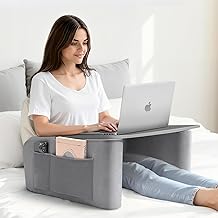
OPTIXCELL Reading Pillow for Gaming with Ergonomic Arm Rests, Wooden Lap Desk for Laptop, Support Pillow with Side Pockets for Reading, Writing, Working, Gaming on Bed, Couch or Floor (Gray, Large)
Best For:
Creators who work from bed or couch and want a stable, comfortable lap surface—writers, casual streamers, and students.
Working long hours from the bed or couch calls for a balance between soft support and a stable work surface. The OPTIXCELL reading pillow with integrated wooden lap desk aims to deliver both. The pillow’s ergonomic armrests and supportive foam core help maintain a more upright posture than a simple pile of cushions, while the wooden lap desk creates a consistent flat surface for a laptop, sketchpad, or plate of snacks.
Many creators report that a combined pillow-and-desk solution is more practical than separate pieces: the desk surface stops the laptop from sinking into soft cushions (which can cause heat issues and uncomfortable angles), and the armrests provide lateral support for wrists and forearms during long typing sessions. Built-in side pockets are handy for stashing a phone, small notebook, or charger, keeping frequently used items within reach.
Compared with rigid lap desks or standing desks, this hybrid product prioritizes comfort and portability. It won’t replace a dedicated ergonomic office chair and external monitor for full-day desk work, but for casual editing sessions, drafting, or streaming from a seated or reclining position, it’s a clear step up. Look for a version with a firm wooden base and dense foam to avoid long-term sagging.
Practical scenarios: a freelance writer finishing a chapter while reclining, a student editing images on a laptop in a dorm room, or a gamer streaming from a couch with a lap desk surface holding a controller and headset. Considerations include the pillow size (large models suit taller users), breathability of the cover fabric for summer use, and whether you’ll need a washable cover.
Buying tips: pick a model with a removable, machine-washable cover if you work long hours in bed, and check the weight limit of the wooden lap desk if you use a heavier gaming laptop. If you need a strictly upright setup for long workdays, a separate ergonomic chair and monitor riser would be a better long-term investment.
Pros
- Ergonomic armrests and a firm wooden lap desk provide stability and better typing angles
- Side pockets keep essentials nearby
- Large size offers ample support for longer sessions
Cons
- Not a substitute for a dedicated ergonomic workstation for full-day use
- Fabric breathability and long-term foam firmness vary by model
If you want a comfortable lap-based setup for longer sessions on the couch or bed, this OPTIXCELL reading pillow with a wooden lap desk is worth considering. Check the latest price on Amazon.
LEBENGURU Reading Pillow for Laptop, Extra Large Armrest Gaming Pillow for Working, Hight Adjustable Lap Desk Pillow for Adult Sitting in Bed, Floor, Sofa

Best For:
Adults who switch between bed, couch, and floor workspaces and want an adjustable lap surface—suitable for long but not full-day sessions.
If you prefer a more customizable lap workspace, the LEBENGURU extra-large reading pillow with an adjustable lap desk offers flexibility for different sitting positions. The larger footprint distributes weight more evenly, and many editions include a height-adjustable lap desk or a removable wooden surface so you can tune the angle and elevation to reduce neck strain.
Creators who value long-term comfort like the mix of dense foam for back support and pronounced armrests that encourage a straighter posture. Compared to standard beanbag-style lap pillows, this design keeps your laptop and wrists at a more consistent height, which helps during long typing sessions, transcription work, or coding marathons. A washable cover and storage pockets are practical touches for busy creators who eat or drink while working.
From a market comparison perspective, this product competes with other pillow-lap desk hybrids but distinguishes itself with its adjustable height feature—handy if multiple people use the same pillow or you switch between sitting up and reclining. It still won’t replace an external monitor and proper ergonomic chair for full-day use, but it can significantly improve comfort for several-hour stretches away from the desk.
Real-world use cases: editing transcripts while half-reclining on a sofa, warming up chapters and notes in a bed-based writing session, or using it as a portable desk for study sessions on the floor. Watch for the lap desk’s weight tolerance—heavier 15"+ laptops may require a sturdier wooden surface.
Buying considerations: choose the right size for your body and laptop, and prefer models with breathable, removable covers if you expect long sessions. If you mainly work upright at a desk with a monitor, this may be a nice secondary option rather than a replacement.
Pros
- Extra-large size distributes weight and supports longer sessions
- Height-adjustable lap desk for better neck and wrist alignment
- Removable/washable covers and storage pockets
Cons
- May not provide enough support for long full-day desk work
- Heavier laptops may need a sturdier lap desk surface
For a flexible, larger lap-desk solution that adjusts to how you like to work, consider this LEBENGURU reading pillow. Check the latest price on Amazon.
OPNICE Desk Organizer and Accessories, 2-Tier Computer Monitor Stand Riser with Drawer and 2 Pen Holders, Laptop Stand, Office Desk Accessories for Office Supplies, Black

Best For:
Creators with small desks who need a simple monitor lift and extra storage—ideal for writers, podcasters, and digital artists using one monitor or a laptop setup.
A tidy desk can be a surprisingly big productivity booster. The OPNICE 2-tier monitor stand riser doubles as a desk organizer, lifting your monitor or laptop to a better eye level while creating storage underneath. Its compact drawer and pen holders are small features that make a difference when your workspace tends to collect cables, sticky notes, and adapters.
For creators who use a single monitor or a laptop with an external keyboard, elevating the screen reduces neck strain and creates storage for external drives, notebooks, or a compact keyboard underneath. Compared with larger standing desk converters, this riser is lightweight, inexpensive, and suited to small desks where a full workstation overhaul isn’t practical.
Realistic use cases include placing a laptop on the riser and using a wireless keyboard below for a more ergonomic typing height, lifting a 24" monitor to reduce downward gaze, or stashing peripherals under the elevated platform. The drawer is useful for keeping SD cards, dongles, and charging cables out of sight but within reach.
When comparing to other risers, consider the material and load capacity; thinner plastic models may warp under heavy monitors. If you use multiple large monitors or heavier studio displays, a sturdier metal riser or an adjustable monitor arm is a better investment. For small home studios and creators with a single display or laptop, this riser is an affordable way to improve posture and desk organization.
Buying tips: check weight capacity and platform dimensions to confirm your monitor or laptop fits securely, and consider whether the height the riser provides reaches the eye level you need. A non-slip surface and rubber feet help keep the stand stable during long typing or sketching sessions.
Pros
- Raises monitor/laptop to a better viewing height
- Built-in drawer and pen holders help declutter desk surface
- Compact and budget-friendly alternative to larger monitor arms
Cons
- Plastic riser may not support very heavy monitors reliably
- Limited height adjustability compared to monitor arms
If you want a compact way to raise your screen and tidy your desk, this OPNICE 2-tier riser is a practical option. Check the latest price on Amazon.
Final Verdict
Long laptop sessions demand a mix of comfort, connectivity, and simple organization. The MOKiN USB-C hub fills in missing ports so creators can attach monitors, drives, and cameras without juggling dongles. OEM HP 62 ink keeps print quality consistent for creators who still rely on hard copy proofs. The OPTIXCELL and LEBENGURU lap pillows offer two different takes on portable comfort—one focused on a wooden lap desk with supportive armrests, the other on a larger, height-adjustable surface for more flexible positions. Finally, the OPNICE monitor riser is an inexpensive way to reclaim neck health and clear desk clutter.
Which one is right for you depends on where most of your work happens. If you’re mobile and rely on external monitors and SD cards, prioritize the hub. If you print proofs regularly, go OEM with ink. If you split time between a desk and bed or couch, pick the pillow that matches your preferred posture and device weight. And if your desk is crowded, the riser can add ergonomic lift and storage without an expensive upgrade.
I’ve summarized each product with practical use cases, pros and cons, and buying considerations so you can match these picks to your workflow. For creators, small changes to gear often noticeably reduce friction and fatigue, helping you stay focused and produce better work.
Conclusion
These Desk products creators use during long laptop sessions picks are trending now and offer great value and variety. Check the links above for latest prices and reviews.
As an Amazon Associate, I earn from qualifying purchases.
Tags:
lap desk, USB-C hub, monitor riser, reading pillow, desk organizer, creator gear, home office accessories
