Top College Gadgets for Student Routines
As an Amazon Associate, I earn from qualifying purchases. This article may contain affiliate links, which means we may receive a commission at no extra cost to you.
Campus life moves fast—back-to-back classes, club meetings, study sessions, and the perpetual juggle of assignments. Picking a handful of reliable gadgets and resources that actually fit into a student’s daily routine can make a big difference. Below you’ll find a curated set of smart, practical items that show up in real student workflows: reusable notebooks that save paper and sync to the cloud, a pocket sticker printer for labels and planners, a no-nonsense cookbook aimed at dorm kitchens, and productivity planners designed for semester goals.
Before we dive in, a quick note: As an Amazon Associate, I earn from qualifying purchases. This article may contain affiliate links, which means we may receive a commission at no extra cost to you. The recommendations are based on research, user feedback, and common campus needs—not personal hands-on testing. The goal here is to help you decide which tools fit your study style, budget, and living situation.
Buying Guide
Choosing the right tech and tools for college depends less on flashy specs and more on everyday fit. Consider these criteria when deciding which items to prioritize:
1) Purpose and workflow: Are you primarily a handwritten-notes student who later digitizes notes, or do you do everything on a laptop? Reusable smart notebooks bridge the gap—keeping tactile note-taking while offering cloud uploads for organization. If you love bullet journals or creative planners, dot-grid formats provide flexible layout options.
2) Portability and power: Dorms and campus lounges have limited outlets and lots of walking between buildings. Smaller devices like portable sticker printers or executive-size notebooks that fit into a backpack reduce friction. Check device dimensions and whether the item fits your bag with other essentials.
3) Long-term cost and sustainability: Reusable notebooks and inkless thermal printers reduce ongoing consumable costs. A Rocketbook, for example, only needs a damp cloth and the occasional replacement pen, while thermal printers skip ink cartridges entirely.
4) Compatibility and integrations: If you use Google Drive, OneNote, Evernote, or iCloud, verify that a smart notebook or device supports the cloud destinations you rely on. For printers, check whether the mobile app supports both iOS and Android and what file types it accepts.
5) Ease of learning: The best tools blend into your routine. A productivity planner with undated pages lets you start mid-semester without wasted pages. A sticker printer that pairs quickly via Bluetooth saves time when labeling course materials or decorating planners.
6) Intended use-cases: If you live in a shared kitchen, a cookbook geared to college students with simple, quick recipes and minimal equipment is far more useful than an elaborate chef’s tome. Likewise, if your classes use diagrams, a dot-grid notebook is preferable for sketching compared to a lined page.
7) Durability and build quality: Dorm life is rough on gear. Look for sturdy covers, replaceable accessories (pens, cleaning cloths), and devices with reliable battery life. Read community feedback for typical wear points—like how binding holds up over a semester or whether thermal labels resist moisture.
8) Who should skip it: Avoid over-specialized gadgets if you’re on a tight budget and already manage fine with digital-only tools. For example, if you take notes directly on a tablet and back them up, a reusable paper notebook may be redundant.
Keep these considerations in mind as you read the product summaries. Each picks up where common student needs intersect with everyday practicality: saving time, staying organized, and making shared living easier.
Rocketbook Core Reusable Smart Notebook, Lined Pages For School, Work and Creative Projects, Letter Size 8.5×11, Gray – Premium

Best For:
Students who prefer handwriting but want cloud backup—ideal for lecture-heavy courses like humanities, social sciences, and law.
If you prefer the tactile habit of writing by hand but hate lost notebooks and paper waste, the Rocketbook Core (lined, letter size) is a practical bridge between analog note-taking and digital organization. The lined pages mimic a traditional notebook, which helps when taking long-form lecture notes, drafting essay outlines, or jotting lab observations where linearity matters. Its synthetic, reusable surface wipes clean with a damp cloth, meaning the same book can carry you through multiple semesters without the piles of used paper.
This model syncs to popular cloud services via the Rocketbook app, letting students send pages straight to Google Drive, OneNote, Dropbox, Slack, and email—handy for group projects or submitting annotated notes to classmates. The letter size 8.5×11 format fits most syllabi, printed handouts, and desk setups, and the lined format is especially useful for classes with heavy text-based note-taking like history, literature, or law.
Compared to disposable spiral notebooks, Rocketbook reduces waste and removes the pain of deciding what to keep or toss at semester end. Compared to tablets, it offers a low-distraction environment: you write, then upload, instead of toggling between apps. Students report appreciating how consistently legible scans are when written with the right pens; Rocketbook recommends specific marker types for best erase performance.
Practical use cases include compiling lecture notes organized by class folders, creating clean study outlines before exams, and keeping a running to-do list that can be archived digitally. For group study, scan and share session notes immediately; for office hours, hand your instructor a quick, polished scan instead of photographed scraps.
Who should buy this? Students who value handwriting, take lots of text-heavy notes, and want a greener, more organized alternative to paper notebooks. Who might skip it? If you already use a tablet with a note app and cloud sync, or you rarely handwrite, the Rocketbook may duplicate functions you already have.
Pros: Reusable pages reduce waste; cloud integration for organized storage; full letter size fits printed materials. Cons: Requires compatible pens for best erasure; some users note a learning curve to consistent scanning. Check the latest price on Amazon.
Pros
- Reusable pages cut down paper waste
- Straightforward cloud integration (Drive, OneNote, Dropbox)
- Full letter size works well with handouts
Cons
- Needs recommended marker pens for reliable erasing
- Learning curve to get consistent scan quality
Check the latest price on Amazon.
iDPRT Sticker Printer, Portable Sticker Maker Machine, Mini Inkless Bluetooth Thermal Printer for iPhone & Android, Pocket Printer for Labels, Barcodes, DIY Journaling, Kids Gift, Gray

Best For:
Creative students, planners, and small-business sellers on campus who need portable, low-cost labels and stickers.
A small, portable sticker printer sounds niche, but for students who organize, decorate, or run small campus side gigs, an inkless thermal sticker printer can be surprisingly useful. The iDPRT portable sticker maker uses thermal printing—no ink cartridges—so operational cost stays low. Pair it with your phone over Bluetooth and print labels, study tabs, barcode tags for small projects, or decorative stickers for planners and dorm décor.
In real student life, this device shines for quick-label needs: labeling storage bins in shared rooms, printing vinyl-like stickers for personalizing notebooks, creating tidy spine labels for textbooks lent to roommates, or producing price tags and promotional stickers for school craft fairs. The app-driven interface often includes templates for different sticker sizes, fonts, and simple graphic elements, which makes it friendly for non-designers.
Compared to traditional label makers, the iDPRT unit offers more flexible output for creative uses—print mini-graphics and stylized text instead of plain embossed type. Compared to full-sized thermal printers, it’s much more portable and dorm-friendly, though it prints smaller sizes and is more suited for stickers and labels than full-page documents.
Customers who use it for journaling praise the crispness of prints and the convenience of carrying one in a backpack. Practical buying considerations: check the sticker paper sizes it supports and whether the included app is regularly updated for your phone. Also, thermal printing means prints can fade with prolonged heat or sunlight exposure, so treat stickers intended for long-term use accordingly.
Best for creatives, organization enthusiasts, student entrepreneurs, and planners who like a hands-on decorative touch. Not ideal for students who need high-volume, high-durability business labels or those looking for full-color photo prints.
Pros: Inkless printing lowers ongoing costs; compact and Bluetooth-enabled for easy use; great for journaling and labeling. Cons: Prints are thermal and can fade over time; limited to small sticker sizes. Check the latest price on Amazon.
Pros
- No ink cartridges needed (thermal printing)
- Compact and Bluetooth-friendly for on-the-go use
- Good for creative journaling and quick labels
Cons
- Thermal prints can fade with heat or sunlight
- Limited to small sticker formats
Check the latest price on Amazon.
Recipes Every College Student Should Know (Stuff You Should Know)

Best For:
New cooks, freshmen, and busy students who need fast, affordable, and reliable meal ideas.
Cooking in college often means tight budgets, limited kitchen gear, and occasional roommate negotiation. ‘Recipes Every College Student Should Know’ is a practical cookbook that focuses on the basics—quick, affordable recipes that don’t require a full set of pots and pans. It’s less about gourmet technique and more about reliable dishes you can pull off between classes and evening study sessions.
Real-world use cases include meal-prepping simple breakfasts like oatmeal variations, whipping up one-pan dinners after late labs, and learning to adapt recipes based on what’s left in a shared fridge. The book typically covers staples—pasta dishes, stir-fries, baked sheet-pan meals, and snackable recipes that work with a microwave or a single skillet. For students who are new to cooking, it demystifies core skills (safe knife use, seasoning basics, and efficient cleanup) so meals are faster and less wasteful.
Compared with lifestyle cookbooks that assume a well-stocked kitchen and time for prep, this volume is pragmatic. It recognizes constraints: dorm rules about open flames, shared appliances, and short windows between commitments. The recipes favor affordable ingredients, and many can be scaled for meal-prep containers—helpful for students balancing nutrition and study time.
Buying considerations: look for editions with clear photography (or none if you prefer text-only), a helpful index for ingredient-based searches, and an emphasis on substitutes so students can improvise. If you enjoy more complex cooking or have easy access to a full kitchen, this might feel basic—but for most undergraduates, it’s a functional starting point.
Best for freshmen, international students adjusting to new ingredients, and anyone who wants to eat better without culinary drama. Not for culinary students or experienced home cooks who want advanced technique.
Pros: Practical, budget-friendly recipes; minimal equipment needed; good for meal-prep and quick dinners. Cons: Simple recipes may feel basic for advanced cooks; limited technique depth. Check the latest price on Amazon.
Pros
- Focuses on quick, budget-friendly meals
- Designed for minimal equipment and shared kitchens
- Good for meal-prep and simple nutrition
Cons
- May be too basic for experienced cooks
- Limited advanced technique coverage
Check the latest price on Amazon.
Rocketbook Fusion Reusable Undated Productivity Planner, Letter Size 8.5×11, Gray – Goals, Monthly and Weekly Calendar, Daily To-do List, Lined and Dotted Notes Pages

Best For:
Students balancing classes, extracurriculars, and part-time work who want a reusable planner that archives to the cloud.
The Rocketbook Fusion blends an undated planner layout with reusable pages and cloud syncing—an attractive option for students who want a single, flexible system for semester planning, weekly scheduling, and on-the-spot brainstorming. Because it’s undated, you won’t waste pages if your semester schedule changes; skip a week and pick up where you left off. It includes goal sections, monthly and weekly calendar layouts, daily to-do areas, plus lined and dotted pages for notes and sketches.
For campus living, this product works well as a single organizational hub. Use the monthly sections to mark exam weeks and campus events, weekly spreads for class schedules and meeting blocks, and daily to-dos for assignments and errands. The dotted and lined pages handle project work—brainstorming for group presentations, sketching lab apparatus, or drafting code snippets. Once pages are filled, scan with the Rocketbook app and assign them to cloud folders so all your semester planning is backed up and searchable.
Compared with disposable planners, the Fusion avoids wasted pages and offers digital archival. Compared with pure digital planners, it preserves the cognitive benefits of handwriting—and provides a quick physical view of a week without flipping through apps. Buyers should consider pen compatibility and the required cleaning routine (a damp cloth to erase), and remember that scans depend on consistent pen contrast for best results.
This planner is best for students who juggle multiple commitments—clubs, classes, and part-time work—and who benefit from a visible, tactile overview of their week. It’s less useful for someone who keeps all schedules in a shared digital calendar and never writes by hand.
Pros: Flexible undated layout prevents wasted pages; mixed page types for varied tasks; cloud sync for archiving. Cons: Requires recommended pens for proper erasing; physical planner may duplicate digital calendars for some users. Check the latest price on Amazon.
Pros
- Undated pages avoid wasted sections
- Combination of calendars, to-dos, and note pages
- Cloud backup for organized archiving
Cons
- Needs compatible pens and cleaning routine
- May duplicate digital calendars for some users
Check the latest price on Amazon.
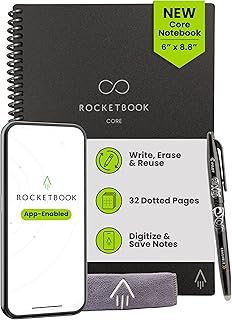
Rocketbook Core Reusable Smart Notebook, Dot Grid Pages For School, Work and Creative Projects, Executive Size 6×8.8, Black – Premium
Best For:
Design, engineering, and commuter students who need a compact reusable notebook for sketches, diagrams, and mixed notes.
For students who sketch diagrams, create layouts, or prefer structured freeform notes, the Rocketbook Core in executive dot-grid format is a versatile, compact option. The dot grid strikes a balance between lined and blank pages—providing subtle guides for drawings and graphs without the restrictive feel of ruled lines. The executive size (roughly 6 x 8.8) fits easily into backpacks, tote bags, or large coat pockets, making it an excellent companion for studio classes, project meetings, and commuter days.
Its reusable surface and Rocketbook app integration make it a solid choice for design students, engineering majors, and anyone who alternates between sketches and notes. Dot grids are helpful for wireframing app ideas, rapidly prototyping visual layouts, drawing quick math diagrams, and keeping tidy hand-drawn timelines for history or project planning. After scanning pages to cloud services, you can wipe the notebook clean and reuse it—saving paper and keeping archived work searchable.
Compared to a full-size dotted Moleskine-style notebook, the executive Rocketbook sacrifices some writing area for portability but gains the benefit of being reusable and cloud-ready. Compared to tablets, it’s distraction-free and doesn’t require charging as frequently, but it won’t replace full-color digital sketches.
Buying notes from users include paying attention to pen tips (some pens work better for scan contrast), the cover durability for day-to-day commuting, and how often you’ll scan vs. archive physically. This size is particularly strong for students who prefer to carry one small notebook rather than a bulky binder or multiple pads.
Who should buy: design and STEM students who sketch and take mixed-format notes, commuters who need a compact notebook, and anyone looking for a portable reusable option. Who may not need it: those who prefer full-size pages for extended notes or color-intensive sketches.
Pros: Dot grid is great for diagrams and layouts; compact executive size is travel-friendly; reusable with cloud sync. Cons: Limited page area for long form notes; best results depend on pen choice. Check the latest price on Amazon.
Pros
- Dot-grid format supports sketches and layouts
- Compact executive size for portability
- Reusable pages with cloud syncing
Cons
- Smaller page area compared to letter-size notebooks
- Scan quality depends on pen selection
Check the latest price on Amazon.
Final Verdict
Selecting the right college gadget depends on how you study, live, and manage time. The Rocketbook Core (letter, lined) is the top pick for students who write long-form notes and want cloud backup without paper waste. The iDPRT sticker printer is ideal for creatives, planners, and campus entrepreneurs who need compact, low-cost labels and stickers. The recipe book is a pragmatic resource for freshmen and busy students trying to eat affordably and efficiently. The Rocketbook Fusion is a great system for students juggling calendars and project pages who value a tactile planner with digital archiving. The Rocketbook Core executive dot-grid suits sketch-heavy classes and commuters who want a portable, reusable option.
If you already work exclusively with a tablet and digital calendars, you may not need reusable paper tools; conversely, if you value handwriting and low ongoing costs, these Rocketbook options and the sticker printer can streamline your routine and reduce waste. Consider what you carry daily—if your backpack is already full of textbooks and a laptop, prioritize compact items like the executive Rocketbook or the portable sticker printer.
Research shows students benefit from systems that require minimal friction: easy scanning, predictable storage, and layouts that match their most common tasks. Use the buying guide above to match product strengths to your semester needs. For each product listed, check the Amazon listing for the latest details and customer questions to make sure the model and included accessories match your expectations. Check the latest price on Amazon.
Conclusion
These College gadgets trending in realistic daily student routines picks are trending now and offer great value and variety. Check the links above for latest prices and reviews.
As an Amazon Associate, I earn from qualifying purchases.
Tags:
college gadgets, student planner, reusable notebook, portable sticker printer, college cookbook, college organization, study tools
