Top Creator-Favorite Gift Ideas for Special Occasions
As an Amazon Associate, I earn from qualifying purchases. This article may contain affiliate links, which means we may receive a commission at no extra cost to you.
Creators and influencers frequently spotlight a handful of thoughtful, tech-forward presents in special occasion videos—items that make memories easy to share and preserve. If you’ve watched a birthday montage, anniversary unboxing, or new-parent favorites roundup, you’ve probably noticed several recurring recommendations: Wi‑Fi digital photo frames, touchscreen smart frames, luxury video books, and even QR video sticker packs. These gifts are popular because they bridge the emotional (photos and video) with the practical (easy sharing, simple setup), so they show up again and again in creator content.
Affiliate disclosure: As an Amazon Associate, I earn from qualifying purchases. This article may contain affiliate links, which means we may receive a commission at no extra cost to you.
Below is a longer buyer’s guide and in-depth breakdown of five creator-favorite products that often appear in gift lists. Each section explains who it’s best for, how people typically use it, practical pros and cons, and buying considerations so you can match the right product to the right recipient.
Buying Guide
Why creators repeat these gift ideas: influence videos and special-occasion rounds often favor items that look good on camera, spark an emotional reaction, and are easily explained in a short clip. Digital photo frames and video books meet those criteria: they light up with family photos, play a message, or show a compilation and filmmakers—both pros and hobbyists—love sharing that reaction. When you shop for these kinds of gifts, consider three main things: ease of use, content-sharing options, and the intended recipient’s tech comfort.
Ease of use: A frame that accepts photos via a dedicated app, email, or direct USB/SD upload will be easier for non-technical recipients. Look for plug-and-play features and responsive touchscreens. If you plan on sending images remotely from a phone, prioritize Wi‑Fi and a reliable app ecosystem.
Content formats: Some devices support both photos and short videos; others limit you to still images. If you want to include moving moments, pick a product with video support and adequate internal storage or cloud options. Also check supported formats and maximum video length.
Design and display quality: Pay attention to screen resolution, IPS displays for wide viewing angles, and anti-glare finishes if the frame will sit in a bright room. Materials—plastic, linen, or faux wood—affect the look and how it fits into home décor.
Longevity and power: Battery-powered video books vs. wall-plug digital frames have different use cases. Rechargeable devices are portable but may require occasional charging; plugged frames are more permanent but need a nearby outlet.
Compatibility and sharing: If multiple family members will send photos, pick a frame or system that supports multiple users and unlimited sharing or cloud syncing. Check app reviews and customer feedback on connection reliability.
Finally, consider who the gift is for. Older recipients often prefer simplicity—email-to-frame or a dedicated app with clear instructions—while younger giftees might appreciate advanced sharing and customization features. Below are five products frequently featured by creators, each explained with real-world use cases and practical buying considerations.
PhotoShare MyLuma LED 7” WiFi Digital Photo Frame with LEDs and Soft Touch Back Panel | Send Photo or Video from Phone to Digital Picture Frame | White Lightning Finish

Best For:
Gift-givers who want a compact, stylish, and simple WiFi-enabled photo frame for family members who prefer plug-and-play simplicity.
The PhotoShare MyLuma 7” WiFi digital photo frame is one of those small-but-delightful gifts creators like to showcase in special-occasion clips because it’s compact, visually pleasing, and easy to use. At its core this frame is aimed at people who want a plug-and-play display that receives photos and short videos from phones. The MyLuma uses WiFi for instant sharing and includes a soft-touch back panel and subtle LED accent lighting that adds a warm glow—features that look good on a mantel, bedside table, or desk.
Main benefits: The frame’s strengths are simplicity and design. Creators frequently point out how little explanation is needed to demonstrate sending a photo: open the companion app or use an email-to-frame feature, send a picture from your phone, and the frame updates almost immediately. This is a great option for families who want to keep grandparents or long-distance relatives connected without requiring them to manage cloud accounts or complicated setups. The built-in LEDs provide a tasteful backlight that helps images pop in low-light conditions, and the white lightning finish keeps the design neutral for most rooms.
Real-life usage: New parents often use the MyLuma to showcase daily baby photos—snap on your phone, send via the app, and the grandparent’s frame shows a rotating slideshow. Travelers might gift it to someone who wants a rotating travel album without dealing with printing. For small apartments, the 7” size is perfectly suited to shelves and nightstands while still delivering legible images.
Why it’s valuable: Compared with bulkier, higher-priced alternatives, the MyLuma is a budget-friendly choice that doesn’t sacrifice basic WiFi sharing, video compatibility, and a pleasant aesthetic. It’s less feature-heavy than larger smart frames, which means fewer settings to confuse a recipient. However, that relative simplicity also means fewer advanced customization options or large storage capacity, so it isn’t meant for power users who want cloud backup, large internal storage, or advanced playlist features.
Buying considerations and practical observations: Check how the companion app is rated and whether your family members’ phones are compatible. For recipients who are less tech-savvy, confirm that the frame supports email uploads or direct family invites. The LEDs are attractive, but placement matters—if the frame is in direct sunlight the backlighting won’t be noticeable. Also note that a 7” screen is intimate rather than immersive; if your goal is to show high-definition portrait videos, you may prefer a larger frame.
Who should buy it: Ideal for gift-givers seeking a tasteful, easy-to-use digital frame for parents, grandparents, or roommates who enjoy swapping photos. Who may not need it: Users who want the largest, feature-packed smart frames with cloud backup and extensive customization options.
Check the latest price on Amazon.
Pros
- Easy WiFi photo/video sharing from phone
- Attractive soft-touch finish with LED backlight
- Compact 7” size fits small spaces
Cons
- Smaller screen not ideal for group viewing
- Fewer advanced features compared with larger smart frames
Check the latest price on Amazon.
Digital Picture Frames Load from Phone,Video Frame,14" Uhale Digital Picture Frame 32GB,Touchscreen Digital Photo Frame WiFi, Instant Sharing, Unlimited Users,Free App,Gifts for Men/Women(Dad/Mom)

Best For:
Families and living-room displays that benefit from a larger, social-viewing digital frame with generous internal storage and app sharing.
The 14" Uhale digital picture frame is a larger, more feature-rich option for anyone who wants a prominent display in a living room or office. Creators often feature larger frames like this in ‘gift guide’ videos because they make a visual statement on camera and allow group viewing during family gatherings. With 32GB of internal storage, a responsive touchscreen, WiFi connectivity, and a free companion app that supports unlimited users, the Uhale is tailored for family networks that want to send photos and videos remotely.
Main benefits: The first thing you notice is the scale—a 14” display is big enough for multiple people to enjoy without crowding around. The touchscreen interface simplifies navigation through slideshows and video playback, while WiFi and app-based sharing mean friends and family can send photos from anywhere. The included internal storage helps keep a sizable archive without relying on external SD cards or constant cloud sync. Creators often highlight the bright IPS display and the way it handles color, which helps photos look vivid on camera.
Real-life usage: This model works well in a family’s shared spaces. For instance, busy parents can keep a rotating slideshow of school-day photos in the kitchen, while distant relatives contribute photos through the app. It’s also a strong pick for small business owners who want a tasteful photo-and-video display in a reception area. During holidays or family reunions, the 14” screen becomes a focal point—great for a slideshow of throwback images or a tribute montages.
Why it’s valuable: Compared with smaller frames, the Uhale 14” offers a more social viewing experience and higher storage that suits households with many contributors. It’s less expensive than some premium smart frames but delivers much of the same functionality—touch control, WiFi sharing, and a solid display. The trade-offs are typical: a larger frame requires a dedicated space and a nearby power source, and some advanced cloud-sync aficionados may find the app features less polished than higher-end brands.
Buying considerations and practical observations: Verify that the free app’s sharing permissions meet your privacy needs and test video format compatibility if you plan to send longer clips. If portability is important, consider that the 14” frame is best used as a stationary piece. Also note that while internal storage is generous, regular backups or transferring favorite files to another device is wise for long-term preservation.
Who should buy it: Families, hosts, or gift-givers who want a notable display for shared photos and videos—particularly households with multiple contributors. Who may not need it: Those seeking a compact, bedside-sized frame or people who need a battery-powered, portable solution.
Check the latest price on Amazon.
Pros
- Large 14” touchscreen for group viewing
- 32GB internal storage and WiFi sharing
- Free app with unlimited users
Cons
- Requires dedicated space and a power source
- App polish may lag behind premium brands
Check the latest price on Amazon.
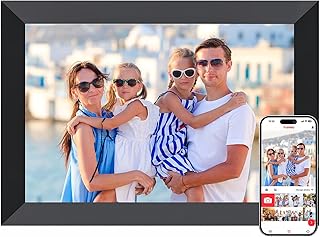
Frameo Digital Picture Frame, 10.1 Inch Smart WiFi Photo Frame with 1280×800 HD IPS Touch Screen, Auto-Rotate, Wall Mountable, Share Photos/Videos Instantly via App from Anywhere
Best For:
Buyers seeking a mid-size, high-resolution smart frame with flexible placement and simple app-based sharing for family or office use.
Frameo’s 10.1-inch smart WiFi photo frame is a mid-sized, polished pick that creators often include in curated gift roundups for its balance of display quality and easy sharing. With a 1280×800 HD IPS touchscreen, auto-rotate support, and wall-mountable design, it adapts to many rooms and presentation styles. The Frameo system focuses on simple app-driven sharing, letting people send photos and short videos from anywhere—an appealing feature for long-distance families and friend groups.
Main benefits: The 10.1” size hits a sweet spot: large enough to read and enjoy at a glance, yet small enough to place on a desk or shelf. The HD IPS panel produces sharp images and consistent colors at wider viewing angles—important if several people will look at the frame from different parts of a room. Auto-rotate is handy when you mix portrait and landscape photos, and the wall-mount capability makes the frame flexible for either tabletop or hung displays.
Real-life usage: One common scenario is a rotating “memory wall” in a hallway where relatives send holiday snaps throughout the year. A newlywed couple might display honeymoon highlights in a living room, while college students living away from home can keep a steady stream of family photos on their desks. Creators like recommending Frameo for its approachable app and quick setup, which makes it easy to demonstrate in a short video segment.
Why it’s valuable: Compared with no-brand or very small frames, Frameo offers dependable display quality and polished app functionality. Its mid-size and resolution give a more premium feel without the price tag of top-tier smart frames. The main compromises are common to mid-range frames: it may lack enterprise-level cloud backup or some advanced playlist scheduling features that power users want.
Buying considerations and practical observations: Check the app review history to see how updates have improved reliability. If users plan to send lots of videos, confirm the frame’s supported video codecs and length limits. The frame’s mounting hardware makes it flexible, but if you want a completely wireless option, remember this model is typically powered by a cord.
Who should buy it: Ideal for anyone who wants an attractive, reliable mid-size smart frame for home or office—particularly households that share content from multiple contributors. Who may not need it: Minimalists who prefer a very small frame or power users who require advanced cloud and scheduling tools.
Check the latest price on Amazon.
Pros
- 1280×800 HD IPS display with auto-rotate
- Wall-mountable and tabletop-friendly
- Simple app-based photo/video sharing
Cons
- Requires power cord (not battery-powered)
- May lack advanced cloud playlist scheduling
Check the latest price on Amazon.
The Motion Books (I LOVE YOU) | Luxury Linen Bound Video Book | Stamped text | Up to 3 hours of video, 7” IPS Display, 4GB of memory & Rechargeable Battery

Best For:
Romantics and event-givers who want a tactile, luxury presentation for long-form video montages and keepsakes.
The Motion Books ‘I LOVE YOU’ luxury video book is a high-impact, tangible present that creators frequently highlight in anniversary and proposal videos for its emotional presentation. It looks like a handcrafted linen-bound book but hides a 7” IPS screen and up to 3 hours of video capacity—enough for compiled footage, narrated messages, or long-form slideshows. It also includes 4GB of memory and a rechargeable battery for portable playback, which makes it feel like a keepsake rather than just a tech gadget.
Main benefits: The biggest advantage is the emotional weight of receiving a physical book that opens to a video message. Creators often use this product in reveal or reaction videos because the moment of flipping open the cover and seeing moving pictures is inherently cinematic. The linen cover, stamped text, and high-quality binding make it a luxe gift for weddings, anniversaries, or milestone birthdays. The rechargeable battery and included memory mean recipients can play the video anywhere—on a coffee table, during a toast, or while traveling.
Real-life usage: Couples often record a montage of messages from family and friends for anniversaries or rehearsal dinners; the Motion Book makes those compilations easy to present. A parent might assemble a chronological video of a child’s early years to play at a milestone party. Because it’s portable, it’s also ideal for surprise proposals or speeches where you want to bring a polished digital element without relying on a projector or TV.
Why it’s valuable: Compared with a digital frame, the Motion Book is about presentation and sentimentality. It doesn’t aim to be a constantly updated picture frame; instead, it’s a curated keepsake for storytelling. That makes it especially valuable for high-emotion gifts—when presentation and tactile quality matter more than remote sharing. If you need ongoing, app-driven updates or daily photo streams, a WiFi frame is a better match.
Buying considerations and practical observations: Consider the intended video length and file sizes—up to 3 hours is generous, but encoding and file format compatibility should be checked before gifting. The rechargeable battery is convenient but expect to charge it between uses if you plan showings at events. Also, a luxury finish means it’s a statement piece; ensure the recipient appreciates physical keepsakes rather than purely digital solutions.
Who should buy it: Best for romantics, parents planning a sentimental reveal, or anyone wanting a memorable presentation piece for special events. Who may not need it: People who prefer continuous cloud-updated displays or want a multi-user sharing system.
Check the latest price on Amazon.
Pros
- Luxe linen-bound presentation with 7” IPS display
- Up to 3 hours of video and rechargeable battery
- Feels like a keepsake—great for emotional reveals
Cons
- Not designed for continuous remote updates
- Requires recharging for repeated portable use
Check the latest price on Amazon.
Personalized Video Recording Sticker | Spokenote QR Code Stickers Let You Add Custom Videos, Instructions to Anything | 10 Pack – Pink

Best For:
Crafters, event hosts, and small businesses wanting to add personalized video messages to physical items using easy QR scanning.
Spokenote QR video stickers offer a different kind of gifting: they attach to physical objects or cards and link to a personal video hosted online. Creators often show these in crafty unboxing or personalized-gift videos because they let you deliver a recorded message without another device—simply scan the QR code. The pack of 10 in pink makes them suitable for party favors, wedding place settings, personalized product tags, or surprise notes hidden in gifts.
Main benefits: The biggest draw is versatility. You can place a sticker on a gift, a recipe card, a handmade item, or a keepsake and record a short video message that the recipient can play anytime by scanning the code with a smartphone. This bridges the physical/digital divide: a printed card suddenly contains a moving, spoken message. Creators like recommending them because they’re easy to personalize and photograph for social content, and they feel intimate—especially when the message is direct and personal.
Real-life usage: Use the stickers as part of a wedding: attach one to each place card and record a 20–30 second toast for guests to watch during or after the event. Small business owners also use these to provide video instructions for delicate products, or crafters attach them to handmade items to tell the story behind the piece. For long-distance relationships, hide a sticker in a care package with a quick “thinking of you” message that the receiver can scan in private.
Why it’s valuable: Compared with sending a separate video file or using a frame, QR stickers are inexpensive, low-tech to use, and highly customizable. They don’t require a dedicated device and can be used once or updated depending on the service’s hosting terms. However, they do depend on the hosting platform’s longevity and the recipient’s ability to scan QR codes—so keep backups of important messages.
Buying considerations and practical observations: Confirm how long videos are hosted and whether you can replace or update the target video after delivery. Check the sticker’s durability (water resistance, adhesive quality) if they’ll be attached to packaging or items that may get handled. Some recipients may be unfamiliar with scanning QR codes—include brief instructions when gifting.
Who should buy it: Creative gifters, event planners, small-business owners, and crafters who want to add personal video messages to physical items. Who may not need it: Recipients who don’t use smartphones or who prefer entirely physical keepsakes without digital elements.
Check the latest price on Amazon.
Pros
- Versatile—attach to gifts, cards, or products
- Personalized video messages accessible via QR scan
- Pack of 10 for multiple uses
Cons
- Depends on hosting platform for video longevity
- Not ideal for recipients without a smartphone or QR knowledge
Check the latest price on Amazon.
Final Verdict
Creators keep returning to a handful of repeatable, emotional gift ideas—WiFi photo frames, mid-sized smart displays, luxury video books, and QR video stickers—because these products make memories tactile and easy to share. For quick, ongoing updates and remote family sharing, a WiFi smart frame like the Frameo or the Uhale 14” is an excellent choice. For intimate presentations or milestone events, the Motion Books luxury video book brings a dramatic, keepsake-quality reveal. If you want something small, stylish, and simple, the PhotoShare MyLuma 7” is a handy bedside or shelf solution. And for craft-forward personalization, QR video stickers open up creative possibilities for event hosts and small businesses.
When choosing, match the product to the recipient’s lifestyle: choose simplicity and email/app-based sharing for older relatives, larger displays for shared family rooms, and luxury presentation pieces for high-emotion events. Also confirm app compatibility, supported video formats, and whether you prefer wired or rechargeable operation. All five of the items above appear frequently in creator gift lists because they deliver emotional impact without requiring recipients to become tech experts.
As an overview: pick a smart frame if you want ongoing, shared updates; pick a video book for curated, emotional storytelling; choose QR stickers for customizable, small-scale personalization. Each option solves a different problem—connection, presentation, or personalization—so the best pick depends on how the recipient will use the gift. Check the latest price on Amazon.
Conclusion
These Gift ideas creators keep sharing during special occasion videos picks are trending now and offer great value and variety. Check the links above for latest prices and reviews.
As an Amazon Associate, I earn from qualifying purchases.
Tags:
digital photo frame, video book gift, creator-favorite gifts, QR video stickers, WiFi photo frame, Frameo, gift ideas for family, personalized gifts
