Carry-On Gear Creators Use for Airport Content
As an Amazon Associate, I earn from qualifying purchases. This article may contain affiliate links, which means we may receive a commission at no extra cost to you.
Shooting engaging airport content is a unique challenge: cramped seats, bright overhead lights, moving subjects and tight time windows. Whether you’re a travel vlogger, an influencer capturing behind-the-scenes travel moments, or a creator who needs polished selfie clips between gates, the right carry-on tools make a huge difference. As an Amazon Associate, I earn from qualifying purchases. This article may contain affiliate links, which means we may receive a commission at no extra cost to you.
In the sections below you’ll find compact, airline-friendly products that creators commonly choose for in-flight and airport filming. I’ve compiled these picks based on product specifications, feature lists, and common customer feedback so you can quickly compare real-world benefits: magnetic MagSafe-style mounts for quick phone attachment, compact suction or clamp mounts for airplane tray tables, auto face-tracking tripods for hands-free framing, and all-in-one vlogging kits with lights and microphones for cleaner audio and flattering light in terminal environments. Expect practical notes about what each item solves, who it’s best for, and the trade-offs to consider when packing them in a carry-on bag.
Buying Guide
What to look for when choosing carry-on filming gear for airport content
1) Size and weight: Airline and gate areas reward compact gear. Look for mounts and tripods that fold small and tucking them into a personal item or carry-on should be effortless. Lightweight doesn’t have to mean flimsy—investigate materials (aluminum vs plastic) and locking mechanisms.
2) Attachment type: There are three common approaches: MagSafe-compatible magnetic mounts (fast to snap on/off), suction-cup or clamp mounts (secure to tray tables or windows), and clip/arm systems for bulkhead or armrest attachment. Match the mount style to where you usually film—tray table selfies, window shots, or standing in the terminal.
3) Stability and rotation: A 360° rotation and a secure locking system let you switch between portrait and landscape quickly. For dynamic shots, pan/tilt smoothness matters—cheaper options can wobble when tapping the screen.
4) Auto face tracking vs manual: Auto-tracking tripods use AI to keep you centered while you move. They’re great for solo creators walking through terminals or filming quick outfit or packing videos. If you prefer static setups, a simple mount may suffice and saves battery.
5) Battery life and power: Rechargeable smart tripods and lights need reliable battery life. Check runtime for the LED and tracking motors, and whether a power bank can charge the device mid-day.
6) Audio and lighting: Terminals are noisy. If you plan to capture voice, a small lav or wireless mic helps. Integrated LED rings or clip lights with adjustable color temperature make skin tones look more natural under fluorescent airport lighting.
7) Airline friendliness and ease of use: Avoid items that need tools or complicated assembly—time at the gate is limited. Also check TSA rules for batteries (usually allowed in carry-ons but check watt-hour limits).
Alternatives to consider: traditional gimbals provide smooth motion for walking shots but are bulkier; compact handheld stabilizers can be a middle ground. If your main goal is very stable cinematic movement, a full gimbal is better; for quick, repeatable airport shots, mounts and auto-tracking stands are usually more practical.
Use these criteria to prioritize what matters: portability, attachment versatility, tracking and battery life. Below are five practical options people choose when filming in airports.
amBand Airplane Travel Essentials Phone Holder, Anti-Slip Magnetic Suction Cup Phone Mount for iPhone Fits Magsafe Attachment, Influencer/Sharer/Content Creator Must Haves for Selfie/Video, Peony Pink

Best For:
Creators who want a compact, quick MagSafe-style mount for seated or tabletop airport filming.
This amBand Airplane Travel Essentials Phone Holder is designed for creators who need a fast, secure way to mount an iPhone-style device in the tight confines of an airplane seat. Using a MagSafe-style magnetic attachment, the mount makes snapping your phone into place a one-handed move—ideal when you’re juggling carry-on items and a coffee. The product pairs magnetic attachment with an anti-slip suction-cup base engineered to sit on flat tray tables and other smooth surfaces. Being lighter and smaller than a full tripod, it’s a common choice for creators who film quick selfies, reaction clips, or short face-forward narrations while waiting for the gate to open.
Main benefits include quick snap-on convenience, a stable base for seated shots, and a low-profile footprint for packing in a personal item. The anti-slip pad helps prevent accidental slips during turbulence or while gesturing. Compared with a bulkier tripod, this holder sacrifices multi-angle flexibility for speed and portability—if you primarily shoot straight-on selfie videos or need something small to keep in a laptop bag, it’s a sensible compromise.
Real-life use cases: attach on your tray table during boarding to film a short travel update, use it on a smooth café table in the terminal for a quick flat-lay or set-it-and-forget-it selfie reel, or pair it with a Bluetooth remote to record a short Q&A. It’s also handy for creators who do live updates from their seat since you can remove and snap on your phone again quickly.
Who should buy: social media creators and influencers who need a compact, fast-mounting solution for seated and tabletop filming. It’s especially useful if you already use a MagSafe-compatible phone case and want minimal setup time.
Who may not need it: creators who require multi-angle tripod setups, heavy gimbals, or who shoot long-form seated interviews might find this too limited. Also, if you usually need a microphone input or external lighting with a larger rig, combine this mount with separate audio/light accessories.
Practical observations and buying considerations: look for a strong magnet rating if you plan to lightly tap your screen during filming, and check customer notes on suction performance across different tray materials. Lightweight construction makes it travel-friendly, but test the fit with your phone case style—especially thick cases may affect magnetic hold.
Check the latest price on Amazon.
Pros
- Fast magnetic snap-on for one-handed use
- Anti-slip suction base suitable for tray tables
- Very compact and travel-friendly
Cons
- Limited angle flexibility compared with full tripods
- Magnetic hold can be weaker with thick cases
Check the latest price on Amazon.
Auto Face Tracking Tripod 360° Rotating Cell Phone Photo and Video Kits Stand, No App, Camera Stand with Remote and Gesture Control, Rechargeable Smart Shooting Stand for Live Recording Tiktok(Black)

Best For:
Solo creators and live streamers who need reliable hands-free face tracking without extra apps.
If you need hands-free movement while staying compact, this Auto Face Tracking Tripod offers a turnkey solution. It’s a 360° rotating stand with face-tracking that requires no additional app—handy for creators who don’t want to fuss with software. The included remote and gesture controls let you start/stop recording or switch modes from a short distance. The rechargeable base usually supports multiple short filming sessions on a single charge, and the mechanical design is made to follow your motion smoothly when you walk through a terminal or demonstrate products at a gate counter.
Key benefits are its true hands-free capability and consistent framing while you move. For solo creators shooting walking-through-terminal clips, fashion transitions, or product demonstrations where you step toward or away from the camera, the tracking removes the need for a companion operator. Compared to a traditional tripod, the smart tripod delivers movement and dynamism without the bulk of a gimbal.
Typical use cases: film a quick outfit-change reel while walking through the concourse, record a behind-the-scenes packing demo with the camera automatically following you as you move, or set it up for a live stream at a gate and use the remote to switch between portrait and landscape orientations. It’s also useful for quick on-the-go tutorials—simply place it on a table or bench and let it follow your hands while you demonstrate.
Who should buy: solo content creators, TikTokers, and live streamers who want reliable auto-framing without extra apps. It’s especially attractive when you travel alone and need a hands-free solution.
Who may not need it: creators who already use a full-featured gimbal or who need professional-level stabilization may find this less precise for high-speed motion. Also, if you prioritize the best possible low-light performance, consider a kit with stronger integrated lighting.
Practical observations: check reported battery life and charging time in reviews if you plan multiple shoots during travel days. The ‘‘no-app’’ convenience is great, but confirm compatibility with larger or heavier phones if you use a rugged case or an add-on lens.
Check the latest price on Amazon.
Pros
- 360° auto face/body tracking for dynamic shots
- No app required—easy setup
- Remote and gesture control included
Cons
- May struggle with very fast motion
- Battery life varies with usage
Check the latest price on Amazon.
Airplane Travel Essentials Phone Holder, for Magsafe Universal 360 Degree Rotation Airplane Gadgets Phone Mount for Flight Europe Vacation Essentials, Gifts Travel Accessories

Best For:
Creators who want a versatile MagSafe-style mount with 360° rotation for quick portrait and landscape switching.
This universal 360-degree rotation phone holder is geared toward travelers who value flexibility in where and how they mount their phone. It’s designed to work with MagSafe-style attachments while offering a rotational joint so you can quickly switch between landscape and portrait framing. Compared with simpler mounts, the 360-degree rotation and extra adjustability help when you need to angle the phone to avoid glare from cabin lights or frame a wider background shot from a small seat area.
The holder’s compact footprint makes it a reasonable addition to a carry-on kit: it’s easier to stash than a tripod and faster to set up than a clamp that needs tightening. For creators filming airport content, the rotation feature is especially helpful during impromptu interviews, quick POV sequences, or when you need to pivot between yourself and a window scene. It also doubles as a general travel accessory for hands-free video calls and time-lapse shots from a plane window (when allowed).
Use-case scenarios: attach to a smooth surface while seated and rotate to capture both a window view and an interior selfie, set it up at airport cafes for dual-purpose laptop-and-phone workflows, or use it during quick arrival clips when you’re short on time. The universal nature of the mount means it often works with non-MagSafe phones if you use an adapter plate, making it handy for creators with a mix of devices.
Who should buy: travelers who want a flexible, rotatable mount that blends MagSafe convenience with manual angle adjustments. It’s particularly useful for creators who switch frequently between portrait and landscape content.
Who may not need it: creators who want advanced tracking or built-in lighting—this holder focuses on mechanical positioning rather than active stabilization or illumination.
Practical observations: check how well it secures heavier phones or phones with large cases. Rotational joints can loosen over time, so confirm build quality and warranty details if you’ll use it daily.
Check the latest price on Amazon.
Pros
- 360° rotation for flexible framing
- Compact and travel-friendly
- Compatible with MagSafe-style attachments
Cons
- Less secure on textured surfaces
- Rotation joint may wear over heavy use
Check the latest price on Amazon.
Vlogging Kit for iPhone/Android, 63”Auto Face Tracking Tripod for iPhone with Light, Wireless Microphones, Scrolling Remote Control for TikTok, Content Creator Kit for YouTube Starter
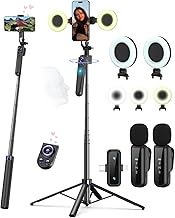
Best For:
Creators who want an all-in-one vlogging kit with tracking, lights, and microphones for streamlined airport content creation.
This Vlogging Kit bundles multiple essentials into one compact package: a 63-inch auto face-tracking tripod, integrated lighting, wireless microphones, and a scrolling remote. For creators who want an all-in-one carry-on solution, the value is in not having to hunt down separate lights and audio gear at the gate. The extendable tripod height makes it usable both seated and standing, while the included mics improve dialogue clarity in noisy terminals.
Benefits include streamlined setup—put the tripod in place, clip on the mic, set the light temperature, and start filming. Compared to buying separate components, the kit brings equipment compatibility and fewer cables to manage. The face-tracking works well for routine movement shots and ensures you stay centered when you step through a terminal or demonstrate products. The integrated LED typically offers adjustable brightness and color temperature adjustments, which help counteract harsh overhead lighting common in airports.
Real-life use cases: stage a quick seated Q&A with clear audio, film a standing outfit-of-the-day with flattering light and hands-free tracking, or set the kit up for a short live stream from a gate area while you answer viewer questions. The included wireless mics remove the need to get physically close to your phone, preserving natural distance and context in the shot.
Who should buy: creators who want a compact, portable studio-in-a-bag for travel days—particularly beginner-to-intermediate content makers who value convenience and integrated audio/lighting.
Who may not need it: seasoned videographers who prefer mixing and matching premium lights/mics or those who already carry a professional gimbal and microphones. Also consider weight: while consolidated, a kit is heavier than a single mount.
Practical observations: check reported battery life for both the light and tracking motors and the wireless mic range in crowded airport conditions. Cable management and a reliable carry case can make this kit far more airport-friendly.
Check the latest price on Amazon.
Pros
- Complete kit with tracking, light, and wireless mics
- Extendable tripod reaches standing height
- Good for live streaming and solo shooting
Cons
- Heavier than single-piece mounts
- Kit components vary in quality compared to standalone pro gear
Check the latest price on Amazon.
MQOUNY Auto Face Tracking Phone Holder, 360° Rotation Face Body Phone Tripod Smart Shooting Camera Mount with Rechargeable Remote and Light for Live Vlog Streaming Video, Rechargeable

Best For:
Frequent travelers who want compact auto-tracking and built-in lighting for quick airport vlogs and live streams.
The MQOUNY Auto Face Tracking Phone Holder is a compact smart mount that combines 360° rotation, face/body tracking, a rechargeable remote, and a built-in light. It’s tailored for creators who want a lightweight, feature-rich device that travels well. The smart tracking algorithms are designed to keep you centered during movement, while the integrated light helps soften terminal lighting without hauling a separate ring light.
Compared with a basic phone mount, this unit adds motion and illumination—useful when you’re recording in terminals with mixed lighting and a lot of backlight from windows. The rechargeable remote is handy if you prefer to start and stop recordings at a distance or switch modes without touching the phone. For creators filming multiple short pieces between flights, this setup cuts down setup time and keeps gear minimal.
Use cases include filming brief fashion transitions across concourses, hands-free vlogs during a layover, and quick product demos where you step around the camera. Because it’s rechargeable, it’s sensible to bring a small power bank if you expect to film multiple sets through a travel day.
Who should buy: creators who want the convenience of smart tracking and built-in lighting in a compact package—particularly those who travel frequently and value simple, repeatable setups.
Who may not need it: creators who already carry dedicated lights and pro audio gear or who need the most rugged stabilization for high-motion shoots.
Practical observations: confirm reported runtime for the light and tracking motor, and check how well the tracking performs in crowded, contrast-heavy airport backgrounds. A small power bank often complements this device nicely for longer travel days.
Check the latest price on Amazon.
Pros
- 360° tracking with integrated light
- Rechargeable remote control
- Compact and travel-oriented design
Cons
- Light and tracking quality limited by compact size
- May need power bank for extended use
Check the latest price on Amazon.
Final Verdict
Choosing the right carry-on filming gear for airport content comes down to how you balance portability, convenience and production needs. If you prioritize the fastest possible setup and minimal bulk, a small magnetic suction or MagSafe-style mount like the amBand or the universal 360° rotator gives reliable seated and tabletop performance. For solo creators who want motion without a second operator, auto face-tracking tripods deliver dynamic framing—options in this list that don’t require apps or that bundle tracking with lights and mics turn gate-side setups into a small portable studio.
Consider how you shoot: if you need integrated audio and lighting for clearer dialogue and flattering skin tones, the vlogging kit with wireless microphones and built-in LED is the most complete single purchase. If you travel light but want smarter framing, the MQOUNY and other auto-tracking stands are lightweight compromises that add motion without a gimbal. Remember to check battery runtimes, phone compatibility (especially if you use a bulky case or add-on lenses), and how each mount attaches to common airport surfaces before you travel.
Above all, choose gear that reduces friction so you can focus on storytelling instead of setup. For most creators shooting between gates, one compact mount plus a small microphone or a combined kit is the sweet spot. If you need to pick a single starting point: a versatile MagSafe-style mount for quick fits plus a small auto-tracking tripod for movement covers the majority of airport filming scenarios.
Check the latest price on Amazon.
Conclusion
These Carry on products creators use during airport content filming picks are trending now and offer great value and variety. Check the links above for latest prices and reviews.
As an Amazon Associate, I earn from qualifying purchases.
Tags:
carry-on filming gear, airport vlogging, auto face tracking tripod, MagSafe phone mount, portable vlogging kit
