Unexpected Productivity Essentials for Realistic Setups
As an Amazon Associate, I earn from qualifying purchases. This article may contain affiliate links, which means we may receive a commission at no extra cost to you.
Productivity setups have evolved beyond giant sit-stand desks and ultra-expensive mechanical keyboards. In the last couple of years a quieter trend has taken hold: small, inexpensive, and sometimes oddball accessories that solve real, everyday problems at the screen. These are the transparent memo panels that clip to your monitor, slim whiteboard organizers that sit under the keyboard, monitor risers that tuck away clutter and add charging, and compact sticky-note holders that make reminders visible without crowding your workspace.
This guide gathers five unexpected but practical products that are currently trending in realistic productivity setups. I researched product specs, common customer feedback and real-world use cases to highlight why these items are finding homes on busy desks — from remote workers juggling meetings to creators managing multiple windows and students balancing deadlines. Whether you want to eliminate sticky-note chaos, lift monitors for better posture, or add a dedicated writable surface that doesn’t clutter your desk, these picks are meant to be pragmatic, affordable, and easy to integrate.
Below you’ll find a clear buying guide, long-form descriptions of each product with realistic use cases, pros and cons drawn from aggregated user observations, and who should (and shouldn’t) buy each item. If you click a product, note that links go to Amazon; I may receive a small commission from qualifying purchases at no additional cost to you.
Buying Guide
Why these small accessories matter: in many real-world setups the big-ticket tech does most of the heavy lifting — laptop, monitor, keyboard, mouse — but it’s the small, thoughtfully placed items that reduce friction throughout the day. A memo strip on a monitor, for example, turns ephemeral sticky notes into a persistent, glanceable reminder without sticking tape to the screen. A riser with drawers and ports keeps charging cables neat and places often-misplaced items like phone or external drives within reach.
Key considerations when choosing monitor memo boards and desk organizers:
– Material and attachment: Look for clear acrylic or polycarbonate for durability and low visual distraction. Attachment methods vary: non-permanent clips or adhesive strips are common. If you swap monitors frequently, choose a clip design that’s easy to move.
– Size and placement: Memo boards that are too wide interfere with screen borders and webcam placement. Narrow strips (around 10–12" long and 2–4" high) give space for quick notes without blocking content. For risers, check the supported width and weight of your monitor(s).
– Additional functionality: Some risers add drawers, USB hubs, wireless charging, or LED accent lighting. Decide which extras you’ll actually use — a flashy LED strip is nice, but a stable drawer with smooth glides might be more valuable for keeping desk clutter hidden.
– Ease of cleaning and writing surface: If you plan to use dry-erase markers, ensure the board is compatible and won’t ghost easily. For adhesive memo holders, verify they won’t leave residue on your monitor or bezels.
– Aesthetics vs. visibility: Transparent accessories blend into most setups, while opaque organizers can help conceal mess. Consider whether you want your desk to feel minimal or intentionally organized.
Who benefits most: multitasking remote workers, students, creators juggling reference material and deadlines, and anyone who wants to reduce visual clutter. Who may not need them: people with very limited desk space that can’t accommodate even small risers, or those who rely entirely on digital task managers and avoid physical notes.
Next, detailed looks at five trending products, each with practical use cases and buying considerations based on product specs and aggregated customer impressions.
Office Desk Accessories 2pcs Multifunction Computer Monitor Memo Board – Transparent Computer Side Panel Memo Creative Monitor Side Panel Suitable for Office Home Desktop

Best For:
Remote workers, multi-monitor users, students, and anyone who likes quick, glanceable physical reminders without adding desk clutter.
This 2-piece set of transparent monitor-side memo boards is designed to clip or stick discreetly to the side of most monitors, creating a narrow writable and sticky-note-friendly surface. Made from clear acrylic, the panels are low-visual-impact yet sturdy enough to hold small notes, checklists, and quick sketches. The idea is simple: relocate the chaotic pile of sticky notes onto a single, organized side panel where you can glance without losing screen real estate.
Main benefits: The transparency keeps your field of vision clean while making reminders instantly visible. For remote workers who toggle between apps, this small addition reduces task-juggling friction by keeping next steps anchored at eye level. The slim profile works well on both single and dual-monitor rigs and avoids blocking webcam zones when placed to the side. The acrylic surface is compatible with erasable markers and can also accept removable sticky notes that won’t lose adhesion quickly because they sit on a flat plane.
Real-life usage examples: If you’re a content creator juggling deadlines, clip one panel to the left monitor for editorial notes and the other to the right for social post ideas. Students can park assignment due dates on the visible strip while working in full-screen reading mode. Customer-support professionals often use these as a place to store quick canned-response reminders or ticket numbers when hopping between tabs.
Why this product is valuable: Compared with pinboards or large whiteboards, these monitor-side panels demand very little space and integrate directly into where you’re already looking. They solve the problem of sticky notes falling off, being forgotten, or cluttering the actual desk surface. The set-of-two approach is practical for multi-monitor setups or for sharing one panel between work and one for personal reminders.
Buying considerations and practical observations: These panels are best suited to monitors with flat bezels or thin frames; highly curved displays or very thick bezels may need alternative mounting. If you frequently remove or reposition them, look for models with non-damaging adhesive or clip solutions. Cleaning is straightforward, but inexpensive acrylic can scratch if rubbed with rough cloths — a microfiber is recommended. Some users mention that very small adhesive pads lose stick after months in humid environments, so keep a spare set of double-sided tape handy.
Who should buy: People who rely on physical notes for quick reminders, multi-monitor users who need glanceable checklists, and home-office workers who prioritize a minimal desk footprint. Who may skip it: those who use only laptops without external monitors or people who prefer purely digital task management.
Check the latest price on Amazon.
Pros
- Transparent design keeps the screen visually clean
- Small footprint ideal for multi-monitor setups
- Works with dry-erase markers and sticky notes
Cons
- Adhesive/clip may not suit very thick or curved bezels
- Acrylic can scratch if not cleaned gently
Check the latest price on Amazon.
2PCS Computer Monitor Memo Board, 11" x 3.1"Clear Acrylic Office Desk Accessories, Computer Monitor Side Note Holder, Message Board for Sticky Notes, Reminders & Memos

Best For:
Users who need a longer, stable space for notes—developers, marketers, students, and shared-desk households.
These 11" x 3.1" clear acrylic memo boards come as a two-pack designed specifically to sit along the edge of a monitor. Slightly larger than many side strips, they provide room for more notes, short checklists, or even a simple daily plan. The thicker acrylic offers a more rigid writing surface compared with paper sticky notes, and because they’re clear they blend into the setup rather than shouting for attention.
Main benefits: The increased length makes these ideal for people who prefer a linear to-do list visible while they work. Because they’re rigid, removable sticky notes adhere more predictably and dry-erase pens write smoothly with minimal ghosting when wiped quickly. The boards are especially helpful if you frequently refer to a handful of numbers, project names, or login shortcuts while moving between applications.
Real-life usage examples: A developer might use a board to keep terminal commands or quick test URLs handy during a debugging session. A marketer could place campaign milestones on one board and daily tasks on the other. In a household with shared computers, one board can be used for family reminders like grocery items while the other is dedicated to work tasks.
Why the product is valuable: Compared to standard sticky-note stations that live on the desk, these monitor-mounted boards are always in the user’s peripheral vision without taking up desk real estate. For people who still rely on tactile notes, they cut down on the common problem of notes being shuffled out of sight or stuck to the wrong monitor. The two-board set supports organization across work/personal or left/right display separation.
Buying considerations and practical observations: These boards work best on flat-bezel monitors and can be less stable on rounded edges. The larger size means you should confirm your monitor width and bezel clearance so nothing obstructs the screen content. Some users prefer clip-on options to adhesive so the memo board can move between monitors — if you switch displays often, check whether the product’s mounting method fits your workflow. Also, thicker acrylic can be slightly more reflective under strong desk lights; positioning and angle matter.
Who should buy: People who want a larger writable area at eye level, multitaskers who keep lists while working, and households sharing one display. Who may skip it: very small monitors or curved displays where the board won’t sit flush.
Check the latest price on Amazon.
Pros
- Larger 11" length for longer lists
- Rigid acrylic improves note adhesion and writing
- Two-pack allows separation of work/personal notes
Cons
- May reflect light under bright desk lamps
- Not ideal for curved or very thick-bezel monitors
Check the latest price on Amazon.
TSJ OFFICE Small Desktop Whiteboard -Glass Dry Erase Board Computer Keyboard Stand White Board Surface Pad with Drawer, Desk Organizers with Accessories for Office, Home, School Supplies – White

Best For:
Compact workspace owners who want a durable dry-erase surface and hidden storage under the keyboard.
The TSJ OFFICE small desktop whiteboard doubles as a keyboard stand and organizational pad. It offers a glass-like dry-erase surface that sits beneath the keyboard when not in use and provides a drawer for storing pens, sticky notes, and small peripherals. This hybrid design is a practical answer to the desire for a writable surface and subtle storage without taking up additional desk depth.
Main benefits: A dedicated reusable writing surface under your keyboard turns idle desk space into a functional planning zone. The elevated platform improves monitor ergonomics by lifting the keyboard slightly and creating under-desk storage for compact items. The glass-like surface resists staining and ghosting better than cheap melamine boards, so short lists and reminders wipe clean with minimal residue.
Real-life usage examples: Writers and editors can draft quick outlines or jot scene beats on the dry-erase pad between typing bursts. Students working on problem sets will find it handy for scratch work without reaching for a notepad. In shared office spaces, the drawer hides pens and a small notepad, making it easy to keep essentials close while presenting a tidy desk when guests arrive.
Why the product is valuable: Compared with standalone whiteboards or desk pads, this product integrates writing space into a place you already use — beneath the keyboard — maximizing limited real estate. The drawer adds a simple organizational element, preventing the common problem of pens rolling off the desk or sticky notes getting lost. Because the surface is designed for dry-erase use, it’s better suited for reusable short-term notes than piling up paper scraps.
Buying considerations and practical observations: Ensure your keyboard height and wrist-rest habits are compatible with the riser height; some mechanical keyboard users prefer a lower angle for typing. The glass-like surface is durable but heavier than plastic alternatives; if you move your setup often, consider portability. The drawer is compact, so it’s best for small accessories rather than bulky items. A microfiber cloth and alcohol wipe are good maintenance tools to prevent marker staining over time.
Who should buy: People with limited desk depth who want an integrated writable surface and small hidden storage—writers, students, and tidy home-office workers. Who may skip it: users with full-size keyboards and wrist trays that require shallow platforms, or those who prefer purely digital scratch space.
Check the latest price on Amazon.
Pros
- Dual-purpose riser and dry-erase surface
- Drawer hides pens and small accessories
- Glass-like surface resists ghosting
Cons
- May raise keyboard height uncomfortably for some typists
- Drawer capacity is limited to small items
Check the latest price on Amazon.
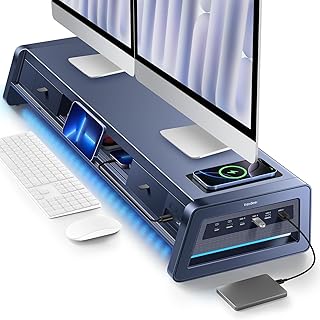
Vaydeer All-in-One Dual Monitor Stand Riser with 2 Drawers, 8USB Ports and Wireless Charging Pad with LED Light Strip for 2 Monitors , Desk Organizer for PC, iMac (Metal, 39.3 inches)
Best For:
Dual-monitor professionals and power users who want an integrated hub, wireless charging, and storage in one sturdy riser.
The Vaydeer all-in-one dual monitor stand riser is a feature-rich desk organizer designed for multi-monitor workstations. At roughly 39.3 inches wide, the metal platform supports two monitors while offering two drawers, an 8-port USB hub, a wireless charging pad, and an LED light strip for subtle backlighting. It’s intended to be a central hub for both ergonomics and cable/desk management.
Main benefits: This riser solves multiple problems at once: it raises monitors to a healthier eye level, adds under-riser storage to clear desk surfaces, centralizes power and USB connections via an integrated hub, and keeps your phone charged without adding extra chargers. The LED strip provides accent lighting that can reduce eye strain in low-light conditions and improve the overall ambiance of a workspace.
Real-life usage examples: A creative professional running dual displays for editing and reference files will appreciate the raised monitors and the ability to tuck external drives or hard-to-find dongles into drawers. Remote workers who host video calls can wire the webcam and accessories to the hub while keeping charging cables hidden. For small home-office setups, the wireless charging pad becomes the default resting spot for a phone between meetings.
Why the product is valuable: Compared with simple wooden or plastic monitor stands, the Vaydeer riser integrates practical tech—USB ports and wireless charging—that frequently require separate accessories. This consolidation reduces cable clutter and centralizes the most-used peripherals in an easy-to-reach location. The metal build tends to be more stable for heavier monitors than thin plastic risers.
Buying considerations and practical observations: Confirm monitor stand footprint and VESA clearance; not every monitor base will match this riser’s dimensions. The hub’s power needs and cable routing require planning — ensure the included cables and any wall adapters match your usage. LED lighting is decorative but may be unnecessary for those who prefer minimal aesthetics. Some users have noted that the drawers are shallow and best suited for small items; if you have many peripherals, add an external storage solution. Also, the width makes it unsuitable for very small desks.
Who should buy: Dual-monitor users who want a consolidated, feature-rich riser to improve ergonomics and reduce cable clutter—designers, editors, developers, and power users. Who may skip it: single-monitor setups on very small desks or users who want a purely minimal aesthetic without LEDs or built-in hubs.
Check the latest price on Amazon.
Pros
- Combines riser, storage, USB hub, and wireless charging
- Metal construction supports heavier monitors
- LED lighting improves low-light visibility
Cons
- Large footprint—needs a wide desk
- Drawers are shallow and not for bulky items
Check the latest price on Amazon.
Joyberg 3PCS Monitor Memo Board, Memo Board for Computer Monitor, Monitor Memo Board Computer Monitor Sticky Note Holder, Office Desk Accessories

Best For:
Budget-conscious users, students, and people experimenting with a visual, segmented note system.
The Joyberg 3-piece monitor memo board set offers a simple and affordable way to create organized, glanceable space on and around your screen. Each piece is sized to hold sticky notes or be used as a small writable area; the three-pack configuration is useful for breaking down tasks into prioritized columns or reserving a side for quick references like passwords (obscured) or meeting codes.
Main benefits: Having three separate boards provides flexibility. You can dedicate one to daily tasks, another to longer-term reminders, and the third to personal notes or quick references. The small form factor makes them unobtrusive and suitable for multi-monitor setups or staggered placement above and to the sides of a laptop screen. Because they’re inexpensive, they’re a low-commitment experiment for people curious about physical reminders.
Real-life usage examples: A project manager might use the three boards as ‘Today’, ‘This Week’, and ‘Later’ columns, which encourages a visible kanban-lite workflow without digital tools. Students can reserve a board for class codes, assignment due dates, and exam reminders. Customer-service reps can keep one board for ticket IDs, another for canned responses, and a third for personal to-dos.
Why the product is valuable: Compared with a single long strip, three smaller boards encourage modular organization and visual separation of information. They’re also easier to reposition for asymmetric monitor setups. Because the price point is low, they’re an excellent option for people experimenting with physical task systems without committing to larger desktop organizers.
Buying considerations and practical observations: Small adhesive pads work for many monitors but may need replacement over time. Because the boards are small, they are best used for concise notes; anyone who likes long lists may find themselves needing multiple boards. The finish can vary between matte and glossy depending on manufacturing batches, which affects dry-erase compatibility and glare. If you prefer a uniform writable feel, test one board first.
Who should buy: People experimenting with physical task organization, those who prefer modular note placement, and users on a budget who want to reduce sticky-note clutter. Who may skip it: users who need single, long lists or larger writable areas.
Check the latest price on Amazon.
Pros
- Three-piece set for modular organization
- Affordable—good for experimenting with physical notes
- Small and unobtrusive on multi-monitor setups
Cons
- Limited space per board for longer notes
- Adhesive may need periodic replacement
Check the latest price on Amazon.
Final Verdict
Small, targeted accessories can make a bigger difference to daily productivity than many larger upgrades. The five products above cover a range of needs: from low-commitment sticky-note alternatives (Joyberg and the clear acrylic strips) to a more integrated organizer-and-hub solution (Vaydeer) and a dual-function riser/whiteboard (TSJ OFFICE). If you’re trying to reduce desk clutter, improve posture, or keep the next action visible without resorting to dozens of paper notes, one of these options will likely fit your workflow.
Start small: experiment with a single monitor memo board to see whether physical notes help you stay on top of tasks; if you like the effect, consider adding a riser or a combinated desk organizer later. For dual-monitor power users, the Vaydeer riser consolidates multiple needs into one investment; for compact desks, TSJ OFFICE’s keyboard-stand whiteboard adds functionality without more depth usage. If budget and flexibility are priorities, the Joyberg or the smaller transparent panels give you the visible reminder benefit with minimal commitment.
Ultimately, choose the product that matches how you actually work. A tidy, realistic productivity setup is built from small changes that stick. If one of these accessories looks useful, consider the product details and mounting method, and match it to your monitor type and desk dimensions.
As an Amazon Associate, I earn from qualifying purchases. This article may contain affiliate links, which means we may receive a commission at no extra cost to you.
Check the latest price on Amazon.
Conclusion
These Unexpected products trending in realistic productivity setups picks are trending now and offer great value and variety. Check the links above for latest prices and reviews.
As an Amazon Associate, I earn from qualifying purchases.
Tags:
monitor memo board, desk organizer, productivity accessories, monitor riser, desktop whiteboard, workspace organization, dual monitor stand
