Top Dorm Gadgets for Remote Internships
As an Amazon Associate, I earn from qualifying purchases. This article may contain affiliate links, which means we may receive a commission at no extra cost to you.
Working a remote internship from a dorm room brings unique constraints: limited space, unpredictable lighting, and the need to look and sound professional on video calls. The right small tech and desk accessories can make the difference between a frustrating setup and a productive, comfortable work environment. Below you’ll find a researched, practical guide to five dorm-friendly gadgets creators and remote interns commonly rely on. This article is written to help you choose what fits your routine, whether you need better lighting, a tidier desktop, or a portable work surface you can use on a bed or couch.
Affiliate disclosure (again for clarity): As an Amazon Associate, I earn from qualifying purchases. This article may contain affiliate links, which means we may receive a commission at no extra cost to you.
Buying Guide
What to prioritize when shopping for dorm-friendly remote internship gear:
1) Size and portability: Dorm rooms are small. Look for clip-on devices, foldable desks, and slim organizers that can easily be removed when you need space. Products that store flat or fold up save significant room.
2) Build quality and clip/mount strength: A monitor-mounted memo board or lighting clip must grip securely without scratching your laptop or monitor. Check for soft silicon pads, adjustable clamps, and reviews that mention stability.
3) Lighting and color temperature: Ring lights differ in brightness and color temperature range. For video calls, a neutral or slightly warm light (3000–4500K) typically looks best on camera; adjustable brightness helps in varying dorm lighting.
4) Comfort and ergonomics: Lap desks should have enough surface area for a laptop and mouse, with stable legs and a comfortable underside cushion if you’ll work from bed. Good ventilation for laptops is a bonus.
5) Multi-functionality: Items that combine uses (e.g., a whiteboard with storage and a wireless charger) reduce clutter and increase value compared to single-purpose items.
6) Cable and charging management: Dorm setups often rely on limited outlets. Prioritize products with integrated cable channels or an included charging pad.
7) Noise and distractions: If you plan to record audio or join frequent calls, avoid gadgets with noisy fans or rattling parts. Lightweight, quiet accessories keep the environment professional.
Who should care most: first-year students and remote interns who need fast, compact upgrades to appear polished on video calls and to manage notes and tasks without a full home office. Who may not need these: those with large, dedicated study spaces and full desktop setups already equipped with professional lighting and desk organizers.
Below are five recommended items, with practical use cases, pros and cons, and clear notes on who will benefit most.
Joyberg 3PCS Monitor Memo Board, Memo Board for Computer Monitor, Monitor Memo Board Computer Monitor Sticky Note Holder, Office Desk Accessories

Best For:
Students and remote interns who want a low-cost, space-saving way to keep short-term reminders and talking points visible during study or video meetings.
Small changes make a big difference when you’re juggling classes, internship tasks, and deadlines from a dorm desk. The Joyberg 3PCS Monitor Memo Board is a minimalist accessory designed to stick to the side of a monitor or laptop bezel to keep urgent notes, phone numbers, or quick reminders right in your line of sight. Each pack includes three clear, thin memo boards that attach with a low-profile adhesive backing. They don’t interfere with your screen space but provide an easy-to-access surface for Post-it style notes or dry-erase markers if you prefer reusable writing.
Main benefits: The immediate advantage is visual organization—no more sticky notes lost under textbooks or buried in a backpack. These memo boards cut down on context-switching: seeing a task reminder and returning to work is quicker than opening a notes app when you’re mid-task. For remote interns who need to keep track of meeting times, quick agenda points, or short snippets of code or vocabulary, having a physical note within peripheral vision reduces time spent searching for information.
Real-life usage examples: Imagine you’re in back-to-back virtual meetings. Instead of juggling a paper notebook, pop a one-line action item onto the memo board and wipe it later. Creators doing live streams or quick screen-shares can list talking points on the board to refer to without switching applications. Students who use flashcards can stick a single study prompt to the board for repeated glance-and-recall sessions while reading.
Why it’s valuable: Compared with full-sized whiteboards, this solution is ultra-compact, inexpensive, and scalable—use one on a laptop and another on a dorm-room monitor. Unlike adhesive Post-its that lose stickiness, these reusable boards are easy to clean and reposition. They’re also less likely to leave adhesive residue than heavy-duty mounting strips.
Buying considerations: Check that your monitor’s bezel has enough flat surface for the adhesive; very thin or curved laptop edges might not provide a firm hold. If you regularly adjust or move your laptop, occasional reapplication may be required. They’re not a replacement for a weekly planner, but they serve perfectly as a glanceable reminder system.
Who this is best for: Students and interns who value visual reminders and need a low-cost, low-space way to keep short-term tasks in view. It’s especially useful for creators who alternate between streaming, studying, and taking quick notes during calls.
Who may not need it: People who prefer fully digital workflows and always use task-management apps may find it redundant. Also, those with very slim bezels or all-in-one tablets might struggle to mount it securely.
Pros: Reusable and repositionable; compact and space-saving; ideal for quick reminders.
Cons: Adhesion can vary on curved or ultra-thin bezels; limited writing area.
Check the latest price on Amazon.
Pros
- Reusable and easy to clean
- Keeps quick reminders in peripheral vision
- Compact and lightweight—saves desk space
Cons
- May not stick well to curved or ultra-thin bezels
- Small writing area not suited for longer notes
Check the latest price on Amazon.
Cyezcor Video Conference Lighting Kit, Ring Light for Monitor Clip On,for Remote Working, Distance Learning,Zoom Call, Self Broadcasting and Live Streaming, Computer Laptop Video Conferencing

Best For:
Interns and creators who need quick, portable improvement to webcam lighting without a full studio setup.
Lighting changes how others perceive you on video calls—soft shadows, washed-out faces, or harsh contrasts can all be solved with a compact clip-on ring light. The Cyezcor Video Conference Lighting Kit is designed specifically for monitor and laptop use, with a clip mount that attaches to the top of screens, an adjustable gooseneck, and multiple brightness and color temperature settings. For dorm dwellers, this means you can create a consistent, flattering light without rearranging furniture or relying on poor overhead lights.
Main benefits: The key advantage is immediate improvement in on-camera presence. A ring-style light diffuses illumination evenly across the face, reducing unflattering shadows and improving webcam exposure. Adjustable brightness and color modes help you match room lighting and skin tone—warm for a cozy feel, cool for crisper daytime calls. The clip design stays attached during standard laptop movement and the flexible arm allows you to fine-tune angle and distance.
Real-life usage examples: During a remote internship presentation, consistent lighting helps your facial expressions register clearly and ensures webcam auto-exposure doesn’t make your video too dark. Creators who shoot short social videos or stream from their laptop will find the light helps cameras produce truer color and clearer detail. For distance learning, the extra light is useful when scanning notes or when a dorm’s single overhead light leaves your face shadowed.
Why it’s valuable: Compared with bulky softboxes or full-size ring lights, a clip-on kit is dorm-friendly—quick to attach, easy to store, and usable with a variety of devices. If you’ve tried relying on a desk lamp and still looked shadowy on camera, this type of targeted, diffused light can be a game-changer.
Buying considerations: Verify clip compatibility with your monitor thickness and check that the gooseneck is sturdy enough for your setup. Some cheaper clips wobble when adjusted. Also plan for power: many clip-on lights draw power via USB, so you may need an available port or a USB power adapter.
Who this is best for: Remote interns, virtual presenters, and creators who need improved on-camera lighting without a permanent setup. Great for students who record short videos, attend many video calls, or stream casually.
Who may not need it: Those with already professional lighting setups or desktop studio rigs won’t benefit as much.
Pros: Easy to mount and store; adjustable color temps and brightness; great for improving webcam image.
Cons: Can wobble on very thin or very thick screens; makes use of a USB port.
Check the latest price on Amazon.
Pros
- Clip-on design saves space
- Multiple brightness and color settings
- Portable and easy to reposition
Cons
- Clip stability varies with screen thickness
- Uses a USB port for power
Check the latest price on Amazon.
Anautin Ring Light for Video Conference Lighting,360°Adjustable,Portable LED Video Conference Lighting for Monitor,Laptop&Desktop Computer,Streaming Light for Zoom Meetings, Selfie Makeup, Video Calls

Best For:
Students, creators, and remote professionals who need flexible on-camera lighting with easy angle adjustments.
If your dormroom lighting is inconsistent, a 360° adjustable ring light gives you more flexibility to craft the exact look you want on camera. The Anautin Ring Light is a compact LED option that clips onto a laptop or monitor and offers a wide range of angle adjustment thanks to its fully flexible arm. It typically includes multiple brightness steps and color temperature modes to help you achieve natural-looking skin tones and balanced highlights, whether you’re doing a midday presentation or an evening study session.
Main benefits: The standout feature is the fully adjustable range—rotate, tilt, and bend the arm to eliminate shadows caused by overhead lights or side lamps. The circular LED array helps create soft, even illumination that compliments webcams and phone cameras. For creators who value a consistent look, the ring format helps produce the subtle catchlight in the eyes that reads as professional on-screen.
Real-life usage examples: Use it for day-to-night transitions when you have consecutive classes or internship calls across different lighting conditions. If you shoot short how-to clips on your laptop, a steady ring light reduces post-processing exposure issues. For students who do makeup tutorials or product demos, the adjustable array makes it simple to move from a close-up to a wider framing without buying a second light.
Why it’s valuable: Compared to basic desk lamps, a ring light focuses on facial illumination and camera-friendly diffusion. Its portability and small footprint mean you can pack it for weekend trips or move it between dorm rooms without a lot of hassle.
Buying considerations: Make sure the clip is padded and can handle repeated attachment without damaging your laptop finish. If you rely on battery power, check battery life and whether it supports both USB power and battery operation for flexibility.
Who this is best for: Creators and interns who need a flexible, flattering light for video calls, recording, or streaming from a laptop or compact desk setup.
Who may not need it: Those who already have a dedicated studio light or larger desktop lighting system.
Pros: Wide adjustment range; soft, even illumination; compact and travel-friendly.
Cons: Battery life varies if model supports battery; some clips can strain thin laptop lids.
Check the latest price on Amazon.
Pros
- 360° flexibility for exact positioning
- Soft, even LED illumination
- Compact for dorm and travel use
Cons
- Battery-powered models have limited runtime
- Clip may stress very thin laptop lids
Check the latest price on Amazon.
CloudTrip Laptop Desk for Bed or Couch, Lap Desk, Woking in Bed Desk, Home Office Desks, Breakfast Tray, Desk with Cup Holder, Watching Movies in Bed, Laptop Stand for Bed, Fordable Legs Desk (Black)

Best For:
Dorm residents who need a portable surface to work from bed or couch and want a compact, multi-use desk alternative.
When your dorm doesn’t offer a dedicated office, a lap desk is the most versatile substitute. The CloudTrip Laptop Desk is a foldable lap desk designed for bed or couch use with a sturdy tabletop, foldable legs, and a built-in cup holder—small touches that make long study sessions more comfortable. It’s large enough for a laptop and mouse, and the foldable legs let you convert it into a low table for meals, reading, or watching videos.
Main benefits: The biggest benefit is ergonomic convenience. Using a laptop for hours perched on your knees can cause heat build-up and awkward posture; a lap desk gives you a stable surface and raises your device slightly to a more comfortable typing angle. The cup holder and slightly raised lip help prevent accidental spills and keep pens and your phone from sliding off.
Real-life usage examples: During a late-night group project, prop the desk over your legs in bed to type without the laptop overheating against your thighs. On weekends, fold the legs out and use it as a TV tray while catching up on lectures or editing video. Interns who need to review documents while on a call will appreciate the extra surface for a notebook and headset without commandeering a roommate’s desk.
Why it’s valuable: Compared with full desktop desks, lap desks are far cheaper and portable. They let you create a semi-ergonomic workspace anywhere in a dorm without drilling holes or rearranging furniture. They’re particularly helpful for students sharing communal areas, letting you keep your work contained and mobile.
Buying considerations: Look for ventilation cutouts if you run heavy software that heats your laptop. Check the leg stability and the hinge quality; cheap models can wobble. If you need a standing solution, this isn’t the right choice—lap desks are best for seated or reclined use.
Who this is best for: Students who alternate between bed and desk, dorm residents without a dedicated workspace, and anyone who wants a portable surface for eating, studying, and light laptop work.
Who may not need it: Those with a full-size desk, external monitors, or a standing workstation will get limited value.
Pros: Portable and foldable; multi-use for work and meals; stabilizes laptop usage in bed.
Cons: Not a substitute for a full ergonomic desk; some models lack ventilation for heavy laptops.
Check the latest price on Amazon.
Pros
- Foldable and easy to store
- Includes cup holder and raised edge
- Provides a stable surface for laptop and mouse
Cons
- Not suitable as a permanent ergonomic solution
- Some models can wobble if legs aren’t robust
Check the latest price on Amazon.
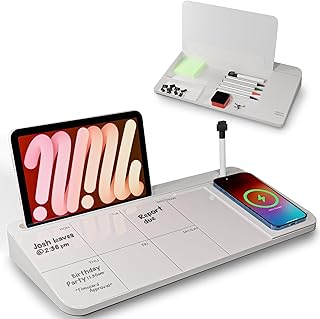
NEXTLUXE Glass Desk Whiteboard with Wireless Charger – Desktop Whiteboard with Storage, Weekly Planner, Dry Erase Pad, Organizer Drawer for Home, School, Office Gadgets – White
Best For:
Organized students and interns who want an attractive, multifunction desktop organizer with a writable surface and wireless charging.
When a dorm desk feels cluttered, a multifunction desktop organizer can restore order while adding premium touches. The NEXTLUXE Glass Desk Whiteboard combines a sleek tempered glass dry-erase surface with integrated storage compartments and a wireless charging pad—bringing planning, charging, and small-item organization into one footprint. The glass surface doubles as a weekly planner or quick brainstorming board that’s easy to wipe clean, while the drawer and compartments keep pens, sticky notes, and cables tucked away.
Main benefits: This product consolidates multiple desk needs: a writable planning surface, a place to stash loose accessories, and a convenient wireless charger. For remote interns, this means fewer distractions—no more hunting for a charger mid-meeting or juggling scattered pens during a timed task. The glass surface looks cleaner than plastic and holds up to repeated use without staining.
Real-life usage examples: Set a weekly sprint or study schedule on the glass surface for quick reference while you work. Use the drawer to store USB drives, dongles, and a pair of earbuds so you’re always ready for a surprise call. Creators who switch between phone and laptop will appreciate charging their phone wirelessly while keeping a neat workspace for script notes or shot lists.
Why it’s valuable: Compared with standalone organizers, the integrated charger and writable glass surface reduce clutter and raise your desk’s functionality without taking up additional space. It’s particularly useful for those who like to plan visually and appreciate a tidy aesthetic.
Buying considerations: Wireless charging efficiency varies—check compatibility with your phone model and whether the charger supports phone cases. The product is heavier due to the glass, so while it’s desktop-sturdy, it’s not intended to be highly portable. Also consider the size relative to your dorm desk; measure your space before buying.
Who this is best for: Students and interns who prioritize a tidy, visually organized desk and who use wireless-charging-capable phones.
Who may not need it: Those who prefer fully digital planning systems or who don’t use wireless charging might not gain as much value.
Pros: Multipurpose—writing surface, storage, and wireless charging; premium glass finish; keeps desk clutter minimal.
Cons: Heavier than plastic organizers; wireless charging compatibility can vary.
Check the latest price on Amazon.
Pros
- Tempered glass dry-erase surface
- Integrated storage drawer
- Built-in wireless charger for convenience
Cons
- Heavier and less portable
- Wireless charging may vary by phone case and model
Check the latest price on Amazon.
Final Verdict
Creating a productive remote-internship setup in a dorm room is about prioritizing compact, multifunctional tools that improve focus and on-camera presence without dominating the space. The Joyberg memo boards are a low-cost way to keep short-term reminders in view; the Cyezcor and Anautin ring lights solve on-camera lighting issues and help you look professional on video calls; the CloudTrip lap desk gives you portable stability for bed and couch work; and the NEXTLUXE glass organizer consolidates planning, storage, and charging into one clean footprint. Combine one or two lighting options with a compact organizer and, if needed, a lap desk, and you’ll have a flexible setup that supports both deep work and polished video appearances. Consider your workflow: if you’re on camera a lot, invest in the ring light first. If space is your constraint, prioritize the glass organizer and memo boards to keep clutter at bay. These five picks are dorm-appropriate, affordable relative to full studio gear, and chosen for practical use cases students and remote interns face regularly.
If you found this guide helpful, check product pages and reviews to confirm compatibility with your devices, and pick the combination that matches your daily routine.
Happy interning—and remember, small upgrades can yield big improvements in how you work and present yourself remotely.
Conclusion
These Dorm room gadgets creators use during remote internships picks are trending now and offer great value and variety. Check the links above for latest prices and reviews.
As an Amazon Associate, I earn from qualifying purchases.
Tags:
dorm room gadgets, remote internship, video conferencing lighting, lap desk, desktop organizer, study accessories, monitor memo board
