Top Reusable Work-from-Home Tools for Creators
As an Amazon Associate, I earn from qualifying purchases. This article may contain affiliate links, which means we may receive a commission at no extra cost to you.
Working from home has pushed creators, freelancers, and remote teams to rethink how they capture ideas, organize tasks, and manage physical notes without creating clutter. Reusable tools—like smart notebooks, dry-erase sticky notes, and compact notepads—offer a sustainable, cost-efficient way to keep your workspace tidy while preserving the flexibility of analog note-taking.
This guide collects a curated set of reusable products that are popular with people who write, sketch, plan, and manage projects from home. I’ll walk through practical benefits, real-life use cases, and buying considerations so you can decide which combination of tools fits your workflow. Whether you need a full-size smart notebook that syncs to cloud apps, pocket-sized sketch pads for on-the-go ideas, or colorful dry-erase notes to organize your monitor edge, there’s a reusable item here that reduces waste and speeds up daily routines.
Affiliate disclosure is included near the top because transparency matters: As an Amazon Associate, I earn from qualifying purchases. This article may contain affiliate links, which means we may receive a commission at no extra cost to you.
Buying Guide
Why choose reusable tools for WFH? Reusable notebooks and dry-erase solutions reduce paper waste, lower ongoing costs, and often add features—like digitization and cloud backups—that standard notebooks don’t provide. Before buying, consider these key factors:
1) Size and format. Think about where you’ll use the item. Letter-size (8.5 x 11) notebooks are ideal for desk-based planning, printed templates, or meeting notes; pocket sizes fit brief walks, quick sketched concepts, or couch brainstorming. Sticky note packs are great when placed around monitors or planners.
2) Compatibility and ink type. Some reusable notebooks and sticky sheets require specific marker types to erase cleanly. Rocketbook products, for instance, are designed with erasable pens and also support scanning to cloud services via a companion app. If you rely on Apple Notes, Google Drive, Slack, or Evernote, verify that the product’s app or workflow integrates easily.
3) Digitization and workflow. One major benefit of smart reusable notebooks is the ability to send notes to folders, email addresses, or cloud drives. This is more efficient than photographing pages manually and simplifies versioning and search.
4) Adhesion and surface quality. For reusable sticky notes, check how well they stick to glass, plastic, or painted walls. Removable adhesive should be strong enough to stay put for days but not so aggressive that it leaves residue. The surface should accept wet-erase and dry-erase pens and stand up to repeated wiping.
5) Durability and cleaning. Look for washable surfaces and easy-to-clean pages. Some reusable note pads come with microfiber cloths and recommended cleaners. Understand how many cycles the product claims to handle and what users say about staining or ghosting.
6) Price vs. lifetime value. Reusable tools cost more upfront than single-use paper but can save money over months or years. Think about how often you take notes and whether cloud features and portability justify the investment.
Who should buy these tools? Creators who draft ideas, sketch scenes, or run frequent remote meetings will get the most value. If you rarely take written notes and prefer typing, standard notebooks or digital-only tools might remain more practical. For hybrid users—people who draw but need digital copies—smart reusable notebooks hit the sweet spot.
This guide focuses on five practical products that cover large-format planning, pocket brainstorming, and colorful reusable notes for visible reminders and labels. Below, each product section explains real-life usage, who it’s best for, pros and cons, and closing thoughts to help you choose.
Rocketbook Core Reusable Smart Notebook, Lined Pages For School, Work and Creative Projects, Letter Size 8.5×11, Teal – Premium

Best For:
Writers, project managers, students and remote professionals who want to digitize handwritten notes and avoid paper clutter.
The Rocketbook Core (Letter, lined pages) is designed for creators who want the tactile experience of handwriting with the convenience of digital organization. Unlike disposable notebooks, this reusable smart notebook uses a special polyester blend page that accepts erasable pens—so you can write, scan, and erase again and again. The companion Rocketbook app recognizes page markers and sends your notes to cloud destinations like Google Drive, Dropbox, Evernote, Slack, and e-mail, making it a strong alternative to plain paper or simple spiral notebooks.
What it solves: For remote workers who juggle meeting notes, draft outlines, and action items, the Rocketbook Core turns analog notes into searchable digital records. That means no more riffling through stacks of paper or losing an important sketch. The lined letter-size format offers ample room for detailed meeting minutes, to-do lists, and multi-column planning—useful for project managers, writers, or students who attend long virtual classes.
Real-life usage scenarios: On a typical work-from-home day, use the Rocketbook Core on your desk to capture morning priorities and project status updates. Scan pages at the end of a call and have the notes automatically routed to a project folder. Because the pages are lined, it’s easy to keep minutes tidy during interviews or brainstorming sessions. The teal cover keeps it visually distinct on a crowded shelf.
Features and comparisons: Compared with standard paper notebooks, Rocketbook adds cloud integration and reusability. Compared with fully digital tablets, it keeps the low-friction act of writing by hand and doesn’t require charging. Important features include the erasable page material, compatibility with Pilot FriXion pens for clean wipes, and the Rocketbook app’s multi-destination scanning.
Who should buy: This notebook is best for creators who regularly need digital backups of handwritten notes—writers, remote meeting hosts, designers collecting feedback, and students attending hybrid classes. It’s less suitable for people who prefer keyboard-first workflows or who require archival paper copies that must remain permanent and non-erasable.
Buying considerations: Choose the letter size if you frequently print, annotate, or need larger layouts. Note that erasing works best with the recommended pens, and heavier ink types or non-approved markers can leave ghosting. Also factor in whether you want lined pages versus dot grid or executive sizes for sketching or layout work.
Check the latest price on Amazon.
Pros
- Reusable pages that erase cleanly with recommended pens
- Companion app sends notes to multiple cloud destinations
- Large letter size ideal for detailed notes and lists
Cons
- Requires specific erasable pens for best results
- Not suitable if you need permanent, archival paper copies
Ready to reduce paper clutter and digitize your notes? Check the latest price on Amazon.
Reusable Sticky Notes 3×3 Work from Home Essentials Pack, Set of 8 Dry Erase with Wet Erase Pen

Best For:
Creators and remote workers who rely on visible, short-term reminders and want a sustainable replacement for disposable sticky notes.
If your desk, monitor, or planner often fills up with torn scraps, a pack of reusable 3×3 sticky notes can be a practical upgrade. These dry-erase sticky notes come in a set of eight and include a wet-erase pen for writing that won’t smudge accidentally. Designed to stick to smooth surfaces—laptops, monitors, whiteboards, or glass—they replace disposable Post-it notes and let you rearrange or rewrite reminders without wasting paper.
What it solves: Creators working from home rely on visible reminders for task lists, daily priorities, and short reference items (short passwords, call times, or one-line prompts). A reusable sticky note reduces paper use and keeps frequently changing info in plain sight. When a task is finished, wipe the surface or use the included pen to mark progress, then reuse the same note for tomorrow’s list.
Real-life usage scenarios: Use a reusable sticky note to map out a 60-minute Pomodoro plan on your monitor during a writing sprint. Place different color notes along the edge of your desk for project categories—content, admin, client work—and move them as tasks shift between stages. They’re also handy for virtual meeting cues: quick bullet points or a concise agenda you can glance at without alt-tabbing to another app.
Features and comparisons: Compared with single-use sticky notes, these washable sheets last much longer and eliminate constant reorders. Unlike full-size whiteboards, they’re portable and flexible for rearranging across work surfaces. Important features to look for include adhesive strength that won’t leave residue, compatibility with both dry-erase and wet-erase markers, and ease of cleaning without ghosting.
Who should buy: This pack is a good fit for freelancers, content creators, and remote workers who use post-it-style reminders and want a more sustainable, reusable option. If your reminders need to be archived or saved long-term, standard paper sticky notes or a digital task manager might be more appropriate.
Buying considerations: Check surface compatibility before you buy—some adhesives stick better to glass and plastic than textured painted walls. Also test markers and erasing instructions to avoid staining. For maximal versatility, pair these with a small microfiber cloth and a dedicated wet-erase pen.
Check the latest price on Amazon.
Pros
- Reusable—reduces paper waste and ongoing costs
- Includes wet-erase pen for smudge-resistant notes
- Portable and sticks to many smooth surfaces
Cons
- Adhesion can vary by surface type
- Not suitable for long-term archival notes
Want to swap disposable notes for reusable reminders? Check the latest price on Amazon.
Rocketbook Mini Reusable Smart Notepad, Pocket Size On-The-Go Notebook, 3.5×5.5, Navy Blue (Pack of 1)

Best For:
Writers, designers, and mobile creators who need a pocket-ready notebook for quick ideas and on-the-go captures.
For creators who need a grab-and-go solution, the Rocketbook Mini is a compact reusable notepad that fits in a pocket or small bag. Measuring roughly 3.5 x 5.5 inches, it’s ideal for quick sketches, idea capture, and short lists. As with other Rocketbook products, the Mini is designed to be used with specific erasable pens and to integrate with a companion app that scans pages and routes them to cloud services.
What it solves: The Mini solves the problem of fleeting ideas lost between Zoom calls, kitchen counters, and couch brainstorming. Instead of a scrap of paper that gets misplaced, you can jot a concept, scan it instantly with your phone, and erase the page for the next idea. This model is particularly useful for creatives who travel between rooms, take walks, or accept calls while pacing.
Real-life usage scenarios: Use the Mini to capture a punchy line of copy during a break, sketch a thumbnail composition while watching reference material, or maintain a one-day task list that you scan and archive at day’s end. Designers often like pocket notebooks for quick wireframe sketches; writers use them to record micro-observations that later become prompts. Because it’s small, you can stash it in a laptop sleeve and have it ready when inspiration strikes.
Features and comparisons: Compared to a full-size smart notebook, the Mini sacrifices page area but gains portability. Compared to smartphone notes, it offers the immediacy and ergonomics of pen-on-paper while still providing a digital backup. Important features include the quick-scan compatibility, erasable page surface, and pocket-friendly dimensions.
Who should buy: The Rocketbook Mini is best for writers, designers, and creators who want a portable, low-friction way to capture ideas and back them up digitally. It’s less suitable for people who need to take long-form notes or heavily annotated documents due to its limited page size.
Buying considerations: Consider whether a pocket-size book fits your note density—if you take dense meeting notes, a larger format may be preferable. Also keep in mind the recommended pens and the app’s scanning quirks; consistent lighting improves digital capture quality.
Check the latest price on Amazon.
Pros
- Highly portable—fits in pockets and small bags
- Reusable and cloud-capable through the companion app
- Great for quick sketches and bite-sized notes
Cons
- Limited writing area—less suited for long notes
- Requires recommended erasable pens for clean erasing
Need a pocket-sized idea-catcher? Check the latest price on Amazon.
JJPRO Dry Erase Sticky Notes – Reusable Whiteboard Stickers 8 Colors 3"x3"-16 Pack. Suitable for All Smooth Surface.Great for Labels, Lists, Reminders and Decals-Washable,Removable

Best For:
Content creators and visual planners who use color-coding to manage multiple projects or workflows.
JJPRO’s dry erase sticky notes offer an expanded, colorful system for visual organization. The 16-pack in eight colors provides a flexible layout for color-coded tasks, labeling, or short-term project boards. Each sticky tile is a little whiteboard—write, erase, and reuse—so these sheets become a portable mini-kanban or a reusable labeling system for work-from-home setups.
What it solves: For creators juggling multiple clients, content buckets, or deadlines, color-coded sticky tiles make it easy to distinguish projects at a glance. Rather than multiple stacks of paper or sticky notes in different shades, you get a consistent, wipeable surface that lives across your monitor or wall. Teams who collaborate remotely can also take quick photos of the layout for asynchronous updates.
Real-life usage scenarios: Use a color for each client or content type—green for social, pink for editorial, blue for admin—and arrange the tiles in columns for To Do, Doing, and Done. During a live video meeting, move a tile to “Doing” as responsibilities shift, and then scan or photograph the board to share status with teammates. They’re also useful for temporary labels on prop bins, camera gear, or storage containers when doing production work at home.
Features and comparisons: Compared with single-color or single-pack reusable notes, JJPRO’s multicolor set offers a visual system that many creators find helpful for time-blocking and project separation. Compared to a dedicated whiteboard, these tiles are more modular and can be placed precisely where you need them. Look for strong adhesive that cleans easily and resists curling.
Who should buy: Ideal for visual organizers, content creators, photographers, and small teams who use color-coding to separate tasks. Not ideal if you want permanent labeling or if you need a large continuous writing surface.
Buying considerations: Verify the adhesive strength on your intended surfaces; glass and smooth plastics tend to work best. If you need archival records of the board over time, pair these with a quick snapshot habit or a smartphone app to store layouts.
Check the latest price on Amazon.
Pros
- Large pack with multiple colors for visual organization
- Reusable surface works with dry-erase markers
- Modular—build mini kanban boards or labels
Cons
- Adhesive performance varies by surface
- Smaller tiles may not suit long-form notes
Looking to color-code your workflow? Check the latest price on Amazon.
Rocketbook Core Reusable Smart Notebook, Dot Grid Pages For School, Work and Creative Projects, Executive Size 6×8.8, Black – Premium
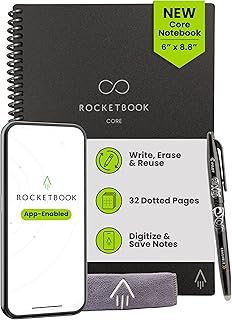
Best For:
UX designers, illustrators, planners and hybrid note/sketch users who want a portable dot-grid smart notebook.
The Rocketbook Core Executive (6 x 8.8, dot grid) is a mid-size reusable smart notebook designed for creators who need structure for sketches, layouts, and neat lists without the bulk of a full letter notebook. Dot grid pages give you the freedom to draw precise diagrams or create balanced layouts while still keeping handwriting tidy. Like other Rocketbook products, it’s built on an erasable synthetic page optimized for compatible pens and cloud scanning.
What it solves: For creatives who alternate between sketching and structured note-taking—UX designers, illustrators doing thumbnails, and planners drafting content calendars—the dot grid format offers a flexible canvas that’s more guided than blank paper but freer than lined pages. The Executive size balances portability and page real estate: it’s big enough for diagrams but compact enough to carry to a client call or between home office spaces.
Real-life usage scenarios: Use the dot grid Rocketbook to sketch wireframes in the morning, annotate client feedback during an afternoon review, and capture a to-do list that you scan and tag by project. Designers can draw layout grids to test spacing, while content creators can map article structures and mind maps without feeling constrained by lines.
Features and comparisons: Compared to the letter-size lined Rocketbook, the Executive dot grid is more suited for drawing and layout work. Compared to tablets, it provides a distraction-free analog surface with cloud backup rather than a digital canvas. Important features include erasable, low-ghosting pages, app-driven scanning and labeling, and a size that fits into most messenger bags and backpacks.
Who should buy: Best for designers, planners, and creators who need a hybrid sketch-and-note tool with reliable digitization. If your daily routine involves only brief reminders or you prefer large-project spreads, you might prefer a larger letter-size or a dedicated digital tablet for illustration.
Buying considerations: If you value precision in sketches, check how the dot grid spacing matches your preferred scale. Remember to use the recommended pens for consistent erasing and to avoid long-term ghosting. The Executive size is excellent for portability but does limit detailed full-page artwork.
Check the latest price on Amazon.
Pros
- Dot-grid layout ideal for sketches and balanced layouts
- Compact executive size with cloud-sync capability
- Reusable pages reduce paper waste
Cons
- Not large enough for extended full-size sketches
- Requires recommended pens to avoid staining
Want a portable notebook for sketches and layouts? Check the latest price on Amazon.
Final Verdict
Reusable tools—smart notebooks, pocket pads, and dry-erase sticky tiles—offer a flexible, eco-friendlier way for creators to organize work-from-home life. For big-picture planning and reliable cloud backups, a Rocketbook Core letter-size gives you room to expand ideas and a straightforward route to digital filing. If portability matters, the Rocketbook Mini captures sudden ideas without interrupting momentum. For hybrid sketching and structure, the Executive dot-grid Core balances layout precision with portability. Reusable sticky notes and colorful dry-erase tiles are inexpensive ways to declutter your desk and keep transient information visible without wasting paper.
When choosing, weigh how you take notes (long-form vs. short reminders), whether cloud integration matters, and what size will actually see daily use. If you rarely write by hand, these might feel redundant; but for creators who still prefer pen and paper ergonomics mixed with modern digitization, they can significantly reduce clutter and speed up your workflow.
If you’re ready to experiment, pick one larger format for desk work and a pocket-sized option for on-the-go captures—then layer in reusable sticky tiles for visual project tracking. That combo gives you a versatile, low-waste toolkit that supports creative work from any room in the house. Check the latest price on Amazon.
Conclusion
These Reusable products creators use during work from home days picks are trending now and offer great value and variety. Check the links above for latest prices and reviews.
As an Amazon Associate, I earn from qualifying purchases.
Tags:
reusable notebook, smart notebook, reusable sticky notes, work from home tools, Rocketbook, dry erase notes, creative productivity
