Desk Accessories Creators Use for Clean Productivity
As an Amazon Associate, I earn from qualifying purchases. This article may contain affiliate links, which means we may receive a commission at no extra cost to you.
As content creators, designers, and focused makers, the little things on your desk add up. A cluttered workspace distracts, slows you down, and makes editing, planning, and ideation harder. This guide looks at a handful of desk accessories that creators—YouTubers, freelancers, digital artists, and remote workers—reach for when they want a clean, productive setup. I researched product specs, customer feedback, and real-world use cases to recommend practical options that balance form and function.
Affiliate disclosure: As an Amazon Associate, I earn from qualifying purchases. This article may contain affiliate links, which means we may receive a commission at no extra cost to you.
Whether you need a dry-erase surface for quick storyboarding, a wireless-charging combo pad, a compact glass writing surface that doubles as a keyboard stand, or under-desk cable management to hide power strips, these picks focus on keeping your creative flow uninterrupted.
Buying Guide
What to look for when choosing desk accessories for a creator setup
1) Surface material and durability: Glass whiteboards and tempered-glass pads are easy to wipe clean and resist stains compared with melamine or plastic. If you plan to write often, prioritize non-ghosting glass or porcelain surfaces.
2) Size and footprint: Creators often work with multiple devices. Choose a pad or stand that leaves room for your keyboard and mouse. If you have a compact desk, a 15–17-inch board gives usable space without overcrowding.
3) Multi-function features: Many modern pads double as keyboard stands, wireless chargers, or organizers. If you prefer fewer items on your desk, a 2-in-1 gadget (whiteboard + charger, or board + drawer) is a good investment.
4) Cable management and mounting: Under-desk trays and cord holders reduce visual clutter and protect cables from damage. Look for screw-mount options and lightweight designs that fit your desk thickness.
5) Aesthetics and color: Creators often show their workspace on camera. Neutral colors (Black, White, Gray) and low-profile designs photograph better and keep the visual focus on your content.
6) Maintenance: Glass boards are easier to clean long-term; marker residue (ghosting) is less of an issue. For electronics, check charging standards (Qi) and cable access.
7) Who should avoid what: If you’re a heavy note-taker who prefers paper, a large full-size whiteboard may still be better. If you already have built-in cable trays or an expensive desk with integrated power, a combined board/charger might be redundant.
Use these pointers to match features to your workflow—focus on what removes friction (socket access, quick notes, hidden cables) rather than adding decorative pieces that create more clutter.
TSJ OFFICE Small Desktop Whiteboard -Glass Dry Erase Board Computer Keyboard Stand White Board Surface Pad with Drawer, Desk Organizers with Accessories for Office, Home, School Supplies – White

Best For:
Freelancers, content creators, remote workers, and students with small desks who want a tidy, camera-friendly desktop note surface.
This TSJ OFFICE small glass desktop whiteboard blends a minimalist look with everyday practicality. Designed as a low-profile keyboard stand and dry-erase surface, it’s essentially a smooth, tempered-glass pad that sits where your keyboard or laptop typically would. The glass surface wipes clean more easily than many plastic boards, and the included shallow drawer provides a tucked-away spot for markers, sticky notes, or small cables—helpful for creators who like to keep tools within reach but out of sight.
Main benefits
The biggest advantage is immediate visual clarity: writing quick bullet points, sketching video shot lists, or jotting down short to-dos without opening a notebook reduces task-switching. Compared with foam or plastic desk pads, glass is resistant to staining and holds a sleek camera-friendly finish. Because this model doubles as a keyboard stand, it raises your typing angle slightly, which some users find improves posture and reduces wrist strain during editing sessions.
Real-life usage
Imagine scripting a short clip: you can sketch shot order, mark takes, and swipe the board clean between scenes. For graphic designers, the whiteboard is a quick place to map composition notes while working on-screen. Podcasters and livestreamers appreciate the low-reflection white surface when placed off-camera as a cue board. The small drawer holds a dry-erase marker and an eraser so you aren’t hunting for supplies mid-session.
Why it’s valuable
Compared with plain desk pads or dedicated whiteboards hung on a wall, this unit keeps planning tools right where your hands are. It’s more durable than melamine pads, easier to maintain than cloth desk mats, and less obtrusive than large standing whiteboards. Customer feedback commonly highlights its clean look and practical drawer, while a few owners note the board’s size is intentionally compact—great for small desks but perhaps too small for users who prefer wider sketching areas.
Who should buy it
Buy this TSJ if you want a compact, camera-friendly desk surface that doubles as a note-taking zone and a keyboard stand. It’s ideal for creators working on small desks, remote professionals who value a tidy webcam backdrop, and students needing a versatile desktop surface.
Who may not need it
If you rely on longform note-taking, large brainstorming sessions, or prefer wall-mounted whiteboards for group work, this compact pad may feel restrictive. Also, if your keyboard is very wide or you use a full-sized mechanical keyboard with tall keycaps, check dimensions before buying.
Practical observations and considerations
This glass surface resists ghosting and is simple to clean with alcohol-based wipes. The drawer is best for slim items; bulky markers or multiple charging cables may not fit neatly. Installation is zero—just place it on your desk—so it’s a low-commitment upgrade for creators who want an instant tidy surface.
Check the latest price on Amazon.
Pros
- Tempered glass resists staining and ghosting
- Integrated drawer keeps small tools accessible
- Doubles as a keyboard stand for better ergonomics
Cons
- Compact size may be limiting for wide keyboards
- Drawer fits only slim items
Check the latest price on Amazon.
SELEAD Desktop Glass Whiteboard with Wireless Charger Station, Dry Erase Board Computer Pad Keyboard Stand with Organizer for Home, School, Office Desk Accessories, Black

Best For:
Multitasking creators, livestreamers, and anyone who wants a compact charging-and-note solution on their desk.
SELEAD’s desktop glass whiteboard takes the multi-function approach further by combining a tempered glass writing surface with a built-in wireless charging station and organizer sections. That convergence is attractive for creators who want fewer items on their desk but need quick access to power. The black glass finish offers a modern, low-glare look that’s especially helpful on camera compared with busy desk mats.
Main benefits
The standout benefit is convenience: a Qi-compatible charging pad built into the corner means you can top up a phone without extra cables cluttering the surface. The glass whiteboard portion is large enough for short to medium notes—think bullet lists, storyboard thumbnails, or voice-over cues. The organizer sections hold pens, a stylus, and small accessories so you can keep the top layer of your desk tidy. Compared with a separate charger and whiteboard, the SELEAD saves surface area and cuts down on visible cords.
Real-life usage
Video creators can prop their phone on a stand and keep it charged while using the whiteboard to track takes. A livestreamer might keep quick moderation cues on the pad next to the touchscreen, while a photographer could jot down shot numbers or lens notes during a session. For hybrid students, the combo simplifies study sessions: phone charging, note-taking, and pen storage in one consolidated zone.
Why it’s valuable
This product answers a common pain point: multiple gadgets and a tangle of cables crowding a small desk. The integrated charging feature eliminates at least one cable, and the tempered glass maintains a wipe-clean surface that looks newer longer than soft desk mats. Compared to plastic combo pads, glass feels premium and resists staining from marker ink.
Who should buy it
If you want an all-in-one desktop solution that reduces clutter, this is a smart pick. Creators who frequently use a phone while working (for reference, uploads, or teleprompter apps) will appreciate the built-in charger. It’s also great for anyone who values a neat camera background.
Who may not need it
Users who already have a high-power wired charging setup, power-hungry devices that don’t support Qi, or those who need larger brainstorming space may prefer standalone boards or bigger desks.
Practical observations and considerations
Check charger compatibility and placement—wireless charging pads work best with thin cases and Qi-enabled phones. Some users may find the black surface shows dust more readily than white, so quick wipes are part of maintenance. Customers often praise the multi-function design but suggest measuring your phone placement to ensure reliable charging.
Check the latest price on Amazon.
Pros
- Built-in Qi wireless charger reduces cable clutter
- Tempered glass surface is easy to clean
- Organizer sections keep pens and small items tidy
Cons
- Wireless charging may not suit thick cases or non-Qi phones
- Black surface can show dust and fingerprints
Check the latest price on Amazon.
TSJ OFFICE Glass Desktop Whiteboard – 17 X 7 Inches Small Dry Erase Board with Pink Light, Black Glass White Board Surface Notepad with 1 Drawer, Desk Organizers for Office, Home, School Supplies

Best For:
Streamers, video creators, and anyone who wants a stylish, camera-ready desktop whiteboard.
This TSJ OFFICE 17 x 7-inch glass desktop whiteboard ups the visual game with a black tempered glass surface and a subtle pink accent light—an aesthetic touch that appeals to creators curating an on-camera backdrop. It includes a shallow drawer for markers and a slim design intended to sit beneath your keyboard or in front of a laptop. The tempered glass surface offers a smooth marker experience and resists long-term ghosting better than cheaper coated boards.
Main benefits
Visually, the black glass with a soft pink glow reads modern and deliberate—perfect for creators who film at their desk or host frequent video calls. Functionally, the board performs like a portable writing surface: quick lists, session outlines, and camera cue notes are all easy to jot down and erase. The drawer keeps essential writing tools close by so you don’t interrupt a workflow to fetch a marker.
Real-life usage
Live streamers can write running cues or a short script outline and keep it just below camera frame. Video editors might use the pad to list timestamps and action items while reviewing footage. Content creators who switch between tasks—recording, editing, replying to comments—benefit from an always-available note zone that keeps the desk neat and the background tidy.
Why it’s valuable
Compared with standard cloth desk mats or plastic pads, the tempered glass surface looks premium and stays cleaner longer. The additional aesthetic lighting is a differentiator for creators who present on camera and want subtle brand colors in their background. The product is a step up from no desk organization at all and competes well with other compact whiteboard-stand combos by offering a distinct look.
Who should buy it
Creators who prioritize studio-style desk aesthetics and want a compact, durable whiteboard that doubles as a keyboard riser should consider this model. It’s especially attractive for streamers, social video creators, and those who regularly video-conference and want a consistent visual.
Who may not need it
If you value maximum whiteboard space for extended brainstorming or work primarily off-camera, you might prefer a larger wall-mounted whiteboard or a desktop pad without lighting accents. The LED accent is decorative and not necessary for functionality.
Practical observations and considerations
The subtle pink light is powered by a small USB connection—plan cable routing if you want to keep the glow on. The drawer is ideal for slim markers and erasers but not bulkier supplies. Customers appreciate the premium feel and camera-ready appearance, though some note the light is best as a background accent rather than a primary task light.
Check the latest price on Amazon.
Pros
- Premium black tempered glass with minimal ghosting
- Subtle LED accent adds studio-style aesthetics
- Integrated drawer keeps small tools concealed
Cons
- LED accent requires a USB connection
- Not suitable if you need a large brainstorming surface
Check the latest price on Amazon.
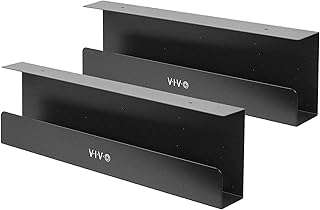
VIVO Under Desk 17 inch Cable Management Trays, Power Strip Holders, Cord Organizers, Wire Tamers for Office and Home, Black, 2 Pack, DESK-AC06-2C
Best For:
Streamers, photographers, and creators with multiple powered devices who need a cleaner on-camera background and safer floor space.
This VIVO two-pack of under-desk cable management trays is a straightforward way to reclaim floor and desktop space. Each tray is 17 inches long and designed to hold power strips, adapters, and a modest bundle of cables. For creators, hiding power strips and keeping cords off the floor reduces tripping hazards, prevents tangling, and improves the look of any on-camera shot.
Main benefits
The primary benefit is organizational: a single tray conceals power bricks and extension strips, so your desk surface can remain dedicated to tools and creativity. Compared with adhesive cable channels that only guide a few wires, these trays hold bulkier items—like power bricks and multi-outlet strips—out of sight. The two-pack accommodates both sides of a wide desk or lets you use one for the main work area and the other for a monitor arm or light.
Real-life usage
Set one tray under the center of your desk to hold the main power strip and a second under a side surface to organize camera chargers, microphone power, or a lamp. Photographers who rotate gear will like not having to unplug multiple items to reach a power strip. Streamers who mount microphones and lights to arms can route those cables cleanly into a tray, keeping the background tidy for viewers.
Why it’s valuable
Cable clutter is a subtle but persistent productivity killer. Wires that pile up create a visual distraction and slow you down when swapping or troubleshooting equipment. These trays are a relatively inexpensive upgrade that makes deep-cleaning your desk simple—unscrew the tray, pull out the power strip, and rearrange cords without crawling under the desk.
Who should buy it
Creators with multiple power-hungry devices—monitors, chargers, lights, cameras—will see immediate benefit. Home office users who want a professional-looking background for video calls should also consider adding trays.
Who may not need it
If your desk has built-in cable channels or you only use a single laptop charger, the trays may be unnecessary. Also, if you need frequent on-the-fly access to plugs (for example, swapping chargers every minute), a visible power strip might be more convenient.
Practical observations and considerations
Installation requires basic tools and mounting screws; check desk thickness and the tray’s mounting orientation. Trays free up floor space and reduce cable wear by preventing tangles. Customers often say these trays dramatically improve the tidiness of streaming setups and studio desks.
Check the latest price on Amazon.
Pros
- Hides power strips and bulky adapters
- Two-tray pack covers wider desks or multiple zones
- Sturdy design prevents cable tangles and floor clutter
Cons
- Requires mounting and basic tools
- May be unnecessary for minimal single-laptop setups
Check the latest price on Amazon.
Final Verdict
A clean desk is more than aesthetics; it’s about reducing friction so your best work—editing, recording, designing—happens without unnecessary interruptions. For creators who want minimal visual clutter and practical function, the TSJ compact glass pad is a solid, no-fuss upgrade that keeps notes at hand. The SELEAD combo board is best if you want the convenience of wireless charging integrated into your workspace. The TSJ 17×7 black glass model adds a studio-polished look with a subtle LED accent for on-camera creators. Finally, the VIVO under-desk trays are a small infrastructure change that yields big returns in tidiness and safety.
Pick the combo that fits your workflow: glass pads for quick notes and camera-friendly surfaces; integrated chargers if you rely on phones during sessions; and under-desk trays to hide the mess of power. These products complement one another—using a glass pad plus under-desk trays creates a low-profile, efficient desk that’s friendly to both productivity and presentation.
If you’re upgrading one component of your setup, start with what causes the most friction: are you constantly hunting markers and notes (choose a glass pad), swapping chargers and dealing with phone battery drain (choose the SELEAD), or tripping over power bricks (choose VIVO trays). Combine options for a cohesive, low-clutter studio that supports consistent output.
Check the latest price on Amazon.
Conclusion
These Desk accessories creators use for clean productivity setups picks are trending now and offer great value and variety. Check the links above for latest prices and reviews.
As an Amazon Associate, I earn from qualifying purchases.
Tags:
desk accessories, glass whiteboard, wireless charger desk pad, cable management tray, creator desk setup, streamer desk organization, keyboard stand whiteboard
