Best Smart Home Assistants for Productivity
As an Amazon Associate, I earn from qualifying purchases. This article may contain affiliate links, which means we may receive a commission at no extra cost to you.
As smart home devices move from novelty to workplace tools, picking the right assistant can meaningfully improve daily productivity. Whether you want a privacy-minded open-source hub, a compact bedside assistant, a full-featured smart display, or a budget-friendly speaker for quick commands, this guide lays out practical choices and real-life uses. Affiliate disclosure: As an Amazon Associate, I earn from qualifying purchases. This article may contain affiliate links, which means we may receive a commission at no extra cost to you.
This guide focuses on what each device does best, who benefits most, and how each option compares to more common alternatives. You’ll find device details, likely use cases, and buying considerations to help you choose a smart assistant that actually helps you get things done.
Buying Guide
How to choose a smart home assistant for productivity
1) Define your workflow needs — voice-first control is great for hands-free tasks, but if you rely on visual information (calendars, timers, video calls) a smart display can save time. If privacy and local control matter, open-source solutions like Home Assistant are strong options.
2) Sound and microphones — choose devices with multiple microphones and good speakers if you use voice in noisy rooms or play background music during work. If voice recognition is central, look for far-field mics and noise reduction features.
3) Ecosystem compatibility — check which smart home standards the assistant supports: Zigbee, Z-Wave, Matter, or popular cloud services. Echo devices are deeply tied to Alexa skills, while open-source systems can bridge many protocols with local control.
4) Setup complexity vs control — out-of-the-box devices (Echo Dot, Show, Spot) offer quick setup and polished Alexa routines. Development or DIY kits provide more control but require time and some technical comfort.
5) Display and camera considerations — smart displays add glanceable information and video calling, but consider privacy shutters and whether you want a camera in bedrooms.
6) Budget and expandability — small speakers are inexpensive entry points, while a smart display or open-source hub may be more of an investment in convenience and long-term automation.
7) Real-world testing and user feedback — read recent customer experiences about reliability, Wi-Fi behavior, and firmware updates. Look for active communities for devices like Home Assistant where new automations and integrations are regularly shared.
Use this guide to balance convenience, control, and privacy. The recommendations below highlight different trade-offs so you can pick the assistant that fits your productivity style.
Third Reality Voice/Music Assistant Dev Edition – Preloaded with Home Assistant Voice Assistant and Music Assistant, Dual Digital Mics, 3W Speaker, 2.4G WiFi only, Open Source

Best For:
Tinkerers, privacy-minded users, and anyone wanting local Home Assistant control and custom automations
If you want local control and deep customization, the Third Reality Voice/Music Assistant Dev Edition is built for tinkerers and privacy-conscious users. Preloaded with Home Assistant Voice Assistant and Music Assistant, it combines an open-source automation platform with voice capabilities. The unit includes dual digital microphones and a 3W speaker that’s adequate for voice prompts, alarms, and light background music. It connects via 2.4GHz Wi-Fi (note: 5GHz is not supported), and because it’s open-source and developer-focused, you can extend integrations, write custom automations, and run local logic rather than routing everything through cloud APIs.
This device solves the problem of cloud dependency that many mainstream assistants rely on. For people who want to keep sensitive automations on their LAN, or who need specific integrations not available via commercial skills, the Home Assistant foundation preloaded on this device is a major advantage. Unlike standard consumer options, setting this up may involve more steps—expect to spend time registering entities, installing add-ons, and configuring voice models. But the trade-off is control: local voice processing, privacy, and the freedom to tie together Zigbee bridges, MQTT devices, and custom scripts.
Real-life use cases include creating office routines that silence notifications during focused work periods, automating light and thermostat scenes when a meeting starts, or triggering complex multi-device morning routines. For a small home office, you could run an automation that lights the desk lamp, queues a productivity playlist via the Music Assistant, and announces the day’s calendar items—without sending personal data to external servers.
Compared with plug-and-play alternatives like Echo Dot or Echo Show, this Dev Edition puts power in the hands of those willing to configure it. It’s more flexible than typical consumer assistants but less turnkey. If you’re comfortable following community documentation and want to build unique automations or run everything locally, this is a compelling choice. If you prefer a simple setup and instant Alexa skills, an Echo device might be a better match.
Who should buy this: DIYers, privacy-focused users, and small-business owners who want local automations and extensive integration options.
Who might skip it: Users who want a ready-to-run, no-configuration-required smart assistant or those who need stable 5GHz Wi-Fi support out of the box.
Practical considerations: plan for time spent on initial configuration, ensure your home network is 2.4GHz compatible, and look into community add-ons for speech-to-text and offline voice models if cloud-free operation is important.
Check the latest price on Amazon.
Pros
- Local control and open-source flexibility
- Preloaded with Home Assistant and Music Assistant
- Good for complex automations and privacy-focused setups
Cons
- Requires technical setup and maintenance
- Only supports 2.4GHz Wi-Fi (no 5GHz)
Check the latest price on Amazon.
Amazon Echo Spot (newest model), Great for nightstands, offices and kitchens, Smart alarm clock, Designed for Alexa+, Glacier White

Best For:
Users needing a compact smart display for a nightstand, small desk, or kitchen counter
The Echo Spot is a compact smart display designed for bedside tables and small surfaces where a quick glance at information matters. With a circular screen optimized for clocks, alarms, weather, and brief visual cards, the Spot is built to be a smart alarm clock and compact assistant. It’s especially handy for nightstand productivity: set gentle wake-up routines, view your morning calendar, ask for a news brief, or use the built-in speaker for background white noise while you focus.
This device addresses the need for glanceable, time-oriented information without the footprint of a larger smart display. In an office or kitchen, the Echo Spot can show timers, recipe steps, and incoming notifications without dominating the counter. Compared to the Echo Show 5, the Spot trades a larger, more detailed display for a smaller, attractive design that fits tight spaces. Audio is tailored for voice and short media playback; if music quality is a priority, an Echo Show or Echo Dot paired with a speaker might perform better.
Practical uses include bedside routines that dim lights and read the first calendar item when you say “Good morning,” kitchen timers that display remaining cook time at a glance, or small meeting rooms where a compact device can quickly show an agenda and start a voice call. For families, placing one near a shared charging station makes it a central quick-answer device for questions like “What’s on my calendar?” or “How long to boil eggs?”
Who should buy this: People who want an attractive, small smart display for nightstands, small desks, or kitchen counters, and who value visual cues and alarms.
Who might skip it: Those who need a larger display for video calls, detailed recipes, or better speakers for music playback. Also, if you’re uncomfortable with a camera in sleeping areas, look for models with shutters or camera-off features.
Practical considerations: evaluate whether the small screen is sufficient for your needs, and compare voice-only devices if you don’t need visual feedback. The Spot is a niche but convenient pick for tight spaces.
Check the latest price on Amazon.
Pros
- Compact footprint ideal for small spaces
- Great as a smart alarm and glanceable information hub
- Good for quick timers and short visual cards
Cons
- Smaller screen limits detailed content
- Audio is not as robust for music
Check the latest price on Amazon.
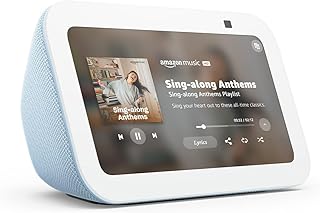
Amazon Echo Show 5 (newest model), Smart display, Designed for Alexa+, 2x the bass and clearer sound, Cloud Blue
Best For:
Home office workers, kitchen users, and bedside users who benefit from a compact display and improved audio
The Echo Show 5 is a versatile smart display that blends visual feedback with improved audio performance. With a compact yet readable screen and claims of twice the bass and clearer sound compared to earlier generations, it’s a reliable choice for people who want both information and media. The display surfaces calendar entries, timers, recipe steps, security camera feeds, and video calls—helpful features when your productivity depends on quick visual confirmation rather than just voice responses.
For home offices, the Echo Show 5 can act as a tiny second screen: pinch in a calendar view during morning planning, pull up a checklist while working through tasks, or view a live feed from a doorbell camera. In the kitchen, the display makes following recipe steps easier and persistent timers visible across the room. The improved speaker makes background music and spoken content more pleasant than the tiniest smart devices, and Alexa’s routine integrations mean you can chain actions like turning on desk lights, starting a focus playlist, and announcing meeting times.
Compared with the Echo Dot, the Show 5 gives you visual context and a more capable speaker; compared with larger Echo Show models, it’s better suited to tight desks and bedside tables where space is limited but a display still makes sense. If you often use video calling, consider the unit’s camera quality and whether you need a larger screen for group calls; otherwise, the Show 5 hits a useful middle ground between size, functionality, and cost.
Who should buy this: People who want a compact smart display with decent sound for home office desks, bedside use, or kitchens where visual feedback improves workflow.
Who might skip it: Those who need top-tier audio for music parties or a much larger screen for detailed recipe browsing or large video calls.
Practical considerations: check camera privacy settings and compare the Show 5’s display size to larger models if you want more on-screen information. It’s a strong all-around choice for productivity without taking up much space.
Check the latest price on Amazon.
Pros
- Compact display with visual feedback
- Improved bass and clearer sound for its size
- Great for timers, camera feeds, and routines
Cons
- Display is small for extended video calls
- Not the best choice for high-fidelity music listening
Check the latest price on Amazon.
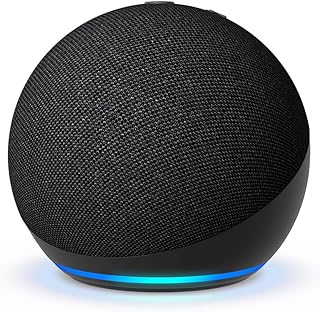
Amazon Echo Dot (newest model) – Vibrant sounding speaker, Designed for Alexa+, Great for bedrooms, dining rooms and offices, Charcoal
Best For:
Users wanting an affordable, voice-first assistant for multiple rooms and quick hands-free tasks
The Echo Dot is the go-to entry point for Alexa-enabled productivity. Compact, affordable, and quick to set up, it offers crisp voice recognition and a surprisingly vibrant speaker for background music, audiobooks, and clear voice responses. For productivity-focused users, the Dot excels at hands-free timers, quick calendar checks, reminders, and controlling smart lights and plugs. Pairing multiple Dots around a home provides consistent voice access in bedrooms, dining areas, and home offices.
The Dot solves the common issue of fragmented voice control—placing small units where you actually need them minimizes the steps to get answers or trigger automations. Compared with the Echo Show 5, the Dot lacks a display, so it’s better for voice-first tasks rather than visual workflows. However, its lower price and compact footprint make it ideal for multi-room setups: use one in a home office for meeting reminders and another in the kitchen for cooking timers.
Real-life scenarios include using a Dot on a desk to set a Pomodoro timer and announce breaks, having a Dot in the dining room read out shopping lists as you add items, or using it in a bedroom to toggle do-not-disturb routines and morning alarms. If audio matters more, you can pair the Dot with Bluetooth speakers or use an Echo device with a larger speaker.
Who should buy this: People who want inexpensive, reliable voice control across multiple rooms and who don’t need a screen.
Who might skip it: Those who want visual feedback, recipe steps, or camera integration—choose a smart display instead.
Practical considerations: consider buying multiple units for coverage, think about whether a paired Bluetooth speaker is needed for richer audio, and review privacy settings related to voice recordings.
Check the latest price on Amazon.
Pros
- Small and inexpensive to deploy in multiple rooms
- Good voice recognition and clear responses
- Great for timers, reminders, and smart control
Cons
- No display for visual information
- Audio is limited compared with larger devices
Check the latest price on Amazon.
Home Assistant Smart Home for Beginners: The Complete Step-by-Step Guide to Automating Your Home with Open-Source Technology

Best For:
Beginners to Home Assistant and DIYers who want a step-by-step approach to home automation
For anyone planning to use Home Assistant hardware or who wants to move beyond basic Alexa routines, this beginner’s guide is a pragmatic companion. It walks through step-by-step setup, common automations, and how to integrate devices using open-source tools. Unlike marketing copy or scattered blog posts, a structured book can save you time and reduce the trial-and-error that often slows down DIY projects.
This guide addresses the steep learning curve many new Home Assistant users face. It covers initial installation, wiring up Zigbee or MQTT devices, common automation recipes (lighting schedules, presence detection, security automations), and tips for keeping services local for privacy and resilience. For productivity-focused users, the book offers examples like automations that mute notifications during focused hours, trigger work-from-home arrival routines, or create context-aware lighting scenes that signal work boundaries.
Compared with collecting tutorials online, a cohesive guide helps you plan a system that grows rather than one-off automations that become brittle. It’s especially helpful if you pair it with a device like the Third Reality Dev Edition—readers can follow unified setup steps and then experiment with advanced automations using real examples.
Who should buy this: New Home Assistant users, DIY enthusiasts, and anyone who wants a structured approach to automations and privacy-preserving setups.
Who might skip it: Users who stick to plug-and-play consumer ecosystems and don’t want to manage local automation servers.
Practical considerations: match the book’s examples to your hardware, and allocate time to follow hands-on chapters. Expect to reference community forums for advanced integrations and device-specific quirks.
Check the latest price on Amazon.
Pros
- Practical, step-by-step explanations
- Covers privacy and local automation strategies
- Useful examples for productivity-focused automations
Cons
- Not necessary for users who only use cloud-based, plug-and-play assistants
- Requires time and willingness to learn
Check the latest price on Amazon.
Final Verdict
Picking the right smart home assistant for productivity comes down to trade-offs between convenience, control, and the types of tasks you want to streamline. If you want local control and the ability to customize complex automations, the Third Reality Voice/Music Assistant Dev Edition paired with a solid how-to guide is a powerful combination. If you prefer quick setup and polished routines, Echo devices (Echo Dot for voice-first control, Echo Show 5 for visual feedback, and Echo Spot for a compact nightstand display) provide reliable, widely supported options.
Think about where you want voice vs. visual interaction, how much setup time you’re willing to spend, and whether privacy-local processing is a priority. For most users looking to boost everyday productivity without deep technical involvement, the Echo Show 5 or Echo Dot are practical starting points. For tinkerers and small businesses that need customizable, offline-capable automations, pair the Third Reality Dev Edition with the Home Assistant guide and you’ll get far more control.
Whichever path you choose, integrate devices thoughtfully—place speakers and displays where they reduce friction, create routines that map to real habits, and prioritize privacy settings that match your comfort level. Check the latest price on Amazon.
Conclusion
These Top Smart Home Assistants for Productivity picks are trending now and offer great value and variety. Check the links above for latest prices and reviews.
As an Amazon Associate, I earn from qualifying purchases.
Tags:
smart home assistants, productivity devices, Home Assistant, Echo Show 5, Echo Dot, open-source home automation, smart display, voice assistant
