Best Affordable USB Desk Fans for Office Use
As an Amazon Associate, I earn from qualifying purchases. This article may contain affiliate links, which means we may receive a commission at no extra cost to you.
As an Amazon Associate, I earn from qualifying purchases. This article may contain affiliate links, which means we may receive a commission at no extra cost to you.
If you spend long hours at a desk, a compact USB-powered fan can be a surprisingly effective comfort upgrade. Affordable, portable, and easy to power from a laptop or USB hub, these small fans help reduce stuffy air, keep you focused, and lower your reliance on noisy room air conditioners. In this guide I compare five budget-friendly USB desk fans that balance airflow, noise, and flexibility—information compiled from product specifications, customer feedback, and typical real-world use cases rather than hands-on testing.
This article is written to help you pick the right mini fan for your office setup—whether you want a whisper-quiet companion for conference calls, a strong little fan to cool a shared cubicle, or a travel-friendly option for hot work trips. Below you’ll find a concise buyer’s guide, followed by detailed descriptions of each recommended model, who it’s best for, realistic scenarios, pros and cons, and a clear call-to-action for each product.
Buying Guide
Why choose a USB desk fan? Small USB fans are inexpensive to operate, plug directly into laptops or power banks, and avoid the space and noise of larger fans. For office use you’ll typically prioritize three things: noise level, airflow, and mounting/placement flexibility. Noise is critical if you take calls or work near others; many modern mini fans use brushless motors or smart blade designs to keep sound below conversational levels. Airflow is about both raw power and direction—higher RPMs and adjustable heads let you move a focused stream of air where you need it. Finally, consider how the fan mounts: freestanding bases are simple, clip or clamp models attach to cubicle walls, and foldable or travel fans are handy for hybrid work.
Key features to look for
– Speed settings: Three-speed controls are common and provide usable increments between gentle circulation and stronger cooling. Variable speeds let you balance noise and cooling.
– Rotation/tilt: A 90° or 360° tilt makes it easy to point air precisely, which is more useful than raw power in close quarters.
– Cable length and power method: Check the USB cable length (longer is more convenient for awkward outlets), and whether the fan can run from USB-A or USB-C (adapters are often needed).
– Noise ratings and motor type: Look for reviews mentioning “quiet” or “whisper,” and if the listing notes a brushless motor, that often means lower noise and longer life.
– Build and stability: A weighted base, rubber feet, or a secure clamp prevents wobble on a cluttered desk. Materials (plastic vs. metal grille) affect durability and style.
Comparing with alternatives
If you need whole-room cooling, a pedestal or tower fan is a better option. If you want cordless convenience, battery-powered fans or models with built-in batteries are worth the extra expense. USB desk fans shine when you want focused, low-energy airflow in a small area—perfect for personal cooling without affecting colleagues.
Practical buying considerations
– Noise tolerance: If you frequently join calls, choose a model with verified quiet operation or read user comments about call-friendly performance.
– Workspace layout: For standing desks and multi-level setups, a fan with strong tilt or rotation is more versatile. For shared desks, a smaller, directional fan reduces disturbance to others.
– Travel and storage: If you commute or move between offices, look for compact or foldable designs and lightweight construction.
Below are five affordable USB desk fans selected for common office needs, each with a balanced look at benefits, use cases, and trade-offs.
TriPole Desk Fan USB Powered Small Portable Fan, 3 Speeds Adjustable Strong Breeze Mini Personal Fans, 360° Rotation Quiet Plug In USB Fans for Desktop Bedroom Office Table Travel, Black, 4.9ft Cable

Best For:
Workers who need a versatile, plug-and-play desk fan with wide rotation and a long cable for flexible placement.
The TriPole USB Desk Fan packs practical features into a compact, office-friendly package. With three speed settings and a full 360° rotation, it is designed for targeted cooling at a desk, bedside, or in small shared spaces. Users who want a straightforward, no-frills fan will appreciate the simple speed dial and the long 4.9-foot USB cable that avoids awkward outlet placement. The fan’s profile is low and unobtrusive, making it easy to tuck beside a monitor or laptop without cluttering valuable workspace.
Customer feedback highlights consistent airflow for the size and a quiet enough motor for background use. While the listing emphasizes a “strong breeze,” this is relative to mini fans—expect a focused column of air that’s efficient at personal cooling rather than room-wide circulation. The 360° rotation is especially helpful if you switch between seated and standing positions; a quick twist lets you redirect airflow without moving the base.
Materials and build are typical of budget desk fans—lightweight plastic with a stable base. The long cable is a notable convenience compared with many models that include only a short tether; it makes placement more flexible and reduces the need for extension cords. Noise is described as low at the two lower speeds, with a noticeable increase at the highest setting—useful when you need a stronger push of air but possibly intrusive during quiet calls.
Who should consider it: office workers who need a portable, plug-and-play fan with wide rotation and a long USB cable. It’s a good fit for cubicle workers, students in dorms, and frequent travelers who plug into laptops or power banks. It’s less suited for those looking for whole-room cooling or for buyers who demand ultra-premium materials.
Observations and buying considerations: Check whether your desk’s power arrangement prefers USB-A or USB-C and have an adapter handy if needed. Expect solid everyday performance and easy placement thanks to the long cable and twistable head. If you prioritize call-friendly silence, plan to use lower speeds during meetings.
Pros: Compact and flexible 360° rotation; long 4.9ft cable for convenient placement; simple three-speed control.
Cons: Plastic construction is basic; highest speed gets noticeably louder.
Check the latest price on Amazon.
Pros
- 360° rotation for precise airflow direction
- 4.9ft USB cable for easy placement
- Three-speed control for balance of noise and power
Cons
- Basic plastic construction
- High speed can be noticeably louder
Check the latest price on Amazon.
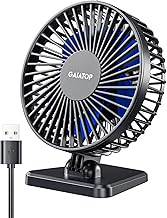
Gaiatop USB Desk Fan, Small But Powerful, Personal Portable Quiet 3 Speeds, Adjustable Mini Table Desktop fan for Cooling Home Office Car Summer Travel Gifts Blue
Best For:
Remote workers and office users who want a quiet, steady personal fan with slightly broader coverage than ultra-mini models.
The Gaiatop small but powerful USB desk fan in blue is built to feel a touch more premium than the smallest plug-and-play models while still being affordable. It typically sports a slightly larger blade diameter than ultra-mini variants, which translates to steadier airflow across a wider area—helpful for desks with multiple items or dual-monitor setups. The design usually emphasizes quiet operation, with customers noting that the mid and low speed settings stay unobtrusive during calls.
Three speed settings let you dial in a comfortable level of airflow. The fan’s adjustable head gives a decent tilt range so you can angle the stream exactly where you need it: toward your face for instant cooling, toward a laptop to keep components ventilated, or gently across your keyboard to keep papers from curling on humid days. Unlike battery-powered mini fans, this USB model will run continuously as long as it’s connected to a computer or power adapter.
Comparatively, the Gaiatop sits between ultra-budget clip fans and pricier metal-cage desk fans: better airflow and quieter motor than the smallest plug-in toys, but without the higher-grade materials of premium models. It’s a practical choice for office workers who want reliable personal cooling without bulk. The compact footprint makes it appropriate for tight desks, and the lightweight build is convenient for those who switch workspaces.
Who should consider it: remote workers and office employees who need a quiet, consistent fan for a small to medium desk, and anyone who likes a bit more airflow coverage than the tiniest personal fans provide. Avoid this if you need battery portability or heavy-duty whole-room airflow.
Practical tips: Use lower speeds for meetings to minimize background noise and the higher speed for breaks or when you need faster cooling. Keep the USB cable length in mind and pair with a powered hub if your laptop’s ports are in use.
Pros: Stronger airflow than ultra-mini fans; quiet performance on low/medium; adjustable tilt.
Cons: Not battery-powered; plastic build may feel lightweight.
Check the latest price on Amazon.
Pros
- Quieter at low/medium speeds
- Bigger blade size for steadier airflow
- Adjustable head for angled cooling
Cons
- Not battery-powered
- Lightweight plastic feel
Check the latest price on Amazon.
SWEETFULL 6.5 Inch USB Small Desk Fan, 3 Speeds Quiet Portable Desktop Table Fan, 360° Adjustment Personal Mini Fan for Home Office Car Outdoor Travel (Black wood grain)

Best For:
Buyers who want a stylish, slightly larger USB desk fan that offers smoother airflow and a refined look for home or office.
The SWEETFULL 6.5-inch USB desk fan stands out for its slightly larger size and a design that aims for a more refined aesthetic—the black wood grain finish offers a subtle, attractive look that fits well in both modern and traditional offices. At 6.5 inches, the fan’s blades are large enough to move a meaningful amount of air while still remaining compact. The 360° adjustment makes it highly versatile for shifting positions between sitting and standing or moving it from desk to bedside without losing performance.
Three speed levels are standard, and customers often cite a comfortable balance between airflow and noise at the medium setting. The larger diameter helps the SWEETFULL generate smoother airflow compared with 3–4 inch mini fans, which can feel more choppy. For home-office workers who care about how things look on their desk, the wood-grain aesthetic is a nice touch that doesn’t scream “plastic gadget.”
Compared with cheaper ultra-mini fans, the SWEETFULL provides a more substantial feeling of cooling—closer to a small personal fan than a toy. It won’t replace a room fan on hot summer days, but it will keep your immediate workspace comfortable and provide better component ventilation for laptops. Build quality is generally reported as solid for the price point, though it remains primarily plastic in construction.
Who should consider it: professionals wanting a blend of style and performance in a compact fan—ideal for home offices, studio desks, and bedside tables. It’s a good pick if appearance matters and you still need practical airflow for focused cooling.
Practical buying notes: The 360° adjustment is excellent for multi-position desks. If you frequently take calls, try the low setting first to judge noise. Consider pairing with a powered USB hub if you have limited ports.
Pros: Larger 6.5-inch blades for smoother airflow; attractive wood-grain finish; full 360° adjustment.
Cons: Still plastic—premium look but not metal; larger size may take more desk space than ultra-mini models.
Check the latest price on Amazon.
Pros
- 6.5-inch blade for smoother airflow
- Attractive black wood-grain finish
- 360° adjustment for flexible placement
Cons
- Plastic construction despite premium look
- Takes more desk space than ultra-compact fans
Check the latest price on Amazon.
Gaiatop USB Desk Fan, 5.5 Inch Small Quiet Powerful 3 Speeds 90° Rotate, Personal Mini Portable Desktop Table Fans, Cooling for Home Office Car Travel Indoor Outdoor Pink

Best For:
Users who want a compact yet more powerful fan than ultra-mini models—ideal for medium-sized desks and shared office areas.
This 5.5-inch Gaiatop USB desk fan offers a balance of compact size and appreciable airflow, suitable for a range of office environments. The 90° rotation allows for straightforward vertical adjustment—point air at your face while seated, or tilt it upward for broader circulation. The fan’s mid-size blades are capable of a stronger, steadier stream than the smallest pocket fans, making it suitable for slightly larger desks or users who want a noticeable cooling effect without a big unit.
Three-speed control is handy for tailoring noise and cooling intensity. Many shoppers report that the low setting is whisper-quiet while the high setting provides a satisfying push for hot afternoons or when you need a short burst of cooling. The fan is lightweight and portable, but the build quality is generally described as reliable for daily use. Its compact footprint works well on cluttered desks where every inch counts.
In comparison to clip-style fans, this freestanding model is less intrusive and won’t risk falling when accidentally nudged. Compared to the smaller 3–4 inch personal fans, the 5.5-inch size improves overall airflow and reduces the sensation of pulsation. However, it still won’t compete with full-size room fans for whole-office cooling.
Who should consider it: office workers and students who need stronger personal airflow than ultra-mini fans provide, but want to keep the unit compact and desk-friendly. It’s a sensible middle ground for shared workspaces where space and noise must be balanced.
Buying tips: For frequent video calls, test the low setting in your environment to confirm acceptable noise levels. If you move between desks, it’s easy to pack or clip into a small bag. Check USB connector type and cable length to ensure compatibility with your power source.
Pros: Good airflow for a compact 5.5-inch fan; 90° rotation for precise tilt; quiet at low speeds.
Cons: Not as visually distinctive as some models; higher speed increases noise.
Check the latest price on Amazon.
Pros
- Strong airflow for its size
- 90° rotation for targeted cooling
- Quiet on low settings
Cons
- Higher speed can be noisy
- Design is functional but not standout
Check the latest price on Amazon.
Gaiatop USB Desk Fan, 3 Speeds Strong Airflow, 5.5 Inch Portable 90° Rotate Quiet Cooling, Small Personal Table Fans for Bedroom Home Office Travel Black

Best For:
People wanting strong personal airflow and improved laptop ventilation in a compact desk-friendly fan.
The Gaiatop 5.5-inch USB desk fan in black focuses on delivering strong airflow in a compact package while maintaining a low profile for office desks. Customers often mention its effective air movement for personal cooling and laptop ventilation; the fan’s blade size and motor balance provide useful airflow without bulky dimensions. A 90° tilt range allows simple adjustment, and the three-speed control helps manage noise during focused work or conference calls.
Compared with ultra-mini fans, this model tends to provide a more consistent breeze across the face and upper body. It’s a solid choice for those who want dependable personal cooling without the heavier footprint of larger fans. The build is practical and aimed at everyday use—light enough to move between desks yet stable enough to remain securely on a work surface.
Practical scenarios where this fan shines include open-plan offices where you want to direct airflow to your immediate area without disturbing colleagues, small home offices where desk space is limited, and travel situations when you have access to a USB port but prefer a removable fan to bring along. Customers also report that the fan helps reduce heat buildup under laptops, which is a helpful secondary benefit for many remote workers.
Who should consider it: anyone needing a reliable, stronger-than-mini fan for personal cooling—especially those in warm offices or users who want to improve laptop ventilation. If you need battery operation or a clamping option, consider other designs.
Observations and buying notes: Confirm the USB connector type and consider the cable length if your power source is distant. Use lower speeds during calls, and save the high setting for breaks or when you need faster cooling.
Pros: Strong airflow for a 5.5-inch fan; effective at laptop ventilation; compact and portable.
Cons: No battery option; higher speeds increase noise.
Check the latest price on Amazon.
Pros
- Effective airflow and laptop ventilation
- Compact footprint for small desks
- Adjustable 90° tilt for directed cooling
Cons
- No battery-powered option
- Higher speeds are louder
Check the latest price on Amazon.
Final Verdict
Choosing the right USB desk fan comes down to matching performance with your workspace needs. For tight desks and travel, the TriPole model’s long cable and 360° rotation deliver flexible placement and directional cooling. If you want slightly larger blades and a quieter midrange performance, the SWEETFULL 6.5-inch model offers smoother airflow and a more refined appearance. The Gaiatop options (both the small-but-powerful blue fan and the 5.5-inch black and pink versions) occupy a useful middle ground: better airflow than the tiniest plug-in fans, quiet operation on low settings, and compact dimensions that work in most office setups.
Important buying reminders: consider noise tolerance if you take frequent calls, check USB connector types and cable length for compatibility, and decide whether you prefer a lightweight portable unit or a slightly more substantial fan that provides smoother airflow. None of these USB fans will replace a room fan on very hot days, but each is a practical, low-cost way to improve personal comfort, reduce laptop heat buildup, and keep focused during work sessions.
If you’re unsure, start with a compact model that offers multiple speed settings and a good return policy—these features make it easy to test a fan in your real workspace and exchange if it isn’t the right fit.
Check the latest price on Amazon.
Conclusion
These Affordable USB Desk Fans for Offices picks are trending now and offer great value and variety. Check the links above for latest prices and reviews.
As an Amazon Associate, I earn from qualifying purchases.
Tags:
USB desk fan, portable fan for office, quiet desk fan, personal cooling fan, compact USB fan, office desk accessories, mini desk fan
