Best Bluetooth Keyboards for Samsung Tablets
As an Amazon Associate, I earn from qualifying purchases. This article may contain affiliate links, which means we may receive a commission at no extra cost to you.
As an Amazon Associate, I earn from qualifying purchases. This article may contain affiliate links, which means we may receive a commission at no extra cost to you.
If you use a Samsung tablet for work, study, or creative projects, a compact Bluetooth keyboard can transform it from a casual consumption device into a genuine productivity machine. On-screen keyboards are fine for short replies, but for sustained typing—emails, drafts, spreadsheets, notes—a physical keyboard speeds things up, reduces typos, and helps you maintain a better posture. In this guide I cover five Bluetooth keyboards that match different budgets and workflows: ultra-slim companion keyboards, backlit portable options for low-light setups, multi-device models for people who switch between phone and tablet, and official Samsung keyboards that bring deeper system shortcuts and an AI key for faster tasks.
I researched compatibility, notable features, real-world use cases, and common customer feedback to give a practical look at what each keyboard does well — and where it might fall short compared with standard laptop keyboards or folio keyboard cases. Whether you want a featherweight travel keyboard, a keyboard with illuminated keys for evening edits, or an official Samsung accessory designed to pair seamlessly with Galaxy devices, there’s a pick below.
Buying Guide
Why Bluetooth keyboards matter for Samsung tablets
Bluetooth keyboards convert a tablet into a light workstation. They reduce reliance on the touchscreen, improve typing speed, and make long-form writing and spreadsheets practical. Beyond speed, they unlock keyboard shortcuts and text navigation that save time compared with constant tapping and selection.
Key criteria to consider
– Compatibility: Look for explicit support for your tablet model (e.g., Galaxy Tab A, S series). Most Bluetooth keyboards use standard HID profiles and will pair with Android, Windows, and iOS devices, but smart keys and AI shortcuts are often specific to Samsung.
– Layout and key travel: Low-profile chiclet keys are common for slim keyboards; they feel different from a laptop but are comfortable for most users. If you type a lot, prioritize a keyboard with responsive key action and a stable base.
– Backlighting: Backlit keys are a huge advantage if you work in low-light environments or travel on planes. Adjustable brightness and multiple colors add flexibility but can slightly shorten battery life.
– Battery and charging: Rechargeable lithium batteries are standard. Consider how many hours of use you’ll get per charge and whether the keyboard supports USB-C charging (more convenient) or older micro-USB.
– Multi-device pairing: If you switch between a Samsung tablet, a phone, and a laptop, multi-device Bluetooth with an easy device-switch key is invaluable. It beats re-pairing and keeps your workflow seamless.
– Form factor and portability: If you travel, prioritize ultra-slim and lightweight designs. If you need a full workstation feel, look at larger keyboards or official keyboard covers that combine a case with a stable hinge.
How these keyboards compare to alternatives
– Folio keyboard cases: These combine protection and typing but can be heavier and more expensive. Standalone Bluetooth keyboards are more versatile because you can position the tablet independently and use the keyboard with other devices.
– Wired keyboards: Rarely practical with tablets unless you use adapters. Wireless Bluetooth keyboards offer the cleanest setup and broader device compatibility.
Who should prioritize which features
– Frequent travelers: Choose lightweight, long-battery models without extra bulk.
– Night owls and commuters: Prioritize backlit keys and stable Bluetooth connections.
– Power users: Look for multi-device pairing, full-sized layouts, and official Samsung keyboards with AI or shortcut keys.
With these points in mind, read on for detailed looks at five keyboards that work well with Samsung tablets, including realistic use cases and buying considerations.
SPARIN Bluetooth Keyboard for Samsung Galaxy Tab A11+/A9 Plus/S11/S10 FE/S10+/S6 Lite and Other Android Tablet, Wireless Keyboard for Samsung Models/Windows/PC/Phone, Lightweight, Ultra-Slim

Best For:
Students, commuters, and casual typists who need an ultra-light, portable keyboard that pairs easily with Samsung tablets and other devices.
If you want a no-frills, featherweight Bluetooth keyboard to pair with a Samsung tablet, the SPARIN Bluetooth Keyboard is a straightforward choice. It’s designed around portability and basic typing comfort rather than premium materials or advanced features. The ultra-slim profile makes it easy to slide into a backpack or briefcase, which is ideal for students, commuters, and anyone who types away from a desk. The keys have a low-profile chiclet design typical of compact Bluetooth keyboards — comfortable for emails, note-taking, and light document editing but not as cushioned as a high-end laptop keyboard. Compatibility is broad: the keyboard supports Android devices (with special key mappings for Samsung and other brands), Windows, and many phones, so you can use it with multiple devices in a pinch.
Practical benefits include quick setup via Bluetooth pairing, a full row of function keys for basic media and volume control, and a slender footprint that leaves plenty of room for the tablet to be propped up on its own stand. Compared with folio cases that integrate a keyboard, SPARIN’s standalone keyboard lets you position the tablet independently, which can improve viewing angles for video calls or presentations. Battery life is typical for compact wireless keyboards: it will usually handle several days to weeks of intermittent use on a single charge depending on your workload.
Real-life scenarios where SPARIN shines include students taking lecture notes in class, writers drafting short posts in coffee shops, and travelers who need a light keyboard for email and messaging. Where it’s less suitable is for heavy typists who want significant key travel or those who need backlighting for low-light work. Compared to bulkier, premium keyboards, SPARIN sacrifices advanced features for portability and value. If your priority is a simple, dependable Bluetooth keyboard that won’t weigh down your bag, SPARIN is a practical pick. Check the latest price on Amazon.
Pros
- Ultra-slim and lightweight — very travel friendly
- Broad compatibility with Android, Windows, and phones
- Simple, uncluttered layout and easy Bluetooth pairing
Cons
- No backlighting — not ideal for low-light typing
- Key travel is minimal compared with premium keyboards
Check the latest price on Amazon.
Samsung Smart Keyboard, Bluetooth Multi-Device Keyboard for Galaxy Phones, Tablets & Laptops, Slim Lightweight Design, AI Shortcut Key, Long Battery Life, EJ-B7800UBEGUJ, Dark Gray

Best For:
Galaxy ecosystem users who want a slim, multi-device keyboard with Samsung shortcuts and an AI key for faster productivity.
The Samsung Smart Keyboard is built with Galaxy users in mind. It’s a modern, slim Bluetooth keyboard that emphasizes multi-device pairing and Samsung-specific shortcuts, including an AI shortcut key that can speed up repetitive tasks and access system-wide features more quickly. The design is lightweight but feels sturdy enough for daily desk use; keys are well-spaced with a responsive feel that many users will find familiar if they’re coming from a laptop keyboard. It’s an appealing middle ground between basic third-party compact keyboards and full folio keyboard cases: more functional than a barebones travel keyboard, but without the bulk of a case-based solution.
One of the major advantages is seamless integration with Samsung phones and tablets. Shortcut keys map naturally to Galaxy functions like split-screen, search, and media control, so you’ll spend less time navigating menus and more time working. Multi-device Bluetooth lets you pair the keyboard with a tablet and phone simultaneously, then switch between them with a dedicated key — helpful if you use a tablet for writing and a phone for messaging or quick lookups. Long battery life is a practical benefit for road warriors; the keyboard typically lasts multiple days or weeks between charges under light-to-moderate use.
Real-world use cases include productivity-focused commuters who want a compact setup for emails and documents, creative professionals who need reliable shortcuts while using editing apps, and students who switch between lecture slides on a tablet and research on a phone. If you rely on Samsung-specific features or want an integrated experience, this keyboard is a natural pick. However, if you need extreme portability with the lightest possible weight or a dedicated keyboard case that protects the tablet, consider other options. Check the latest price on Amazon.
Pros
- Seamless Samsung integration and AI shortcut key
- Multi-device Bluetooth makes switching devices smooth
- Slim profile with good key spacing for comfort
Cons
- Higher cost than basic third-party keyboards
- Not a protective folio — needs a separate case for tablet protection
Check the latest price on Amazon.
Backlit Bluetooth Keyboard Small Portable Wireless Keyboard Rechargeable Illuminated for Android Samsung Tablet Cell Phone Smartphone iPad A16 11th 10th Generation iPad Pro Air Mini iPhone (Black)

Best For:
Night-time workers, students, and frequent travelers who need backlit keys and compact portability for Samsung tablets and other devices.
For users who often work in dimly lit environments — think evening flights, cafes at night, or late-night study sessions — a backlit keyboard is a must-have. This compact backlit Bluetooth keyboard offers illuminated keys with adjustable brightness, making it easier to type accurately when ambient light is low. The keyboard is small and portable but retains a sensible key layout that supports efficient typing for long messages, emails, or quick document edits.
Rechargeability is a key convenience: a built-in battery charges via a USB cable (check the connector type before buying) and provides hours of illuminated use. Backlighting usually impacts battery life, so look for a model that offers adjustable levels or an auto-off feature to extend runtime. Compared with non-backlit budget keyboards, the illuminated model noticeably reduces typing errors in the dark and makes for a more comfortable night-time workflow.
Use-case scenarios include digital nomads working on late flights, students studying in dorm rooms with shared lights, or anyone who enjoys working during off-hours without disturbing others. The keyboard’s compact size makes it easy to pair with a Samsung tablet that’s set on a lap or small table. That said, if you prefer a full-sized desktop feel or require heavy-duty durability, this small portable backlit keyboard isn’t a replacement for larger mechanical or premium folio keyboards. It’s a great middle ground for people who need backlighting and portability without the expense and weight of an integrated keyboard case.
Overall, this backlit Bluetooth keyboard is a practical pick for low-light productivity and mobile use. Check the latest price on Amazon.
Pros
- Adjustable backlighting for low-light typing
- Rechargeable battery — no disposable batteries required
- Compact and easy to carry
Cons
- Backlighting shortens battery runtime at higher brightness
- Smaller footprint may feel cramped for users who prefer full-sized keys
Check the latest price on Amazon.
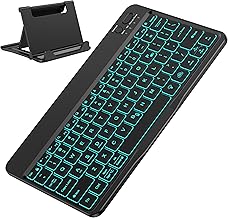
OMOTON Bluetooth Keyboard for Tablet/Android/Windows/iOS, with 7 Colors Backlight Rechargeable Wireless Mini Keyboard for Galaxy Tab A9+ / S9 FE / S10 / S11 / A11 Series etc, Black
Best For:
Users who want a customizable backlight and a portable keyboard for mixed-device use — great for students, creators, and casual typists.
The OMOTON Bluetooth keyboard blends fun customization with practical features. Its standout is a seven-color backlight system that lets you cycle through hues or set a single tone for long typing sessions — a handy feature if you want to personalize your setup or improve key visibility in dim environments. The mini layout keeps the keyboard compact and travel-ready, while rechargeable power eliminates the waste and cost of disposable batteries.
Beyond aesthetics, OMOTON offers a stable Bluetooth connection and multi-platform compatibility with Android, Windows, and iOS devices, making it a flexible companion for users who own multiple gadgets. The keycaps have a low-profile chiclet style with moderate travel and reasonable spacing for everyday typing. Compared with standard plain black keyboards, the color options make OMOTON stand out for creators, students, and anyone who wants a bit of flair alongside functionality.
Typical use cases include content creators who appreciate a visually distinctive accessory, students who move between classes and dorm studying, and remote workers who want a compact keyboard for hybrid setups. If you frequently switch devices, OMOTON’s broad compatibility is a plus. On the downside, the mini form factor means some keys are smaller or combined, which can slow fast touch-typists. Also, while the color backlight is eye-catching, serious typists may prioritize key action and stability over lighting effects. Compared with premium Samsung-branded keyboards, OMOTON offers a budget-friendly way to get backlighting and rechargeable power, but it doesn’t integrate Samsung-specific shortcuts or an AI key.
If you want a compact, colorful keyboard that’s fun to use and practical for everyday tasks, OMOTON is worth considering. Check the latest price on Amazon.
Pros
- Seven-color backlight for personalization and visibility
- Rechargeable — eco-friendly and convenient
- Wide device compatibility across OS platforms
Cons
- Mini layout may feel cramped for fast typists
- Doesn’t have Samsung-specific shortcut keys or AI features
Check the latest price on Amazon.
Samsung Official Pro Keyboard with Ai Key (2026) for Galaxy Tab S11 Ultra | Laptop-Like Experience – (Gray)

Best For:
Professionals, power users, and anyone who wants a laptop-like typing experience and Samsung-integrated shortcuts on the Galaxy Tab S11 Ultra.
For users who want the closest thing to a laptop experience with a Galaxy Tab S11 Ultra, the Samsung Official Pro Keyboard aims to deliver. As an official accessory, it offers deeper integration with the tablet’s software — from shortcut keys mapped to system commands to an AI key designed to accelerate common tasks and smart workflows. The keyboard is engineered to feel more like a laptop keyboard, with refined key travel, a stable base, and a robust hinge or connection mechanism when used as a keyboard cover or detachable accessory.
The value proposition here is cohesion: Samsung’s accessory designers optimize layout, shortcut mapping, and pairing behavior for a seamless experience. That typically translates to smoother use of split-screen multitasking, quick access to features, and better overall ergonomics for long typing sessions. Power users who rely on their tablet for document editing, coding, content creation, or extended virtual meetings will appreciate the professional touch. It’s also a logical choice for users who want guaranteed compatibility and timely firmware or software support from Samsung.
Comparatively, third-party keyboards can be lighter or cheaper but rarely offer the same level of integration or an AI key baked into system shortcuts. The trade-offs are usually price and portability — official pro accessories tend to be pricier and slightly heavier than ultra-slim third-party options. If you want a true laptop-like setup where the tablet acts as your primary computing device, the Samsung Official Pro Keyboard is a compelling investment. If you only need occasional typing on the go, a smaller, less expensive Bluetooth keyboard may be more appropriate.
For professionals and heavy tablet users who want an experience close to a laptop without buying one, this keyboard is a top pick. Check the latest price on Amazon.
Pros
- Laptop-like key feel and professional build quality
- Official Samsung integration with AI key and dedicated shortcuts
- Optimized compatibility and support for Galaxy tablets
Cons
- Usually more expensive than third-party alternatives
- Heavier and less pocketable than ultra-slim travel keyboards
Check the latest price on Amazon.
Final Verdict
Choosing the right Bluetooth keyboard for a Samsung tablet comes down to balancing portability, special features, and how you use your device every day. If you prioritize absolute lightness and a minimal carry weight, the SPARIN keyboard is a sensible, no-nonsense pick. For those who value Samsung-specific shortcuts, multi-device pairing, and a more polished user experience without buying a full folio case, the Samsung Smart Keyboard is a practical middle path. Night owls and frequent travelers who need visibility in dim conditions will appreciate the small backlit keyboard or the broader color options of the OMOTON model. And if you’re treating your Galaxy Tab S11 Ultra as a primary workstation, the Samsung Official Pro Keyboard delivers a near-laptop typing experience and deeper OS integration.
Beyond the specifics of each model, remember to prioritize the features that fit your daily habits: backlighting for low-light work, multi-device pairing if you switch gadgets often, and a form factor that suits your travel and desk routines. If you’re unsure, buying a compact standalone Bluetooth keyboard first is a low-risk way to improve productivity — you can always upgrade later to an official or pro-grade keyboard if your workflow demands it.
Whichever keyboard you pick, pairing a tidy Bluetooth keyboard with a Samsung tablet is one of the most effective ways to turn that tablet into a portable, capable productivity platform. Check the latest price on Amazon.
Conclusion
These Bluetooth keyboard for Samsung tablet productivity picks are trending now and offer great value and variety. Check the links above for latest prices and reviews.
As an Amazon Associate, I earn from qualifying purchases.
Tags:
Bluetooth keyboard, Samsung tablet keyboard, tablet productivity, wireless keyboard, backlit keyboard, multi-device keyboard, portable keyboard
