Wireless Gadgets Creators Are Obsessed With
As an Amazon Associate, I earn from qualifying purchases. This article may contain affiliate links, which means we may receive a commission at no extra cost to you.
Tech creators, remote teams, and content makers have a short attention span for gadgets that don’t solve real problems. Lately, there’s been a wave of wireless devices that do exactly that: remove friction, reduce cables, and add new functionality to daily workflows. From contactless workplace tools to pocket AI assistants and display dongles that kill HDMI tangles, this roundup highlights five wireless products that show up again and again in creator toolkits.
Below you’ll find a practical guide to what each device does, realistic use cases drawn from typical creator and small business workflows, buying considerations, and pros and cons so you can decide which one fits your setup. As an Amazon Associate, I earn from qualifying purchases. This article may contain affiliate links, which means we may receive a commission at no extra cost to you.
Buying Guide
When shopping for wireless gadgets, creators tend to focus on three practical priorities: reliability, low-latency performance, and seamless integration with existing tools. Here are the core buying considerations to keep in mind before you click "buy":
– Compatibility: Check device compatibility with your phones, laptops, and apps. Many wireless adapters support AirPlay, Miracast, and DLNA, but some work better with certain operating systems. For speakers and chargers, ensure Qi compatibility and Bluetooth codec support (SBC, AAC, aptX) if audio fidelity matters.
– Latency and stability: For streaming, mirroring, or live presentations, lower latency is essential. Look for products advertising 60Hz refresh for displays or Bluetooth 5.x for audio stability. Dual-band Wi‑Fi support (2.4G + 5G) often improves performance in crowded networks.
– Security and privacy: Devices that handle personal or workplace data—time clocks or AI recorders—should offer secure data export and clear privacy settings. For businesses, check how attendance data is exported and whether it integrates with payroll software.
– Power and portability: Battery life is crucial for pocket recorders and portable speakers. For desk gadgets, consider whether USB power or internal battery is preferable. If you commute with gear, weight and pocketability matter.
– Real-world value vs alternatives: Compare wireless gadgets to built-in smartphone features and low-cost wired alternatives. A dedicated AI recorder can offer better transcription accuracy and meeting features than a phone app, while a wireless display dongle can be a cheaper, simpler alternative to a streaming set-top box.
With these points in mind, the five products below are described with realistic scenarios, who they suit best, and where they fit in a creator’s toolkit.
uAttend Touch-Free Voice Control and Facial Recognition Time Clock with Temperature Reader (DR2500)

Best For:
Small to medium teams, studio owners, restaurants, co‑working spaces needing contactless time tracking.
For creators who run teams—whether a small video production house, a co‑working studio, or a growing café—time tracking can quickly become a logistics headache. The uAttend DR2500 aims to simplify clocking in while reducing contact points. This touch-free time clock combines facial recognition and voice control with a temperature reader so employees can check in without touching a keypad, and managers can add a basic layer of health screening where it’s appropriate.
The device solves a few common problems: buddy-punching and inaccurate time entries from manual systems, hygiene concerns on crowded check-in stations, and the friction of handling paper time sheets. Compared to traditional swipe badges or PIN-based clocks, the DR2500’s facial recognition is faster for busy shifts where staff need a quick, hygienic way to log time. It’s particularly useful in environments where uniforms or gloves make fingerprint scanners impractical.
Real-life usage includes a film crew checking call times before set, restaurant staff clocking in between rushes, or a workshop where multiple freelancers share a workspace. The system can integrate with payroll exports and online management portals, reducing administrative overhead. Features like voice prompts and audible confirmations make it friendly for first-time users and multi-lingual teams.
Important buying considerations: confirm the facial-recognition accuracy in different lighting conditions and whether the device supports offline punch storage if your internet is unreliable. For businesses that need a simple, hygienic clock-in system without the complexity of enterprise software, this model is a practical middle ground.
Who it’s best for: small shops, studios, and offices that want a touch-free, fast time-tracking system with basic health screening. Who may not need it: micro-businesses with a single employee or companies already invested in enterprise HR systems with integrated time clocks.
Pros
- Touch-free facial recognition reduces contact and speeds check-ins
- Built-in temperature reader adds a basic health screening layer
- Voice control and audible confirmations help reduce user error
Cons
- Facial recognition can be affected by lighting or accessories like hats
- May be overkill for solo entrepreneurs or very small teams
If you need a hygienic, fast time clock with facial recognition and temperature readouts, learn more and check the latest price on Amazon. https://www.amazon.com/dp/B08TTDKQBP?tag=theideaofart-20
AIMIBO True 4K Wireless Display Adapter, 2026 Plug & Play 2.4G+5G@60Hz HDMI Wireless Dongle for i-Phone 17 Android Windows macOS Tablet Laptop to HDTV Monitor Projector -Support Airplay DLNA Miracast

Best For:
Presenters, remote teams, content creators who need portable, plug-and-play screen mirroring.
Dropping a small wireless HDMI dongle into your bag can change how you present, stream, and work away from your primary desk. The AIMIBO True 4K Wireless Display Adapter is designed for creators who need reliable screen mirroring and streaming from phones, tablets, and laptops to TVs, monitors, and projectors. It supports AirPlay, Miracast, and DLNA across dual-band Wi‑Fi (2.4G + 5G) and claims 4K output at 60Hz for smoother motion during video playback.
This dongle is useful for last-minute client presentations, collaborative editing sessions in a conference room, or casting a phone camera to a larger display for live demos. Compared to wired HDMI adapters, a wireless adapter removes cable friction and can allow multiple presenters to connect without swapping cords. Against full streaming boxes or smart TVs, a compact dongle wins on portability and simplicity: plug it into HDMI, power it over USB, and it’s ready for mirroring.
Real-world considerations: wireless mirroring still depends heavily on the local Wi‑Fi environment. For stable 60Hz output—important for motion-heavy footage—use a 5GHz band and reduce competing traffic on the network. Latency is generally low enough for slideshows and video playback, but gamers or fast-paced live switching might still prefer a wired HDMI connection. Also verify OS support and whether casting requires a supporting app on the host device.
Who it’s best for: creators who present often, remote workers who use multiple meeting rooms, and casual streamers who want a quick way to mirror content without a bulky set-top box. Who may not need it: live event producers needing ultra-low latency wired connections or users who only ever plug into one fixed display.
Pros
- Supports AirPlay, Miracast, and DLNA for broad compatibility
- Dual-band Wi‑Fi and 4K@60Hz support improve image quality
- Small, portable solution compared to full streaming boxes
Cons
- Performance depends on local Wi‑Fi conditions; latency may vary
- Not a substitute for wired HDMI in ultra-low latency needs
For portable 4K mirroring that cuts HDMI clutter, read more and check the latest price on Amazon. https://www.amazon.com/dp/B0FSQ7VGFW?tag=theideaofart-20
Wireless Induction Speaker, 5-in-1 Bluetooth 5.3 Phone Stand with 360° Rotation & RGB Ambient Light – Cool Tech Gadgets Gifts for Men Women Dad Mom – Compatible iPhone/Android/iPad/Samsung (Black)

Best For:
Desk creators, remote workers, casual streamers and anyone who wants to reduce desktop clutter.
A tidy desk setup is a creator’s friend, and this 5-in-1 wireless induction speaker aims to consolidate common desktop tools into one sleek unit. It combines a Bluetooth 5.3 speaker, Qi wireless charging pad, adjustable phone stand with 360° rotation, RGB ambient lighting, and hands-free call controls. For people who switch between recording, editing, and streaming, the convenience of a single device that charges your phone, props it at a good camera angle, and plays reference audio can be surprisingly freeing.
Practical use cases include a creator filming mobile tutorials who wants a stable phone mount and charging while recording, a streamer using the RGB light as subtle background illumination, or a remote worker on long conference days who needs easy access to speakerphone functions. Compared with separate chargers, stands, and speakers, an integrated device reduces cable mess and desk footprint.
Audio performance for such compact units is often balanced toward clarity and voice reproduction rather than deep bass — which is fine for podcasts, voice notes, and calls. Bluetooth 5.3 improves pairing stability and range over older chipsets, and the wireless charging pad supports Qi-enabled phones so you won’t need extra adapters. The stand’s 360° rotation makes it flexible for landscape or portrait streaming.
Considerations: if you’re an audiophile who wants deep, full-range sound for music mastering, a dedicated speaker or studio monitors are better. Battery and charging speeds vary between models, so check whether the unit runs from a USB connection or has an internal battery for portability.
Who it’s best for: desk-based creators, remote workers, and casual streamers who want a neat all-in-one desk gadget. Who may not need it: audio professionals requiring high-fidelity monitors or people who already have a preferred multi-device charging ecosystem.
Pros
- Combines Qi charging, speaker, and adjustable stand to save desk space
- Bluetooth 5.3 for stable connections and hands-free call support
- RGB lighting and 360° rotation add creative flexibility
Cons
- Audio is tuned for clarity rather than deep bass
- May duplicate features you already have (charger, speaker, stand)
If a compact 5-in-1 desk gadget sounds useful, find full specs and check the latest price on Amazon. https://www.amazon.com/dp/B0GH7Z8241?tag=theideaofart-20
Pocket AI Voice Recorder & Smart Assistant – Auto Transcription, Summaries & Action Items – AI Note Taker for Meetings, Calls & Productivity – Space Grey

Best For:
Journalists, podcasters, consultants, and teams needing fast, accurate transcription and AI summaries.
If meetings, interviews, and idea capture are a regular part of your creative workflow, a pocket AI recorder can save hours of manual notes. This AI voice recorder is designed to automatically transcribe conversations, generate summaries, and pull out action items—features that help teams move faster after a meeting. Unlike general voice memo apps, an AI note taker focuses on delivering usable outputs: searchable transcripts, time-stamped highlights, and concise summaries that you can share with colleagues.
Use cases include remote teams that want reliable meeting minutes, reporters conducting interviews who need accurate transcripts, and solo founders who prefer audio capture but want organized notes afterward. The device is handy for multi‑speaker situations because it generally tags timestamps and can often identify speaker turns, making editing and reference simpler.
Compared with recording on a smartphone, a dedicated device often offers better microphone placement, longer battery life, and features designed specifically for transcription accuracy and privacy controls. Still, performance depends on ambient noise, the number of speakers, and microphone quality. For noisy rooms, consider external mic support or a quieter environment for best results.
Practical buying considerations: check the transcription languages supported, whether processing happens on-device or in the cloud (and what the privacy policy is), the export formats available (SRT, TXT, DOCX), and whether summaries are human‑editable. Also note battery life for back-to-back interviews and whether the device pairs with companion apps for easier file management.
Who it’s best for: journalists, podcasters, consultants, and teams that run frequent meetings and want fast, accurate transcripts and summaries. Who may not need it: casual users who only occasionally record and prefer free smartphone apps.
Pros
- Auto transcription and summaries reduce post-meeting work
- Designed for conversational capture with timestamps and action items
- Portable and optimized for long recording sessions
Cons
- Transcription accuracy can drop in noisy environments
- Privacy depends on whether processing is on-device or cloud-based
For streamlined meeting notes and AI-powered summaries, view details and check the latest price on Amazon. https://www.amazon.com/dp/B0GV214XQ9?tag=theideaofart-20
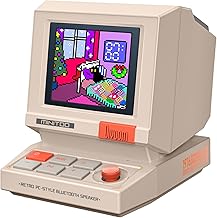
Divoom MiniToo Retro PC-Style Computer Speaker, Smart Pixel Screen with DIY Faces, Bluetooth & USB Audio, Alarm/White Noise Clock, Desk Setup Gift for Bedroom, Office & Gaming
Best For:
Gamers, streamers, and creators who want a fun, customizable desk speaker with pixel display.
The Divoom MiniToo leans into playful productivity. It’s a compact Bluetooth speaker with a retro pixel art front that you can customize via an app, showing DIY faces, animations, notifications, alarms, and basic widgets like clocks and white noise. For creators who spend long hours at a desk, it’s both a practical audio device and a visual mood board that livens up your workspace.
Use it as a notification display—new follower alerts, timer triggers, or an ambient animation to signal break time. The speaker provides decent sound for podcasts and background music; the USB audio option also makes it simple to connect to a PC for voice chat during streams or collaborative sessions. The app-driven pixel canvas invites quick creativity: build a tiny on-screen mascot that reacts to music or your calendar.
Compared to a plain mini Bluetooth speaker, the Divoom offers personality and extra utility. It’s not meant to replace full-size monitors or studio speakers, but it fills the niche of a compact desk companion that blends function and fun. Practical observations from users often point to how the pixel display becomes a small habit-forming part of the workday—setting break timers or cheering when a task is completed.
Buying considerations include checking the app compatibility for your platform, the speaker’s battery life if you plan to move it around, and how loud it needs to be for your environment. If you want a conversation starter for your desk or a compact smart display with audio, this one delivers.
Who it’s best for: gamers, streamers, and desk-based creators who want a quirky, customizable desk companion. Who may not need it: users prioritizing high-fidelity audio or those who prefer minimalist setups without extra visual clutter.
Pros
- Customizable pixel screen adds personality and useful notifications
- Compact Bluetooth and USB audio for desk use
- Alarms, white noise, and app-driven features enhance productivity
Cons
- Not a substitute for high-fidelity speakers
- Pixel display may be distracting for minimalists
If a playful, pixel-powered desktop speaker sounds like your vibe, check full specs and the latest price on Amazon. https://www.amazon.com/dp/B0FRF3XGQ4?tag=theideaofart-20
Final Verdict
Wireless gadgets are most valuable when they remove friction from your workflow—whether that’s reducing cables, simplifying presentations, capturing ideas, or making a workspace feel curated. The uAttend DR2500 is the practical choice for small teams that need secure, touch-free time tracking. The AIMIBO 4K adapter is a portable way to mirror content without a bulky box, ideal for presenters and remote workers. The 5‑in‑1 induction speaker is a space-saving desk companion for daily calls and charging, while the Pocket AI recorder accelerates meeting productivity with transcripts and summaries. The Divoom MiniToo is for creators who value personality and small, productivity-boosting displays.
Decide based on the problem you need to solve: cut cables and clutter? Consider the AIMIBO dongle or induction speaker. Need meeting notes and action items without manual typing? The Pocket AI recorder is a focused solution. Want a combination of utility and fun for your desk? The Divoom offers personality and practicality. For team attendance and safer check-ins, the uAttend is purpose-built.
If you’re still unsure, list your top three must-haves (compatibility, portability, or fidelity) and choose the product that best matches two out of three. Each product here targets a different pain point creators face, and each can meaningfully reduce friction in your daily routine.
Check the latest price on Amazon.
Conclusion
These Wireless gadgets creators are obsessed with lately picks are trending now and offer great value and variety. Check the links above for latest prices and reviews.
As an Amazon Associate, I earn from qualifying purchases.
Tags:
wireless gadgets, creator gear, AI recorder, wireless display adapter, desktop speaker, time clock, pixel speaker
